
The modern workplace is undergoing a significant transformation, driven by a growing awareness of the health implications of prolonged sitting. For decades, the standard office setup featured a fixed-height desk, encouraging hours of sedentary activity. However, research has increasingly highlighted the detrimental effects of this lifestyle, linking it to a myriad of health issues ranging from back pain and obesity to more serious chronic conditions.
This has spurred a surge in ergonomic solutions designed to promote movement and better posture throughout the workday. Among the most popular are standing desks and desk converters, each offering a distinct approach to incorporating standing into your work routine.
Choosing between a standing desk and a desk converter can be a pivotal decision for anyone looking to improve their workspace ergonomics and overall well-being. While both aim to reduce sitting time, they differ significantly in terms of cost, installation, flexibility, and aesthetic integration. Understanding these differences is key to making an informed choice that aligns with your specific needs, budget, and workspace constraints. This article will provide a comprehensive comparison, exploring the pros and cons of each option, helping you determine which solution is the best fit for your home or office environment.
Key Takeaways
- Standing desks are complete, height-adjustable workstations, offering greater stability and a seamless aesthetic but typically come at a higher price point and require more assembly.
- Desk converters are placed on top of existing desks, providing a more budget-friendly and flexible solution for transitioning to a standing posture, though they can sometimes be less stable and may limit workspace.
- The choice depends on budget, existing furniture, desired stability, space availability, and aesthetic preferences.
- Both solutions can offer significant health benefits by reducing sedentary time, improving posture, and potentially boosting productivity and energy levels.
- Proper ergonomics, including monitor height and keyboard placement, are crucial regardless of the chosen solution.
Understanding Standing Desks
A standing desk, also known as a sit-stand desk or height-adjustable desk, is a complete desk designed to allow users to alternate between sitting and standing positions throughout the workday. These desks feature a mechanism that raises or lowers the entire work surface, enabling a smooth transition between postures. They are available in various configurations, including manual crank, electric motor, and pneumatic lift systems, each with its own advantages in terms of ease of use and speed of adjustment.
Types Of Standing Desks
Standing desks can be broadly categorized by their adjustment mechanism:
- Electric Standing Desks: These are the most popular and user-friendly option. With the push of a button, an electric motor smoothly raises or lowers the desk to a preset height. Many models offer memory presets, allowing you to quickly return to your preferred sitting and standing heights. They offer the most convenience but are generally the most expensive.
- Manual Crank Standing Desks: These desks use a hand crank to adjust the height. While more affordable than electric models, they require more effort and time to change positions, which can be a deterrent for frequent adjustments.
- Pneumatic/Gas Spring Standing Desks: These use a gas spring to assist in lifting the desk, making manual adjustments easier. They are typically quicker to adjust than crank models but may have weight limitations and can be less robust than electric options over the long term.
- Fixed-Height Standing Desks: While less common now, these are desks designed solely for standing. They are the most basic and affordable option but lack the flexibility to sit, which is often recommended for prolonged periods of standing.
Advantages Of Standing Desks
Investing in a full standing desk offers several compelling benefits:
- Stability and Durability: As a complete unit, standing desks are generally more stable, especially when fully extended. They are designed to support the weight of monitors, computers, and other office equipment without wobbling.
- Aesthetics and Integration: Standing desks are designed to be a cohesive piece of furniture, often available in various finishes and styles that can seamlessly integrate into home or office decor. They provide a clean, uncluttered workspace.
- Ergonomic Design: Many electric standing desks offer generous height ranges, accommodating a wide variety of users, from shorter individuals to taller professionals. The entire surface moves, ensuring your monitor and keyboard remain at optimal ergonomic heights relative to each other.
- Ample Workspace: Full standing desks typically offer a larger and more continuous work surface compared to converters, allowing for more equipment and freedom of movement.
Disadvantages Of Standing Desks
Despite their advantages, standing desks also have potential drawbacks:
- Cost: Standing desks, particularly electric models, represent a significant investment. Prices can range from a few hundred dollars for basic manual models to over a thousand for premium electric desks with advanced features.
- Assembly and Installation: These desks often require assembly, which can be time-consuming and may necessitate two people. Their size and weight can also make them more challenging to move or relocate.
- Space Requirements: A full standing desk replaces your existing desk, meaning it occupies a dedicated space. If you have a small apartment or a compact office cubicle, a standing desk might be too large.
Understanding Desk Converters
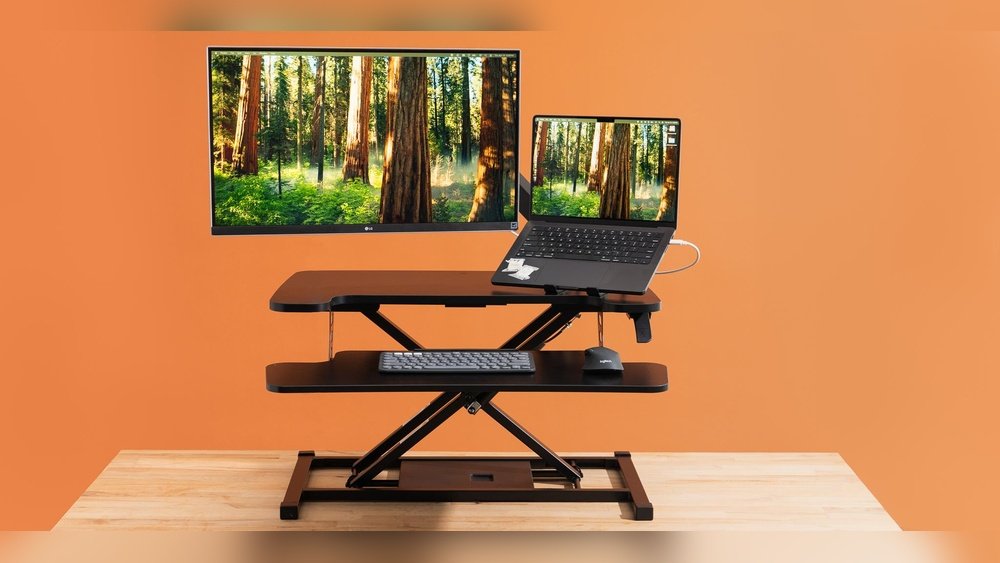
A desk converter, also known as a standing desk converter or riser, is an accessory that sits on top of your existing desk. It provides an adjustable-height platform for your monitor and keyboard, allowing you to convert your traditional desk into a temporary standing workstation. These converters come in various designs, from simple risers with fixed shelves to complex multi-tiered units with gas springs or electric motors for height adjustment.
Types Of Desk Converters
Desk converters are typically classified by their adjustment mechanism and design:
- Manual Lift Converters: These are the most common type. They usually feature a spring-loaded or gas-assisted mechanism that allows you to lift the top platform with a handle or lever. Adjustments are generally quick but require some physical effort.
- Electric Converters: Less common but increasingly available, electric converters use a motor to raise and lower the platform, offering the same push-button convenience as electric standing desks. These are typically more expensive than manual converters.
- Static Risers: These are non-adjustable platforms that simply elevate your monitor and keyboard to a standing height. They are the most basic and affordable option but offer no flexibility to sit and stand easily.
- Multi-Tiered Converters: Many converters feature separate levels for the monitor and keyboard. This allows for better ergonomic positioning, ensuring your monitor is at eye level while your keyboard and mouse are at a comfortable typing height.
Advantages Of Desk Converters
Desk converters offer a compelling alternative for many users:
- Cost-Effectiveness: This is often the biggest advantage. Desk converters are significantly cheaper than full standing desks, making them an accessible entry point into sit-stand working. Prices can range from under $100 for basic models to $300-$500 for more advanced electric or feature-rich manual units.
- Ease of Use and Installation: Most converters come pre-assembled or require minimal setup. They simply sit on your existing desk, making them incredibly easy to deploy without tools or major disruption.
- Flexibility and Portability: You can easily move a desk converter from one desk to another, or even take it with you if you relocate. This flexibility is ideal for renters or those who frequently change their workspace.
- Utilizes Existing Furniture: If you already have a desk you like, a converter allows you to upgrade its functionality without replacing it. This preserves your current workspace aesthetic and saves on the cost of a new desk.
Disadvantages Of Desk Converters
While convenient, desk converters also come with limitations:
- Stability Concerns: Because they sit on top of another surface, converters can sometimes be less stable, especially when raised to their full height. This can lead to monitor wobble during typing or mouse movements, which can be distracting.
- Limited Workspace: Converters often reduce the available surface area on your existing desk. The base of the converter occupies space, and the lifting mechanism can make it difficult to place items like documents or a coffee cup within easy reach when standing.
- Aesthetics: While designs have improved, some converters can look clunky or out of place on an otherwise stylish desk. The cables from your monitor and computer may also be more visible.
- Weight and Size Limitations: Converters have weight capacities for monitors and keyboards, and some may not accommodate multiple large monitors or heavy equipment. The footprint of the converter can also be substantial.
Health Benefits Of Standing More
The primary driver behind the popularity of both standing desks and converters is the growing body of evidence linking prolonged sitting to adverse health outcomes. Incorporating more standing and movement into your workday can yield significant benefits.
Reducing Sedentary Behavior
The human body is not designed for prolonged periods of inactivity. Sitting for more than 6-8 hours a day is associated with an increased risk of:
- Weight Gain and Obesity: Sitting burns fewer calories than standing. Over time, this can contribute to a caloric surplus and weight gain.
- Cardiovascular Disease: Studies suggest a link between excessive sitting and an increased risk of heart disease, even for individuals who exercise regularly.
- Type 2 Diabetes: Sedentary behavior can negatively impact insulin sensitivity, increasing the risk of developing type 2 diabetes.
- Certain Cancers: Some research indicates a correlation between high levels of sedentary time and an increased risk of colon, endometrial, and lung cancers.
- Musculoskeletal Issues: Prolonged sitting often leads to poor posture, back pain, neck strain, and tight hip flexors.
By alternating between sitting and standing, you can break up these long periods of inactivity, promoting better circulation and engaging more muscles.
Improving Posture And Reducing Back Pain
Many office workers experience back pain due to poor posture while sitting. This often involves slouching, rounded shoulders, and an unsupported lower back. Standing can help:
- Engage Core Muscles: Standing naturally encourages better core engagement.
- Promote Spinal Alignment: When standing with proper posture, your spine can maintain its natural curves, reducing strain on the lower back.
- Increase Movement: The ability to shift weight, sway, and take small steps while standing encourages micro-movements that are beneficial for spinal health.
In my experience, the ability to easily switch between sitting and standing has been instrumental in alleviating chronic lower back discomfort that plagued me during long periods of desk work.
Boosting Energy And Productivity
While it might seem counterintuitive, standing can actually increase your energy levels and improve focus.
- Increased Blood Flow: Standing promotes better circulation, which can deliver more oxygen to the brain, leading to increased alertness and reduced feelings of fatigue.
- Reduced Sluggishness: The physical act of standing can combat the mid-afternoon slump that often accompanies prolonged sitting.
- Potential for Improved Mood: Some studies suggest that reducing sedentary time can have positive effects on mood and reduce feelings of stress and anxiety.
A study published in the *British Journal of Sports Medicine* found that interventions to reduce sitting time were associated with improvements in self-reported fatigue and mood.

Credit: reflecta.de
Comparing Standing Desks And Desk Converters: Key Factors
When deciding between a standing desk and a converter, several factors should guide your decision.
Cost And Budget
- Standing Desks: Generally more expensive, ranging from $200-$500 for basic manual models to $500-$1500+ for high-quality electric desks.
- Desk Converters: Significantly more affordable, typically ranging from $70-$150 for basic static risers to $150-$500 for advanced electric or feature-rich manual converters.
Installation And Assembly
- Standing Desks: Require more involved assembly, often taking 1-3 hours and potentially needing two people.
- Desk Converters: Minimal to no assembly required; typically placed directly on top of an existing desk.
Stability And Durability
- Standing Desks: As a single, integrated unit, they offer superior stability and are built for long-term, heavy use.
- Desk Converters: Can be less stable, especially when fully extended, and may experience wobble. Durability can vary greatly by model and build quality.
Workspace And Aesthetics
- Standing Desks: Provide a dedicated, cohesive workspace. Available in various designs to match office decor.
- Desk Converters: Sit on top of existing desks, potentially limiting surface area and sometimes impacting the overall aesthetic. Cable management can also be more challenging.
Flexibility And Portability
- Standing Desks: Are permanent fixtures and difficult to move.
- Desk Converters: Highly flexible and portable, easy to move between locations or swap out.
Ergonomic Features
- Standing Desks: Offer a full range of motion for the entire desk surface, allowing for optimal positioning of monitors and keyboards relative to each other. Many electric models offer memory presets.
- Desk Converters: Ergonomics depend on the design. Multi-tiered models are best for separating monitor and keyboard heights. Limited height adjustment range compared to full standing desks on some models.
Here’s a table summarizing the key differences:
| Feature | Standing Desk | Desk Converter |
|---|---|---|
| Cost | Higher ($200 – $1500+) | Lower ($70 – $500) |
| Installation | Requires assembly (1-3 hours) | Minimal to no assembly |
| Stability | Excellent | Variable, can be less stable |
| Workspace Area | Full desk surface | Reduced surface area on existing desk |
| Aesthetics | Integrated, cohesive design | Can be less integrated, potentially clunky |
| Portability | Low (heavy, fixed) | High (easy to move) |
| Flexibility | Adjustable height for sitting/standing | Adjustable height for sitting/standing on existing desk |
| Durability | Generally high | Variable, depends on quality |
Making The Right Choice For Your Workspace
The best solution for you hinges on your individual circumstances and priorities.
When A Standing Desk Is The Better Choice
- You’re setting up a new workspace: If you’re furnishing a home office or redesigning an existing one, a standing desk offers a clean, integrated solution from the ground up.
- Budget is not the primary constraint: If you can afford the higher upfront cost, a standing desk provides long-term value and superior ergonomics.
- You need maximum stability: If you use multiple large monitors, heavy equipment, or are sensitive to any desk movement, a full standing desk is the more stable option.
- You want a seamless aesthetic: A standing desk becomes a central piece of furniture, designed to look good and integrate well into your space.
- You plan to use it extensively: For professionals who will be using the sit-stand functionality daily for many years, the investment in a robust standing desk is often worthwhile.
When A Desk Converter Is The Better Choice
- You have a limited budget: Converters offer a cost-effective way to experience the benefits of a standing workstation.
- You have an existing desk you like: If you’re happy with your current desk’s surface area, style, and stability, a converter is a great way to upgrade its functionality.
- You need flexibility and portability: If you might move offices, work from different locations, or want the option to easily remove the standing setup, a converter is ideal.
- You want to try standing without a major commitment: A converter is a low-risk way to test the waters of a sit-stand routine before investing in a full standing desk.
- Space is very limited: A converter takes up less overall space than replacing your entire desk.
Ergonomic Best Practices For Standing Workstations
Regardless of whether you choose a standing desk or a converter, proper ergonomic setup is crucial to maximize benefits and avoid new strains.
Monitor Height And Distance
- Top of the screen should be at or slightly below eye level. This prevents neck strain from looking up or down.
- Maintain an arm’s length distance from the screen. This reduces eye strain.
- Consider a monitor arm: These are excellent accessories for both standing desks and converters, allowing precise positioning and freeing up desk space.
Keyboard And Mouse Placement
- Elbows should be at approximately a 90-degree angle when typing, with wrists straight and relaxed.
- Ensure your keyboard and mouse are at a height that allows this posture. This is where multi-tiered converters or the full surface of a standing desk are beneficial.
- Use a keyboard tray if necessary: Some standing desks and converters may benefit from an under-desk keyboard tray for optimal typing posture when sitting.
Standing Posture
- Stand with your weight evenly distributed. Avoid locking your knees.
- Keep your shoulders relaxed and your head aligned over your spine.
- Alternate between standing and sitting regularly. Aim for a 1: 1 or 2:1 ratio of sitting to standing time, or simply switch whenever you feel the need. Standing all day can also lead to fatigue and discomfort.
- Use an anti-fatigue mat: These cushioned mats can significantly improve comfort for your feet, legs, and back during extended standing periods.
Example Scenario: Sarah’s Home Office Upgrade
Sarah, a freelance graphic designer, found herself experiencing persistent lower back pain and mid-day fatigue. Her existing L-shaped desk was functional but contributed to long hours of sitting. She had a budget of around $400 and wanted a solution that didn’t require a complete overhaul of her workspace.
After researching, she opted for a manual gas-spring desk converter. It fit perfectly on her existing L-shaped desk, providing a stable platform for her dual monitors and keyboard. The converter came almost fully assembled, requiring only about 15 minutes to set up. Sarah found she could easily switch between sitting and standing every hour, which significantly reduced her back pain. While the converter did take up some space on her desk, she found the improved comfort and energy levels well worth the trade-off. She later added an anti-fatigue mat for added comfort when standing.
Example Scenario: Mark’s Corporate Office Setup
Mark works in a large tech company that encourages ergonomic solutions. He needed a stable setup for his triple-monitor array and was willing to invest in a long-term solution. The company offered a stipend for home office equipment, and Mark had a budget of $800.
He chose an electric standing desk with a large surface area and memory presets. The desk arrived in several boxes and took him and a friend about two hours to assemble. Once set up, Mark found the desk incredibly stable, even when adjusted to its full height. He programmed his preferred sitting and standing heights into the memory presets, allowing him to switch postures with a single button press. The clean lines of the standing desk also improved the overall aesthetic of his home office. The ample surface area easily accommodated his monitors, laptop, and other peripherals.
Frequently Asked Questions
What Is The Main Difference Between A Standing Desk And A Desk Converter?
The fundamental difference lies in their structure. A standing desk is a complete, standalone piece of furniture designed to be height-adjustable. A desk converter, on the other hand, is an accessory that sits on top of an existing desk, transforming it into a temporary standing workstation.
How Much Do Standing Desks And Desk Converters Typically Cost?
Standing desks are generally more expensive, with prices ranging from around $200 for basic manual models to $1,500 or more for premium electric versions. Desk converters are significantly more affordable, typically costing between $70 for simple static risers and $500 for advanced electric models.
Are Standing Desks Or Converters More Stable?
Standing desks, being complete units designed for height adjustment, generally offer superior stability. Desk converters, which rest on top of another surface, can sometimes be less stable, particularly when raised to their maximum height, and may experience some wobble.
Can A Desk Converter Replace A Full Standing Desk?
For many users, yes. If budget, space, or the need to utilize an existing desk are primary concerns, a desk converter can effectively provide the benefits of a sit-stand workstation. However, if maximum stability, a larger integrated workspace, and a seamless aesthetic are priorities, a full standing desk is usually the better choice.
How Often Should I Switch Between Sitting And Standing?
There’s no single rule, but a common recommendation is to alternate every 30-60 minutes. Listen to your body; switch when you feel tired, uncomfortable, or simply want to change your posture. The key is to reduce prolonged sedentary periods rather than standing all day, which can also lead to fatigue.
The transition to more active work environments is more than a trend; it’s a fundamental shift towards prioritizing health and well-being in the modern workplace. Both standing desks and desk converters offer viable pathways to reduce sedentary behavior, improve posture, and potentially boost productivity.
Your choice between the two will ultimately depend on a careful assessment of your budget, existing furniture, space constraints, and personal preferences. By understanding the distinct advantages and disadvantages of each, you can make an informed decision that supports a healthier, more dynamic workday.