
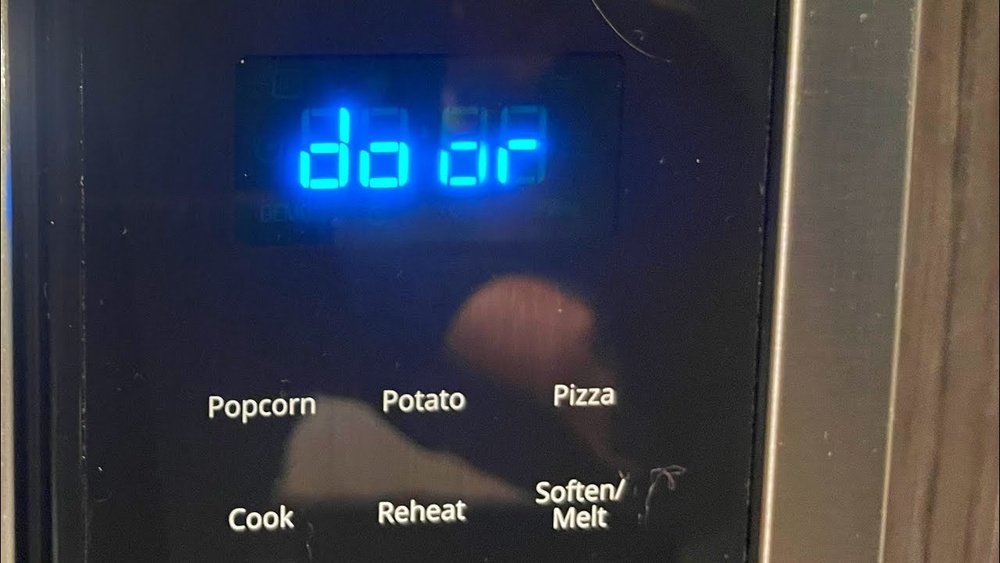
A Whirlpool microwave door error can be a frustrating and disruptive issue, leaving you unable to use a vital kitchen appliance. Whether it’s a persistent error code, a door that won’t latch properly, or a microwave that refuses to start due to a perceived door malfunction, these problems can halt your meal preparation in its tracks. Understanding the common causes, troubleshooting steps, and potential solutions for these errors is crucial for restoring your Whirlpool microwave to full functionality efficiently and safely.
This comprehensive guide will navigate you through the intricacies of Whirlpool microwave door errors. We’ll explore the underlying reasons for these malfunctions, provide step-by-step diagnostic procedures, and outline the repair or replacement options available. Our aim is to empower you with the knowledge to tackle these issues, whether you’re a seasoned DIYer or simply seeking to understand what might be wrong before calling a professional.
Key Takeaways
- Door Latch Issues: The most frequent cause of Whirlpool microwave door errors is a faulty door latch mechanism, including broken latches, misaligned doors, or obstructed sensors.
- Safety Interlocks: Microwaves have multiple safety interlock switches that prevent operation when the door is open. If these switches fail or are not triggered correctly, an error can occur.
- Control Panel/Board Problems: Less commonly, errors can stem from issues with the microwave’s electronic control panel or main control board.
- Troubleshooting Steps: Basic troubleshooting includes unplugging the microwave, checking for obstructions, and verifying the door closes securely.
- Error Codes: Specific error codes on Whirlpool microwaves can provide clues to the problem, though they often require consulting the user manual or a technician.
- Professional Repair vs. DIY: Simple fixes like clearing obstructions can be DIY, but complex electrical issues or component replacements often necessitate professional service.
- Preventative Maintenance: Keeping the door and latch area clean and ensuring the microwave is level can help prevent future door-related errors.
Understanding Whirlpool Microwave Door Error Codes
Whirlpool microwaves, like many modern appliances, utilize error codes to communicate specific malfunctions to the user. When a Whirlpool microwave door error occurs, it’s often accompanied by a code displayed on the digital interface. These codes are designed to be diagnostic tools, offering a starting point for troubleshooting. While the exact codes can vary slightly between different Whirlpool models, they generally point towards issues related to the door’s integrity and its communication with the appliance’s internal systems.
Understanding these codes is the first step in addressing the problem effectively. For instance, a code might indicate a problem with the door switch assembly, a failure in the door sensor, or a more general communication error between the door and the main control board.
Without knowing what the code signifies, a user might resort to unnecessary or incorrect troubleshooting steps, potentially exacerbating the issue or delaying a proper fix. It’s always advisable to consult your specific Whirlpool microwave model’s user manual for a definitive list of error codes and their meanings.
Many manuals are available online on the official Whirlpool website.
Common Error Code Categories
While specific codes vary, they often fall into general categories:
- Door Switch Errors: These codes typically signal a problem with one or more of the microswitches that detect whether the door is open or closed.
- Sensor Malfunctions: Some advanced models have sensors that monitor the door’s position or seal. Errors here indicate these sensors aren’t functioning correctly.
- Communication Errors: These can indicate a fault in the wiring harness connecting the door assembly to the main control board, or a problem with the control board itself.
- Latch Mechanism Faults: Codes might relate to the physical latch mechanism itself, suggesting it’s stuck, broken, or not engaging properly.
What To Do When An Error Code Appears
- Consult the Manual: Locate your Whirlpool microwave’s user manual. If you don’t have a physical copy, search for it online using your model number. The manual will list specific error codes and their probable causes.
- Power Cycle: The simplest first step for many electronic appliance errors is to perform a power cycle. Unplug the microwave from the wall outlet, wait for at least 5-10 minutes, and then plug it back in. This can reset the control board and clear temporary glitches.
- Observe the Door: While the microwave is unplugged, visually inspect the door. Ensure it closes flush and is not warped or damaged. Check the latch area for any visible obstructions.
- Note the Code: If the error persists after a power cycle, record the exact error code displayed. This information will be invaluable if you need to contact customer support or a repair technician.
- Seek Professional Help: If the manual or basic troubleshooting doesn’t resolve the issue, or if the error code points to a complex internal component, it’s time to consider professional assistance.

Credit: fleetappliance.com
The Anatomy Of A Microwave Door And Its Role In Error Detection
A microwave oven’s door is far more than just a barrier to keep food inside; it’s a critical component of the appliance’s safety and operational systems. For a Whirlpool microwave door error to occur, it almost invariably involves a malfunction within this seemingly simple assembly. The door is equipped with several integrated parts designed to ensure the microwave operates only when the door is securely closed, preventing the escape of harmful microwave radiation.
At the heart of the door’s functionality are the door interlock switches, also known as safety switches. Most microwaves have at least three of these switches. One is the primary interlock switch, which is the first to be triggered when the door is closed. It signals to the control board that the door is shut and that it is safe to proceed with operation. Then, there are one or two secondary interlock switches (sometimes called the “hold” switches) and a tertiary interlock switch (or “fan” switch). These switches are engaged only when the door is fully latched. They act as a failsafe; if the primary switch were to fail or be bypassed, these secondary switches would still prevent the microwave from operating. The door latch mechanism itself, usually a plastic or metal hook and catch system, physically engages these switches when the door is closed and latched.
Beyond the switches, the door assembly includes the door seal or gasket. This rubber or composite material creates a tight seal around the door frame to prevent microwave leakage. A damaged or dirty seal can prevent the door from closing properly, leading to interlock switch issues and potential errors. Finally, the door frame and hinges provide structural integrity and allow the door to open and close smoothly. Any damage or misalignment in these components can impact the door’s ability to engage the safety switches correctly.
Key Components Involved In Door Operation And Error Detection
- Door Latch: The physical hook or mechanism that secures the door shut.
- Door Interlock Switches: Safety switches that detect the door’s closed state. Typically, there are primary, secondary, and sometimes tertiary switches.
- Door Seal/Gasket: The material around the door edge that creates a seal against microwave radiation.
- Door Frame: The structural part of the door that houses the seal and latch components.
- Hinges: Connect the door to the microwave body, allowing it to open and close.
- Control Panel Interface: The sensors or switches that detect the physical movement of the latch and engage the interlock switches.
How Door Issues Trigger Errors
When any of these components fail or become obstructed, the microwave’s control system registers a problem. For example:
- A broken latch means the door won’t stay shut, so the interlock switches aren’t engaged, triggering an error.
- A misaligned door might prevent the latch from fully engaging the switches, even if it appears closed.
- A faulty interlock switch might send an incorrect signal (e.g., indicating the door is open when it’s closed, or vice versa) to the control board.
- Debris or damage on the door seal can prevent a complete closure, leading to switch activation failure.
Understanding these interconnected parts is vital for diagnosing why your Whirlpool microwave might be displaying a door error.

Credit: www.youtube.com
Troubleshooting Common Whirlpool Microwave Door Errors
When faced with a Whirlpool microwave door error, the first instinct might be to panic or immediately call for service. However, many common issues can be resolved with basic troubleshooting steps. These procedures are designed to identify whether the problem is a simple fix or requires professional intervention. Always prioritize safety by unplugging the microwave before attempting any physical inspection or manipulation of its parts.
The most frequent culprits behind door errors are physical obstructions or a door that isn’t closing properly. Food debris, packaging materials, or even a slightly misaligned turntable can prevent the door from seating correctly. This, in turn, can interfere with the activation of the door interlock switches.
A simple visual inspection and cleaning can often resolve these kinds of issues.
Another common area to check is the door latch mechanism itself. Look for any visible damage, such as cracked plastic or bent metal components. Sometimes, the latch can become stiff or stuck, preventing it from engaging properly with the catch on the microwave body.
Gentle manipulation or cleaning might free it up, but if it appears broken, replacement is usually necessary.
Step-by-step Troubleshooting Guide
- Unplug the Microwave: Crucially, disconnect the power cord from the wall outlet. This is a non-negotiable safety step.
- Inspect the Door Seal: Carefully examine the rubber or composite gasket around the door opening. Look for any tears, cracks, or areas where it might be loose or detached. Clean the seal and the corresponding area on the microwave frame with a damp cloth to remove any food residue or grime.
- Check for Obstructions: Open the door fully and inspect the latch area on both the door and the microwave body. Remove the turntable and check the area beneath it for any foreign objects. Ensure no dishes or containers are left inside that could be preventing the door from closing flush.
- Examine the Door Latch: Locate the small hooks or tabs on the door that engage with the microwave body. Check for any signs of physical damage, bending, or wear. Try gently pushing or wiggling the latch mechanism to see if it moves freely.
- Test Door Closure: With the microwave still unplugged, close the door firmly. Does it feel like it’s closing evenly? Is there a significant gap anywhere? Does it latch securely? If the door feels loose, uneven, or doesn’t latch properly, this indicates a potential issue with the hinges, frame, or latch alignment.
- Verify Interlock Switch Engagement (Visual/Auditory Clues): While you can’t directly test the switches without disassembly, you can sometimes get clues. When you close a properly functioning door, you might hear a faint “click” as the switches engage. If you hear no click or a grinding noise, it could indicate a problem with the latch or switches.
- Power Cycle (Again): After your physical inspection, plug the microwave back into the power outlet. See if the error code has cleared. If it has, try running a short, simple cooking cycle (e.g., 30 seconds with water) to ensure it’s working correctly.
- Consult Error Codes: If the error persists, refer back to your user manual to decipher any displayed error codes. This can help narrow down the possibilities.
When To Call A Professional
If the error persists after these steps, or if you notice any of the following, it’s time to contact a qualified appliance repair technician:
- Visible damage to the door hinges or frame.
- The door latch mechanism appears broken or severely damaged.
- The error code specifically indicates a faulty switch or control board.
- You are uncomfortable performing any of the inspection steps.
- The microwave is still under warranty.
Attempting complex repairs without the necessary expertise can be dangerous due to the high voltages present inside a microwave oven, even when unplugged.

Credit: www.youtube.com
Diagnosing Faulty Door Interlock Switches
The door interlock switches are the unsung heroes of microwave safety. Their primary function is to detect whether the door is securely closed and latched, signaling the control board to allow or prevent operation. When these switches malfunction, it’s a common cause for a Whirlpool microwave door error. Because they are critical safety components, their failure typically results in the microwave refusing to start or displaying an error message.
A microwave usually has multiple interlock switches. The primary switch is the first to be activated when the door closes. If it signals that the door is closed, the microwave’s magnetron (the component that generates microwaves) can be energized. However, there are also secondary and sometimes tertiary switches that are only engaged when the door is fully latched.
These act as a backup; if the primary switch fails or is faulty, these additional switches ensure the microwave still won’t operate if the door isn’t properly secured. This redundancy is a key safety feature.
How Switches Fail
Interlock switches are mechanical components that are repeatedly actuated every time the microwave door is opened and closed. Over time, this constant use can lead to wear and tear. Common failure modes include:
- Mechanical Wear: The internal contacts within the switch can become worn down, pitted, or corroded, leading to intermittent or complete failure to make or break the electrical connection.
- Sticking: The switch actuator (the part that is pushed by the door latch) can become stuck in one position due to debris, damage, or internal mechanism failure.
- Broken Actuator: The plastic arm or lever that the door latch pushes can break.
- Wiring Issues: The wires connecting the switches to the control board can become loose, corroded, or broken, interrupting the signal.
Symptoms Of Faulty Interlock Switches
- Microwave won’t start: This is the most common symptom. The display might light up, you can set the time and power, but pressing “Start” does nothing.
- Error Code: As discussed, specific error codes often point directly to interlock switch problems.
- No Lights Inside: In some cases, if the primary switch fails to signal “closed,” the interior light might not even turn on when the door is opened.
- Intermittent Operation: The microwave might work sometimes but not others, especially if a switch is failing intermittently.
- Humming Sound then Stops: The microwave might start humming briefly (indicating it’s trying to power up) and then immediately stop and display an error, suggesting a safety interlock has been tripped.
Testing Interlock Switches (requires Caution)
Warning: Testing interlock switches involves accessing the internal components of the microwave. This requires removing the outer casing and working with electrical components. If you are not experienced with appliance repair and electrical safety, it is strongly recommended to have this diagnosis performed by a qualified technician. Microwaves contain capacitors that can store a dangerous electrical charge even when unplugged.
If you are comfortable and knowledgeable, the general process involves:
- Disconnect Power: Ensure the microwave is unplugged.
- Remove Casing: Carefully remove the screws holding the outer metal casing and slide it off.
- Locate Switches: Identify the door interlock switches, usually mounted near the door latch mechanism. They will have wires connected to them.
- Test Continuity: Using a multimeter set to continuity mode, test each switch. With the door open (switch not pressed), there should be no continuity between certain terminals (indicating an open circuit). When the door is closed or the switch actuator is pressed manually (simulating door closure), continuity should be established between those terminals (indicating a closed circuit). You’ll need to know the specific configuration for your model, often found in service manuals. If a switch fails to show the correct continuity in either state, it needs replacement.
Replacement of these switches is a common repair, but again, safety is paramount.
The Role Of The Door Latch And Hinge Assembly
The door latch mechanism and the hinge assembly are the physical components that allow the microwave door to function correctly and, crucially, to engage the safety interlock switches. When these parts are damaged, worn, or misaligned, they are a direct cause of Whirlpool microwave door errors. Unlike electronic failures, issues with the latch and hinges are often visible and can sometimes be diagnosed with a simple physical inspection.
The door latch typically consists of one or more plastic or metal hooks on the door itself that fit into corresponding slots or catches on the microwave’s front frame. When you close the door, these hooks are designed to slide into place and hold the door shut securely.
As they engage, they push levers or actuators connected to the interlock switches, signaling to the microwave’s control system that the door is properly closed and latched.
The hinge assembly is equally important. It connects the door to the main body of the microwave, allowing it to pivot open and closed. Hinges can be located at the top, bottom, or sides of the door, depending on the model. They need to be robust enough to support the weight of the door and allow for smooth, consistent movement.
Common Problems With Latches And Hinges
- Broken Latch Hook: The plastic hook on the door can break off due to repeated stress or impact. This prevents the door from staying closed at all.
- Worn Catch: The corresponding slot on the microwave frame where the latch hooks engage can become worn or damaged, preventing a secure fit.
- Stiff or Binding Hinges: Dirt, rust, or bent hinge components can make the door difficult to open or close, leading to improper latch engagement.
- Bent or Misaligned Door Frame: If the door itself or the frame it’s mounted on is bent or warped (perhaps from an impact or improper handling), it can cause the door to sit unevenly, preventing the latch from aligning correctly with the switches.
- Loose Hinge Screws: Over time, screws holding the hinges can loosen, causing the door to sag and misalign.
How These Issues Lead To Errors
When the latch doesn’t fully engage, or if the door is misaligned due to hinge problems, the interlock switches are not activated correctly.
- Latch Not Engaging: If the latch hook is broken or the catch is damaged, the door might appear closed but won’t physically secure. The interlock switches won’t be triggered, and the microwave will refuse to start, often displaying a door error.
- Misalignment: A sagging door due to faulty hinges can cause the latch to miss its catch or not push the switch actuators firmly enough. This leads to the control board interpreting the door as open, even if it looks closed.
- Binding Hinges: If the door is hard to close, the user might not push it firmly enough for the latch to engage properly. Conversely, if the hinges are binding in the open position, the door might not close fully.
Inspection And Basic Fixes
- Visual Check: Open and close the door several times. Does it move smoothly? Does it sit flush when closed? Inspect the latch hooks and catches for any visible damage. Check the hinges for looseness or bending.
- Tighten Screws: If hinge screws are loose, carefully tighten them. Be cautious not to overtighten and strip the threads.
- Clean and Lubricate: Clean the latch mechanism and hinge points. A small amount of silicone-based lubricant can sometimes help with stiff hinges, but avoid over-lubricating, which can attract dirt.
- Gentle Realignment: If the door seems slightly off, you might be able to gently push or pull on the frame while closing it to achieve better alignment. However, significant bending or warping usually requires professional repair or replacement.
If the latch hooks are broken or the hinges are severely damaged, replacement of these parts is typically necessary. This can sometimes be a DIY job for those with mechanical aptitude, but it often requires disassembling the door or front panel, which can be complex.
Control Panel And Main Board Issues
While less common than physical door component failures, a Whirlpool microwave door error can sometimes originate from the appliance’s electronic brain: the control panel or the main control board. These components are responsible for interpreting signals from the door switches and sensors, managing cooking cycles, and displaying information to the user. When they malfunction, they can incorrectly register a door error or fail to communicate properly with the door safety systems.
The control panel is the user interface, the keypad and display you interact with. It houses the circuitry that registers button presses and sends commands to the main board. Issues here might manifest as unresponsive buttons, a blank or flickering display, or erratic behavior that could be misinterpreted as a door error.
The main control board (or P.C.B. – Printed Circuit Board) is the central processing unit of the microwave. It receives all input signals (from the control panel, door switches, temperature sensors, etc.) and directs the operation of various components like the magnetron, fan, and turntable motor. A fault on the main board can lead to a wide range of problems, including false error codes.
How Electronic Components Can Cause Door Errors
- Faulty Sensors on the Control Panel: Some modern microwaves have sensors integrated into the control panel that detect when the door is opened or closed, in addition to the traditional interlock switches. If these sensors fail, they can send incorrect data.
- Damaged Control Board: A power surge, component failure, or manufacturing defect on the main control board can cause it to malfunction. It might incorrectly interpret signals from the door switches, believing the door is open when it is actually closed, thus triggering a door error.
- Wiring Harness Issues: The wires connecting the door switches and the control panel to the main control board can become damaged, corroded, or loose. This can disrupt communication, leading the main board to