Film Vs Digital Photos: Ultimate Showdown for Stunning Images

Film Vs Digital Photos

Are you torn between choosing film or digital photos for your next shoot? You’re not alone.

Both have their fans, and each offers something unique that can change the way your pictures look and feel. Imagine holding a photo that has a warm, timeless touch or snapping dozens of shots without worrying about running out of film.

Which one fits your style and needs better? Keep reading to discover the real differences, pros, and cons, so you can make the best choice for your photography journey.

Film Vs Digital Photos: Ultimate Showdown for Stunning Images

Credit: www.youtube.com

Film Photography Basics

Film photography holds a special place in the world of pictures. It uses physical film to record images. This method creates a unique look and feel that many photographers love. Understanding the basics helps appreciate why some still choose film over digital.

Film photography requires knowing how film works, the types available, and the gear needed. Each part plays a key role in capturing timeless photos.

How Film Captures Images

Film is coated with light-sensitive chemicals. When exposed to light, these chemicals react and create a hidden image. This image is called a latent image. It becomes visible after developing the film in a darkroom or lab. The process captures colors and details differently than digital sensors.

Types Of Film

There are many types of film. Black and white film shows images in shades of gray. Color film captures a full range of colors. Slide film produces positive images on a transparent base. Each type offers different textures and moods. Film speed, called ISO, controls how sensitive the film is to light. Lower ISO films need more light but produce finer detail.

Film Cameras And Equipment

Film cameras come in many shapes and sizes. Single-lens reflex (SLR) cameras are popular for their control and sharp images. Rangefinder cameras are smaller and quiet. Medium format cameras use larger film for higher quality. Other tools include light meters, film rolls, and developing tanks. Each piece helps photographers create their vision on film.

Digital Photography Essentials

Digital photography changed how we capture moments. It is fast, flexible, and widely used. Understanding digital photography basics helps you take better photos.

This section explains how digital cameras work and what makes them popular. It also covers how images are processed digitally. These essentials give a clear picture of digital photography.

How Digital Sensors Work

Digital cameras use sensors to capture light. These sensors are made of millions of tiny units called pixels. Each pixel records the brightness and color of light.

The sensor converts light into electrical signals. These signals become digital data that form an image. The quality depends on sensor size and pixel count.

Popular Digital Cameras

Many types of digital cameras exist for different needs. Point-and-shoot cameras are small and easy to use. DSLRs offer more control and better image quality.

Mirrorless cameras are compact but powerful. Smartphones also have advanced cameras with many features. Choosing a camera depends on your skill and budget.

Image Processing In Digital

After capturing, the camera processes the image. It adjusts colors, brightness, and sharpness automatically. This helps create a clear and balanced photo.

Images are saved as files like JPEG or RAW. RAW files keep more data for editing later. Editing software can improve photos further before sharing.

Image Quality Comparison

Comparing image quality between film and digital photos helps photographers choose the best medium. Both have unique strengths that affect how images look. Understanding these differences clarifies what each option offers.

Resolution And Detail

Digital cameras capture images with pixels, creating clear, sharp pictures. Higher megapixels mean more detail. Film captures detail differently, using grains instead of pixels. Fine-grain film can show rich detail, but digital often wins in sharpness. Scanned film quality depends on the scanner used. Digital files allow easy zooming without losing detail.

Color Reproduction

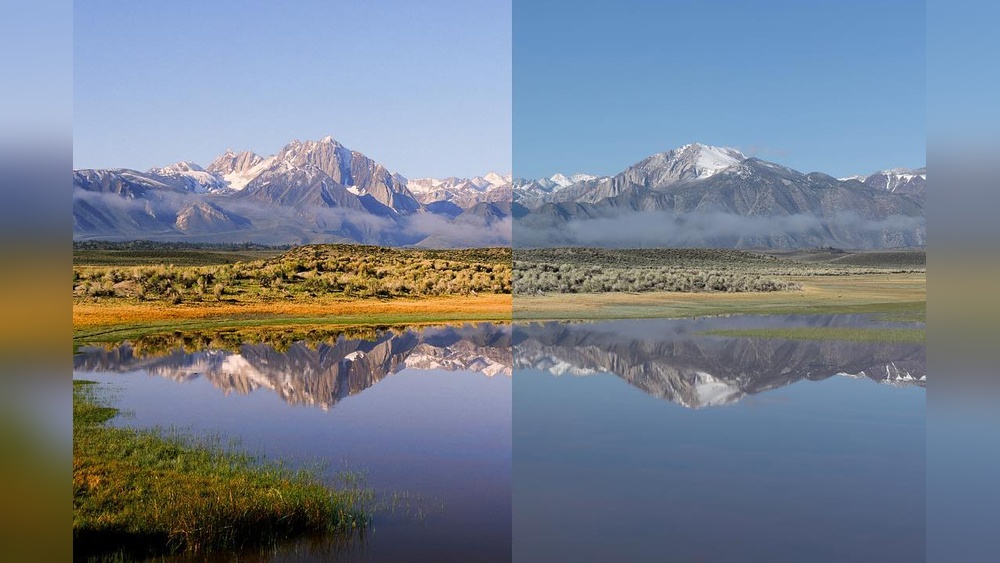
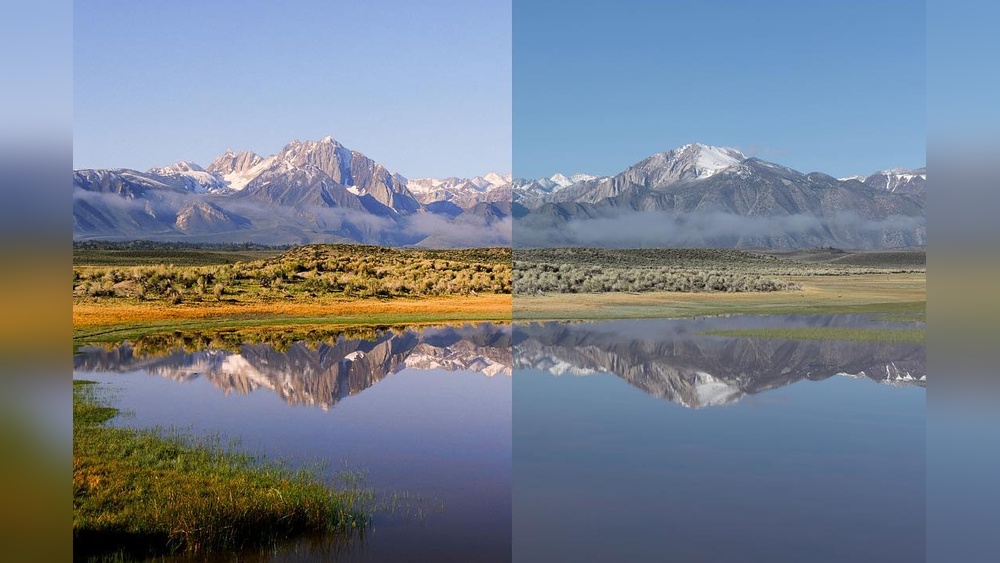
Film often produces warm, natural colors with subtle shifts. It handles skin tones softly and creates pleasing color blends. Digital cameras capture colors precisely and can be adjusted easily. Some digital images may look cooler or more clinical. Different film types offer varied color styles. Digital color can be edited after shooting for exact results.

Dynamic Range

Dynamic range measures how well a camera captures light and shadows. Film usually handles bright and dark areas smoothly, with gradual transitions. Digital sensors have improved dynamic range over time. They can capture more detail in shadows and highlights in a single shot. But digital can lose detail if exposure is off. Film’s response to light can feel more organic and less harsh.

Film Vs Digital Photos: Ultimate Showdown for Stunning Images

Credit: www.youtube.com

Cost And Accessibility

Cost and accessibility play a big role in choosing between film and digital photography. Both have different costs to start and keep going. Access to tools and materials also varies. Understanding these aspects helps you pick the right option.

Initial Investment

Film cameras often cost less upfront than digital cameras. Older models are easy to find and affordable. Digital cameras usually require a bigger initial spend. High-quality digital cameras come with advanced features. Lenses and accessories add to the initial cost for both types.

Ongoing Expenses

Film photography needs constant buying of film rolls. Developing and printing film adds to the cost. Each shot has a price. Digital photography has lower ongoing costs. Memory cards and occasional upgrades are the main expenses. No need to pay for each photo taken.

Availability Of Resources

Film supplies can be harder to find in some areas. Not all stores stock film or chemicals anymore. Developing labs are fewer but still exist. Digital cameras and accessories are widely available. Editing software and online tutorials make learning easier. More options make digital photography more accessible.

Creative Control And Flexibility

Creative control and flexibility play a big role in choosing between film and digital photography. Each method offers different ways to shape your images. Understanding how you can adjust settings, process photos, and add artistic effects helps you pick the best option for your style.

Manual Settings And Adjustments

Film cameras often require you to set focus, aperture, and shutter speed manually. This hands-on process teaches you the basics of exposure and composition. Digital cameras usually provide automatic modes but also allow full manual control. This gives you the chance to experiment with settings and see results instantly on the screen.

Post-processing Options

Digital photos can be edited easily on a computer. You can change brightness, contrast, and colors with a few clicks. Film photos need to be developed and scanned before editing. The editing process for film is slower but can add a unique touch to your images. Both formats offer ways to improve your photos after taking them.

Unique Artistic Effects

Film has a natural grain and color tone that many photographers love. These effects give photos a vintage or classic feel. Digital images are cleaner and sharper but can be modified with filters and presets. Both film and digital allow creative expression. The choice depends on the look you want to achieve.

Workflow And Convenience

Workflow and convenience play a big role in choosing between film and digital photography. Each method affects how quickly and easily you can shoot, review, store, and share your photos. These factors impact both beginners and experienced photographers.

Shooting Speed

Digital cameras allow fast shooting without limits. You can take hundreds of photos quickly. Film cameras need more care. You must load and unload rolls of film. Each roll holds a limited number of shots. This slows down the process and requires more planning.

Image Review And Storage

Digital photos show instantly on the screen. You can check focus and exposure right away. Film photos require development before viewing. This takes time and effort. Digital images store on memory cards. They are easy to organize and back up. Film negatives need physical storage. They can be damaged or lost over time.

Sharing And Distribution

Digital photos are simple to share online. You can upload them to social media or email quickly. Film photos need scanning to become digital files. This step adds time and cost. Printed film photos must be mailed or scanned for sharing. Digital photography offers faster and easier sharing options for most users.

Longevity And Archiving

Longevity and archiving play a big role in choosing between film and digital photos. How long your photos last matters. The way you store them affects their quality over time. This section explores the durability of film, digital file preservation, and risks with backup strategies. These points help you protect your memories for years.

Durability Of Film

Film photos can last many decades if stored properly. Physical prints resist digital corruption. They can fade or get scratched but often remain visible. Storing film in a cool, dry place helps preserve colors and details. Archival-quality sleeves and boxes protect them from dust and light. Film’s physical nature means you hold a real object. This can feel more permanent than digital files.

Digital File Preservation

Digital photos need careful management to last long. Files can be copied many times without loss. You can store them on hard drives, SSDs, or cloud services. Digital images do not fade, but files can become corrupted. Formats like JPEG and TIFF are common. Using standard file formats helps with future access. Regularly updating storage devices avoids data loss from hardware failure.

Risks And Backup Strategies

Both film and digital photos face risks. Film can suffer physical damage or chemical decay. Digital files risk accidental deletion or hacking. Backups reduce loss risks. For film, making digital copies creates a safety net. For digital photos, use multiple storage locations. Combining local drives with cloud backups is smart. Regular checks of backups ensure files remain accessible. Being proactive saves your memories from unexpected loss.

Film Vs Digital Photos: Ultimate Showdown for Stunning Images

Credit: fstoppers.com

Environmental Impact

Choosing between film and digital photography affects more than just image quality and style. The environmental impact plays a key role in this decision. Both methods have effects on the planet that photographers should consider. Understanding these impacts helps make better choices for the environment.

Chemical Use In Film Development

Film development uses many chemicals. These include developers, fixers, and rinses. Many chemicals can harm water and soil if not handled correctly. Waste from film labs needs careful disposal. Small labs sometimes lack proper waste management. This increases pollution risks. Film production also uses plastic and metal for rolls and cans. These materials add to landfill waste.

Energy Consumption Of Digital Gear

Digital cameras need electricity to operate. Charging batteries and using computers consume energy. Data storage and editing use servers that run all day. This continuous power use adds up. Manufacturing digital devices also requires energy and resources. Despite no chemical waste, digital gear has a carbon footprint. Energy source matters greatly in this impact.

Sustainability Considerations

Film photography needs physical materials and chemicals. Digital photography relies on electronic devices and energy. Both produce waste but in different forms. Reusing and recycling help reduce harm in both types. Using renewable energy lowers digital impact. Choosing eco-friendly chemicals helps film labs. Photographers can reduce waste by careful practices. Thoughtful choices support a healthier planet.

Choosing Between Film And Digital

Choosing between film and digital photography depends on many factors. Each medium offers unique qualities that suit different needs. Understanding these differences can help you decide which fits your style and goals best.

Matching Style To Medium

Film captures images with a warm, timeless feel. It often shows more grain and softer tones. This makes it great for portraits and artistic projects.

Digital photos are sharp and clear. They work well for quick shoots and detailed images. Digital suits those who like editing and sharing photos fast.

Think about the look you want. Choose the medium that matches your creative vision.

Budget And Purpose

Film cameras and film rolls cost more over time. Developing and printing add to the expense. Film suits hobbyists who enjoy the process.

Digital cameras may have a higher initial cost. But they save money on film and development. They are ideal for frequent shooting and professional work.

Consider how often you shoot and what you want to do with your photos.

Future Trends In Photography

Digital photography keeps evolving with new features and better quality. Innovations like AI editing and high-speed shooting grow popular.

Film remains valued for its unique aesthetic. Some photographers mix both mediums for creative effects.

Choose the medium that fits your present needs and future plans.

Frequently Asked Questions

What Are The Main Differences Between Film And Digital Photos?

Film photos use physical film to capture images, while digital photos use electronic sensors. Film often has a grainy look, and digital photos are clearer and easier to edit.

Which Is Better For Beginners, Film Or Digital Photography?

Digital photography is better for beginners because it allows instant review and easy corrections. Film requires more patience and skill due to limited shots and developing time.

How Does Image Quality Compare Between Film And Digital Photos?

Digital photos usually have higher resolution and sharpness. Film images offer unique textures and colors that many find appealing but less precise.

What Are The Cost Differences Between Shooting On Film And Digital?

Film photography involves ongoing costs like buying and developing film. Digital cameras have a higher upfront cost but lower running expenses over time.

Can Digital Photos Mimic The Look Of Film Photography?

Yes, digital photos can be edited to look like film using filters and presets. Many apps and software help create the classic film style easily.

Conclusion

Both film and digital photos have their own unique charm. Film offers a classic feel and rich texture. Digital provides quick results and easy editing. Choosing depends on your style and needs. Experiment with both to see what fits best.

Photography is about capturing moments, not tools. Enjoy the process and keep taking pictures.
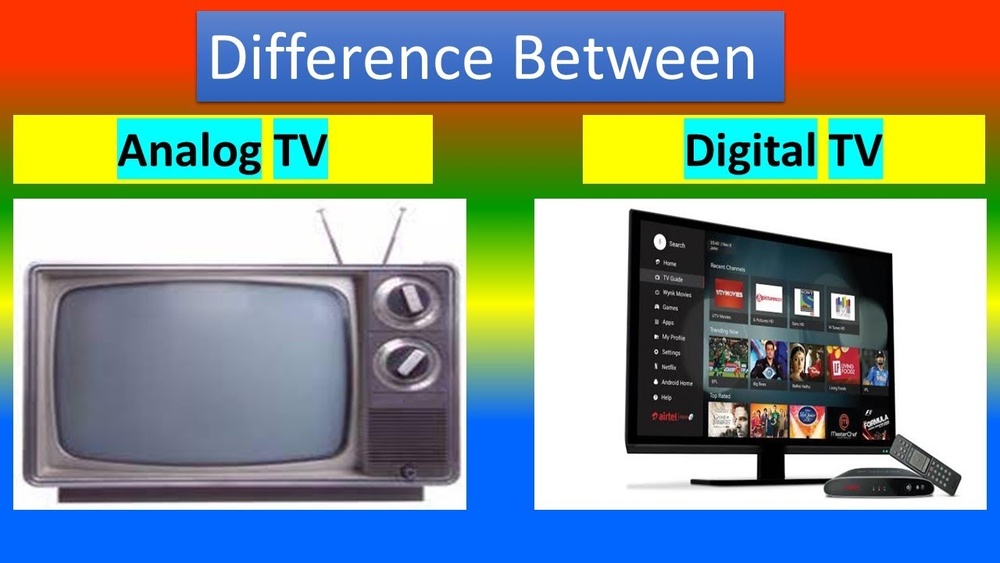
Analog Vs Digital Fernsehen: Ultimate Guide to TV Technology Differences

Analog Vs Digital Fernsehen

Are you curious about the difference between analog and digital television? Understanding these two can change the way you watch your favorite shows and improve your viewing experience.

Whether you’re setting up a new TV or just want to know why your picture quality varies, this article will clear things up for you. Keep reading to discover which option suits your needs best and how it impacts your entertainment at home.

Don’t miss out on learning what could make your TV time better and more enjoyable!

Analog Tv Basics

Analog TV is the older technology for broadcasting television signals. It sends audio and video as continuous waves. This method was common before digital TV became popular. Understanding the basics of analog TV helps to see how it differs from digital systems.

Many homes used analog TV for decades. It shaped how people watched shows and news. Even now, some places still rely on analog signals for TV.

Signal Transmission

Analog TV sends signals through radio waves or cables. These waves carry video and sound as electrical signals. The signal strength can change over distance or obstacles. This can cause the picture to flicker or the sound to crackle.

The signal is continuous, meaning it varies smoothly over time. This method is simple but less resistant to interference. Weather, buildings, and other signals can affect the quality.

Picture And Sound Quality

Analog TV usually shows images in lower resolution. The picture can be blurry or fuzzy. Colors may not be sharp or bright. The sound quality is also basic and can have noise.

Over time, the picture can degrade as the signal weakens. This makes watching analog TV less clear compared to digital TV. Still, many found the quality acceptable for years.

Common Formats

Several formats exist for analog TV worldwide. NTSC is common in the United States and Japan. PAL is used in Europe and parts of Asia. SECAM is popular in France and some African countries.

Each format has different frame rates and color encoding. These differences affect how the TV displays the picture. Devices made for one format may not work with another.

Analog Vs Digital Fernsehen: Ultimate Guide to TV Technology Differences

Credit: www.amazon.ie

Digital Tv Essentials

Digital TV has changed how people watch television. It offers clearer pictures and better sound. Digital TV uses technology that sends data as numbers. This method improves the quality of broadcasts. Understanding digital TV basics helps you see its benefits clearly.

Digital TV also supports more channels and interactive features. It uses less bandwidth than older systems. This means more programs fit into the same space. The technology behind digital TV is complex but easy to grasp with simple facts.

How Digital Signals Work

Digital TV sends information as bits, which are 0s and 1s. These bits carry audio and video data. The signal is compressed to save space. Compression keeps good quality without using too much bandwidth. The TV decodes this signal back into sound and images. This process avoids the fuzziness seen in analog TV.

Enhanced Audio And Video

Digital TV delivers sharper images with more colors. It supports high-definition (HD) and even ultra-high-definition (UHD). Sound quality is clearer and can include surround sound. Viewers enjoy a more immersive experience. These improvements make watching TV more enjoyable and lifelike.

Popular Standards

Several digital TV standards exist worldwide. DVB-T is common in Europe for terrestrial broadcasts. ATSC is used mainly in North America. ISDB-T is popular in Japan and parts of South America. Each standard has unique features but shares core digital benefits. Knowing these helps understand regional differences in digital TV.

Key Differences Between Analog And Digital

Understanding the key differences between analog and digital television helps viewers make better choices. These differences affect picture quality, the number of channels, and how signals travel. Below are the main points that separate analog from digital TV.

Signal Clarity And Interference

Analog TV sends signals as continuous waves. These waves can lose strength and pick up noise. This causes blurry pictures and fuzzy sound. Digital TV sends signals as data bits, like computer code. This method keeps the picture and sound clear. Digital signals resist interference better than analog.

Bandwidth Usage

Analog TV uses more bandwidth to send one channel. It sends the full signal all the time. Digital TV compresses signals. This means it uses less bandwidth for each channel. Digital transmission is more efficient and saves space in the airwaves.

Channel Availability

Analog TV offers fewer channels. Each channel needs its own bandwidth. Digital TV can carry many channels in the same space. Viewers get more choices with digital. Some digital systems offer extra features like guides and subtitles.

Analog Vs Digital Fernsehen: Ultimate Guide to TV Technology Differences

Credit: www.youtube.com

Impact On Viewing Experience

The shift from analog to digital television has changed how people watch TV. It affects picture quality, sound, and the way viewers interact with content. These factors shape the overall viewing experience. Understanding these differences helps viewers choose the best option for their needs.

Picture Resolution

Analog TV delivers a softer image with visible lines and noise. Digital TV offers a sharper and clearer picture. It supports high definition, showing more details and vibrant colors. This makes digital TV better for modern screens and big displays.

Sound Fidelity

Analog sound can be fuzzy and affected by interference. Digital sound is clean and crisp. It supports surround sound formats, making movies and shows more immersive. Viewers enjoy clearer dialogue and richer audio effects with digital TV.

Interactive Features

Analog TV provides only basic viewing with no interaction. Digital TV adds features like program guides and on-demand content. Some digital services allow viewers to pause, rewind, or record shows. These options offer more control over what and how to watch.

Equipment And Compatibility

Choosing between analog and digital television affects the equipment you use. Each type needs specific devices to work correctly. Compatibility matters to avoid extra costs and poor picture quality.

Older TVs may not support digital signals without added gear. Digital systems often require new cables and connectors for best results. Understanding these differences helps you prepare your home setup well.

Tv Sets And Tuners

Analog TVs use tuners made for radio waves. They capture signals directly from antennas or cables. Digital TVs have built-in tuners that decode digital signals.

Many older TV sets lack digital tuners. They need external boxes to convert signals for display. Newer sets usually support both analog and digital signals.

Cables And Connectors

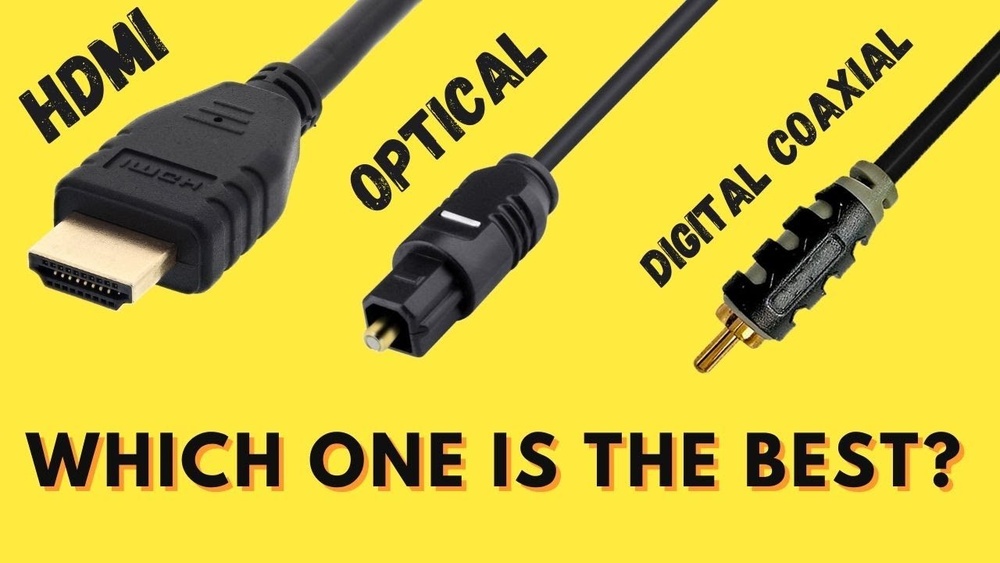
Analog TV mostly uses coaxial cables and RCA connectors. These cables carry simple signals but can lose quality over distance. Digital TV uses HDMI cables for clearer, sharper images.

HDMI combines audio and video in one cable. It supports high-definition content, unlike analog connectors. Using the right cable improves your viewing experience greatly.

Set-top Boxes

Set-top boxes help older TVs receive digital broadcasts. They convert digital signals into analog form for the TV. These boxes connect through coaxial or HDMI cables.

Some digital boxes offer extra features like recording and on-demand content. They expand what your TV can do without buying a new set. Choosing the right box depends on your TV and service type.

Analog Vs Digital Fernsehen: Ultimate Guide to TV Technology Differences

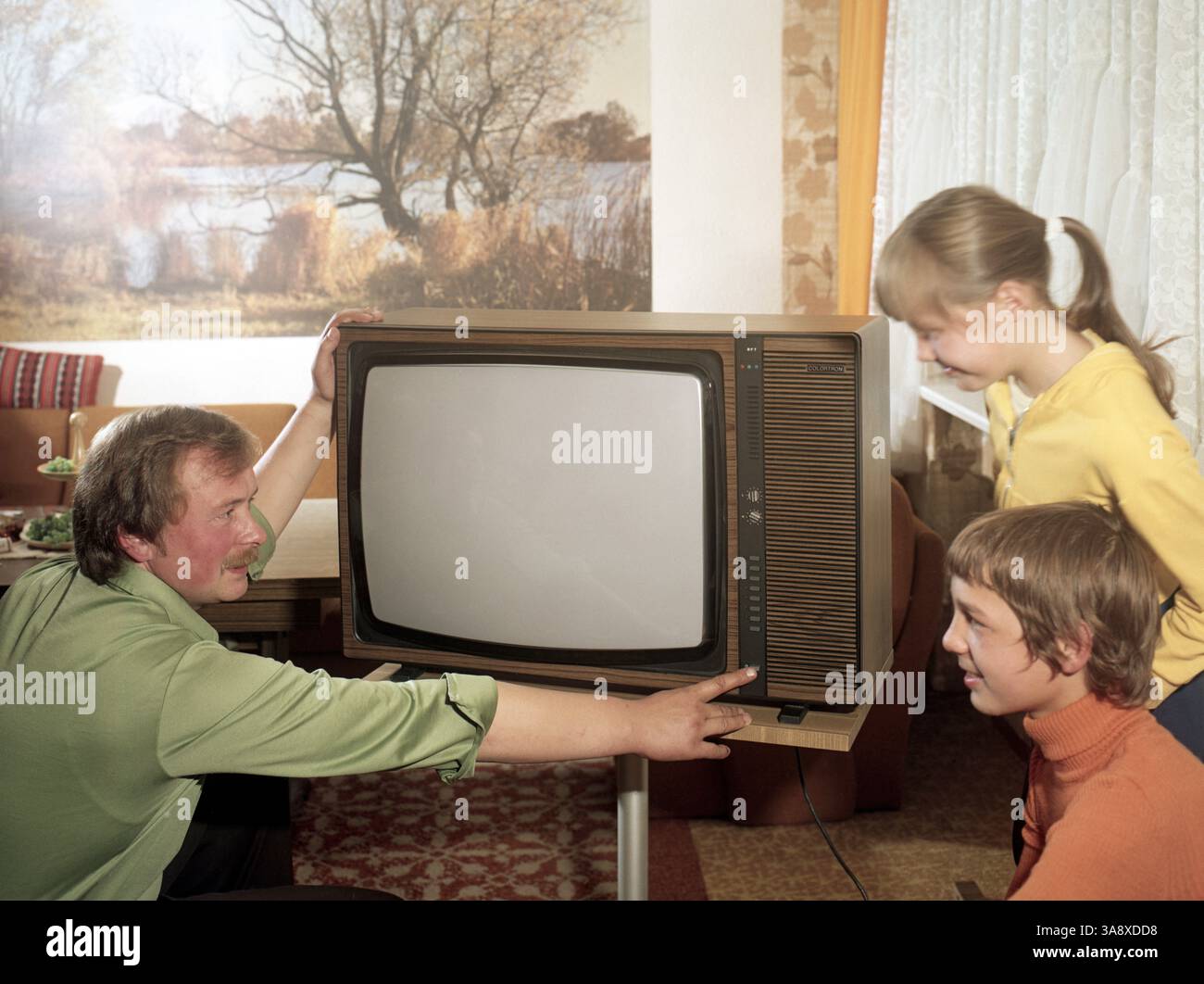
Credit: www.alamy.com

Transition From Analog To Digital

The transition from analog to digital television marked a major change in how people watch TV worldwide. This shift involved moving from old signals to new, clearer digital broadcasts. It took years for many countries to fully switch over. The change improved the TV experience but also brought challenges for viewers and broadcasters.

Global Shift Timelines

Many countries began digital TV broadcasts in the early 2000s. Some nations completed the switch by 2010, while others took longer. The United States ended analog broadcasts in 2009. Europe followed with different dates for each country. Some places still use analog signals in rural areas. The timeline depended on technology, laws, and public readiness.

Benefits Of Switching

Digital TV provides sharper picture quality and better sound. It allows more channels to fit in the same air space. Viewers can access interactive features and electronic guides. Digital signals are less prone to interference and static. This improves the overall viewing experience. Broadcasters also benefit from lower transmission costs.

Challenges Faced

Many people needed new TVs or set-top boxes. Some older TVs could not receive digital signals. The switch confused viewers about equipment and service. Broadcasters faced high costs to upgrade technology. Rural areas had trouble getting strong digital signals. Governments had to educate the public about the change. Despite issues, most adapted to digital TV over time.

Future Of Tv Technology

The future of TV technology promises many changes that will affect how people watch shows and movies. Advances in technology are making TVs smarter, clearer, and more connected. These changes make the viewing experience better and more personal.

Streaming And Smart Tvs

Streaming services have grown fast in recent years. Smart TVs let users watch shows directly from the internet. No need for cable or satellite boxes. Apps are built into the TV, making access easy and quick. This allows viewers to choose from many programs anytime they want.

4k And Beyond

Picture quality keeps improving. 4K resolution offers four times more pixels than full HD. Images look sharper and more detailed. Some TVs now support 8K, which is even clearer. These advances bring a more lifelike experience to the screen. Bright colors and better contrast add to the realism.

Integration With Other Devices

Modern TVs work well with other smart devices. Phones, tablets, and smart speakers connect easily. This allows control by voice or mobile apps. Users can stream music, cast videos, or display photos on the big screen. Integration makes the TV part of a larger home system.

Frequently Asked Questions

What Is The Difference Between Analog And Digital Tv?

Analog TV sends signals as waves, while digital TV sends data as bits. Digital TV offers clearer images and sound. Analog can have more interference and lower quality.

Why Did Tv Switch From Analog To Digital?

Digital TV uses bandwidth better and supports high-definition channels. It allows more channels and better picture quality. Analog signals are less efficient and harder to maintain.

Can Analog Tvs Receive Digital Channels?

Most analog TVs cannot receive digital signals directly. A digital converter box is needed to watch digital channels on analog TVs. This box changes digital signals into analog.

How Does Digital Tv Improve Picture And Sound Quality?

Digital TV transmits data without noise, so images are sharper and sound is clearer. It supports high definition and surround sound. Analog signals often cause fuzziness and static.

Is Digital Tv More Expensive Than Analog Tv?

Digital TVs can cost more upfront but offer better features. Over time, digital TV saves money by providing more channels and better quality. Analog TV is mostly outdated now.

Conclusion

Choosing between analog and digital television depends on your needs and equipment. Analog signals offer simplicity but lower picture quality. Digital TV delivers clearer images and more channels. It also supports interactive features. Many countries now favor digital broadcasts for better service.

Older devices may only work with analog signals. Digital requires compatible TVs or set-top boxes. Understanding the differences helps you pick the right option. Think about signal quality, available channels, and device compatibility. This way, you enjoy the best viewing experience possible.

Iphone Vs Digital Camera: Ultimate Showdown for Perfect Photos

Iphone Vs Digital Camera

Are you torn between using your iPhone or a digital camera to capture your best moments? You’re not alone.

Both have their perks, but which one truly fits your needs? Imagine snapping a quick photo or taking your photography skills to the next level—your choice can make all the difference. Keep reading to discover the key differences that will help you decide which tool is right for you.

By the end, you’ll know exactly when to pull out your iPhone and when to reach for that digital camera.

Image Quality Comparison

Image quality is a key factor when choosing between an iPhone and a digital camera. Both devices capture photos but differ in how they handle light, color, and detail.

Understanding these differences helps you pick the right tool for your photography needs. Let’s dive into the main aspects of image quality.

Sensor Size And Resolution

The sensor size in digital cameras is usually larger than in iPhones. A larger sensor can capture more light and detail. This leads to sharper and clearer images.

iPhones use smaller sensors but use software to improve photo quality. Resolution also matters. Digital cameras often have higher resolution sensors, meaning more pixels and better zoom.

iPhones balance sensor size with powerful image processing. This helps create good photos even with smaller sensors.

Color Accuracy And Dynamic Range

Digital cameras tend to have better color accuracy. They capture colors closer to what the eye sees. This makes photos look natural and vibrant.

iPhones use smart algorithms to adjust colors and enhance photos. Sometimes, colors appear brighter but less true to life.

Dynamic range is the ability to capture details in bright and dark areas. Digital cameras usually perform better here, showing more detail in shadows and highlights.

Low Light Performance

Low light is challenging for both devices. Digital cameras with larger sensors capture more light, producing clearer images in dark settings.

iPhones improve low light photos using software tricks like night mode. This brightens images but can add noise or blur.

For very low light, digital cameras often give better results. iPhones work well for casual shots and quick sharing.

Portability And Convenience

Portability and convenience are key factors when choosing between an iPhone and a digital camera. Both devices offer different advantages depending on how you plan to use them. Understanding their differences helps you pick the right tool for capturing moments easily and quickly.

Size And Weight

iPhones are small and light. They fit easily in pockets or small bags. Carrying an iPhone does not feel heavy or bulky. Digital cameras vary in size. Some are compact, but many are larger and heavier. Carrying a digital camera means extra space and weight in your bag. For travel or daily use, iPhones offer better portability.

Ease Of Use

iPhones are simple to use. The touchscreen and built-in apps make taking photos quick. There is no need to learn complex settings. Digital cameras often require manual adjustments. Users must understand focus, aperture, and ISO for best results. iPhones are better for casual users who want quick photos without fuss.

Sharing And Editing On The Go

iPhones let you share photos instantly. You can upload pictures to social media or send them by message. Editing tools are built into the phone. You can crop, filter, and adjust photos fast. Digital cameras need you to transfer photos to a computer first. Editing and sharing take more time and extra steps.

Lens Versatility

Lens versatility plays a big role in how you capture photos. It affects the style, detail, and reach of your images. Both iPhones and digital cameras offer options, but they differ in flexibility and power.

Understanding these differences helps you pick the right tool for your photography needs. Let’s explore key features like zoom, wide angle, and lens options.

Zoom Capabilities

iPhones use digital and optical zoom combined. Optical zoom keeps the image clear up to a certain point. Beyond that, digital zoom cuts quality. Digital cameras offer much stronger optical zoom. They can capture far-away subjects without losing sharpness. This makes digital cameras better for wildlife or sports photography.

Wide Angle And Telephoto Options

Most iPhones have built-in wide angle and telephoto lenses. These lenses help capture landscapes or close-up portraits easily. Digital cameras often have more powerful wide angle and telephoto lenses. They provide sharper images and better light control. This allows more creative control over your shots.

Interchangeable Lenses

iPhones do not support interchangeable lenses. You use the built-in lenses only. Digital cameras allow you to swap lenses for different effects. You can choose macro, fisheye, or prime lenses. This flexibility makes digital cameras more versatile for various photo styles.

Iphone Vs Digital Camera: Ultimate Showdown for Perfect Photos

Credit: lensbaby.com

Manual Controls And Features

Manual controls and features help you take better photos with more creativity. Both iPhones and digital cameras offer options to adjust settings. These controls affect how your images look and feel.

Digital cameras usually provide more manual options. They allow precise control over settings like shutter speed and ISO. iPhones have simplified controls but still offer some manual adjustments through apps.

Understanding these controls lets you experiment with photography. It improves your skills and lets you capture unique shots. Let’s explore some key manual controls and features.

Exposure And Focus Settings

Exposure controls how much light hits the camera sensor. Digital cameras let you adjust shutter speed, aperture, and ISO separately. This helps in bright or dark scenes. iPhones handle exposure automatically but allow tap-to-focus and brightness adjustment. Manual focus is limited on iPhones but precise on digital cameras.

Creative Modes And Filters

Digital cameras often include scene modes for portraits, landscapes, and sports. These modes adjust settings for best results. iPhones offer built-in filters and effects in the camera app. They also have portrait mode with background blur. Both devices let you add creativity but with different levels of control.

Advanced Shooting Techniques

Digital cameras support techniques like long exposure, bracketing, and RAW shooting. These techniques enhance photo quality and style. iPhones now support RAW photos and night mode for low light. Both can use burst mode to capture fast action. Digital cameras offer more tools for advanced users.

Battery Life And Storage

Battery life and storage are important for both iPhones and digital cameras. They affect how long you can shoot and how many photos you can keep. These factors influence your shooting experience and convenience.

Shooting Duration

Digital cameras often have larger batteries. They allow longer shooting times without recharging. Some models can shoot for hours. iPhones have smaller batteries. Heavy use of the camera drains them quickly. Video recording uses more power than photos. Carrying a power bank helps with iPhone shooting.

Memory Capacity

Digital cameras use memory cards. You can buy cards with large storage, like 128GB or more. This holds thousands of photos and videos. iPhones have built-in storage. Options range from 64GB to 1TB. Storage fills up faster with high-resolution photos. Managing space is necessary to avoid running out.

Backup And Transfer Options

Digital cameras require a card reader or USB cable to transfer files. This process can be slow or fast, depending on the device. iPhones offer wireless backup options. iCloud stores photos automatically. AirDrop shares files instantly with other Apple devices. These options save time and reduce data loss risks.

Iphone Vs Digital Camera: Ultimate Showdown for Perfect Photos

Credit: www.signatureedits.com

Cost And Value

Cost and value are important factors when choosing between an iPhone and a digital camera. Both devices serve the purpose of capturing photos but differ in price and features. Understanding these differences helps make a better choice for your needs and budget.

Examining initial costs, extra expenses, and long-term benefits provides a clear picture of what to expect. This section breaks down these aspects to help you decide which option offers the best value.

Initial Investment

An iPhone usually costs more upfront than many digital cameras. Flagship models can be expensive but include many features beyond photography. Digital cameras have a wide price range from budget to professional models. Entry-level cameras might cost less than a new iPhone. Mid-range and high-end cameras can be very costly. The choice depends on your budget and how much you want to spend on photography tools.

Accessories And Upgrades

iPhones rarely need extra gear to take good photos. Most users only buy a case or screen protector. Digital cameras often require additional accessories. Lenses, tripods, memory cards, and camera bags add to the total cost. Upgrading lenses or adding flashes can improve photo quality but increase expenses. iPhones receive software updates that improve camera performance without extra cost. Digital cameras may need hardware upgrades or new models to keep up with technology.

Long-term Value

iPhones hold value well due to brand popularity and software support. They can serve many purposes besides photography, like calls and apps. Digital cameras focus mainly on image quality and manual controls. They may provide better photos for serious photographers. Over time, camera sensors and lenses may become outdated. iPhones receive updates that keep the device useful for years. Consider how you plan to use the device to judge long-term value.

Use Case Scenarios

Choosing between an iPhone and a digital camera depends on your needs. Both tools offer unique benefits. Your choice should fit the situation you face.

Different scenarios call for different devices. Understanding these helps you pick the right one each time.

Casual Photography

The iPhone excels in casual photography. It is always with you and easy to use. Snap quick photos of friends, food, or pets without fuss. Its built-in editing tools help polish images fast. No extra gear needed. It fits perfectly for daily moments and social sharing.

Professional Work

Digital cameras lead in professional work. They offer higher image quality and more control. Photographers use them for portraits, events, and products. Interchangeable lenses and manual settings improve results. They handle low light better than phones. Professionals prefer cameras for sharp, detailed shots.

Travel And Adventure

Travelers must balance weight and quality. The iPhone is light and ready for quick shots. It helps capture landscapes and street scenes easily. Digital cameras suit adventure trips needing zoom or ruggedness. They survive harsh conditions and deliver better photos from afar. Each device fits different travel styles.

Iphone Vs Digital Camera: Ultimate Showdown for Perfect Photos

Credit: www.youtube.com

Future Trends In Photography

The future of photography is exciting and full of change. Both iPhones and digital cameras keep evolving fast. New technology helps us take better photos with less effort. This makes photography more fun and accessible for everyone.

Many new tools and features will shape how we capture moments. From smart phones to pro cameras, innovation is everywhere. Let’s explore some key trends that will affect photography soon.

Smartphone Camera Innovations

Smartphones are adding better lenses and sensors. Night mode and portrait effects keep improving. Phones now use multiple cameras for zoom and wide shots. They are also getting faster processors for sharper images. Expect higher resolution and better low-light performance soon.

Digital Camera Advancements

Digital cameras focus on image quality and speed. New models offer bigger sensors and faster autofocus. Mirrorless cameras are gaining popularity for light weight and power. Video features like 4K and slow motion are better. Battery life and durability also improve for long shoots.

Integration Of Ai And Computational Photography

Artificial intelligence plays a big role in photo editing. Phones and cameras use AI to adjust colors and exposure automatically. Computational photography merges multiple images to create one perfect shot. AI helps remove noise, sharpen details, and enhance faces. This makes photos look professional with little effort.

Frequently Asked Questions

Which Is Better For Photography, Iphone Or Digital Camera?

Digital cameras usually offer better image quality and more settings. IPhones are good for quick photos and easy sharing.

Can Iphone Cameras Replace Digital Cameras For Professionals?

No, digital cameras have advanced features that pros need. IPhones are great for casual photos, not professional shoots.

How Do Iphone And Digital Camera Lenses Differ?

Digital cameras have larger, changeable lenses for different shots. IPhones use small built-in lenses with some zoom options.

Is It Easier To Edit Photos On Iphone Or Digital Camera?

Editing is simpler on an iPhone with apps ready to use. Digital camera photos need transferring to a computer first.

Which Device Is More Portable, Iphone Or Digital Camera?

IPhones are small and always with you, very handy. Digital cameras can be bulky and require carrying extra gear.

Conclusion

Choosing between an iPhone and a digital camera depends on your needs. IPhones offer convenience and quick sharing. Digital cameras provide better image quality and zoom options. Both have strengths that suit different users. Consider what matters most: ease or picture detail.

Either way, capturing memories remains the goal. Your choice will help you enjoy photography more. Keep practicing and have fun with your photos.

Computed Radiography Vs Digital Radiography: Ultimate Comparison Guide

Computed Radiography Vs Digital Radiography

When it comes to getting clear and accurate medical images, you might wonder which technology works best for you: Computed Radiography or Digital Radiography. Both promise detailed pictures of your body, but they do it in very different ways.

Understanding the difference can help you make smarter decisions about your health or the care you provide to others. Ready to discover which option offers faster results, better quality, and more convenience? Keep reading, and you’ll find out exactly what sets these two technologies apart—and why it matters to you.

Basics Of Computed Radiography

Computed Radiography (CR) is a medical imaging method that uses special plates to capture X-ray images. It bridges the gap between traditional film X-rays and fully digital systems. CR offers a simpler and less costly way to digitize X-ray images compared to some newer technologies.

This technology helps medical staff view and store images more easily. It provides clearer pictures than old film X-rays. CR plays a vital role in many healthcare settings by making X-ray imaging more accessible.

How Computed Radiography Works

Computed Radiography uses a photostimulable phosphor plate to capture X-rays. When X-rays hit the plate, they create a latent image. The plate is then scanned with a laser to release stored energy as light. This light is converted into a digital image by a computer.

The digital image can be enhanced and viewed on screens. This process allows faster image sharing and easier storage compared to film.

Equipment And Technology

The main equipment includes a phosphor imaging plate and a CR reader. The imaging plate replaces traditional film. After exposure, the plate is inserted into the CR reader. The reader scans the plate and converts the image to digital form.

Computers and specialized software process and store images. The system supports easy image transfer to other devices or networks.

Common Applications

Computed Radiography is used in hospitals, clinics, and dental offices. It works well for chest, bone, and dental X-rays. CR is helpful in emergency rooms due to its quick image processing.

It also supports veterinary imaging and industrial non-destructive testing. This versatility makes CR a popular choice across many fields.

Computed Radiography Vs Digital Radiography: Ultimate Comparison Guide

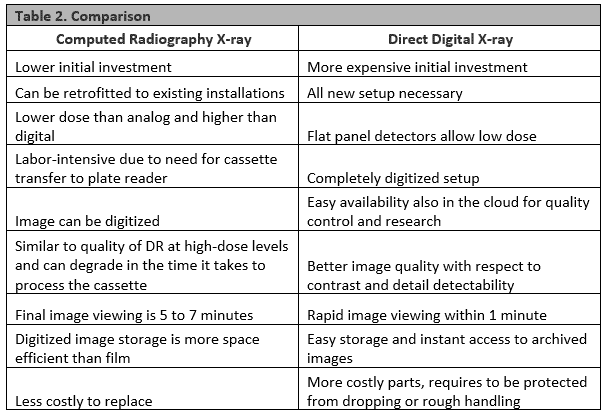
Credit: www.jucm.com

Basics Of Digital Radiography

Digital radiography is a modern way to capture X-ray images using digital sensors. It replaces older film-based methods with faster and clearer image processing. This technology helps doctors see inside the body with less radiation and quicker results.

Digital radiography improves diagnosis and treatment. It allows easy storage and sharing of images. The system uses computers to display and enhance X-ray pictures immediately.

Digital Radiography Technology

Digital radiography uses electronic sensors to capture images. These sensors convert X-rays into digital signals. Computers process these signals to create clear images. The process is quick and efficient compared to traditional film. It reduces the need for retakes due to poor image quality. This technology also allows image enhancement and manipulation on the screen.

Types Of Digital Detectors

There are two main types of digital detectors: direct and indirect. Direct detectors convert X-rays directly into an electrical signal. Indirect detectors first convert X-rays into light, then into an electrical signal. Both types produce high-quality images but differ in how they capture data. The choice depends on the medical application and equipment availability.

Typical Uses In Medical Imaging

Digital radiography is widely used in hospitals and clinics. It helps in examining bones, chest, teeth, and soft tissues. The technology supports quick diagnosis of fractures, infections, and lung conditions. It also aids in dental checkups and mammography. Doctors rely on digital radiography for clear and fast imaging results.

Image Quality Comparison

Image quality is vital in radiography. It helps doctors see clear and accurate pictures. Comparing computed radiography (CR) and digital radiography (DR) reveals key differences in image quality. These differences affect how well health professionals can diagnose patients. Focus on resolution, contrast, and artifacts to understand each method’s strengths.

Resolution And Detail

Resolution shows how sharp an image looks. Digital radiography usually has higher resolution than computed radiography. This means DR can show smaller structures clearly. CR images sometimes appear softer or less detailed. Clear resolution helps doctors detect tiny fractures or abnormalities.

Contrast And Clarity

Contrast means the difference between dark and light areas in an image. Digital radiography offers better contrast and clarity. It shows tissues with more distinct edges. Computed radiography can have lower contrast, making images look flat. Good contrast helps spot problems quickly and accurately.

Artifact And Noise Levels

Artifacts are unwanted marks or distortions in images. Noise appears as grainy or speckled textures. Digital radiography produces fewer artifacts and less noise. Computed radiography images may have more noise, which can hide details. Clear images with low noise improve diagnosis and patient care.

Workflow And Efficiency

Workflow and efficiency are key factors in medical imaging. They affect how quickly patients receive care and how smoothly staff complete tasks. Comparing computed radiography (CR) and digital radiography (DR) shows clear differences in these areas. Understanding these differences helps clinics choose the best technology.

Image Acquisition Speed

Digital radiography captures images instantly. The sensor sends data directly to the computer. This reduces waiting time significantly. Computed radiography requires a separate step. The imaging plate must be scanned to create a digital image. This step can slow down the process. Faster image capture means quicker diagnosis and treatment.

Processing And Storage

Digital radiography stores images electronically right away. This allows easy access and quick sharing with other staff. Computed radiography needs image processing after scanning. This adds time and extra work. Storage space is also a concern with CR. Digital images are smaller and easier to organize. Efficient storage saves time and reduces errors.

Impact On Clinical Workflow

Digital radiography improves clinical workflow by reducing steps. Staff spend less time handling images and more time with patients. Computed radiography’s extra steps can cause delays and increase workload. Faster workflows help clinics see more patients daily. Smooth operations lead to better patient satisfaction and staff morale.

Cost And Maintenance

Cost and maintenance are key factors in choosing between computed radiography (CR) and digital radiography (DR). These costs affect your budget and the long-term success of your imaging department. Understanding the differences helps in making the right choice.

Initial Investment

Computed radiography requires a lower upfront cost than digital radiography. CR systems use imaging plates and scanners. Digital radiography needs flat-panel detectors that cost more. The higher price of DR equipment reflects its faster image processing. Smaller clinics often prefer CR due to budget limits.

Operating Expenses

Operating costs for CR include buying and replacing imaging plates. Scanning and digitizing images take extra time and resources. Digital radiography reduces these costs by producing instant images. DR systems need less film and fewer supplies. Electricity use is higher for DR but often balanced by efficiency.

Equipment Longevity

Computed radiography machines have a moderate lifespan. Imaging plates wear out and need regular replacement. Digital radiography systems tend to last longer with proper care. DR detectors can be expensive to replace if damaged. Regular maintenance extends equipment life for both systems.

Computed Radiography Vs Digital Radiography: Ultimate Comparison Guide

Credit: www.youtube.com

Radiation Exposure

Radiation exposure is a key concern in medical imaging. Both Computed Radiography (CR) and Digital Radiography (DR) use X-rays to capture images. Understanding their differences helps ensure patient safety and image quality. This section explains how radiation dose varies between these systems and the safety rules that guide their use.

Dose Differences Between Systems

Digital Radiography generally uses less radiation than Computed Radiography. DR sensors are more sensitive, capturing images with lower doses. CR requires higher doses because it uses a photostimulable phosphor plate. Lower radiation means less risk for patients during repeated exams. Choosing DR can reduce the total radiation exposure over time.

Safety Considerations

Minimizing radiation is crucial for patient safety. Radiology staff follow strict protocols to limit exposure. Protective gear, such as lead aprons, shields vital organs. Machines are calibrated to use the lowest dose for clear images. Training ensures technicians handle equipment correctly. Safety measures protect both patients and healthcare workers.

Regulatory Standards

Government agencies set rules to control radiation use. The FDA and NRC regulate X-ray device safety in the U.S. Facilities must meet dose limits and report exposure levels. Regular inspections verify compliance with safety standards. Regulations help maintain consistent protection across all imaging centers. Staying within limits prevents unnecessary radiation risks.

Flexibility And Portability

Flexibility and portability are key factors when choosing between Computed Radiography (CR) and Digital Radiography (DR). These features affect how easily the equipment fits into different medical environments. They also impact how quickly and effectively healthcare professionals can perform imaging tasks. Understanding these differences helps in selecting the right technology for specific needs.

Suitability For Various Settings

Computed Radiography works well in many places. It can fit into clinics with limited space. CR systems use plates that are easy to carry and store. Digital Radiography often needs more space for its hardware. It works best in hospitals and large centers. DR provides fast results, but may require a fixed setup.

Mobile Imaging Capabilities

CR offers good mobility. The imaging plates are lightweight and portable. This makes CR ideal for bedside or field imaging. DR systems have portable options, but they tend to be heavier and pricier. Mobile DR units are improving but can be less common. CR remains a practical choice for mobile imaging needs.

Adaptability To Different Procedures

Both CR and DR adapt to various imaging procedures. CR plates can be used in many machines and settings. This allows flexibility for different body parts and patient conditions. DR provides instant images, speeding up the process. It suits procedures requiring quick decisions. CR’s adaptability makes it useful where multiple procedures occur.

Computed Radiography Vs Digital Radiography: Ultimate Comparison Guide

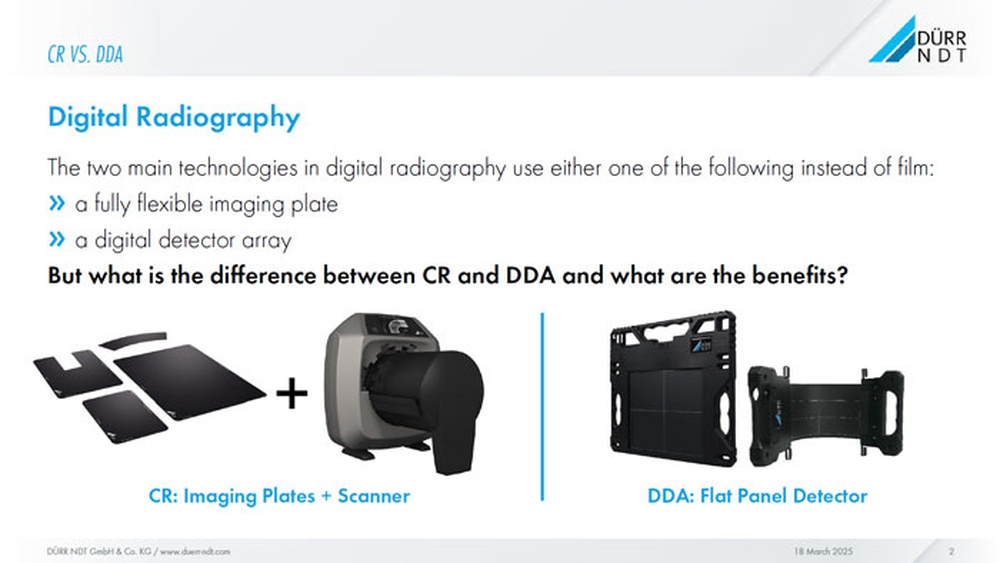
Credit: ndtblog-us.fujifilm.com

Future Trends And Innovations

The future of radiography is bright with ongoing trends and innovations. Both Computed Radiography (CR) and Digital Radiography (DR) continue to evolve. These improvements aim to enhance image quality and make procedures faster and safer. New technologies promise to change how radiography is practiced worldwide.

Advancements In Detector Technology

Detectors are the heart of radiography systems. New materials improve sensitivity and reduce noise. Thinner, lighter detectors make machines easier to handle. Some detectors now capture images faster, helping patients spend less time in exams. These upgrades also reduce radiation exposure.

Artificial Intelligence Integration

AI helps in analyzing images quickly and accurately. It supports radiologists by highlighting areas of concern. This reduces human error and speeds up diagnosis. AI algorithms also optimize image quality automatically. It is becoming a vital tool in both CR and DR systems.

Potential Impact On Radiography Practices

Faster image processing means quicker patient care. Enhanced image clarity leads to more precise diagnoses. Portable and wireless devices enable radiography in remote areas. Training for radiographers is evolving to include new tech skills. The workflow in clinics and hospitals is becoming more efficient.

Frequently Asked Questions

What Is The Main Difference Between Computed And Digital Radiography?

Computed radiography uses a special imaging plate to capture X-rays, while digital radiography captures images directly using electronic sensors. Digital radiography is faster since it skips the plate scanning step. Both create digital images but use different technology.

Which Radiography Method Offers Better Image Quality?

Digital radiography usually provides clearer and sharper images than computed radiography. It allows immediate image viewing and better detail. Computed radiography images may sometimes appear less sharp due to the scanning process.

How Do Computed And Digital Radiography Compare In Cost?

Computed radiography tends to have lower initial equipment costs but higher running costs. Digital radiography equipment is more expensive upfront but cheaper to maintain over time. Cost depends on the size and needs of the facility.

Can Computed Radiography And Digital Radiography Work With The Same X-ray Machines?

Both can use standard X-ray machines, but the detectors differ. Computed radiography requires special imaging plates, while digital radiography needs flat-panel sensors. Switching between them may need extra tools or adapters.

Which Method Is Faster For Capturing And Viewing X-ray Images?

Digital radiography is faster because it shows images instantly on a computer screen. Computed radiography requires scanning the imaging plate before viewing, which takes more time. Speed is important in busy medical settings.

Conclusion

Choosing between computed radiography and digital radiography depends on your needs. Both methods create clear medical images. Digital radiography offers faster results and easier storage. Computed radiography uses special plates to capture images. Cost and equipment may influence your choice.

Understanding the differences helps you decide better. Each has strengths for different situations. Think about speed, quality, and budget. Ask your healthcare provider for advice too. This knowledge ensures the best care for you.

Electronic Vs Digital: Key Differences You Must Understand

Electronic Vs Digital

Have you ever wondered what really sets electronic devices apart from digital ones? You might think they are the same, but understanding the difference can change the way you use technology every day.

Whether you’re buying gadgets, fixing devices, or just curious, knowing the key points between electronic and digital can save you time and money. Keep reading to discover simple explanations and clear examples that will help you make smarter choices with your tech.

This is information you don’t want to miss!

Electronic Vs Digital: Key Differences You Must Understand

Credit: diro.io

Electronic Basics

Understanding the basics of electronics helps you see how many devices work. Electronics use tiny parts to control electric currents. These devices process signals, send information, or perform tasks automatically. They are different from simple electrical devices that only carry power.

Electronics form the backbone of modern technology. From radios to computers, they rely on these small components. Learning about electronics makes technology easier to understand.

What Makes A Device Electronic

An electronic device controls electric current to do a specific job. It uses components that can change or manage signals. These signals might be sound, light, or data. The device often has circuits that guide how electricity flows.

Unlike basic electrical tools, electronic devices handle complex tasks. They can amplify, switch, or convert signals. This ability allows them to work with information, not just power.

Common Electronic Components

Several parts make up electronic devices. Resistors control the flow of electric current. Capacitors store and release energy. Diodes allow current to flow in one direction only.

Transistors act like switches or amplifiers. Integrated circuits combine many small parts into one chip. Each component has a special role in the device’s function.

Digital Fundamentals

Digital technology plays a major role in our daily lives. It shapes how we communicate, learn, and entertain ourselves. Understanding digital fundamentals helps us see how this technology works behind the scenes. It also shows the difference between electronic and digital systems.

Digital systems use specific ways to handle data. These methods make digital devices reliable and easy to use. The basics of digital technology involve signals, data encoding, and processing methods.

Defining Digital Technology

Digital technology uses numbers to represent information. Most often, it uses two numbers: 0 and 1. These numbers are called binary digits or bits. Each bit shows an off or on state.

This binary system allows digital devices to store and process data. It makes digital systems less sensitive to noise or errors. Digital technology powers computers, smartphones, and many other devices.

How Digital Signals Work

Digital signals carry data using discrete values. Instead of smooth waves, they use sharp steps. These steps represent the bits 0 and 1. This clear difference helps devices read signals accurately.

Digital signals switch between low and high voltage levels. Low voltage means 0, high voltage means 1. This switching happens very fast to send data quickly. Devices decode these signals to perform tasks or show information.

Core Differences

The core differences between electronic and digital systems lie in their signal types and how devices work. Understanding these basics helps in choosing the right technology for various uses.

Electronic systems often deal with continuous signals, while digital systems handle signals in steps or bits. This fundamental distinction affects their design and function.

Analog Vs Digital Signals

Electronic devices mostly use analog signals. These signals vary smoothly over time. They can take any value within a range. This makes them good for natural sounds and images.

Digital signals work with two states: on or off, represented by 1s and 0s. These signals are easier to store and transmit without losing quality. Digital signals are common in computers and smartphones.

Device Operation Modes

Electronic devices often operate in a continuous mode. They respond to changing inputs in real-time. For example, a radio receiver adjusts signal strength smoothly.

Digital devices operate in discrete steps. They process data in chunks or bits. This mode supports logic operations and error correction. Digital devices include calculators and digital watches.

Electronic Vs Digital: Key Differences You Must Understand

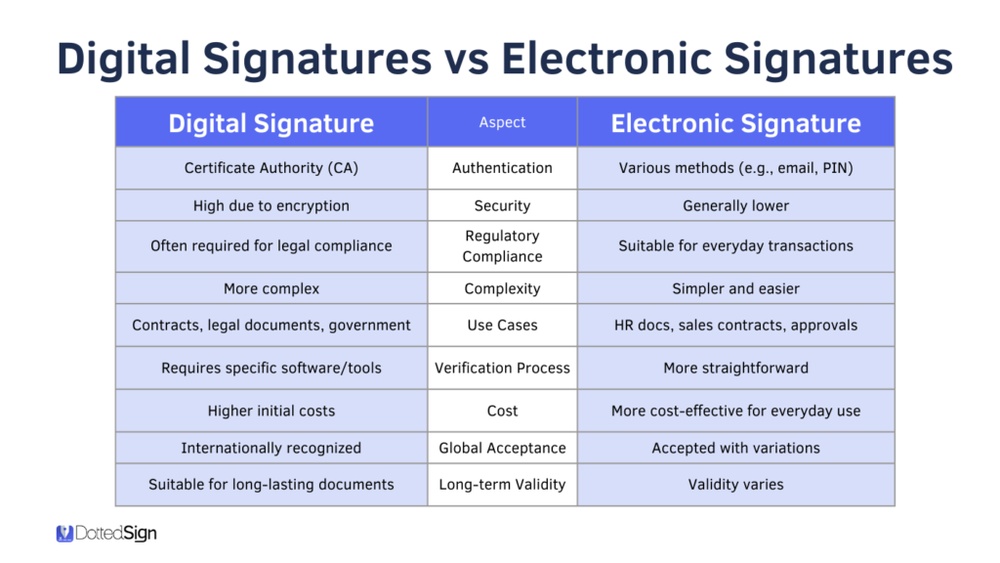
Credit: www.dottedsign.com

Applications Of Electronic Devices

Electronic devices play a big role in daily life and industry. They help perform tasks faster and easier. These devices use electric signals to work. Understanding their applications shows their importance and variety.

Everyday Electronic Gadgets

Many electronic devices are part of daily routines. Smartphones, laptops, and televisions use electronic circuits. These gadgets help us communicate, learn, and entertain. Kitchen appliances like microwaves and coffee makers also use electronics. They improve convenience and save time. Electronic devices in homes make life comfortable and efficient.

Industrial Electronic Systems

Industries rely heavily on electronic systems for production. Machines use sensors and control circuits to work accurately. Electronics control factory robots, ensuring safety and precision. Energy management systems use electronics to reduce waste. Electronics in industries improve productivity and product quality. They support complex operations in manufacturing and processing plants.

Uses Of Digital Technology

Digital technology plays a major role in everyday life. It changes how people communicate, work, and enjoy entertainment. Devices and systems use digital signals to process and store information. This makes digital technology fast, reliable, and easy to use.

Digital technology appears in many products and systems. It helps improve efficiency and makes tasks simpler. People use digital tools at home, school, and work. The following sections explain common uses of digital technology.

Consumer Digital Products

Many products use digital technology for better performance. Smartphones, tablets, and laptops are examples. They store data in digital form and connect to the internet. Digital cameras capture images with high quality and save them digitally. Smart TVs and streaming devices provide easy access to shows and movies. Digital watches show time and track health data. These products make daily life more convenient and enjoyable.

Digital Systems In Computing

Computers use digital systems to process information. They work with binary code, using zeros and ones. This allows fast calculations and data management. Digital systems control software, hardware, and networks. Servers store and share information across the internet. Digital systems also power devices like printers, routers, and scanners. They support many industries, from healthcare to finance. Digital computing systems keep technology running smoothly and reliably.

Electronic Vs Digital: Key Differences You Must Understand

Credit: www.formstack.com

Advantages And Limitations

Understanding the advantages and limitations of electronic and digital technologies helps in choosing the right tools. Each has unique features that suit different needs. Knowing these can save time and effort in various applications.

Benefits Of Electronic Devices

Electronic devices are simple and often easy to repair. They work well with analog signals like sound or light. These devices use less power for basic tasks. They handle continuous data smoothly. Many electronic tools operate without complex programming. This makes them reliable for everyday use. They are often cheaper for basic functions. Electronic components are widely available and easy to replace. They provide quick responses in real-time situations. These features make electronics useful in many fields.

Strengths Of Digital Technology

Digital technology processes data in binary, which reduces errors. It offers high accuracy in calculations and measurements. Digital devices can store large amounts of information. They allow easy editing and sharing of data. Many digital tools support complex software applications. They provide better security through encryption. Digital systems can integrate with networks for communication. They adapt quickly to new tasks with software updates. These technologies often include user-friendly interfaces. Digital technology drives innovation in computing and communication.

Future Trends

The future of electronics and digital technology is bright and full of potential. Both fields are evolving fast, shaping how we live and work. New trends promise smarter devices and better connections.

These changes will affect many areas, from home gadgets to industry tools. Understanding these trends helps us prepare for what’s next. Here are some key developments in electronics and digital technology.

Emerging Electronic Innovations

Electronics are becoming smaller and more powerful. Flexible circuits and wearable tech are gaining popularity. These devices fit better into daily life. Energy efficiency is improving in electronic components. This means longer battery life and less power waste. New materials like graphene enhance speed and durability. Sensors are becoming more sensitive and accurate. They can monitor health, environment, and machines easily. These innovations support smarter cities and homes.

Advancements In Digital Technology

Digital technology keeps advancing rapidly. Artificial intelligence is shaping software and systems. It helps machines learn and make decisions. Cloud computing allows data access from anywhere. This boosts work flexibility and collaboration. 5G networks provide faster and more reliable connections. Virtual and augmented reality create immersive experiences. These technologies change education, gaming, and shopping. Data security and privacy get stronger protections. This builds trust in digital services.

Frequently Asked Questions

What Is The Main Difference Between Electronic And Digital?

Electronic refers to devices using electric signals. Digital means using numbers, often 0s and 1s, to represent data.

How Do Electronic And Digital Technologies Work Together?

Electronic parts create signals. Digital systems process these signals as numbers to perform tasks.

Which Devices Are Electronic But Not Digital?

Old radios and simple amplifiers use electronic parts but do not process digital data.

Why Is Digital Preferred Over Purely Electronic Systems?

Digital systems handle data more accurately and allow easier storage and processing than analog electronic systems.

Can Electronic Devices Function Without Digital Components?

Yes, many electronic devices work without digital parts, relying on continuous electrical signals instead.

Conclusion

Electronic and digital technologies serve different purposes in today’s world. Electronic devices work with continuous signals, while digital devices use discrete data. Each has unique strengths and fits specific needs. Choosing between them depends on the task and desired outcome.

Understanding their differences helps make smarter decisions. Both play important roles in modern life and technology. Knowing which to use can improve efficiency and results. The basics are simple but crucial to grasp. Keep exploring to learn more about these fascinating fields.

Cine Xl Vs Digital: Ultimate Showdown for Film Enthusiasts

Cine Xl Vs Digital

Are you curious about the real difference between Cine XL and Digital? Whether you’re a filmmaker, a video enthusiast, or just someone who loves great visuals, understanding these two options can change the way you create and enjoy movies.

Imagine capturing your story with the richest colors, sharpest details, or the smoothest editing. Which one gives you that edge? Keep reading to discover what sets Cine XL apart from Digital, and find out which one fits your needs perfectly.

Your next project could depend on it.

Cine Xl Vs Digital: Ultimate Showdown for Film Enthusiasts

Credit: cvp.com

Film Quality Comparison

Comparing film quality between Cine XL and digital formats reveals key differences. Each offers unique visual experiences. Understanding these helps choose the right medium for your project.

Image Resolution And Texture

Cine XL provides a rich, organic texture. Its resolution depends on the film stock and camera used. Digital cameras offer consistent, high-resolution images. Digital files often appear sharper and cleaner than Cine XL. Film grain in Cine XL adds a tactile feel missing in digital images.

Color Reproduction

Cine XL captures colors with a natural warmth and depth. Colors may shift slightly based on film type and processing. Digital formats reproduce colors more precisely and consistently. Digital allows easy color correction during editing, improving accuracy. Cine XL colors often have a softer, vintage look.

Grain And Noise Characteristics

Cine XL shows visible grain due to film emulsion. Grain varies with ISO and film stock choice. Grain can enhance mood and texture in images. Digital noise appears in low light but is often less noticeable. Noise in digital files can be reduced by software tools.

Shooting Process Differences

The shooting process differs a lot between Cine XL and digital cameras. These differences affect how filmmakers work and the final look of the film. Understanding these changes helps in choosing the right method for each project.

From the equipment to how fast you can shoot, each method has its own rules. These rules change the way you plan and handle your filming days.

Camera Equipment And Handling

Cine XL cameras are large and heavy. They need careful handling and steady support. Operators must know how to load and adjust the cameras manually.

Digital cameras are lighter and easier to carry. They often have automatic settings that help with focus and exposure. This makes shooting faster and less tiring.

Film Loading Vs Digital Storage

Cine XL uses physical film rolls. Each roll holds limited footage and needs to be loaded in a dark room or with special care. Film must be changed after every few minutes of shooting.

Digital cameras save images on memory cards. These cards can store hours of footage. No need to stop often for changing film. This saves time on set.

Shooting Speed And Flexibility

Shooting with Cine XL is slower. Filmmakers must plan shots carefully because film is expensive and limited. Mistakes can be costly.

Digital shooting is more flexible. You can record many takes without worrying about running out of film. This allows more creativity and experimentation during filming.

Editing And Post-production

Editing and post-production shape the final look of a film. This stage refines the story, visuals, and sound for the audience. The process differs between Cine XL and digital formats. Each method has unique tools and challenges.

Editing Workflow

Cine XL editing involves physical film cutting and splicing. Editors work with actual film strips, which takes more time. Digital editing uses software to cut and arrange clips quickly. It allows easy changes and instant previews. Digital workflows support faster decision-making and flexibility.

Special Effects Integration

Special effects on Cine XL require manual techniques like optical printing. This process is complex and less flexible. Digital editing simplifies effects creation and layering. Effects can be added and adjusted on the computer. Digital tools offer more control and creative freedom.

Color Grading Techniques

Cine XL color grading depends on chemical processes and timing. It is less precise and harder to adjust later. Digital color grading uses software to tweak colors easily. Editors can correct or enhance scenes with precision. Digital methods provide consistent and repeatable results.

Cine Xl Vs Digital: Ultimate Showdown for Film Enthusiasts

Credit: ktar.com

Cost And Accessibility

Cost and accessibility play a big role in choosing between Cine XL and digital filming. Both formats have different price points and access levels. These factors affect filmmakers’ decisions, especially those with limited budgets or resources. Understanding the costs and how easy it is to access each option helps make a better choice.

Initial Investment

Cine XL requires buying film stock and special cameras. These cameras often cost more than digital ones. Film stock prices can be high. Digital cameras have a one-time cost. You pay once and then shoot many projects. This makes digital easier to start with for new filmmakers.

Ongoing Expenses

Cine XL needs constant buying of film rolls. Developing and processing the film adds more costs. This can add up fast for long projects. Digital filming saves money here. You can reuse memory cards and hard drives. Editing digital files costs less than handling film.

Availability For Filmmakers

Finding Cine XL film and labs can be tough. Not all places have the materials or services. Digital gear is easier to find worldwide. Many stores and online shops sell digital cameras. Digital editing software is common and affordable. This makes digital filming accessible for many creators.

Archival And Longevity

Archival and longevity are key concerns for filmmakers and collectors. Choosing between Cine XL and digital formats affects how long films last. Each format has unique ways to preserve content over time. Understanding these differences helps protect valuable footage for future generations.

Film Preservation Methods

Traditional film uses physical reels made of durable materials. These reels require careful storage in cool, dry places. Temperature and humidity control prevent film from degrading. Archivists often use special chemicals to slow decay. Proper handling avoids scratches and tears. Film can last over 100 years with good care.

Digital Storage Challenges

Digital files depend on electronic devices and formats. Storage media can fail or become obsolete. Hard drives, SSDs, and cloud services all have risks. Files may get corrupted or accidentally deleted. Regular backups and updates are essential. Digital files need constant attention to remain accessible.

Restoration Possibilities

Film can be cleaned and repaired with physical tools. Scratches and color fading can be fixed by experts. Digital restoration uses software to correct damage. It can remove noise, fix colors, and improve sharpness. Both methods can restore old footage to near-original quality. Restoration costs vary based on damage and format.

Audience Experience

The audience experience differs greatly between Cine XL and digital formats. Both offer unique ways to watch movies. These differences affect how viewers enjoy films and remember them. Understanding these points helps choose the best option for your viewing habits.

Theatrical Presentation

Cine XL provides a grander theatrical experience. The large screen and higher resolution create vivid images. Sound systems in Cine XL theaters are powerful and clear. This setting pulls viewers into the movie world. Digital formats may lack the same size and sound depth. The cinema atmosphere adds excitement and focus to the film.

Home Viewing Quality

Digital formats shine in home viewing. They offer convenience and easy access. High-definition screens on TVs and devices improve image quality. Many digital platforms support subtitles and multiple languages. Cine XL is limited to theaters and showtimes. Digital lets viewers watch anytime and pause if needed.

Emotional Impact And Nostalgia

Cine XL often triggers strong emotions and nostalgia. The classic film feel and large format evoke memories. Watching in a theater can feel like a special event. Digital viewing is more casual and flexible. It lacks some of the old-school charm but suits everyday life. Each format creates different emotional connections.

Environmental Impact

The choice between Cine XL and digital formats affects the environment in different ways. Each method has unique impacts on natural resources and waste. Understanding these effects helps filmmakers make better decisions.

Film Production Waste

Traditional film uses chemicals and plastic materials. These create waste that is hard to recycle. Film reels also require storage space and can degrade over time. Disposing of chemicals safely is costly and complex. This waste can harm soil and water if not handled properly.

Digital Energy Consumption

Digital filmmaking needs powerful computers and servers. These devices consume a lot of electricity. Data centers run 24/7 to store and process digital files. The energy often comes from fossil fuels, increasing carbon emissions. Digital editing and rendering can also use significant power.

Sustainability Considerations

Both film and digital have sustainability challenges. Film waste demands careful disposal and less frequent use. Digital requires clean energy to reduce its carbon footprint. Using renewable energy sources can help digital processes. Choosing the right format depends on balancing creative needs and environmental care.

Cine Xl Vs Digital: Ultimate Showdown for Film Enthusiasts

Credit: www.harkins.com

Future Trends In Filmmaking

Filmmaking is evolving quickly with new trends shaping its future. Both Cine XL and digital formats play key roles in this change. Understanding upcoming trends helps filmmakers choose the right tools. The future brings exciting possibilities for creativity and technology.

Hybrid Technologies

Filmmakers now mix Cine XL and digital tools to get the best of both. Hybrid systems combine film’s rich texture with digital’s ease and speed. This blend offers unique looks and flexible workflows. Many studios invest in gear that supports both formats. Hybrid technology opens new doors for storytelling and innovation.

Emerging Formats

New film formats are appearing alongside digital upgrades. Formats like 8K digital and high dynamic range (HDR) improve image quality. Some filmmakers also explore revived film stocks with modern chemicals. These formats offer sharper images and richer colors. Experimentation with formats helps creators find fresh visual styles.

Industry Adoption Rates

Digital filmmaking remains popular due to lower costs and faster editing. Still, some directors prefer Cine XL for its authentic look. Adoption rates vary by region and project type. Big studios often choose digital for blockbusters and commercials. Indie filmmakers sometimes pick Cine XL for art films and documentaries. The mix of formats keeps the industry diverse and dynamic.

Frequently Asked Questions

What Is The Main Difference Between Cine Xl And Digital?

Cine XL uses film to capture images, while Digital records images electronically. Film creates a classic look; digital offers quick editing.

Which Format Offers Better Image Quality: Cine Xl Or Digital?

Digital often provides sharper images with more detail. Cine XL delivers a warmer, grainy feel that many find charming.

Is Cine Xl More Expensive Than Digital Filming?

Yes, Cine XL usually costs more due to film and processing. Digital filming is generally cheaper and more convenient.

Can Cine Xl Footage Be Easily Edited Like Digital?

Editing Cine XL requires film scanning to digital files first. Digital footage can be edited instantly on computers.

Which Format Is Preferred For Professional Filmmaking Today?

Digital is widely preferred for its speed and flexibility. Some filmmakers still choose Cine XL for its unique aesthetic.

Conclusion

Choosing between Cine XL and digital depends on your needs and style. Cine XL offers a classic feel with rich textures. Digital provides speed and easy editing. Each has its own strengths and weaknesses. Think about what matters most for your project.

Both can create great results in their way. The best choice fits your budget and goals. Keep experimenting to find what suits you best.

Western Digital Vs Seagate: Ultimate Storage Showdown 2026

Western Digital Vs Seagate

When it comes to choosing a reliable hard drive, you’re probably stuck between two big names: Western Digital and Seagate. Both offer a range of products that promise speed, storage, and durability.

But which one is really the best choice for your needs? Whether you’re backing up important files, expanding your gaming setup, or building a new PC, picking the right brand can save you time, money, and frustration. You’ll discover the key differences, pros, and cons of Western Digital vs Seagate—so you can make a confident decision and get the most from your storage.

Keep reading, because your data deserves the best.

Company Backgrounds

Understanding the backgrounds of Western Digital and Seagate helps to know their strengths. Both are giants in the hard drive industry with rich histories and strong reputations. Their stories explain their place in the market today.

History Of Western Digital

Western Digital started in 1970 as a company that made chips. It soon moved into making hard drives. The company grew fast and became a key player in storage technology. It bought other firms to expand its reach. Western Digital now offers many storage solutions beyond hard drives.

History Of Seagate

Seagate began in 1979 with a focus on hard drives. It was one of the first to create 5.25-inch drives. Seagate grew by innovating and expanding its product range. The company has led many storage technology advances. It remains a strong name in data storage worldwide.

Market Presence And Reputation

Western Digital and Seagate have wide market presence. Both serve consumers, businesses, and industries. Western Digital is known for reliability and product variety. Seagate is praised for innovation and performance. Customers trust both brands for durable storage solutions.

Western Digital Vs Seagate: Ultimate Storage Showdown 2026

Credit: www.infinibandta.org

Product Range Comparison

Western Digital and Seagate offer a wide variety of storage products. Both brands cover different needs for users. Comparing their product ranges helps choose the right option. Each company has strengths in certain areas.

Hard Disk Drives (hdds)

Western Digital provides HDDs for everyday use and heavy workloads. Their WD Blue series fits basic users. WD Black targets gamers and professionals. WD Red is designed for NAS devices. Seagate also offers diverse HDDs. The BarraCuda line suits general use. IronWolf serves NAS users. SkyHawk focuses on surveillance systems. Both brands deliver reliable HDDs with various capacities.

Solid State Drives (ssds)

Western Digital’s SSD lineup includes WD Blue and WD Black models. These drives offer good speed for gaming and work tasks. Seagate’s SSDs, like FireCuda, aim at gamers and power users. Seagate’s Barracuda SSDs target everyday users. Both companies provide SATA and NVMe SSDs. NVMe drives deliver faster data transfer rates. Users can find SSDs at different price points from both brands.

External Storage Solutions

Western Digital excels in external storage with My Passport and Elements drives. These offer portable and desktop solutions. Seagate has Backup Plus and Expansion drives for similar uses. Both brands offer external SSDs for faster performance. Many external drives come with backup software. Portability, speed, and capacity vary across models. Users can choose based on their storage needs and budgets.

Performance And Reliability

Performance and reliability are key factors in choosing a hard drive. Both Western Digital and Seagate offer solid options. This section compares their speed, durability, and failure rates. It helps you decide which brand fits your needs better.

Speed And Data Transfer Rates

Western Digital drives often provide consistent speeds. Their Blue and Black series balance performance and cost. Seagate drives tend to offer higher peak speeds, especially in their Barracuda line. Both brands support fast data transfer for most tasks. Seagate sometimes leads in burst speed, but Western Digital excels in steady transfer rates.

Durability And Lifespan

Western Digital drives are known for steady durability. They usually last several years under normal use. Seagate drives offer similar lifespan but may vary by model. Both brands use advanced technology to protect data. Proper care and cooling increase the lifespan of any drive.

Failure Rates And Warranty

Western Digital has slightly lower failure rates in some reports. Seagate drives show higher failure in certain heavy-use scenarios. Warranty periods vary: Western Digital often offers 2 to 5 years. Seagate provides similar warranty lengths, depending on the model. Check warranty terms carefully before buying.

Technology And Innovation

Technology and innovation play a key role in the battle between Western Digital and Seagate. Both brands invest heavily to improve storage solutions. Their focus is on speed, durability, and user experience. Understanding their technology helps choose the right drive for your needs.

Advanced Storage Technologies

Western Digital uses HelioSeal technology to fill drives with helium. This reduces friction and heat inside the drive. Seagate employs Multi-Tier Caching and Heat-Assisted Magnetic Recording. These methods boost data density and speed. Both companies push limits to increase drive capacity and reliability.

Energy Efficiency

Western Digital designs drives to consume less power. Their drives run cooler, saving energy over time. Seagate also focuses on low power use. Their drives adjust speed to reduce energy during low activity. Energy efficiency matters for long-term cost and environmental impact.

Software And Firmware Features

Western Digital includes software for drive health monitoring and backup. Their firmware updates improve performance and security. Seagate offers similar tools with enhanced data recovery options. Both brands keep software updated to protect and optimize drives.

Pricing And Value

Pricing and value play a big role when choosing between Western Digital and Seagate. Both brands offer a variety of hard drives and SSDs at different price points. Understanding the cost and what you get for it helps make a smart choice. Let’s break down how each brand stands on price and value.

Cost Per Gigabyte

Western Digital and Seagate both compete closely on price per gigabyte. Seagate often offers slightly lower prices for large-capacity drives. Western Digital tends to price their drives a bit higher but includes more advanced features. The price difference is usually small. Buyers get a good deal either way, depending on storage needs.

Bundle Offers And Promotions

Both brands run promotions from time to time. Western Digital sometimes offers bundled software or extended warranties. Seagate often includes backup software or discounts on future purchases. These extras add value to the purchase. Checking for current deals can save money and boost overall value.

Long-term Value

Durability and reliability affect long-term value. Western Digital drives often have a strong reputation for lasting longer. Seagate drives provide good performance but may need replacement sooner. Warranty terms also matter. Western Digital usually offers longer warranty periods. This can reduce future costs and add peace of mind.

Western Digital Vs Seagate: Ultimate Storage Showdown 2026

Credit: www.youtube.com

Customer Support And Service

Customer support and service play a big role in choosing between Western Digital and Seagate. Good support helps solve problems fast. It also makes users feel confident about their purchase. Both companies offer various ways to help customers. Their service quality can influence the overall experience with their products.

Let’s look closer at how each brand handles support channels, customer reviews, and replacement policies. This information helps buyers make smart decisions.

Support Channels

Western Digital provides multiple support options. These include phone, email, and live chat. Their website also has a detailed FAQ section. It covers common questions and troubleshooting steps. Seagate offers similar channels. They have phone support, email, and live chat too. Both companies also have community forums. These forums let users share tips and solutions.

Western Digital’s chat support often responds quickly. Seagate’s phone support is known for helpful staff. The availability of these channels varies by region.

Customer Reviews And Feedback

Customer reviews show mixed experiences for both brands. Some users praise Western Digital for quick support. Others mention delays in response times. Seagate users often say their issues get resolved well. Some complain about slow replies or unclear answers.

Both brands receive positive feedback for professional and friendly service. Negative reviews mostly focus on wait times. Overall, customer feedback suggests decent support but room for improvement.

Rma And Replacement Policies

Western Digital offers a warranty period that varies by product. They allow returns and replacements through an RMA process. Customers report the process is straightforward but can take time. Seagate also provides warranty coverage and an RMA system. Their replacement process is similar in ease and speed.

Both companies require proof of purchase for claims. They usually ship replacement units quickly after approval. Users should check warranty terms carefully before buying.

Use Case Recommendations

Choosing between Western Digital and Seagate depends on your specific needs. Each brand excels in different areas. Understanding these strengths helps you pick the right drive for your tasks. Below are recommendations based on common use cases.

Gaming And High-performance Needs

For gaming and high-performance tasks, speed and reliability are key. Western Digital’s Black series offers fast read/write speeds. It handles large game files and quick loading times well. Seagate’s FireCuda drives combine speed with large storage. They are suitable for gamers who need extra space. Both brands provide solid options, but WD Black edges out in raw speed.

Enterprise And Data Center Use

Enterprise environments require durability and uptime. Seagate’s Exos line is designed for heavy workloads and 24/7 operation. It delivers strong performance and reliability in data centers. Western Digital’s Ultrastar drives also meet enterprise standards. They focus on high capacity and error correction. Choose Seagate for intense workloads. Opt for Western Digital for balanced performance and capacity.

Casual And Everyday Storage

For everyday use, affordability and ease matter most. Western Digital’s Blue series offers reliable storage at a low price. It suits users who need space for documents, photos, and videos. Seagate’s Barracuda drives provide similar features with competitive pricing. Both brands serve casual users well. Pick based on current deals or personal brand preference.

Western Digital Vs Seagate: Ultimate Storage Showdown 2026

Credit: gamersnexus.net

Frequently Asked Questions

Which Brand Offers Better Hard Drive Durability, Western Digital Or Seagate?

Western Digital drives are often praised for long-term durability. Seagate drives also provide good reliability but may have slightly higher failure rates in some models.

How Do Western Digital And Seagate Compare In Hard Drive Speed?

Seagate generally offers faster drive speeds, especially in their higher-end models. Western Digital drives focus more on balanced speed and reliability.

Which Is More Affordable, Western Digital Or Seagate Hard Drives?

Seagate drives usually come at a lower price point for similar storage sizes. Western Digital drives may cost a bit more but often include extra features.

Are Western Digital Or Seagate Better For External Hard Drives?

Both brands make reliable external drives, but Western Digital has a strong reputation for user-friendly designs. Seagate offers competitive options with good speed and capacity.

What Warranty Options Do Western Digital And Seagate Provide?

Western Digital typically offers 2 to 5 years of warranty coverage. Seagate warranties usually range from 1 to 3 years, depending on the model.

Conclusion

Choosing between Western Digital and Seagate depends on your needs. Both brands offer reliable storage options. Western Digital suits users who want quiet and cool drives. Seagate often provides higher storage capacities at good prices. Think about what matters most: speed, capacity, or budget.

Reading reviews and comparing features helps too. Either way, you get solid performance for everyday use. Trust your choice and enjoy safe data storage. Simple and smart decisions win every time.

Analog Vs Digital Camera: Ultimate Guide to Choose the Best

Analog Vs Digital Camera

Are you trying to decide between an analog or digital camera but feel overwhelmed by the options? Choosing the right camera can make a huge difference in how you capture your most important moments.

You might wonder which one suits your style better, or which offers the best quality and ease of use. This article will break down the key differences in a simple way, helping you understand what each camera can do for you.

By the end, you’ll have a clear idea of which camera matches your needs and creative goals. Keep reading to unlock the secret to taking photos you’ll love.

Key Differences

Choosing between analog and digital cameras depends on understanding their key differences. These differences affect how photos are taken, saved, and viewed. Knowing these can help you pick the right camera for your needs.

Image Capture Process

Analog cameras use film to capture images. Light hits the film, creating a chemical reaction. This reaction forms the photo. Digital cameras use sensors to capture light. The sensor changes light into digital data instantly. This process allows quick viewing and editing of photos.

Image Quality

Analog cameras often create images with natural grain and depth. Film can capture wide color ranges and subtle details. Digital cameras produce sharp, clear images. They offer high resolution and easy adjustments. However, image quality depends on the camera model and settings.

Storage And Format

Analog photos are stored on physical film rolls. These require development in a darkroom or lab. Digital photos save as files on memory cards. This allows thousands of images to be stored and shared easily. Digital formats include JPEG, RAW, and TIFF.

Cost And Maintenance

Analog cameras need film and processing, which costs money over time. Film and chemicals must be stored carefully. Digital cameras have higher upfront costs but no film fees. They need battery power and occasional software updates. Maintenance mainly involves cleaning lenses and sensors.

Advantages Of Analog Cameras

Analog cameras offer unique benefits that many photographers appreciate. They bring a different experience compared to digital cameras. Using film changes how you see and capture the world.

These cameras have qualities that make photos look special. They do not rely on modern technology, which some find refreshing. Here are some key advantages of analog cameras.

Film Aesthetics

Film creates a warm and natural look in photos. Colors appear soft and rich, not harsh or artificial. Grain adds texture that feels organic and artistic. This style is hard to copy with digital tools.

Dynamic Range

Analog film captures a wide range of light and shadow. It shows details in both bright and dark areas well. This helps create images with depth and balance. Digital sensors sometimes lose details in extreme light.

No Battery Dependency

Most analog cameras work without batteries. You can shoot anywhere without worrying about power. This makes them great for outdoor or remote locations. It also means fewer technical problems during shooting.

Advantages Of Digital Cameras

Digital cameras offer many benefits over analog models. They provide more control and flexibility for photographers. These advantages help both beginners and experts capture great images easily.

Below are some key benefits of using digital cameras that make them popular today.

Instant Image Review

Digital cameras let you see your photos right after taking them. No need to wait for film development. You can check if the picture is clear or well-framed. This helps you take better shots on the spot. Mistakes can be fixed immediately by retaking the photo.

Higher Storage Capacity

Memory cards in digital cameras store hundreds or thousands of photos. Unlike film rolls, you don’t need to change storage often. This is convenient for long photo sessions or travel. You can also save videos and other media alongside photos. Storage size is easy to increase by using larger cards.

Advanced Features

Digital cameras include many built-in features to improve photos. Options like autofocus, face detection, and image stabilization help capture sharp images. You can also adjust settings like ISO, white balance, and exposure quickly. Some models offer creative filters and editing tools. These features give more control and creative freedom.

Types Of Analog Cameras

Analog cameras come in several types. Each type offers unique features and image qualities. Understanding these types helps you choose the right camera for your needs. Here are the main types of analog cameras used by photographers.

35mm Cameras

35mm cameras are the most common analog cameras. They use 35mm film rolls. These cameras are compact and easy to carry. Many beginners and professionals prefer them. The film size allows for sharp and detailed photos. They work well for everyday photography and special projects.

Medium Format Cameras

Medium format cameras use larger film than 35mm. The film size gives better image quality and detail. These cameras are popular among portrait and fashion photographers. They are bulkier but provide richer colors and sharper pictures. Medium format cameras capture more light and depth.

Large Format Cameras

Large format cameras use the biggest film size. They produce very high-resolution images. These cameras are often used for landscapes and architecture photos. Large format cameras are heavy and need a tripod. They offer excellent control over focus and perspective.

Types Of Digital Cameras

Digital cameras come in different styles. Each type suits different needs and skill levels. Knowing the types helps you choose the right camera for your photos.

Here are the main types of digital cameras people use today.

Dslr Cameras

DSLR cameras have large sensors and interchangeable lenses. They offer high image quality and manual controls. These cameras are perfect for serious photographers. They capture sharp photos in many lighting conditions. DSLRs are bulkier but very reliable.

Mirrorless Cameras

Mirrorless cameras are smaller than DSLRs but offer similar quality. They lack a mirror inside, making them lighter. These cameras also use interchangeable lenses. Fast autofocus and good video features are common. Mirrorless cameras are great for travel and everyday use.

Point And Shoot Cameras

Point and shoot cameras are compact and easy to use. They have fixed lenses and automatic settings. These cameras are ideal for beginners or casual photographers. You can carry them anywhere for quick snapshots. The image quality is good for simple photos.

Choosing Based On Photography Style

Choosing a camera depends on the type of photography you want to do. Different styles need different features. Both analog and digital cameras have strengths. Understanding your style helps pick the right camera.

Portrait Photography

Portrait photography focuses on people’s expressions and emotions. Analog cameras give a soft, natural look. Many photographers like the film’s texture for portraits. Digital cameras offer quick previews and easy edits. They also handle low light better. For sharp, detailed portraits, digital is great. For classic, warm tones, analog works well.

Landscape Photography

Landscape photography captures wide scenes and nature. Analog cameras capture rich colors and fine details. Film can show depth in shadows and highlights. Digital cameras give instant results and easy sharing. They handle different lighting conditions with ease. For long trips, digital is lighter and more flexible. For timeless, textured images, analog is ideal.

Street Photography

Street photography captures candid moments in daily life. Analog cameras offer a discreet, quiet shooting experience. Film encourages thoughtful, slow shooting. Digital cameras allow many shots without extra cost. They also provide fast autofocus and quick sharing. For casual, spontaneous shots, digital is handy. For artistic, thoughtful images, analog adds charm.

Action And Sports Photography

Action photography needs speed and precision. Digital cameras have fast autofocus and high frame rates. They capture sharp images of fast movement. Analog cameras struggle with speed and quick shots. Digital also offers easy image review and deletion. For sports, digital cameras are usually better. They keep up with fast, changing scenes.

Budget Considerations

Budget plays a big role in choosing between analog and digital cameras. Understanding the costs helps you pick the right option. Both types have different expenses you must consider.

Initial Investment

Analog cameras often cost less upfront. You can find used models at low prices. Digital cameras usually need a higher initial payment. New models offer advanced features but come with a bigger price tag.

Ongoing Costs

Film and development add to analog camera costs. Each roll of film has a price. Developing film takes time and money. Digital cameras have fewer ongoing costs. You only pay for memory cards and occasional maintenance.

Resale Value

Analog cameras can hold value well. Vintage models may even increase in price. Digital cameras lose value faster as new models appear. Selling digital gear often means a lower return.

Analog Vs Digital Camera: Ultimate Guide to Choose the Best

Credit: www.ccfamct.us

Maintenance And Durability

Maintenance and durability play a big role in choosing between analog and digital cameras. Both types need care to work well over time. Their design and parts affect how you handle, store, and fix them. Understanding these differences helps keep your camera safe and working longer.

Handling And Storage

Analog cameras often need careful handling. Film can get damaged by light or heat. Store these cameras in cool, dry places. Digital cameras are more resistant to light but still need protection from moisture and dust. Use padded bags for both types to avoid drops and scratches.

Repair And Servicing

Analog cameras may require specialized repair skills. Finding parts can be hard and costly. Digital cameras can also break but are easier to fix. Many service centers offer repairs and software updates. Regular checks help prevent bigger problems in both camera types.

Longevity

Analog cameras can last decades with good care. Film and mechanical parts wear out but can be replaced. Digital cameras may become outdated faster due to new technology. Their batteries and sensors can degrade over time. Proper maintenance extends the life of both camera types.

Future Trends In Cameras

The future of cameras blends old and new technologies. Both analog and digital cameras continue to evolve with exciting trends. These changes affect how photographers capture and enjoy images.

Advances in camera technology bring better quality and new features. Meanwhile, some people still love the charm of film photography. A unique mix of analog and digital methods is also gaining attention.

Technological Innovations

Digital cameras now offer higher resolution and faster processing. New sensors capture clearer images in low light. Artificial intelligence helps with focus and scene detection. Cameras become smarter and easier to use. Software updates improve camera functions over time.

Film Revival Movements

Film photography is regaining popularity among artists and hobbyists. Many enjoy the authentic look of film photos. Film cameras are becoming collectible items again. New film stocks and developing labs support this trend. Workshops teach people how to shoot with film.

Hybrid Cameras

Hybrid cameras combine analog and digital features. They allow users to shoot on film and digital formats. This offers flexibility and creative control. Some hybrids let you preview images digitally before printing. These cameras appeal to both traditional and modern users.

Analog Vs Digital Camera: Ultimate Guide to Choose the Best

Credit: flegenheimer.com

Analog Vs Digital Camera: Ultimate Guide to Choose the Best

Credit: www.youtube.com

Frequently Asked Questions

What Is The Main Difference Between Analog And Digital Cameras?

Analog cameras use film to capture images, while digital cameras use electronic sensors. Digital cameras store images as files on memory cards.

Which Camera Type Offers Better Image Quality?

Digital cameras generally provide higher image quality with clearer and sharper photos. Analog cameras can have a unique, nostalgic look but less detail.

How Do Analog And Digital Cameras Differ In Cost?

Analog cameras often cost less upfront but require ongoing film and development expenses. Digital cameras have a higher initial price but lower long-term costs.

Can Digital Cameras Store More Photos Than Analog Ones?

Yes, digital cameras can store hundreds or thousands of images on memory cards. Analog cameras are limited by the number of film exposures.

Which Camera Is Easier To Use For Beginners?

Digital cameras are easier for beginners due to instant image preview and automatic settings. Analog cameras need more skill and knowledge of film handling.

Conclusion

Choosing between analog and digital cameras depends on personal needs and style. Analog cameras offer a classic feel and unique photo quality. Digital cameras provide instant results and easy editing options. Both types have strengths worth considering. Think about how you want to capture and use your photos.

Your choice will shape your photography experience. Either way, enjoy creating and sharing your pictures.

Hdmi Vs Optical Digital Audio: Ultimate Sound Quality Showdown

Hdmi Vs Optical Digital Audio

When it comes to getting the best sound from your devices, you might wonder: HDMI or Optical Digital Audio – which one should you choose? You want clear, powerful audio without any hassle, but the tech terms can feel confusing.

Don’t worry, this guide will help you understand the key differences quickly and easily. By the end, you’ll know exactly which option fits your setup and gives you the sound experience you deserve. Keep reading to make sure your audio delivers every time.

Hdmi Vs Optical Digital Audio: Ultimate Sound Quality Showdown

Credit: www.whathifi.com

Hdmi Audio Basics

HDMI audio has changed how we connect devices. It carries both sound and video through one cable. This makes setups simpler and cleaner. Understanding HDMI audio basics helps you choose the right option for your home or office.

Below, you will learn how HDMI sends sound, the formats it supports, and its key benefits.

How Hdmi Transmits Sound

HDMI sends digital audio signals along with video signals. This happens through a single cable. The audio data is encoded and sent in packets. These packets travel from the source device to the receiver or TV. The receiver then decodes and plays the sound.

This method keeps audio quality high without interference. It also supports multiple audio channels for surround sound.

Supported Audio Formats

HDMI supports many audio formats. It handles basic stereo sound and advanced surround sound. Formats like Dolby TrueHD and DTS-HD Master Audio are common. These formats deliver clear, detailed sound for movies and music. HDMI also supports uncompressed audio, which keeps the sound pure.

Advantages Of Hdmi Audio

Using HDMI for audio has many benefits. It reduces the number of cables needed. This cuts down on clutter and confusion. HDMI can carry high-definition audio with no loss in quality. It supports both video and audio signals at once. This makes it easier to connect devices like Blu-ray players, game consoles, and soundbars.

HDMI also supports advanced features like audio return channel (ARC). This lets your TV send sound back to a receiver without extra cables.

Optical Digital Audio Essentials

Optical digital audio is a popular way to send sound from one device to another. It uses light to carry sound signals. This method offers clear sound without electrical interference. Many people choose optical audio for home theaters and sound systems.

Understanding the basics of optical digital audio helps you decide if it fits your needs. Below are key points about how it works, what audio formats it supports, and its main benefits.

How Optical Audio Works

Optical audio sends sound using light pulses. It uses a small glass or plastic cable called TOSLINK. The source device converts sound into light signals. The receiving device changes light back into sound. This process keeps audio free from noise and interference.

Common Audio Formats

Optical audio supports popular formats like Dolby Digital and DTS. It can carry surround sound signals. Stereo audio is also common with optical connections. Some formats need more bandwidth than optical can provide. Still, optical works well for many home audio needs.

Benefits Of Optical Audio

Optical audio avoids electrical interference found in copper cables. It delivers clear and crisp sound quality. The cable is thin and flexible, making it easy to install. It supports multiple audio channels for surround sound. Optical cables also resist corrosion, lasting longer than some alternatives.

Sound Quality Comparison

Choosing between HDMI and optical digital audio often leads to questions about sound quality. Both cables carry digital signals, but they deliver audio differently. Understanding these differences helps pick the best option for your setup.

Sound quality depends on several factors, including the type of audio data, cable quality, and timing. Let’s explore how these elements affect the listening experience.

Audio Fidelity Differences

HDMI supports uncompressed audio formats like Dolby TrueHD and DTS-HD Master Audio. These formats offer high-resolution sound with rich details. Optical cables carry compressed audio, usually limited to Dolby Digital or DTS. This can reduce sound clarity and depth. For stereo or basic surround sound, both work well. For advanced audio formats, HDMI delivers better fidelity.

Impact Of Cable Quality

Cable quality affects signal strength and noise levels. HDMI cables are less prone to interference due to better shielding. Optical cables use light signals and are immune to electrical noise. Poor-quality optical cables can cause signal loss or dropouts. High-quality cables ensure a clean, stable audio signal. Choosing the right cable can improve sound performance.

Latency And Synchronization

Latency means delay between audio and video signals. HDMI carries both audio and video, which helps keep them in sync. Optical audio only sends sound, so syncing can be tricky. Some devices add audio delay to match video timing. HDMI’s integrated design often results in better synchronization. This is important for movies and games.

Compatibility And Setup

Choosing between HDMI and optical digital audio depends on device compatibility and setup. Both cables send sound but work differently. Understanding their setup needs helps you pick the right one.

Device Compatibility

HDMI supports both audio and video signals. Most modern TVs, gaming consoles, and soundbars have HDMI ports. Optical audio cables only carry sound. Older devices, like some DVD players or sound systems, use optical ports. Check your devices for the right input and output ports. Some devices might not support HDMI audio, making optical the only option.

Ease Of Installation

HDMI cables plug into one port and carry sound and picture. This means fewer cables and simpler setup. Optical cables connect only audio, so you need another cable for video. Optical cables are easy to plug in but require careful alignment. The ends are fragile and need gentle handling. HDMI connectors are more robust and fit snugly.

Cable Length And Durability

HDMI cables work best under 50 feet to keep strong signals. Optical cables can run longer distances without signal loss. Optical cables are made of plastic or glass fiber. They can break if bent sharply. HDMI cables are thicker and less likely to bend or break. Choose the cable type based on your room layout and distance.

Use Cases And Scenarios

Choosing between HDMI and optical digital audio depends on the device and setup. Each connection type suits different situations. Understanding their use cases helps in picking the right one.

Home Theater Systems

HDMI is common in home theater systems. It carries both audio and video signals through one cable. This makes setup easier and cleaner. Optical cables only send audio, so they need an extra cable for video. For surround sound formats like Dolby TrueHD or DTS-HD Master Audio, HDMI offers better support. Optical cables work well with basic surround sound but have limits on advanced audio formats.

Gaming Consoles

Gaming consoles often use HDMI to connect to TVs and sound systems. HDMI transfers high-quality audio and video at once. This helps deliver immersive gameplay with clear sound effects and graphics. Optical cables can carry audio from some consoles but don’t support video. For best performance and ease, HDMI is preferred in gaming setups.

Streaming Devices

Streaming devices like Roku or Apple TV usually have HDMI outputs. HDMI sends both video and audio to your TV or receiver. This keeps connections simple and neat. Optical audio may be an option, but it only carries sound. Using HDMI ensures full compatibility with modern streaming services and high-definition content.

Hdmi Vs Optical Digital Audio: Ultimate Sound Quality Showdown

Credit: www.youtube.com

Troubleshooting Common Issues

Troubleshooting common issues with HDMI and optical digital audio can help improve your sound experience. Many users face problems that stop the audio from playing smoothly. Knowing how to fix these issues saves time and frustration. Below are some typical problems and quick fixes to keep your audio clear and consistent.

Signal Dropouts

Signal dropouts cause audio to cut in and out. This issue often happens with HDMI cables due to poor connections or damaged wires. Try unplugging and replugging the cable firmly. Using a high-quality cable can reduce dropouts. For optical audio, make sure the cable is not bent or broken. Clean the connectors gently to remove dust or dirt that blocks the signal.

Audio Format Mismatches

Audio format mismatches cause no sound or distorted audio. HDMI supports many audio formats, but some devices may not. Check your device settings and select a compatible audio format. Optical audio supports fewer formats, mainly stereo and Dolby Digital. Change your device output settings to match the supported format. This step ensures your sound system receives the right signal.

Connection Stability

Unstable connections lead to poor audio quality or interruptions. Loose cables cause this problem with both HDMI and optical audio. Always secure the cables in the ports firmly. Avoid moving or twisting cables while in use. Keep cables away from power cords or devices causing interference. A stable connection keeps your audio consistent and clear.

Future Trends In Audio Connectivity

Audio technology keeps evolving, shaping how we enjoy sound. New trends in audio connectivity aim to improve sound quality and ease of use. Both HDMI and optical digital audio cables will be affected by these changes. Understanding these trends helps in choosing the right connection for future devices.

Emerging Audio Technologies

Audio tech is moving beyond traditional formats. Object-based audio, like Dolby Atmos, offers immersive sound. Wireless audio connections are becoming more reliable and faster. These innovations require better bandwidth and signal quality. Devices must support these new formats to deliver great audio.

Hdmi Advancements

HDMI continues to improve with each new version. HDMI 2.1 supports higher audio quality and faster data transfer. It can carry uncompressed audio and video signals simultaneously. This makes HDMI ideal for modern home theaters and gaming setups. Future HDMI versions may include even more audio features.
Optical Audio Relevance

Optical audio remains popular for simple setups and older devices. It supports clear digital audio without interference. Optical cables do not carry video signals, limiting their use. Newer audio formats may not work well with optical connections. Still, optical audio serves well for basic stereo and surround sound.

Hdmi Vs Optical Digital Audio: Ultimate Sound Quality Showdown

Credit: www.lumicapital.eu

Frequently Asked Questions

What Is The Main Difference Between Hdmi And Optical Audio?

HDMI carries both video and audio signals in one cable. Optical audio only carries sound using light signals.

Which One Has Better Sound Quality, Hdmi Or Optical?

HDMI supports higher sound quality with formats like Dolby TrueHD. Optical is limited to older formats like Dolby Digital.

Can Hdmi And Optical Cables Connect To The Same Device?

Some devices have both ports, but they serve different functions. You cannot use both cables for the same audio track.

Is Optical Audio Cable Good For Home Theater Systems?

Optical works well for basic surround sound systems. For advanced audio, HDMI is a better choice.

Does Hdmi Support Surround Sound Better Than Optical?

Yes, HDMI supports modern surround sound formats like 7. 1 channels. Optical usually supports up to 5. 1 channels only.

Conclusion

Choosing between HDMI and optical digital audio depends on your needs. HDMI carries both sound and video through one cable. Optical cables only carry sound but avoid interference. For high-quality surround sound, HDMI often works better. Optical is good for older devices and simpler setups.

Think about your devices and what you want. Both can deliver clear audio. Your choice should match your equipment and budget. Either way, you can enjoy good sound at home. Simple and clear—just what you need.

Screen Print Vs Digital Print: Ultimate Guide to Choosing Right

Screen Print Vs Digital Print

Choosing the right printing method can make all the difference in how your design looks and feels. You might be wondering whether screen printing or digital printing is best for your project.

Each has its own strengths, and knowing which one fits your needs can save you time, money, and frustration. You’ll discover the key differences between screen print and digital print, so you can make a confident choice that brings your vision to life exactly as you imagine.

Keep reading to find out which printing method will work best for you.

Screen Print Vs Digital Print: Ultimate Guide to Choosing Right

Credit: theoddfactory.com

Screen Printing Basics

Screen printing is one of the oldest and most popular printing methods. It uses a stencil and mesh screen to transfer ink onto a surface. This technique produces bold, vibrant designs that last long.

Understanding the basics helps you see why screen printing is still widely used. It works well for many materials and projects.

How Screen Printing Works

First, a screen is made with a stencil of the design. The screen blocks ink in some areas and lets it pass in others. Ink is pushed through the mesh using a squeegee. It presses the ink onto the material below. Each color in the design needs a separate screen. This makes the process take more time for multi-color prints.

Materials And Inks Used

Screen printing works on cotton, polyester, paper, wood, and more. Different inks fit different materials. Plastisol ink is common for textiles. It sits on top of fabric and stays bright. Water-based inks soak into the fabric for a softer feel. Specialty inks include metallics, glow-in-the-dark, and puff inks. Each type creates unique effects.

Common Applications

Screen printing is popular for T-shirts, posters, and signs. It also prints on bags, hats, and stickers. Businesses use it for branding and merchandise. Artists choose screen printing for fine art prints. It works well for large runs, making it cost-effective. The prints hold up well after many washes or outdoor use.

Digital Printing Essentials

Digital printing has changed how we create designs on many materials. It offers quick results with clear images. This method uses digital files instead of physical plates. Many businesses choose digital printing for its speed and flexibility.

Understanding digital printing basics helps in choosing the right print method. It fits well for small runs and detailed artwork. The process is simple and cost-effective for many uses.

Digital Printing Process

Digital printing starts with a digital image file. The printer reads this file and applies ink directly to the material. No need for printing plates or extra setup. Inkjets or laser technology often create the images. The process is fast and allows easy changes to the design.

Types Of Digital Printers

There are several digital printers available. Inkjet printers spray tiny droplets of ink onto the surface. Laser printers use toner and heat to fuse the image. Dye-sublimation printers use heat to transfer dye into materials. Each type works best for specific printing needs.

Suitable Materials

Digital printing works on many materials. Paper, fabric, plastic, and metal can all be printed on. It suits items like t-shirts, posters, and signs. The surface must be smooth and ready to hold ink well. This method is flexible and adapts to different projects easily.

Cost Comparison

Cost plays a big role in choosing between screen printing and digital printing. Each method has different expenses at various stages. Knowing these costs helps you pick the right printing option for your project.

Setup And Production Costs

Screen printing has higher setup costs. Creating screens for each color takes time and materials. This makes small orders expensive.

Digital printing has low setup costs. It uses a printer that can start printing right away. This suits small orders and quick jobs.

Economies Of Scale

Screen printing becomes cheaper with large orders. The setup cost spreads over many items. The price per piece drops as quantity grows.

Digital printing costs stay about the same per item. It is not affected much by order size. Best for small batches or custom prints.

Long-term Expenses

Screen printing requires maintenance of screens and equipment. This adds to long-term costs. It also needs storage space for screens.

Digital printing needs ink and printer maintenance. It has fewer ongoing expenses. The printer can handle different designs easily.

Screen Print Vs Digital Print: Ultimate Guide to Choosing Right

Credit: www.rushordertees.com

Print Quality And Durability

Print quality and durability play a big role in choosing between screen print and digital print. These factors affect how the final product looks and how long it lasts. Understanding the differences helps pick the best option for your needs.

Both printing methods offer good results, but they vary in color, texture, and strength. Let’s explore these aspects one by one.

Color Vibrancy And Accuracy

Screen printing uses thick ink layers, producing bold and vibrant colors. It works well on dark fabrics and shows bright, solid colors clearly. Digital printing uses inkjet technology, which offers a wide color range and smooth gradients.

Screen printing often delivers more accurate colors for simple designs with fewer tones. Digital print suits complex images with many shades but may appear less vivid on some materials.

Wear And Tear Resistance

Screen prints last longer through many washes. The thick ink layer resists cracking and fading. It is ideal for items that need to endure heavy use.

Digital prints sit on the fabric’s surface and can fade faster. They may show signs of wear after repeated washing. Proper care extends the life but is less durable than screen prints.

Texture And Finish

Screen printing creates a raised texture. You can feel the ink on the fabric, giving a classic printed look. This adds a tactile quality to the design.

Digital printing feels softer and smoother. The ink soaks into the fabric, making the print blend with the material. It suits lightweight and stretchy fabrics well.

Turnaround Time

Turnaround time is a key factor when choosing between screen printing and digital printing. It affects how quickly you receive your finished product. Understanding each method’s timing helps you plan better. Let’s break down the process into setup time, production speed, and shipping.

Setup Time

Screen printing needs more setup. Creating screens for each color takes time. This step can take several hours or even days. Digital printing skips this step. It uses a printer to apply the design directly. Setup is almost instant, making digital print faster here.

Production Speed

Screen printing is fast once setup is done. It can print many items quickly. Large orders benefit from this speed. Digital printing prints one item at a time. It is slower for large batches but fast for small runs. Choose based on your order size.

Shipping And Delivery

Shipping times depend on your location and carrier. Both printing methods have similar shipping times. Some printers offer faster shipping options. Check with your printer for delivery speed. Plan your order to allow enough shipping time.

Customization And Design Flexibility

Customization and design flexibility are key factors in choosing between screen print and digital print. Each method offers unique advantages depending on the project needs. Understanding these differences helps in selecting the best printing technique for your design.

Color Limitations

Screen printing uses a separate screen for each color. This makes it best for designs with few colors. Complex or colorful designs can be costly and time-consuming.

Digital printing can print many colors at once. It handles gradients and shades easily. This method suits designs with many colors or photos.

Detail And Complexity

Screen printing works well with bold, simple designs. Fine details may not print clearly. Small text or thin lines can blur or fade.

Digital printing captures fine details perfectly. It reproduces sharp lines and small text clearly. Complex images look great with this method.

Batch Size Considerations

Screen printing is cost-effective for large batches. Setup takes time and effort, but per-unit cost drops with volume.

Digital printing has no setup fees. It is ideal for small batches or one-off prints. Each print can be different without extra cost.

Environmental Impact

The environmental impact of printing methods matters a lot today. Choosing the right printing process can reduce waste and save energy. Screen printing and digital printing have different effects on the environment. Understanding these differences helps make better choices for the planet.

Ink And Material Waste

Screen printing uses thick layers of ink. This often creates more ink waste. Extra ink can dry on screens and get thrown away. Digital printing applies ink directly to the fabric. It uses only the needed amount, cutting down waste. Digital printing also avoids the use of screens, reducing material waste.

Energy Consumption

Screen printing needs more energy. It requires separate screens and drying time for each color. This process takes longer and uses more electricity. Digital printing machines run faster and use less power. They print designs directly, reducing energy use during production.

Sustainable Practices

Both methods can use eco-friendly inks and materials. Water-based inks and biodegradable materials reduce pollution. Recycling screens in screen printing lowers waste. Digital printing supports on-demand printing, which helps avoid overproduction. Choosing sustainable inks and efficient machines improves environmental impact.

Choosing Based On Project Type

Choosing the right printing method depends a lot on the type of project. Different projects need different techniques to get the best results. Understanding your project helps pick the best print method. This saves time, money, and effort.

Screen printing and digital printing each suit certain project types. Let’s explore how to choose based on your project needs.

Small Runs Vs Large Runs

Small print runs fit digital printing well. Digital printing has low setup costs. It works great for orders of a few pieces. The process is fast and flexible.

Large runs often benefit from screen printing. Screen printing has higher setup costs. But it becomes cheaper per piece in big orders. The colors are bright and last long on large batches.

Promotional Items

Digital printing is good for detailed designs on promotional items. It handles many colors without extra cost. You can print photos and complex graphics easily.

Screen printing works best for bold, simple designs. It is durable and vibrant on many materials. Great for logos or slogans on giveaways.

Apparel And Merchandise

Screen printing is popular for apparel. It creates strong, vibrant prints that last through washing. Best for T-shirts, hoodies, and hats with fewer colors.

Digital printing suits merchandise with many colors or small details. It prints directly on fabric without screens. Perfect for custom or one-off items.

Tips For Working With Printers

Working with printers can be a smooth process with the right approach. Clear preparation and communication help avoid mistakes. This ensures your prints come out just as you want. Follow these tips to make your print project easier and better.

Preparing Your Artwork

Start with clean and simple designs. Use high-resolution images for sharp prints. Check colors carefully and use the right color mode. Save your files in formats printers accept, like PDF or TIFF. Remove any hidden layers or extra marks. This helps printers work faster and with fewer errors.

Communicating Your Needs

Tell the printer exactly what you want. Share details like print size, colors, and materials. Mention your budget and deadline clearly. Ask questions if you do not understand something. Good communication prevents confusion and delays. It helps the printer meet your expectations better.

Reviewing Proofs

Always ask for a proof before the final print. Check the proof for color, size, and text errors. Compare it with your original artwork carefully. Look for any missing details or changes. Approve the proof only when you are sure it is right. This step saves time and money by avoiding reprints.

Screen Print Vs Digital Print: Ultimate Guide to Choosing Right

Credit: www.familyindustries.com

Frequently Asked Questions

What Is The Main Difference Between Screen Print And Digital Print?

Screen printing uses stencils and ink layers, while digital printing applies ink directly. Screen print is best for bulk orders, digital for small runs or detailed designs.

Which Printing Method Is Better For Colorful Designs?

Digital printing handles complex, multi-color designs well with smooth gradients. Screen printing works best with fewer colors and bold designs.

Is Screen Printing More Durable Than Digital Printing?

Screen printing generally lasts longer and resists fading after many washes. Digital prints may fade faster but offer more detail and color variety.

Which Printing Type Is More Cost-effective For Small Orders?

Digital printing is cheaper for small quantities because it needs no setup. Screen printing has setup costs, making it cheaper only for large runs.

Can Digital Printing Print On All Fabric Types?

Digital printing works best on cotton and light fabrics but can print on others. Screen printing adapts well to many fabric types, including dark and textured ones.

Conclusion

Choosing between screen print and digital print depends on your needs. Screen printing works best for large orders and simple designs. Digital printing suits small orders and detailed images. Think about your budget, time, and design style. Both methods offer good quality but differ in cost and speed.

Knowing these facts helps you pick the right print type. This way, your project turns out just as you want it.