Analog Vs Digital Clock: Ultimate Guide to Choosing Right

Analog Vs Digital Clock

Have you ever stopped to think about the clock you use every day? Whether it’s on your wall, your phone, or your wrist, the way time is shown can make a big difference in how you experience it.

Analog and digital clocks each have their own unique style and advantages. But which one suits you best? By the end of this article, you’ll discover how these two types of clocks impact your daily routine and why choosing the right one could actually change the way you manage your time.

Keep reading—you might be surprised by what you learn!

Analog Clock Basics

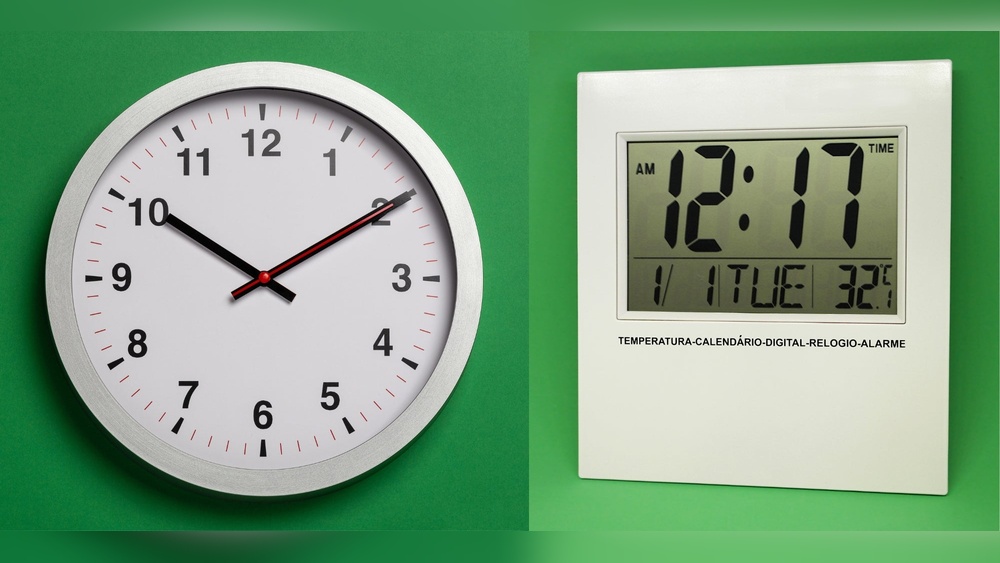
Analog clocks have been a part of daily life for centuries. They use moving hands to show time. The face of an analog clock usually has numbers from 1 to 12.

Understanding the basics of analog clocks helps to appreciate their design and function. These clocks are simple yet effective tools for telling time.

How Analog Clocks Work

Analog clocks use three hands: hour, minute, and sometimes second. The hour hand moves the slowest. The minute hand moves faster, completing one round in 60 minutes. The second hand moves quickly, making a full circle in 60 seconds. Inside, gears control the movement of these hands. A battery or a mechanical spring powers the clock.

Common Designs And Styles

Many analog clocks have round faces, but square and rectangular ones exist. Some clocks show all numbers, while others use dots or lines. The hands can be simple or decorative. Classic styles include wooden frames and Roman numerals. Modern designs often feature minimal faces and bright colors.

Advantages Of Analog Clocks

Analog clocks help improve time-reading skills. They show the passage of time visually. This makes it easier to understand concepts like quarter past or half past. They do not rely on digital displays, so they work during power outages. Analog clocks add charm and style to any room.

Digital Clock Features

Digital clocks have become common in homes, schools, and offices. They show the time with numbers, making it easy to read at a glance. These clocks often include extra features that add convenience to daily life. Understanding these features helps you choose the right clock for your needs.

How Digital Clocks Operate

Digital clocks use electronic circuits to keep time. A quartz crystal inside vibrates at a steady rate. The clock counts these vibrations to track seconds, minutes, and hours. The time is shown on an LED or LCD screen in numbers. This process keeps the display accurate and easy to read.

Popular Digital Clock Types

There are many types of digital clocks. Alarm clocks are common and help wake people up. Wall clocks with digital displays are easy to see from far away. Some digital clocks include radios or Bluetooth speakers. Smart clocks connect to Wi-Fi and show weather or reminders.

Benefits Of Digital Clocks

Digital clocks are simple to read, even from a distance. They often include alarms, timers, and backlights for nighttime use. Many models offer snooze buttons and multiple alarms. Digital clocks need less maintenance than analog ones. They keep accurate time and usually cost less.

Comparing Accuracy And Reliability

Choosing the right clock depends a lot on accuracy and reliability. Both analog and digital clocks offer different benefits in these areas. Understanding their strengths helps you pick the best option for your needs.

Timekeeping Precision

Digital clocks often keep time more precisely than analog ones. They use electronic signals that reduce errors. Analog clocks rely on mechanical parts, which can drift over time. This makes digital clocks better for exact timekeeping. Still, high-quality analog clocks can be quite accurate too.

Power Sources And Battery Life

Digital clocks usually need batteries or electricity to run. Battery life varies but often lasts several months. Analog clocks may use batteries or wind-up mechanisms. Wind-up clocks do not need batteries but require regular winding. Battery-powered analog clocks often last longer than digital ones.

Durability And Maintenance

Analog clocks tend to be more durable due to fewer electronic parts. Mechanical parts can wear out but are often easy to fix. Digital clocks have more delicate components that can fail. Maintenance for digital clocks mostly involves battery replacement. Analog clocks may need occasional cleaning and adjustments.

Analog Vs Digital Clock: Ultimate Guide to Choosing Right

Credit: www.premierclocks.com

User Experience And Readability

User experience and readability play a big role in choosing between analog and digital clocks. How easy it is to read the time affects daily use. Lighting and user needs also matter. Each type of clock offers different benefits for reading and viewing.

Ease Of Reading Time

Digital clocks show numbers directly. This makes reading the time quick and clear. No need to guess the position of hands. Analog clocks require interpreting the hands’ positions. Some people find this slower or confusing. Others enjoy the visual aspect of analog clocks. Learning to read analog clocks takes practice for some users.

Visibility In Different Lighting

Digital clocks often have backlights. This helps reading time in dark rooms. Some digital clocks use bright screens that work well in daylight. Analog clocks rely on contrast between hands and face. Good lighting is needed to see analog clocks clearly. Glow-in-the-dark hands or numbers improve visibility at night.

User Preferences And Accessibility

User habits influence clock choice. Older adults may prefer analog clocks for familiarity. Younger users often like digital clocks for speed. People with vision problems may find digital clocks easier to read. Analog clocks can be harder for those with low vision. Accessibility features like large digits or voice time help digital clock users.

Design And Aesthetics

Design and aesthetics play a big role in choosing between analog and digital clocks. The look of a clock can change a room’s feel. It can add charm, modernity, or a classic vibe.

Both types have unique designs that suit different tastes and spaces. Understanding these differences helps you pick a clock that fits your style perfectly.

Style Matching With Decor

Analog clocks often have a timeless, classic look. Their round faces and moving hands bring a warm, traditional feel. They work well in homes with vintage or rustic decor.

Digital clocks have a sleek, clean design. Their bright numbers and simple shapes fit modern and minimalist spaces. They blend well with contemporary furniture and gadgets.

Customization Options

Analog clocks come in many styles, from ornate to simple. You can find wood, metal, or plastic frames in various colors. Some have unique hands or numbers that add character.

Digital clocks often offer features like different display colors and brightness levels. Some let you change the time format or add alarms. These options help match your preferences easily.

Size And Portability

Analog clocks range from small bedside models to large wall pieces. Their size can make a strong style statement or fit discreetly in any spot. Many are lightweight and easy to move.

Digital clocks tend to be compact and light. They are perfect for desks, nightstands, or travel. Their size and shape make them highly portable and practical.

Additional Features And Functions

Clocks today do more than just show time. Both analog and digital clocks offer extra features that suit different needs. These features can make a clock more useful in daily life.

Alarm And Timer Capabilities

Digital clocks often include built-in alarms and timers. These can be set easily with buttons. Many allow multiple alarms for different times. Analog clocks may have alarms but usually only one. Timers are rare in analog models. Digital alarms are louder and more precise, helping you wake up on time.

Smart Features And Connectivity

Some digital clocks connect to Wi-Fi or Bluetooth. They sync time automatically and update for daylight savings. Smart clocks may show weather or news updates. You can control them with voice assistants. Analog clocks lack these smart functions. They focus on simple, classic timekeeping without technology.

Energy Efficiency

Analog clocks use less power and often run on one battery for months. Digital clocks use more energy because of displays and features. Some digital models have energy-saving modes. Solar-powered analog clocks save even more energy. Choosing the right clock depends on how much power you want to use.

Cost Considerations

Cost is a major factor when choosing between analog and digital clocks. Understanding the expenses helps you pick the best option for your budget.

Different types of clocks have different price points and upkeep needs. This section breaks down these costs.

Price Range Comparison

Analog clocks often start at lower prices. Simple models can cost very little. Designer or vintage analog clocks may be pricier. Digital clocks usually have a wider price range. Basic digital clocks are affordable. Advanced models with extra features cost more. Both types offer options for tight or flexible budgets.

Long-term Value

Analog clocks tend to last longer without upgrades. Their simple mechanism needs less power. Digital clocks may need battery or electricity replacements. Some digital models become outdated quickly. Analog clocks keep their charm and function for years. Digital clocks offer more functions but may not last as long.

Repair And Replacement Costs

Repairing analog clocks can be affordable if parts are available. Some vintage clocks might need expert care, which costs more. Digital clocks can be harder to fix. Their circuits and screens are often costly to replace. Sometimes replacing the whole digital clock is cheaper than repair. Consider these factors when thinking about long-term costs.
Analog Vs Digital Clock: Ultimate Guide to Choosing Right

Credit: www.premierclocks.com

Choosing The Right Clock For You

Choosing the right clock means picking one that fits your life and space well. A clock is more than just a timekeeper. It can add style, help with punctuality, and even boost focus. Understanding your needs and environment helps you choose wisely.

Assessing Your Needs

Think about how you use a clock daily. Do you prefer quick time checks or detailed readings? Some people like seeing the exact seconds. Others want a simple glance to know the hour. Consider your vision and how much detail you want.

Also, decide if you want a clock that makes noise. Some analog clocks tick, which can bother light sleepers. Digital clocks usually run silently. Your personal comfort matters a lot in this choice.

Matching Clock Type To Environment

Match the clock style to the room where it will hang. A kitchen might suit a digital clock for easy reading during cooking. A living room could benefit from an analog clock as a decorative piece. Offices often need clear, fast time checks, so digital clocks work well.

Consider lighting too. Digital clocks need power and light to display clearly. Analog clocks can be easier to see in dim light or without power. The environment shapes what type fits best.

Tips For Making The Final Decision

Test both types before buying. Notice which one feels natural to read. Check if the size fits your space. A large clock may suit a big wall but look odd in a small room.

Think about maintenance. Digital clocks may need battery changes or power sources. Analog clocks might need winding or battery changes less often. Choose the one that fits your lifestyle and routine.
Analog Vs Digital Clock: Ultimate Guide to Choosing Right

Credit: executivefunctioningsuccess.com

Frequently Asked Questions

What Is The Main Difference Between Analog And Digital Clocks?

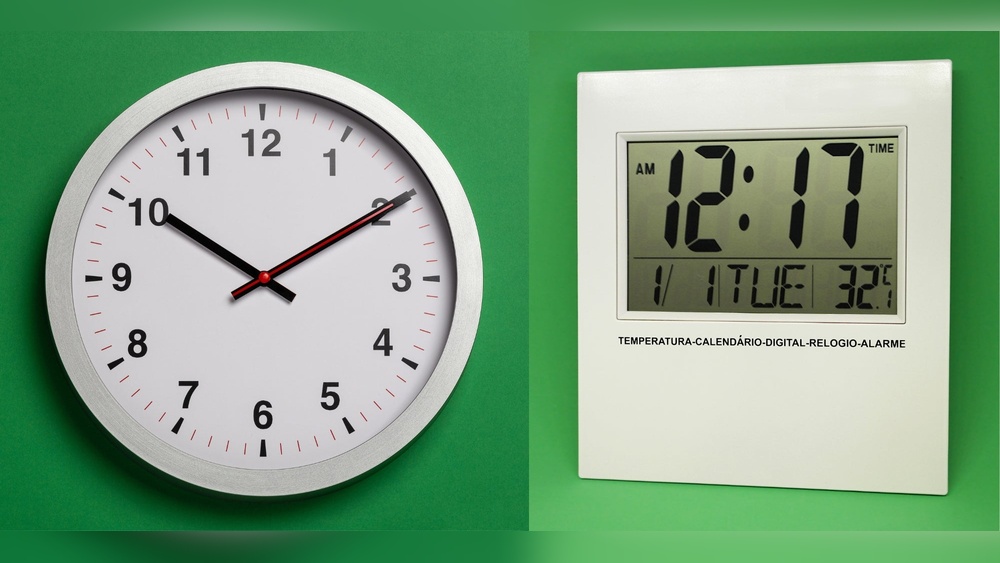
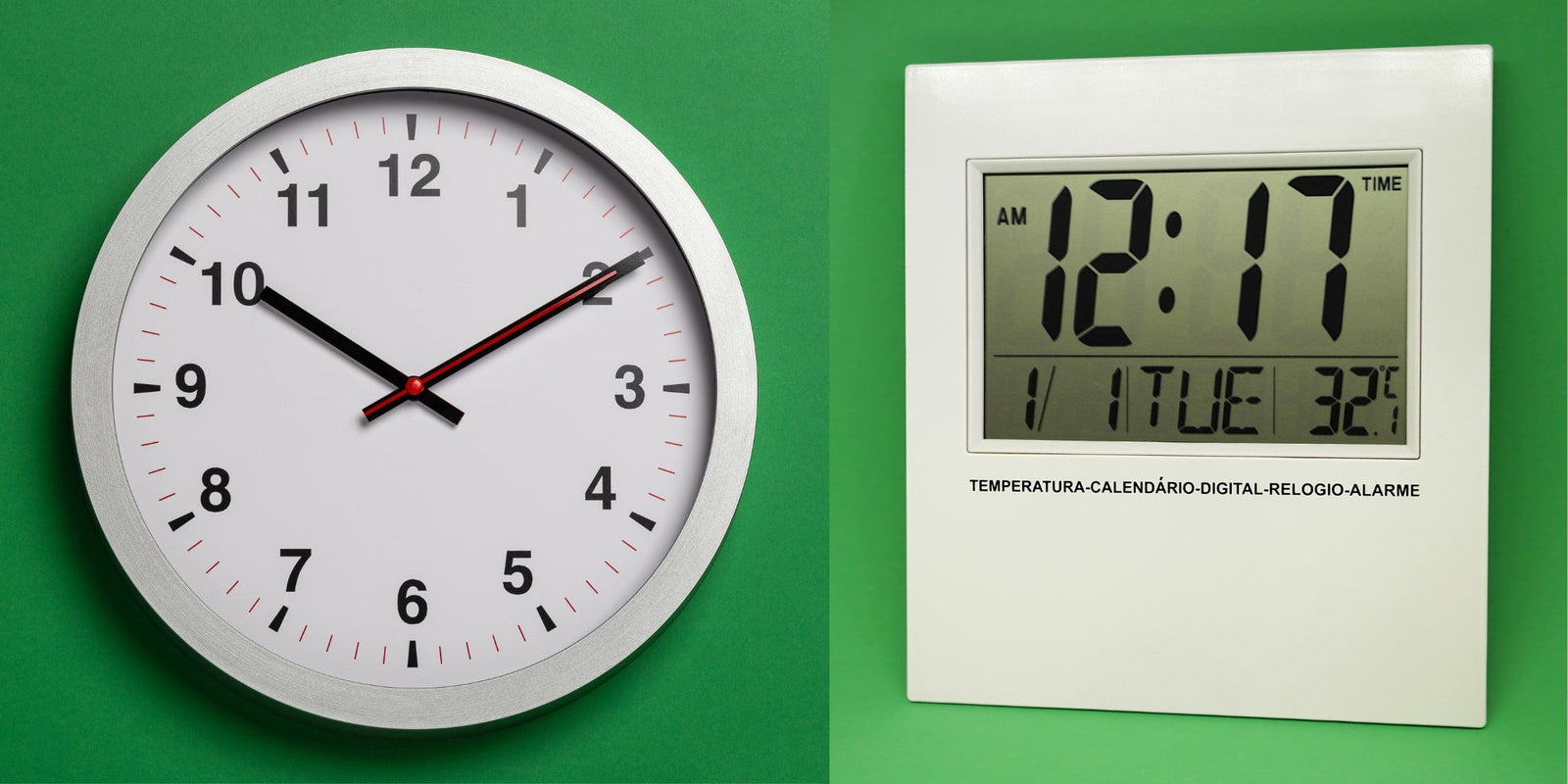
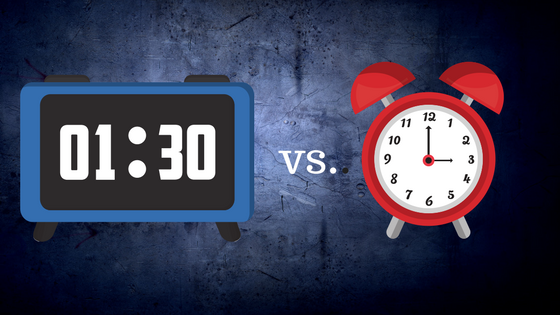
Analog clocks show time with hands on a dial. Digital clocks display time with numbers on a screen.

Which Clock Type Is Easier To Read For Kids?

Digital clocks are usually easier for kids to read because they show clear numbers. Analog clocks need learning to read the hands.

Do Analog Clocks Use More Power Than Digital Ones?

Analog clocks often use less power, especially if they are mechanical. Digital clocks usually need batteries or electricity.

Can Digital Clocks Show More Information Than Analog Clocks?

Yes, digital clocks can show date, temperature, and alarms. Analog clocks mainly show only the current time.

Which Clock Type Suits Modern Home Decor Better?

Digital clocks fit well in modern, minimalist spaces. Analog clocks offer a classic, traditional look that suits vintage styles.

Conclusion

Choosing between analog and digital clocks depends on your needs. Analog clocks show time with hands, which some find easier to read. Digital clocks display numbers and often include extra features. Both types serve their purpose well. Think about where and how you will use the clock.

Comfort and style matter too. Either way, you get a tool that helps you keep track of time every day. Simple, clear, and useful—choose what fits you best.
Hdmi Audio Vs Digital Optical: Ultimate Sound Showdown Explained

Hdmi Audio Vs Digital Optical

Are you confused about the difference between HDMI audio and digital optical connections? You’re not alone.

When setting up your home theater or sound system, choosing the right audio connection can feel overwhelming. But understanding how HDMI audio and digital optical work can make a huge difference in the sound quality you experience. You’ll discover which option suits your needs best and how to get the most out of your audio setup.

Keep reading, because the right choice could transform the way you enjoy movies, music, and games.

Hdmi Audio Basics

HDMI audio is a common way to send sound from one device to another. It carries audio and video signals through a single cable. This makes it simple and clean to connect devices like TVs, gaming consoles, and sound systems. Understanding how HDMI works helps you choose the right setup for your home entertainment.

Let’s explore the basics of HDMI audio and how it handles sound.

How Hdmi Transfers Sound

HDMI sends audio as digital data. This means the sound stays in its original form without losing quality. It uses high-speed signals to carry sound from the source to the output device. The cable supports multiple audio channels, allowing surround sound formats to work perfectly.

Supported Audio Formats

HDMI supports many audio formats. These include stereo sound, 5.1, and 7.1 surround sound. It also handles advanced formats like Dolby TrueHD and DTS-HD Master Audio. These formats offer clear and rich sound. The support for high-quality audio makes HDMI popular for home theaters.

Video And Audio Integration

One key benefit of HDMI is its ability to carry video and audio together. This removes the need for separate cables. It saves space and reduces cable clutter. The connection ensures audio and video stay in sync. This leads to a better viewing and listening experience.

Hdmi Audio Vs Digital Optical: Ultimate Sound Showdown Explained

Credit: www.amazon.com

Digital Optical Audio Basics

Digital optical audio is a popular method for transmitting sound. It uses light to carry audio signals. This method keeps sound clear and free from electrical noise. You often find optical audio in home theaters and soundbars. It connects devices like TVs, DVD players, and gaming consoles.

Understanding how digital optical audio works helps you choose the right audio connection. It also shows the type of sound quality you can expect.

How Optical Audio Works

Optical audio uses fiber optic cables. These cables carry light pulses representing audio data. The light travels through a thin glass or plastic fiber. A laser or LED sends the light signal. At the receiving end, a sensor converts light back to electrical audio signals.

This process reduces interference from other electronic devices. It ensures the sound stays clean and clear over longer distances.

Common Audio Formats

Optical audio supports many popular formats. It handles stereo sound and surround sound systems. Formats like Dolby Digital and DTS are common. These deliver multi-channel audio for a richer experience. The cable carries compressed audio to keep data size low. It suits most home audio setups and gaming systems.

Limitations And Strengths

Optical audio has clear strengths. It avoids electrical interference and signal loss. It works well for long cable runs. The cable is thin and flexible. Still, it has limits. It does not support high-definition audio formats like Dolby TrueHD. It also can’t carry video signals. For these, HDMI might be better. Optical audio remains a reliable and simple choice for good sound.

Audio Quality Comparison

Audio quality matters a lot when choosing between HDMI audio and digital optical cables. Both carry sound signals but differ in how they deliver sound. Understanding these differences helps pick the right cable for your setup. This section compares their sound quality in clear points.

Sound Fidelity And Clarity

HDMI supports uncompressed audio formats, keeping sound pure and clear. It can carry high-resolution audio like Dolby TrueHD and DTS-HD Master Audio. Digital optical cables send compressed audio, which may lose some details. The result is slightly less clear sound than HDMI. For critical listening, HDMI often provides better fidelity.

Channel Support And Surround Sound

HDMI handles multiple audio channels easily, supporting up to 8 channels or more. It works well with modern surround sound systems like 7.1 or Atmos. Optical cables usually support up to 5.1 channels but cannot handle newer formats. This limits the richness of sound in a home theater. HDMI is a better choice for full surround sound experience.

Latency And Signal Interference

HDMI cables tend to have lower latency, making audio sync smoother with video. Digital optical cables use light signals, which resist electrical interference well. This reduces noise but may introduce slight delays. Both cables offer good performance, but HDMI usually has an edge for fast, clear audio transmission without delay.

Hdmi Audio Vs Digital Optical: Ultimate Sound Showdown Explained

Credit: www.amazon.com

Compatibility And Setup

Understanding compatibility and setup helps you choose the right audio connection. Both HDMI and digital optical cables carry audio signals but work differently. Knowing device support, cable length, and installation ease makes setup smoother.

Device Support For Hdmi And Optical

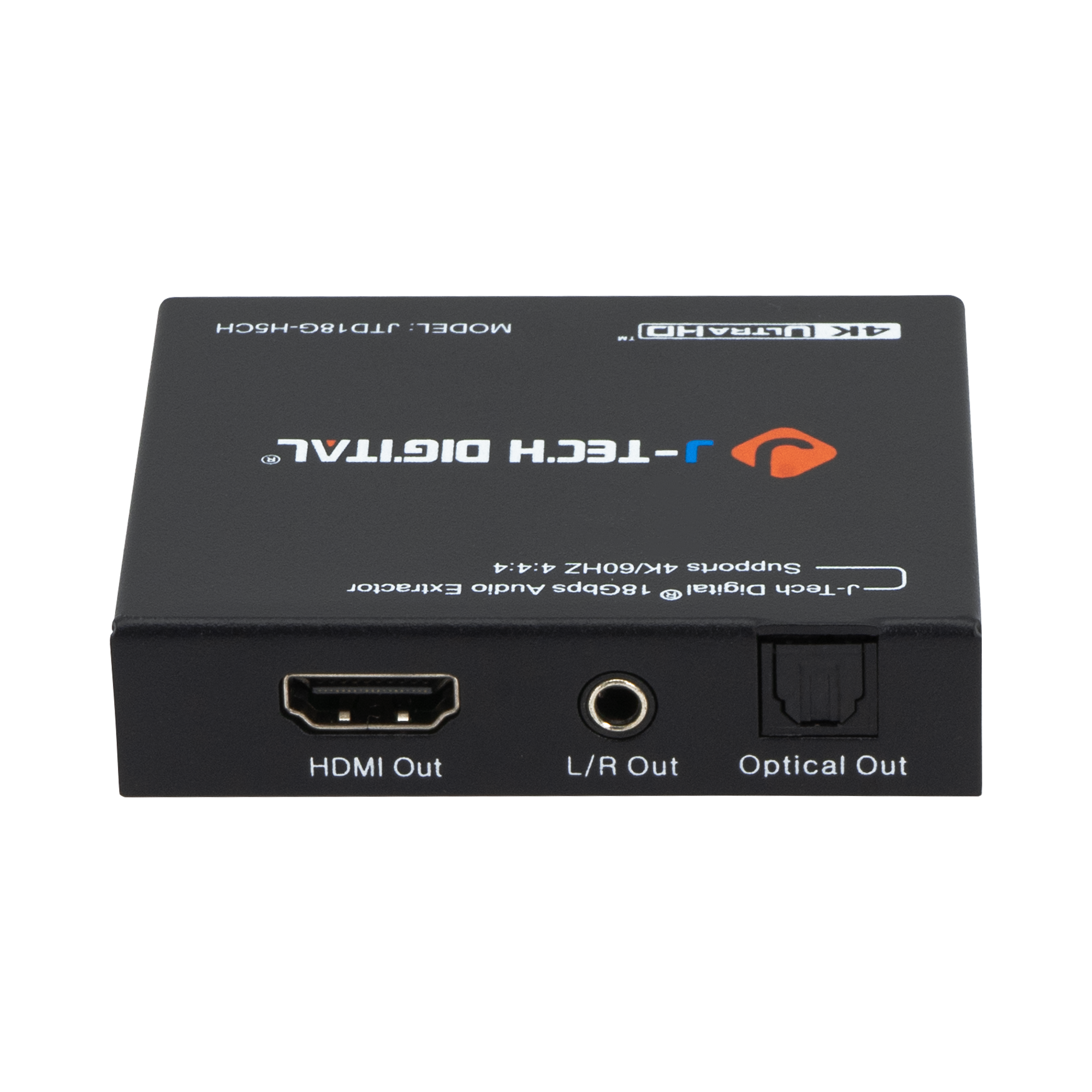
Most modern TVs, soundbars, and gaming consoles support HDMI. HDMI carries both audio and video signals in one cable. Digital optical ports appear on older devices and some newer ones. Optical only sends audio, so video needs a separate cable. Check your device ports before buying cables.

Cable Length And Durability

HDMI cables usually work well up to 50 feet. Longer cables may lose signal quality. Optical cables can run longer, sometimes over 100 feet, without signal loss. Optical cables use plastic or glass fibers inside, making them fragile. HDMI cables are thicker and more durable for daily use.

Ease Of Installation

HDMI cables plug in easily with a simple rectangular connector. One cable handles audio and video, reducing clutter. Optical cables have a small, square connector that fits only one way. They need careful handling to avoid damaging the fiber inside. Both cables are simple to connect but HDMI is more user-friendly.

Use Cases For Each Connection

Choosing between HDMI audio and digital optical depends on the devices you use. Each connection type fits different setups and needs. Understanding where each excels helps you pick the best option for your system. Let’s explore common use cases for both connections.

Home Theater Systems

HDMI is often best for home theaters. It carries both audio and video signals together. This means fewer cables and easier setup. HDMI supports high-quality sound formats like Dolby TrueHD and DTS-HD Master Audio. These formats enhance surround sound experience. Digital optical works well too but has limits. It does not support the latest high-definition audio formats. Optical is good for older systems without HDMI inputs.

Gaming Consoles And Pcs

HDMI is the preferred choice for gaming consoles and PCs. It delivers both clear video and audio through one cable. This reduces clutter around your setup. HDMI supports 5.1 and 7.1 surround sound for immersive gaming. Optical audio can still work for sound only. It may be used if your device has no HDMI audio output. But optical can limit audio quality in fast-paced games.

Streaming Devices And Tvs

Streaming devices and modern TVs usually support HDMI audio. It allows direct connection for both sound and picture. This makes streaming simple and clean. Digital optical is useful for TVs with limited HDMI ports. It sends good quality audio to soundbars or receivers. Optical is also handy for older streaming devices without HDMI audio output.

Cost And Availability

Choosing between HDMI audio and digital optical depends on cost and availability. These factors affect your budget and setup options. Understanding prices and equipment needs helps you pick the right connection. Also, thinking about future upgrades saves money later.

Cable Prices And Options

HDMI cables usually cost more than digital optical ones. Basic HDMI cables start around $5 to $10. Optical cables often cost less, starting near $3. Both types come in various lengths and qualities. You can find affordable options in most electronics stores. Quality matters for longer cables to avoid signal loss.

Equipment Requirements

HDMI needs devices with HDMI ports. Most TVs, soundbars, and receivers have them today. Optical cables require TOSLINK ports. These appear on many older audio devices and some new ones. Some devices have both, making switching easy. Check your gear before buying cables.

Future-proofing Your Setup

HDMI supports higher audio formats and video signals. This makes it better for future devices. Optical cables focus on audio only and do not carry video. If you plan to upgrade your system, HDMI offers more flexibility. Optical may suit simple audio setups well.

Hdmi Audio Vs Digital Optical: Ultimate Sound Showdown Explained

Credit: www.jtechdigital.com

Frequently Asked Questions

What Are The Main Differences Between Hdmi Audio And Digital Optical?

HDMI carries both audio and video signals, while digital optical only carries audio. HDMI supports higher audio quality and more channels. Optical is simpler but limited to audio only.

Can Digital Optical Support Surround Sound Like Hdmi?

Yes, digital optical supports surround sound but only up to 5. 1 channels. HDMI can handle more channels and better formats like Dolby Atmos. Optical is good for basic surround sound needs.

Which Is Better For Gaming: Hdmi Audio Or Digital Optical?

HDMI is better for gaming because it carries both sound and video. It also supports high-quality audio and low delay. Optical works but may miss some advanced sound features.

Is Digital Optical Compatible With All Sound Systems?

Most modern sound systems have digital optical inputs. It works well with older and some budget devices. HDMI is more common on newer, high-end systems.

Does Hdmi Audio Provide Better Sound Quality Than Digital Optical?

HDMI can deliver better sound quality with support for high-definition audio formats. Optical audio is limited to standard formats like Dolby Digital. For rich, clear sound, HDMI is preferred.

Conclusion

Choosing between HDMI audio and digital optical depends on your needs. HDMI carries both sound and video in one cable. Digital optical sends only sound but has less interference. HDMI supports more advanced sound formats. Optical works well with older devices.

Both options provide clear audio quality. Think about your setup and device compatibility. Either way, you get great sound for movies and music. Simple and effective.

Digital Marketing Vs Social Media Marketing: Key Differences Revealed

Digital Marketing Vs Social Media Marketing

Are you wondering how to boost your business and reach more customers online? You’ve probably heard about digital marketing and social media marketing, but do you know the real difference between the two?

Understanding these can change the way you promote your brand and spend your budget. This article will clear up the confusion and help you decide which strategy fits your goals best. Keep reading to discover what works for you and how to get the most out of your marketing efforts.

Digital Marketing Vs Social Media Marketing: Key Differences Revealed

Credit: peppermintcreate.com

Scope Of Digital Marketing

Digital marketing covers a wide range of activities beyond social media. It uses many channels to reach customers online. This broad scope allows businesses to connect with different audiences in various ways.

Understanding these channels helps clarify how digital marketing differs from just social media marketing. The wide reach and flexibility make digital marketing a powerful tool for businesses.

Channels Beyond Social Media

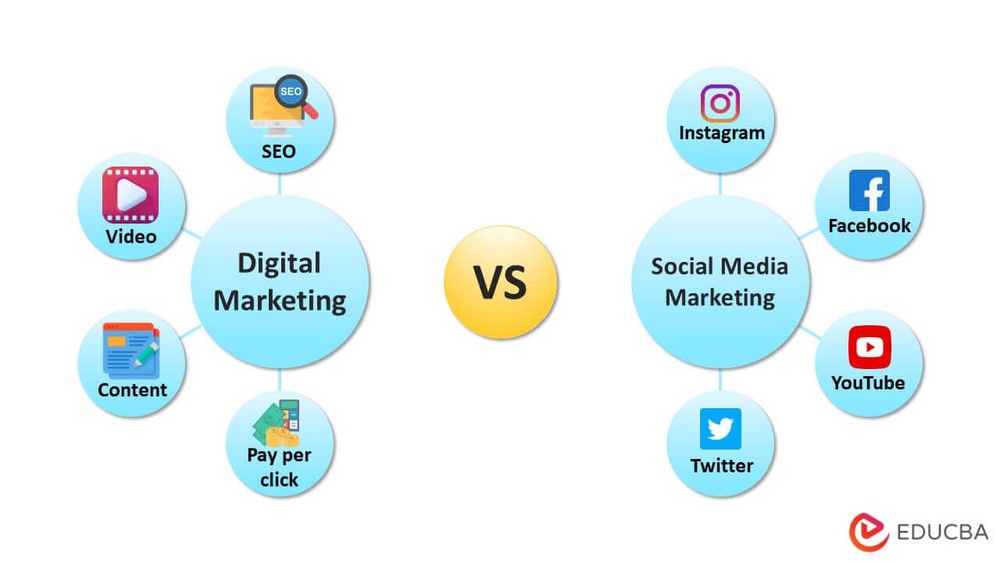
Digital marketing includes search engines, email, websites, and online ads. Search engine optimization (SEO) helps websites rank higher on Google. Email marketing sends messages directly to customers’ inboxes. Pay-per-click ads appear on search results or websites. Content marketing shares useful articles, videos, or blogs. These channels work together to attract and engage customers.

Integration With Traditional Marketing

Digital marketing often connects with traditional marketing methods. TV, radio, and print ads can support online campaigns. Using both online and offline channels builds stronger brand awareness. This mix helps reach people who prefer different types of media. Combining digital and traditional marketing creates a balanced approach.

Focus Areas Of Social Media Marketing

Social media marketing focuses on connecting with audiences through online platforms. It targets specific groups to build relationships and promote brands. Understanding key areas helps businesses use social media effectively.

Popular Social Platforms

Social media marketing uses platforms where people spend time daily. Facebook remains a top choice for wide reach and diverse audiences. Instagram attracts younger users with visual content like photos and videos. Twitter works well for quick updates and real-time conversations. LinkedIn targets professionals, ideal for business networking and B2B marketing. TikTok grows fast with short, creative videos that engage younger users. Choosing the right platform depends on where the audience is active.

Content Types And Engagement

Content drives social media success. Posts include images, videos, text, and stories. Videos capture attention quickly and often get more shares. Images create instant interest and help messages stand out. Stories offer short, temporary content that feels personal and urgent. Engagement happens through likes, comments, and shares. Responding to comments builds trust and encourages more interaction. Polls and questions invite users to join conversations. Good content keeps followers interested and loyal.

Target Audience And Reach

Understanding the target audience and reach is key in digital marketing and social media marketing. Both strategies aim to connect with people but use different methods. Knowing the difference helps businesses spend their budget wisely and get better results.

Broad Vs. Niche Targeting

Digital marketing often targets a broad audience using search engines, websites, and emails. It casts a wide net to attract many potential customers. Social media marketing usually focuses on niche groups with specific interests or demographics. Platforms like Facebook and Instagram allow precise targeting by age, location, and hobbies. This helps brands reach people who are more likely to be interested in their products.

Organic And Paid Strategies

Both digital and social media marketing use organic and paid methods. Organic strategies include content creation and search engine optimization. These methods build trust over time without direct costs. Paid strategies involve ads and sponsored posts. Digital marketing ads appear on search results and websites. Social media ads show up in users’ feeds and stories. Paid ads offer quick reach and precise targeting, while organic methods take longer but create lasting engagement.

Digital Marketing Vs Social Media Marketing: Key Differences Revealed

Credit: www.springboard.com

Tools And Techniques

Tools and techniques are essential in both digital marketing and social media marketing. They help businesses reach the right audience and measure success. These tools make tasks easier and more efficient. Each marketing approach uses specific tools to achieve its goals.

Analytics And Metrics

Analytics track user behavior and campaign performance. Digital marketing tools analyze website traffic, conversion rates, and user engagement. Social media marketing focuses on likes, shares, comments, and follower growth. Both types of analytics help marketers understand what works and what needs improvement. Data guides future marketing strategies and budget allocation.

Automation And Scheduling

Automation tools save time by handling repetitive tasks. Digital marketing uses email automation and customer relationship management (CRM) systems. Social media marketing relies on scheduling tools to plan posts ahead. These tools ensure consistent communication with the audience. Automation also improves efficiency and reduces human errors.

Budget Considerations

Budget plays a big role in choosing between digital marketing and social media marketing. Knowing the costs helps businesses plan better. It also allows them to use funds wisely for the best results.

Understanding how much each option costs is key. A clear idea of expenses helps avoid surprises. Budget limits often decide which marketing method suits a business.

Cost Variations

Digital marketing costs vary widely. It includes many channels like email, SEO, and pay-per-click ads. Each channel has its own price range.

Social media marketing usually costs less upfront. It focuses on platforms like Facebook, Instagram, or Twitter. Spending depends on ad type and audience size.

Small businesses may find social media marketing cheaper to start. Digital marketing can require larger budgets for full campaigns. Costs also change based on goals and tools used.

Return On Investment

Return on investment (ROI) measures how much profit comes from marketing spend. Digital marketing often shows clear ROI through tracking tools. Businesses can see which campaigns work best.

Social media marketing ROI can be harder to measure. Engagement and brand awareness may grow without immediate sales. Still, it builds customer trust over time.

Both methods can deliver strong ROI. Success depends on strategy, budget, and consistent effort. Wise spending leads to better returns in either case.

Campaign Goals And Objectives

Campaign goals and objectives guide every marketing effort. They define what a business wants to achieve. Digital marketing and social media marketing share some goals but differ in focus and approach. Understanding these differences helps choose the right strategy.

Brand Awareness

Brand awareness means making people recognize a brand. Digital marketing uses many channels like websites, email, and ads. It reaches a broad audience across the internet.

Social media marketing focuses on building brand presence on platforms like Facebook and Instagram. It engages users with posts, stories, and comments. This creates a more personal connection.

Lead Generation And Sales

Lead generation is about attracting potential customers. Digital marketing uses targeted ads, SEO, and email campaigns to collect leads. It tracks data to find the best prospects.

Social media marketing also generates leads through interactive content and direct messages. It can drive quick sales by promoting offers to active users. Both methods support sales but use different tools.

Challenges And Limitations

Digital marketing and social media marketing face various challenges. These hurdles can limit success and affect results. Understanding these issues helps businesses adapt and improve strategies.

Algorithm Changes

Algorithms control what content users see online. Platforms like Google and Facebook often change these rules. Marketers must constantly adjust their tactics. These changes can reduce visibility and reach. It becomes harder to keep audiences engaged. Staying updated with algorithm shifts is a constant task.

Audience Saturation

Many brands compete for attention on the same platforms. This leads to audience saturation. Users see too many ads and posts daily. It makes standing out difficult for marketers. Audiences may ignore or block repetitive content. Marketers need fresh ideas to stay noticed. Overcoming saturation requires creativity and persistence.

Future Trends

The future of digital marketing and social media marketing will change quickly. New tools and habits will shape how brands reach people. Staying updated will help marketers stay effective and relevant.

Emerging Technologies

Artificial intelligence will play a bigger role in marketing. It helps create personalized ads and content fast. Virtual reality and augmented reality will offer new ways to engage customers. Chatbots will improve customer service on social media. Voice search will change how people find information online. Marketers must learn to use these tools well.

Evolving Consumer Behavior

People want more authentic and honest brand messages. They prefer short, clear, and visual content. Mobile use will keep growing, so marketing must be mobile-friendly. Privacy concerns will make consumers cautious about their data. Social media users expect quick responses from brands. Trust and transparency will become key to winning customers.

Digital Marketing Vs Social Media Marketing: Key Differences Revealed

Credit: www.reliablesoft.net

Frequently Asked Questions

What Is The Main Difference Between Digital Marketing And Social Media Marketing?

Digital marketing covers all online marketing channels. Social media marketing focuses only on social platforms like Facebook or Instagram.

Can Social Media Marketing Work Without Digital Marketing?

Social media marketing can work alone but digital marketing helps reach more people. They often work best together.

Which Is Better For Small Businesses: Digital Or Social Media Marketing?

Social media marketing is often cheaper and easier for small businesses. Digital marketing offers a wider reach but may cost more.

How Do Digital Marketing And Social Media Marketing Measure Success?

Digital marketing tracks website visits, clicks, and sales. Social media marketing focuses on likes, shares, comments, and followers.

Does Social Media Marketing Include Paid Advertising?

Yes, social media marketing uses paid ads on platforms. Digital marketing also includes paid ads on search engines and websites.

Conclusion

Digital marketing covers many online methods to reach customers. Social media marketing focuses on platforms like Facebook and Instagram. Both help businesses grow but serve different purposes. Choosing the right one depends on your goals and audience. Use digital marketing for broad reach and data tracking.

Use social media marketing to build relationships and engage users. Combining both can create a strong online presence. Think about what fits your business best. Start small, test, and learn as you go. Success comes from using tools that work for you.

Digital Vs Disc PS5: Ultimate Comparison for Gamers 2026

Digital Vs Disc Ps5

Are you torn between choosing the Digital or Disc version of the PS5? This decision can shape your entire gaming experience, from how you buy games to how you enjoy them at home.

Understanding the key differences can save you money, hassle, and frustration. You’ll discover what sets these two versions apart and which one fits your lifestyle best. Keep reading to make the smartest choice for your gaming setup.

Digital Vs Disc PS5: Ultimate Comparison for Gamers 2026

Credit: lifehacker.com

Design And Build

The design and build of the PS5 play a big role in choosing between the Digital and Disc editions. Both models share a similar look but have some important differences. These differences affect their size, weight, and ports. Understanding these can help you decide which PS5 fits your needs better.

Size And Weight Differences

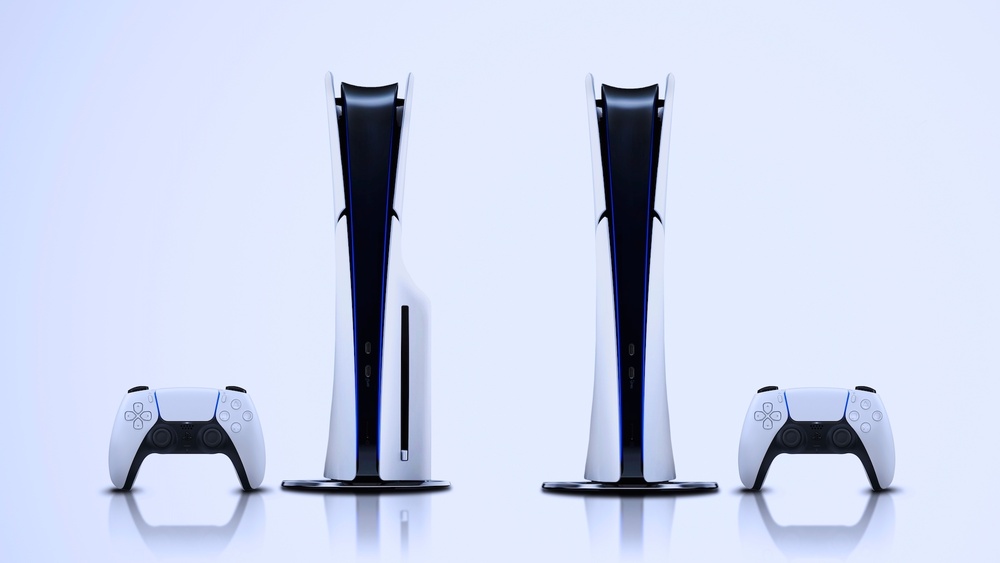
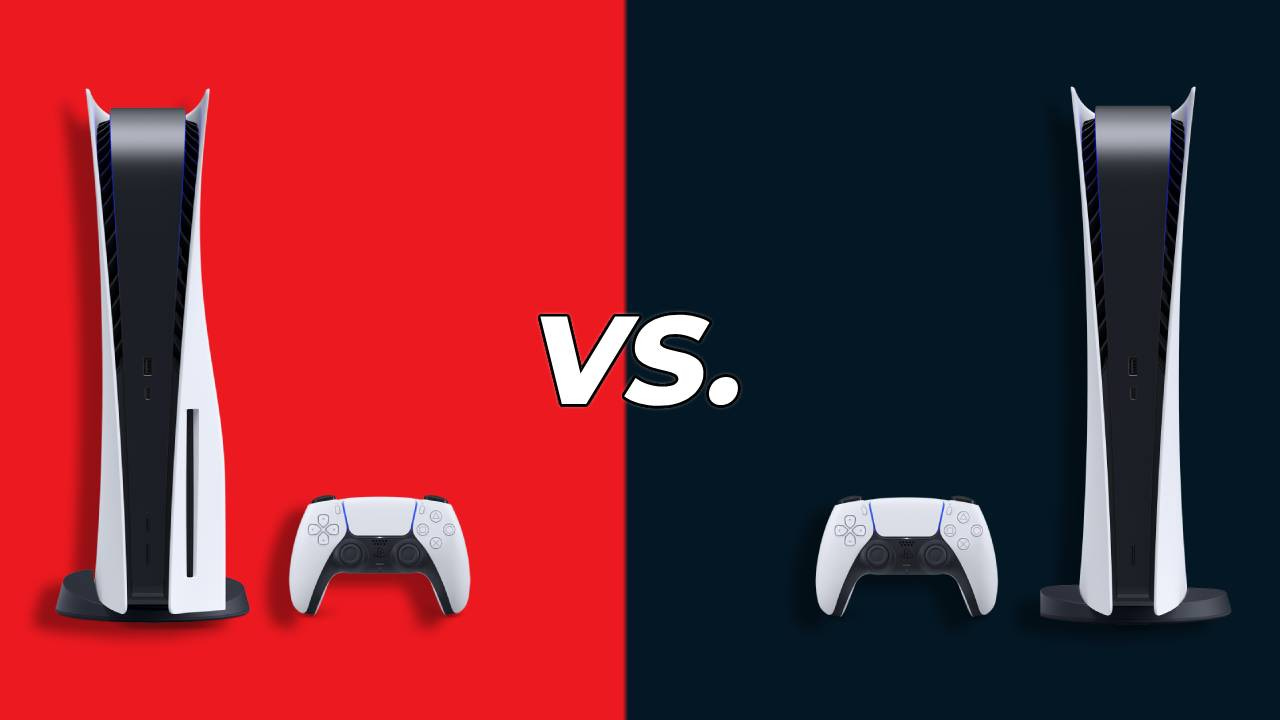
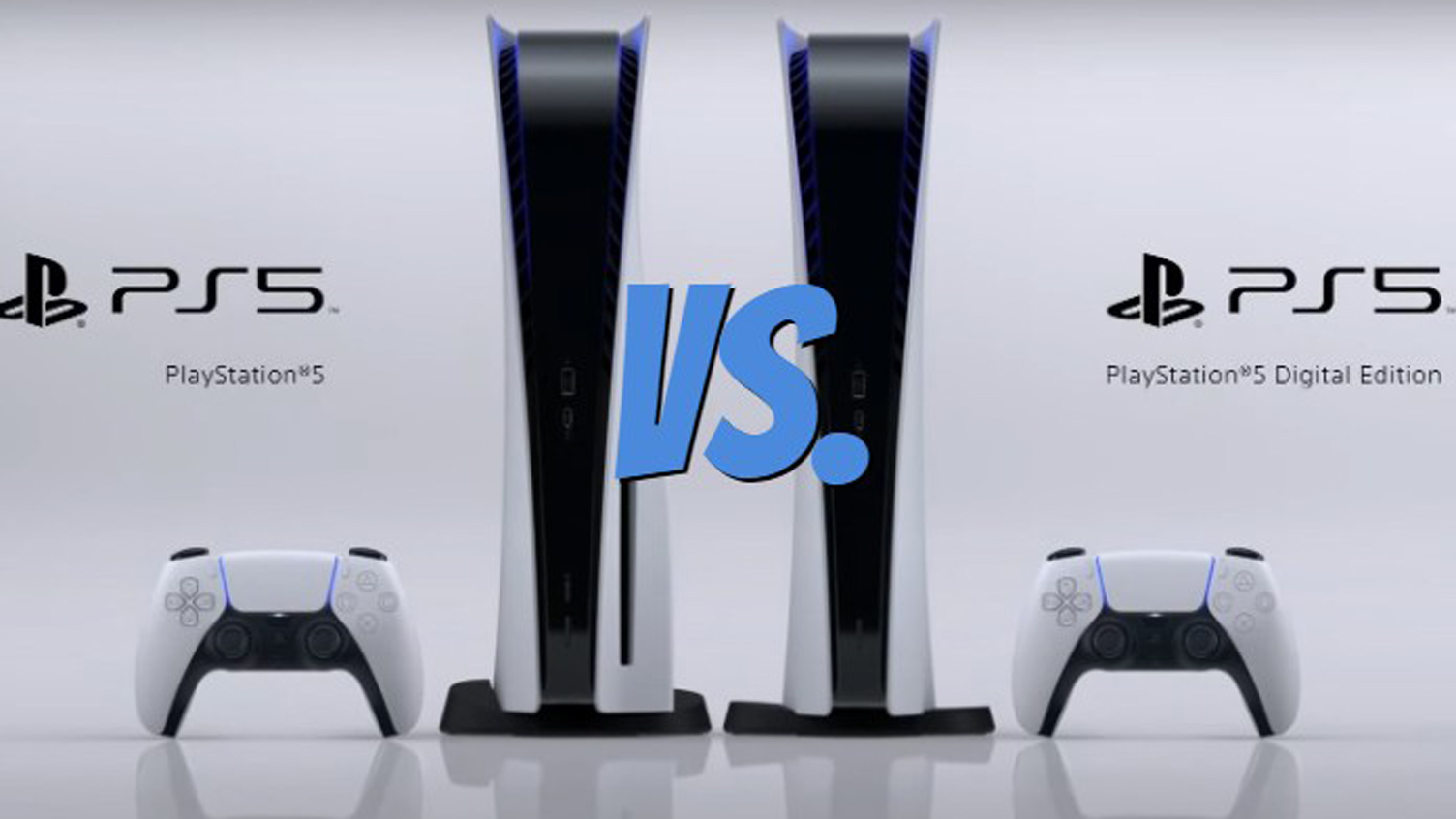
The Disc PS5 is larger and heavier than the Digital edition. This is because it has a built-in disc drive. The Digital PS5 is slimmer and lighter, making it easier to place in tight spaces. The size difference might affect where you keep the console in your room.

Aesthetic Variations

The Digital PS5 has a smooth, clean look without the disc slot. The Disc PS5 has a visible disc drive on one side. Both have the same white and black color scheme with blue LED lights. The difference is subtle but noticeable once you compare them side by side.

Port And Connectivity Options

Both models offer similar ports, including USB and HDMI connections. The Disc PS5 has an extra slot for the disc drive. Both support Wi-Fi and Bluetooth for wireless devices. The Digital edition lacks a disc drive but includes all the same ports for controllers and accessories.

Performance And Hardware

The performance and hardware of the PS5 Digital and Disc editions are very similar. Both versions offer powerful features that deliver smooth gaming experiences. This section explores the key hardware differences and similarities between the two models.

Processor And Gpu Specs

Both PS5 versions use the same processor and graphics unit. The CPU is a custom AMD Ryzen Zen 2 with eight cores. It runs at 3.5 GHz, providing fast and efficient processing. The GPU is based on AMD’s RDNA 2 architecture. It offers 10.28 teraflops of power. This setup supports ray tracing and high frame rates. Players get crisp visuals and smooth gameplay in both editions.

Storage Capacity And Expansion

Each PS5 comes with an 825 GB custom SSD. This storage allows quick loading times and fast data transfer. The Digital Edition has no disc drive, so all games must install digitally. The Disc Edition supports physical discs and digital downloads. Both models support M.2 SSD expansion. This lets players add more storage space for games and apps. Storage options are flexible to fit different needs.

Cooling Systems And Noise Levels

The cooling systems in both PS5 versions are nearly identical. Each uses a large fan and a heat sink to keep temperatures low. This setup ensures the console runs quietly under normal use. Noise levels remain minimal during gameplay. The cooling design prevents overheating and maintains performance. Gamers can enjoy long sessions without distraction from loud fans.

Game Library And Compatibility

The game library and compatibility are key parts of choosing between the Digital and Disc PS5. This affects what games you can play and how you access them. Each version offers different options for owning and playing games. Understanding these differences helps you pick the right PS5 for your needs.

Physical Vs Digital Game Access

The Disc PS5 lets you buy physical game discs from stores. You can trade, lend, or sell these discs later. The Digital PS5 only supports games bought online from the PlayStation Store. It does not have a disc drive. Digital games download directly to your console. This means no physical discs to handle or store.

Backward Compatibility

Both PS5 versions support many PS4 games. You can play most PS4 discs on the Disc PS5. The Digital PS5 can play PS4 games downloaded from your library. Some older PS3 or PS2 games may work through digital downloads or remasters. Check game support before buying older titles.

Exclusive Titles Availability

Exclusive games are available on both PS5 versions. These titles come from Sony’s studios and cannot be played elsewhere. The Disc PS5 has no advantage for exclusives. Digital and physical versions of these games are sold. Your choice does not limit access to exclusive PS5 games.

Digital Vs Disc PS5: Ultimate Comparison for Gamers 2026

Credit: www.theshortcut.com

User Experience

The user experience on the PS5 varies slightly between the Digital Edition and the Disc Edition. Both consoles offer powerful performance and smooth gameplay. Yet, the way players interact with games and features can feel different. This section explores the key differences in user experience.

Loading Times And Game Installation

Both PS5 versions load games quickly thanks to the fast SSD. The Digital PS5 downloads and installs games directly from the PlayStation Store. This process takes time depending on internet speed. The Disc PS5 requires inserting the game disc. It installs part of the game to the SSD but needs the disc to play. Loading times during gameplay are nearly the same on both models.

Interface And Features

The user interface is identical on both PS5 versions. Players navigate menus smoothly with the same layout and options. The Digital PS5 has no disc drive, so the interface does not show disc-related options. Both consoles support features like 3D audio, ray tracing, and the Control Center. Users can enjoy seamless updates and access to digital libraries on both models.

Controller Differences

The PS5 DualSense controller is the same for both versions. It offers haptic feedback and adaptive triggers. This adds a tactile feel to gameplay. There is no difference in controller performance or design between the Digital and Disc PS5. Players can use any DualSense controller on either console without issues.

Cost And Value

Choosing between the Digital and Disc PS5 models often comes down to cost and value. Understanding the price differences helps buyers make a smart choice. Both models offer great gaming experiences but vary in how much you pay upfront and over time.

Initial Purchase Price

The Digital PS5 costs less at the start. It has no disc drive, which lowers production costs. The Disc PS5 is more expensive because it includes a Blu-ray drive. This price gap makes the Digital version attractive for budget-conscious buyers. Still, the Disc model offers more flexibility with physical games.

Long-term Savings And Expenses

The Digital PS5 saves money by avoiding physical game purchases. Digital games often have sales and discounts. The Disc PS5 allows buying used or discounted physical copies, which can be cheaper. Both models may require spending on extra storage. Consider how often you buy new games to estimate long-term costs.

Resale And Trade-in Options

The Disc PS5 has an advantage in resale value. Physical copies can be sold or traded in for cash or credit. The Digital PS5 relies only on digital licenses, which cannot be resold. This limits options for recovering some purchase cost. Selling the Disc PS5 itself is similar to the Digital version, but game resale adds extra value.

Connectivity And Online Services

The PlayStation 5 offers strong connectivity and online services. Both Digital and Disc versions connect to the internet for a smooth gaming experience. These features affect how players access games, multiplayer modes, and online content.

Playstation Network Integration

Both PS5 models link to the PlayStation Network (PSN). PSN allows players to access friends, messages, and trophies. It also supports cloud saves, which helps keep game progress safe. This integration is key for social and gaming features.

Digital Storefront And Downloads

The Digital PS5 relies fully on the PlayStation Store for games. Players download all titles directly to the console. The Disc PS5 can also download games but uses physical discs too. Download speed depends on the internet connection for both models.

Multiplayer And Subscription Services

Online multiplayer requires a PS Plus subscription on both PS5 versions. PS Plus offers free monthly games and exclusive discounts. Both models access streaming services like Netflix and Spotify. Subscription services work equally well on Digital and Disc PS5s.

Future-proofing And Upgrades

Choosing between the Digital and Disc PS5 models involves thinking about future-proofing and upgrades. Both versions offer strong performance now, but how they handle updates and new games matters for the long term. Understanding software support, hardware life, and game compatibility helps make a better decision.

Software Updates And Support

Sony provides regular software updates for both PS5 models. These updates improve system stability and add new features. The updates are the same for Digital and Disc versions. Both receive security patches and performance improvements simultaneously. This means users get the latest software benefits regardless of the model chosen.

Hardware Longevity

Hardware inside both PS5 versions is nearly identical. The main difference is the disc drive in the Disc model. This extra part may face wear over time. The Digital model has fewer moving parts, which may reduce hardware issues. Both consoles come with built-in cooling and robust components to extend lifespan. Proper care can help either model last many years.

Compatibility With Upcoming Titles

Both PS5 models run all new PS5 games. Most new titles also support backward compatibility with PS4 games. However, physical disc games require the Disc version. Digital only users must buy games from the PlayStation Store. Some collectors or gamers who prefer physical copies might choose the Disc model. Otherwise, both consoles support the full library of new and upcoming games.

Digital Vs Disc PS5: Ultimate Comparison for Gamers 2026

Credit: www.laptopmag.com

Which Model Fits Your Gaming Style

Choosing between the Digital and Disc PS5 models depends on how you play games. Each version offers unique benefits for different gaming styles. Understanding your habits helps you pick the right fit.

Think about how often you play, what types of games you prefer, and how you like to own your games. These points guide your choice.

Casual Vs Hardcore Gaming

Casual gamers play less often and enjoy easy access to games. The Digital PS5 works well here, offering quick downloads and no need for discs. It saves time and space.

Hardcore gamers prefer a wide game collection and physical copies. The Disc PS5 suits them, allowing use of used games and sharing discs. It supports a large library.

Physical Collectors Vs Digital Enthusiasts

Collectors value game cases and physical artwork. They like to build shelves of games. The Disc PS5 lets them keep and show off these items.

Digital enthusiasts want convenience and instant access. They buy games online and avoid clutter. The Digital PS5 fits this lifestyle perfectly.

Space And Setup Considerations

The Digital PS5 is slightly slimmer and lighter. It fits well in smaller spaces and simple setups.

The Disc PS5 needs more room due to its drive. It works best with larger entertainment centers.

Think about your room size and setup before choosing a model.

Frequently Asked Questions

What Are The Main Differences Between Digital And Disc Ps5?

Digital PS5 only plays downloaded games, while Disc PS5 uses physical discs. Disc version can play used or borrowed games; Digital cannot.

Which Ps5 Version Is Better For Game Collection?

Disc PS5 allows collecting physical games and sharing with friends. Digital PS5 saves space but needs internet to download games.

Can Digital Ps5 Play Games Offline?

Yes, but only after games are fully downloaded and activated. Some features may need internet, but most single-player games work offline.

Is The Digital Ps5 Cheaper Than The Disc Version?

Digital PS5 has a lower upfront price but no disc drive. Game prices may be higher online, which could add up over time.

How Do Game Updates Work On Digital Vs Disc Ps5?

Both versions require internet to download updates and patches. Updates install automatically when connected to the internet on either PS5.

Conclusion

Choosing between Digital and Disc PS5 depends on your needs. The Digital PS5 offers a sleek design and easy access to games online. The Disc PS5 lets you play physical games and share discs with friends. Both versions deliver great performance and amazing graphics.

Think about your budget, game preferences, and internet speed. Each option has its own benefits. Make a choice that fits your gaming style and enjoy the PlayStation experience. Simple, clear, and ready to play.

Computed Radiography Vs Digital Radiography: Key Differences Explained

Computed Radiography Vs Digital Radiography

Are you confused about the difference between Computed Radiography and Digital Radiography? You’re not alone.

Choosing the right imaging method can feel overwhelming, especially when both sound so similar. But understanding how each works can make a big difference for your health, your time, and even your wallet. This article will clear up the confusion and help you know exactly what to expect from each option.

Keep reading—you’ll discover key facts that could change how you view medical imaging forever.

Computed Radiography Vs Digital Radiography: Key Differences Explained

Credit: www.youtube.com

Basics Of Computed Radiography

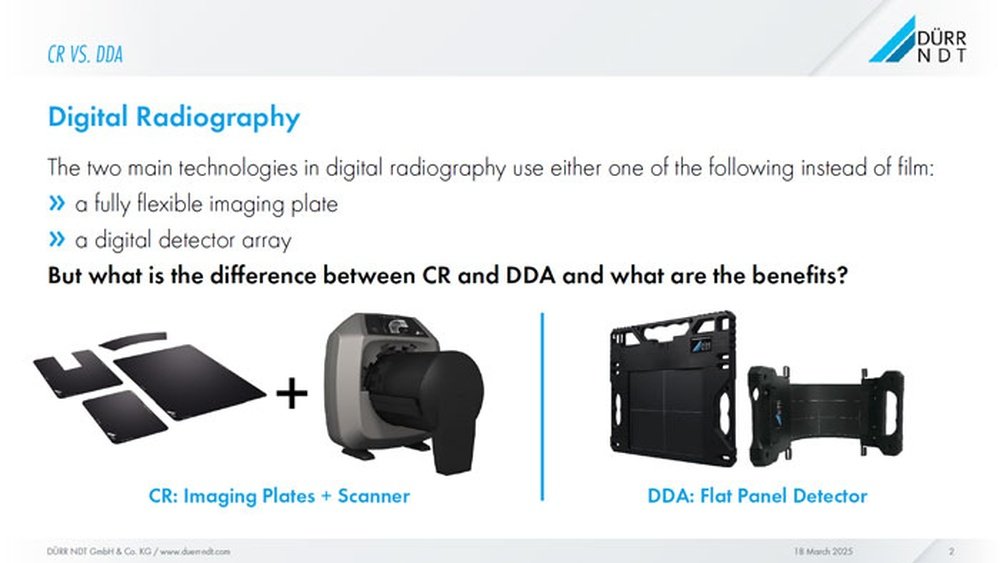
Computed Radiography (CR) is a medical imaging method that uses special technology to create X-ray images. It is a step between traditional film X-rays and fully digital systems. CR captures images on plates instead of film. These plates store the image data and then transfer it to a computer. This process helps doctors see inside the body without surgery.

CR is widely used in hospitals and clinics. It improves image handling and reduces the need for chemicals used in film processing. Understanding how CR works helps to see its role in medical imaging today.

How Computed Radiography Works

CR uses a special plate coated with photostimulable phosphor. When X-rays hit the plate, it stores the energy from the rays. The plate is then scanned with a laser beam. This laser releases the stored energy as light. A sensor captures this light and converts it into an electronic signal. The signal creates a digital image on a computer screen. Doctors can then analyze the image to diagnose problems.

Equipment Used In Computed Radiography

The main equipment includes the CR plate, a laser scanner, and a computer system. The CR plate replaces traditional X-ray film. The laser scanner reads the plate after exposure. It sends image data to the computer. The computer processes and displays the image. Other tools like image storage systems help manage patient records. This setup makes CR flexible and easy to use in many settings.

Image Quality In Computed Radiography

CR images have good quality but vary by system and technique. The digital images can be adjusted for brightness and contrast. This helps improve the view of bones and tissues. CR images have less detail than some digital systems. Still, they are clear enough for many diagnoses. The ability to enhance images helps doctors find issues faster. CR provides a reliable way to see internal body structures.

Basics Of Digital Radiography

Digital radiography is a modern method of taking X-ray images. It uses digital sensors instead of traditional film. This technology helps doctors see inside the body quickly and clearly. Digital radiography has many benefits, such as faster image processing and easier storage.

Understanding the basics helps to see why it is widely used in medical fields today. It improves patient care by providing sharper images and reducing radiation exposure.

How Digital Radiography Works

Digital radiography captures X-ray images using digital sensors. These sensors convert X-rays into electronic signals. The signals then create a digital image on a computer screen. This process happens almost instantly. No need to develop film in a darkroom.

The images can be adjusted for better clarity. Doctors can zoom in or change contrast. This flexibility helps in diagnosing problems more accurately.

Equipment Used In Digital Radiography

The main equipment includes a digital sensor or detector. It replaces traditional X-ray film. A computer system processes and displays images. Sometimes, a flat panel detector is used. This device is thin and lightweight.

A typical digital radiography setup also has an X-ray tube. It produces the X-rays needed for imaging. The entire system is designed for quick image capture and easy handling.

Image Quality In Digital Radiography

Digital radiography provides clear and detailed images. It can show small differences in tissue density. This makes it easier to spot issues like fractures or infections.

Images are sharp and can be enhanced using software. This helps doctors make better decisions. The quality reduces the need for retakes, saving time and radiation dose.

Comparing Image Acquisition

Comparing image acquisition in computed radiography (CR) and digital radiography (DR) reveals key differences. These differences affect how quickly images are captured, stored, and processed. Understanding these aspects helps medical staff choose the right technology for their needs.

Speed And Efficiency

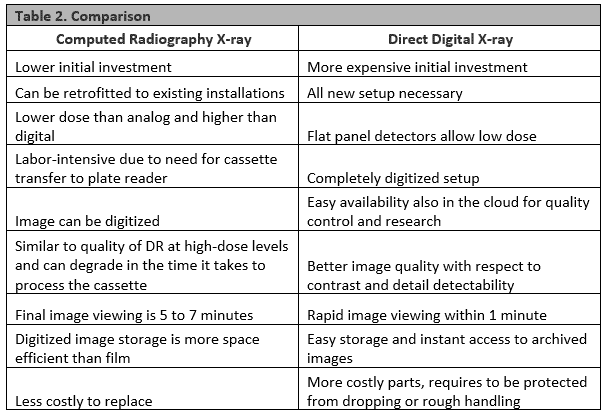
Digital radiography captures images instantly. The sensor converts X-rays directly into digital images. This reduces the wait time for results. Computed radiography uses a cassette with a special plate. The plate must be scanned after exposure, which takes more time. DR offers faster workflows and quicker patient care.

Image Storage And Retrieval

Digital radiography stores images directly in a computer system. Images can be accessed immediately from any workstation. Computed radiography requires manual transfer of images from the scanner to storage. This adds extra steps and delays. DR simplifies image management and helps avoid lost files.

Image Processing Techniques

Both CR and DR allow image enhancement using software. DR images often have higher resolution and better contrast. This helps in clearer diagnosis. CR images need more processing to improve quality. DR’s advanced processing tools provide sharper and more detailed images quickly.

Computed Radiography Vs Digital Radiography: Key Differences Explained

Credit: ndtblog-us.fujifilm.com

Radiation Exposure Differences

Radiation exposure is a key concern in both Computed Radiography (CR) and Digital Radiography (DR). It affects patient safety and image quality. Understanding the differences in radiation doses helps in choosing the right technology for medical imaging.

Dose Levels In Computed Radiography

Computed Radiography uses a special plate to capture X-ray images. This process often requires a higher radiation dose than digital methods. The imaging plates need enough exposure to produce clear pictures. Sometimes, this means patients receive more radiation during CR scans.

Higher dose levels in CR can affect patient safety, especially in repeated exams. Medical staff must monitor and control exposure carefully. Despite this, CR remains useful in many settings due to its cost and flexibility.

Dose Levels In Digital Radiography

Digital Radiography captures images directly with a digital sensor. This method usually needs less radiation than CR. The sensors are more sensitive, allowing clear images at lower doses. Patients benefit from reduced radiation exposure during DR exams.

Lower dose levels in DR help reduce risks linked to radiation. The fast processing also improves workflow and patient comfort. DR technology is becoming more common in hospitals and clinics for these reasons.

Safety Considerations

Both CR and DR require strict safety protocols to protect patients and staff. Limiting radiation dose is a top priority in imaging centers. Protective equipment and proper training support safe use of both technologies.

Regular equipment checks ensure accurate dose delivery. Staff should follow guidelines to minimize unnecessary exposure. Choosing the right radiography method depends on balancing image quality and radiation safety.

Cost And Maintenance Factors

Cost and maintenance play a big role in choosing between computed radiography (CR) and digital radiography (DR). These factors affect the budget and daily work of clinics and hospitals. Understanding the costs and upkeep helps make a smart decision.

Initial Investment

Computed radiography systems usually cost less at the start. They use special plates to capture images, which are cheaper than digital sensors. Digital radiography requires a higher upfront cost because of advanced technology. The digital sensors and software raise the initial price. Smaller clinics might prefer CR because of lower startup costs.

Operational Costs

Operational costs include running the equipment and supplies. CR needs plates that wear out and must be replaced regularly. This adds to ongoing expenses. DR systems cut costs by creating images instantly without extra materials. Power use is similar for both, but DR often saves time, reducing staff costs. Over time, DR may be cheaper to operate.

Maintenance Requirements

CR machines need regular cleaning and plate care to avoid image errors. Plates can get scratched or damaged and need replacement. DR systems require less frequent maintenance but need software updates. Sensor repairs can be costly if damaged. Both systems need trained staff for upkeep. Keeping machines in good shape ensures clear images and reliable service.

Clinical Applications And Suitability

Clinical applications of Computed Radiography (CR) and Digital Radiography (DR) vary based on their technology. Each suits different medical environments and patient needs. Understanding these differences helps in choosing the right tool for better diagnosis and treatment.

Best Uses For Computed Radiography

Computed Radiography is ideal for clinics with limited budgets. It works well in settings that already use traditional X-ray equipment. CR is flexible because it uses imaging plates that can be reused. It suits general radiology tasks like chest X-rays and bone imaging. CR also performs well in mobile units and remote areas. It provides decent image quality for many routine exams. The process is slower than DR but still effective for many uses.

Best Uses For Digital Radiography

Digital Radiography offers faster image capture and viewing. It is perfect for busy hospitals needing quick results. DR provides higher image resolution, which helps in detailed diagnostics. It is great for emergency rooms, dental clinics, and orthopedics. DR reduces radiation exposure compared to CR. It supports advanced image processing for better clarity. The system allows instant sharing of images for consultations. DR is excellent for frequent imaging and high patient volume.

Choosing The Right Technology

Selecting between CR and DR depends on clinical needs and budget. Consider patient volume and required image quality. Facilities with high throughput benefit more from DR’s speed. Smaller clinics may find CR more affordable and flexible. Think about future upgrades and technology support. Training staff on new systems is also important. The right choice improves workflow and patient care.

Future Trends In Radiography

The future of radiography is changing fast. New tools and ideas are shaping how we capture and use images. These changes affect both Computed Radiography (CR) and Digital Radiography (DR). The field is moving toward clearer, faster, and smarter imaging. This improves patient care and helps doctors make better decisions.

Technological Advancements

Radiography machines are becoming more powerful and compact. Sensors now capture images with higher clarity and less radiation. Portable devices allow imaging outside traditional clinics. These advancements help reach more patients in remote areas. Equipment also gets easier to use. This means quicker exams and less waiting time.

Integration With Ai And Software

Artificial intelligence is changing how radiographs are read. AI can spot problems that humans might miss. Software helps enhance image quality automatically. It also organizes large amounts of data efficiently. This saves time for radiologists and reduces errors. AI tools support faster diagnosis and treatment plans.

Impact On Healthcare Practices

Hospitals and clinics use radiography in new ways. Imaging becomes part of routine checkups and emergency care. Faster results lead to quicker treatment decisions. This reduces patient stress and hospital stays. Telemedicine benefits as images can be shared instantly. Radiography helps doctors collaborate worldwide for better care.

Computed Radiography Vs Digital Radiography: Key Differences Explained

Credit: www.jucm.com

Frequently Asked Questions

What Is The Main Difference Between Computed And Digital Radiography?

Computed radiography uses a special cassette to capture images, while digital radiography uses a direct digital detector. Digital radiography offers faster image processing and better image quality.

Which Radiography Method Is Faster For Image Processing?

Digital radiography provides images instantly on a computer screen. Computed radiography requires extra steps to scan and process the image.

Are Computed And Digital Radiography Equally Safe For Patients?

Both methods use low doses of X-rays and are safe for patients. The radiation exposure levels are similar in both techniques.

Which Radiography Type Is More Cost-effective For Clinics?

Computed radiography has lower initial costs but higher ongoing expenses. Digital radiography costs more upfront but saves money over time with less maintenance.

Can Digital Radiography Improve Diagnosis Accuracy Compared To Computed?

Yes, digital radiography offers clearer images with better detail. This helps doctors make quicker and more accurate diagnoses.

Conclusion

Choosing between computed radiography and digital radiography depends on needs. Computed radiography offers lower costs and easy integration. Digital radiography provides faster results and better image quality. Both methods have unique benefits for medical imaging. Understanding these differences helps make smarter decisions.

Think about budget, speed, and clarity when choosing. Each option suits different situations and preferences. Clear images improve diagnosis and patient care. Consider what fits your facility best. The right choice supports effective and efficient health services.

Dial Vs Digital Caliper: Ultimate Precision Comparison Guide

Dial Vs Digital Caliper

When it comes to measuring with precision, choosing the right tool makes all the difference. You might be wondering whether a dial caliper or a digital caliper suits your needs better.

Both have their strengths, but understanding how each works can save you time, reduce mistakes, and improve your results. You’ll discover the key differences between dial and digital calipers, so you can pick the perfect one for your projects and get the most accurate measurements every time.

Keep reading—you’re about to make your measurements easier and more reliable.

Dial Vs Digital Caliper: Ultimate Precision Comparison Guide

Credit: learn.adafruit.com

Dial Caliper Basics

Dial calipers are precise tools used to measure objects. They show measurements on a dial, which makes reading easier. This tool has been popular for many years in workshops and labs. Understanding dial calipers helps you decide if they fit your needs better than digital calipers.

Design And Components

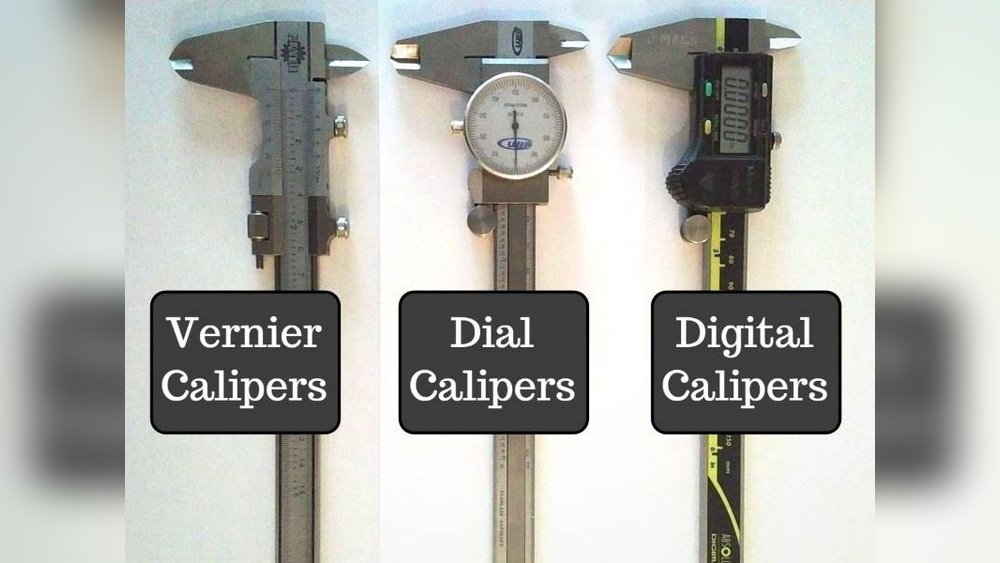
A dial caliper has several key parts. It includes a main scale and a sliding jaw. The dial is circular and shows the measurement. A needle on the dial moves as the jaw slides. There is also a locking screw to hold the position.

How It Measures

The jaws of the caliper close on the object to measure. The main scale shows the measurement in inches or millimeters. The dial needle moves to show fractions of a unit. This allows for precise readings down to thousandths of an inch. The user reads both the scale and dial for the final measurement.

Common Uses

Dial calipers are used in many fields. Mechanics use them to measure engine parts. Woodworkers check thickness and depth. Metalworkers use them for small, precise measurements. They work well where battery power is not reliable. Their durability makes them good for tough workshop environments.

Digital Caliper Basics

Digital calipers have become popular tools for precise measurement. They offer clear, quick readings. These tools are easy to use even for beginners. Understanding their basics helps in choosing the right caliper for tasks.

Design And Features

Digital calipers usually have a stainless steel body. They include a digital screen for easy reading. The screen shows measurements in inches or millimeters. Some models have buttons for zeroing or switching units. Their jaws measure inside, outside, and depth dimensions. The design focuses on accuracy and user comfort.

Measurement Technology

Digital calipers use electronic sensors to measure distances. The sensors detect the position of the sliding jaw. This data converts into digital numbers shown on the screen. They provide precise readings, often up to 0.01 millimeters. Battery power is needed to run the digital display. This technology reduces human error in reading measurements.

Popular Applications

Digital calipers are widely used in many fields. They help in metalworking and woodworking for exact cuts. Engineers use them to check parts during manufacturing. Hobbyists find them useful for model building and crafts. Their accuracy makes them suitable for quality control tasks. Anyone needing precise measurements can benefit from digital calipers.

Accuracy And Precision

Accuracy and precision are key factors in choosing between dial and digital calipers. These tools measure objects, but their reliability varies. Understanding their strengths helps pick the right tool for the job. The focus here is on how consistent their measurements are, the typical errors you might see, and their calibration needs.

Measurement Consistency

Dial calipers use a mechanical dial to show measurements. This can cause slight variations each time you measure. Digital calipers display numbers on a screen, reducing guesswork. They usually give the same reading for repeated measures. Digital models often offer better consistency for precise tasks.

Error Margins

Dial calipers have small mechanical parts that can wear out. This wear causes tiny errors in reading. Digital calipers have electronic sensors that reduce these errors. Their error margins are often smaller than dial calipers. Still, both types can have errors if not handled carefully.

Calibration Needs

Dial calipers need regular manual calibration. This keeps their dial and scale aligned correctly. Digital calipers also require calibration but less often. Some digital models reset automatically when turned on. Proper calibration ensures accurate and precise measurements every time.

Ease Of Use

Ease of use is a key factor when choosing between a dial and a digital caliper. Each type has its own way of showing measurements and interacting with the user. Some users find one tool simpler than the other. Understanding these differences helps you pick the right caliper for your needs.

Reading Measurements

Dial calipers use a circular dial with a needle. The needle points to the measurement on a scale. This can be tricky for beginners. You must carefully read the dial and the main scale. Digital calipers show numbers on a screen. The numbers are clear and easy to read. No need to guess or interpret. Digital readouts reduce mistakes in measurement.

User Interface

Dial calipers have a physical dial and a sliding scale. You turn a small wheel to move the jaws. The interface feels mechanical and tactile. Digital calipers have buttons to turn on, zero the display, and switch units. The buttons are simple and quick to use. Digital tools offer more convenience with fewer steps.

Learning Curve

Dial calipers require practice to read correctly. Beginners may find it confusing at first. It takes time to get used to the needle and scale. Digital calipers are easier to learn. The clear digital numbers mean less guesswork. Users can start measuring accurately almost immediately. Digital calipers suit those new to measuring tools.

Durability And Maintenance

Durability and maintenance play a big role in choosing between dial and digital calipers. Both tools face wear and tear from daily use. Knowing how to care for each type helps them last longer and perform better.

Material And Build Quality

Dial calipers usually have metal bodies. This makes them strong and hard to break. The dial part is often covered with glass or plastic. Digital calipers often use metal or plastic. Plastic models are lighter but less durable. Metal ones hold up better under rough use. Check the quality before buying to match your needs.

Battery And Power Considerations

Dial calipers do not need batteries to work. This makes them reliable anytime. Digital calipers run on small batteries. These batteries last a long time but will need changing. Some digital models turn off automatically to save power. Keep spare batteries handy to avoid downtime.

Cleaning And Care

Dust and dirt can affect both caliper types. Wipe the measuring surfaces with a clean cloth. Use a little oil on metal parts to stop rust. Avoid water on digital screens and dials. Store calipers in cases to protect from damage. Regular care keeps measurements accurate and tools ready.

Cost Comparison

Comparing the cost of dial and digital calipers helps decide the best tool for your needs. Costs vary based on features, quality, and brand. Understanding these differences can save money and ensure you get the right caliper.

Initial Purchase Price

Dial calipers usually cost less than digital ones at first. Basic dial calipers are simple tools with fewer parts. Digital calipers have electronic parts, which raise their price. The price gap can be significant for casual users.

Long-term Expenses

Dial calipers have low ongoing costs because they don’t need batteries. Digital calipers require battery replacements over time. Repairs may cost more for digital calipers due to complex electronics. Dial calipers are easier and cheaper to fix if broken.

Value For Money

Dial calipers offer good value for simple measuring tasks. Digital calipers provide faster and easier reading, saving time. For frequent use, digital tools may justify their higher price. Choose based on how often and precisely you measure.

Choosing The Right Caliper

Choosing the right caliper is important for accurate measurements. Different types serve different needs. Both dial and digital calipers have their strengths. Understanding your needs helps you pick the best tool.

Task Requirements

Consider the type of measurement you need. Dial calipers are great for quick, simple readings. Digital calipers provide precise results and easy-to-read numbers. For complex tasks, digital calipers may be better. For basic work, dial calipers work well.

Work Environment

Think about where you will use the caliper. Digital calipers need batteries and can be sensitive to dirt. Dial calipers are more durable in rough environments. For clean, controlled spaces, digital calipers shine. For dusty or oily places, dial calipers last longer.

Personal Preference

Your comfort with the tool matters. Some prefer the classic feel of dial calipers. Others like the quick digital readout. Try both types before buying. Choose the one that feels easier to use. This helps avoid mistakes during measurement.

Dial Vs Digital Caliper: Ultimate Precision Comparison Guide

Credit: woodworking.stackexchange.com

Tips For Accurate Measurements

Accurate measurements are key for both dial and digital calipers. Small errors can lead to big problems in your work. Follow simple steps to get precise readings every time. These tips help you avoid mistakes and keep your tools reliable.

Proper Handling

Hold the caliper firmly but gently. Avoid pressing too hard on the object. Keep the jaws clean and free from dirt or dust. Always measure on a flat surface to get steady results. Store the caliper in its case after use to prevent damage.

Regular Calibration

Check calibration often to maintain accuracy. Use a gauge block or standard to test the tool. Adjust the caliper if readings are off. Digital calipers may need battery checks for consistent performance. Calibration keeps measurements true over time.

Avoiding Common Mistakes

Do not rush your measurements. Take your time to align the jaws correctly. Avoid measuring curved or uneven surfaces. Read the scale or display carefully. Never force the caliper jaws closed; this can damage the tool and affect accuracy.

Dial Vs Digital Caliper: Ultimate Precision Comparison Guide

Credit: woodworking.stackexchange.com

Frequently Asked Questions

What Is The Main Difference Between Dial And Digital Calipers?

Dial calipers use a mechanical dial to show measurements, while digital calipers display numbers on an LCD screen. Digital calipers are often easier to read. Dial calipers do not need batteries.

Which Caliper Type Is More Accurate, Dial Or Digital?

Digital calipers generally provide more precise readings with less chance of error. Dial calipers can be accurate but depend on reading the dial carefully. Both types can measure in millimeters or inches.

How Easy Is It To Read Measurements On Dial Vs Digital Calipers?

Digital calipers show clear numbers on a screen, making them easier to read quickly. Dial calipers require reading a small dial, which can be harder for some users. Digital calipers reduce mistakes in reading.

Can Dial Calipers Work Without Batteries Like Digital Calipers?

Yes, dial calipers work mechanically without any batteries. Digital calipers need batteries to power the LCD screen. This makes dial calipers more reliable if batteries run out.

Which Caliper Is Better For Beginners, Dial Or Digital?

Digital calipers are usually better for beginners due to their easy-to-read display. Dial calipers may require practice to read the dial correctly. Beginners often prefer digital for faster and clearer measurements.

Conclusion

Choosing between a dial and digital caliper depends on your needs. Dial calipers offer clear, mechanical readings without batteries. Digital calipers provide quick, easy-to-read measurements and extra features. Both tools measure accurately when used right. Consider your budget, ease of use, and work type.

Either option will help you measure with confidence. Simple, precise tools for your projects.

Digital Signature Vs Electronic Signature: Key Differences Revealed

Digital Signature Vs Electronic Signature

Are you confused about the difference between a digital signature and an electronic signature? You’re not alone.

Both terms sound similar and are often used interchangeably, but they aren’t exactly the same. Understanding these differences can save you time, protect your documents, and keep your business secure. You’ll discover what sets digital and electronic signatures apart, how each works, and which one fits your needs best.

Keep reading to make confident decisions the next time you sign anything online.

Digital Signature Vs Electronic Signature: Key Differences Revealed

Credit: www.formstack.com

Basics Of Digital And Electronic Signatures

Digital and electronic signatures help prove who signed a document. Both make it easy to sign papers online. They save time and reduce the need for paper. Understanding the basics helps you know which one fits your needs.

Each type of signature has a unique way of working. Knowing their differences is important for business and legal use. This section explains what digital and electronic signatures are and where they are used.

What Is A Digital Signature?

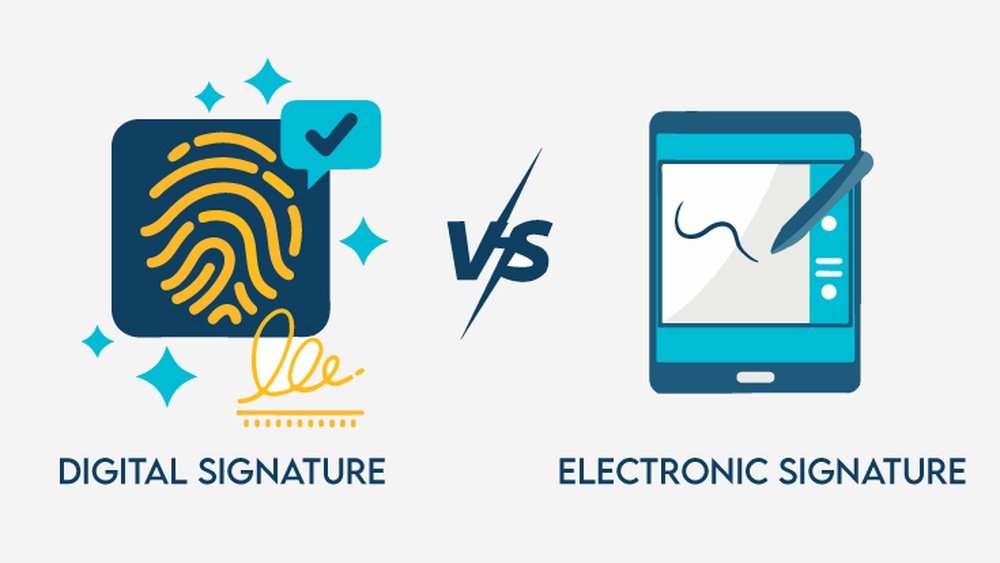
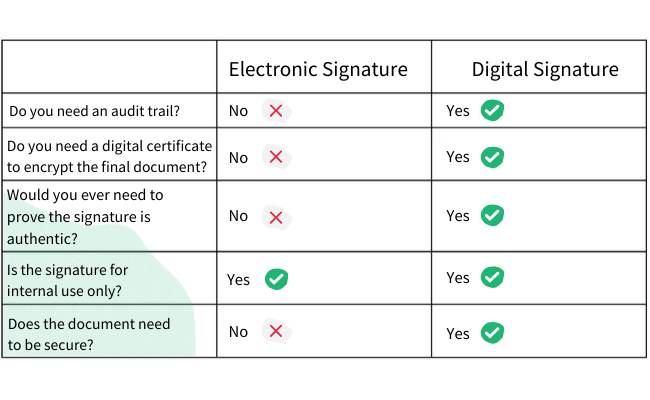
A digital signature uses special codes to secure a document. It links the signer’s identity to the document. It works with encryption technology to prevent changes after signing.

Digital signatures require a digital certificate from a trusted authority. This certificate confirms the signer is who they say they are. The signature also shows if the document was altered.

What Is An Electronic Signature?

An electronic signature is any electronic mark showing agreement. It can be a typed name, a scanned image, or a click on a button. It is simpler and less strict than a digital signature.

Electronic signatures are easy to use and often accepted for many agreements. They prove the signer agreed to the terms but may not offer strong security.

Common Uses In Business And Legal Contexts

Businesses use digital signatures for contracts, tax forms, and official documents. They provide strong proof and help meet legal rules.

Electronic signatures are common in sales agreements, approvals, and everyday documents. They speed up processes but may need extra checks for security.

Both types help companies reduce paper use and speed up workflows. Choosing the right one depends on the document’s importance and legal needs.

Digital Signature Vs Electronic Signature: Key Differences Revealed

Credit: www.dottedsign.com

Technology Behind Each Signature

The technology behind digital and electronic signatures varies greatly. Each uses different methods to confirm identity and secure documents. Knowing how each works helps you choose the right option for your needs.

Encryption And Certificates In Digital Signatures

Digital signatures use encryption to secure data. This means they convert information into a code that only the recipient can decode. Certificates from trusted authorities verify the signer’s identity. These certificates link the signer to a public key. The public key and private key work together to create a unique digital signature. This process ensures the document is not altered after signing.

Methods Used For Electronic Signatures

Electronic signatures are simpler and more flexible. They include scanned images of a handwritten signature or typed names. Some use a finger or stylus on a touchscreen. Others may use a click or tap to agree to terms. They do not always require encryption or certificates. Electronic signatures focus on user intent rather than complex security measures.

Security Features Compared

Digital signatures offer strong security through encryption and certificates. They provide proof of identity and document integrity. Electronic signatures rely more on legal acceptance and audit trails. They can be less secure if not properly managed. Digital signatures are best for sensitive or official documents. Electronic signatures suit everyday agreements and less critical uses.

Legal Status And Compliance

Understanding the legal status and compliance of digital and electronic signatures is essential. It helps businesses and individuals know which type of signature to use for official documents. Legal rules make sure these signatures are safe and trustworthy.

Each type of signature follows different laws and regulations. These rules protect the rights of all parties involved. Knowing these differences avoids problems and keeps agreements valid.

Regulations Governing Digital Signatures

Digital signatures follow strict rules set by governments. These rules require strong security measures. They use encryption to verify the signer’s identity. The laws also demand a clear audit trail of the signing process. This makes digital signatures highly reliable and secure.

Legal Acceptance Of Electronic Signatures

Electronic signatures have broad legal acceptance. Many countries accept them for most contracts and agreements. They do not always require the same security level as digital signatures. Still, they must show intent to sign and consent. This makes electronic signatures flexible and easy to use.

Global Variations In Law

Different countries have their own laws about signatures. Some require digital signatures for specific documents. Others accept electronic signatures for most purposes. Businesses must check local laws before using any signature type. This helps avoid legal risks and ensures compliance worldwide.

Advantages And Limitations

Digital signatures and electronic signatures offer different benefits and limits. Understanding these helps to choose the right solution for your needs. Each has unique strengths and some challenges to keep in mind. This section breaks down their main advantages and limitations.

Strengths Of Digital Signatures

Digital signatures provide strong security for documents. They use encryption to verify the signer’s identity. This makes it very hard to forge or alter documents. Digital signatures also ensure data integrity, confirming the document hasn’t changed. They meet strict legal standards in many countries. This helps businesses comply with regulations and avoid disputes.

Benefits Of Electronic Signatures

Electronic signatures are easy and fast to use. They let people sign documents from any device or location. This speeds up business processes and saves time. Electronic signatures work well for simple agreements and approvals. They reduce paper use and printing costs. Many platforms offer user-friendly interfaces for a smooth signing experience.

Potential Drawbacks To Consider

Digital signatures require special software and technical knowledge. Setting up can be costly and complex for small businesses. They may not be accepted everywhere, depending on local laws. Electronic signatures can be less secure if not properly managed. Some types of documents may need stronger verification methods. Always check legal requirements before choosing a signature method.

Choosing The Right Signature Type

Choosing the right signature type depends on your business needs and legal rules. Digital signatures and electronic signatures serve different purposes. Knowing their differences helps you pick the best option. This choice affects security, costs, and user ease.

Industry-specific Requirements

Some industries require digital signatures for stronger security. Healthcare and finance often need high trust and data protection. Other sectors accept simpler electronic signatures for routine tasks. Check your industry rules before selecting a signature type.

Cost And Implementation Factors

Electronic signatures usually cost less and are easier to install. Digital signatures need special software and certificates, raising costs. Consider your budget and tech skills. Choose a signature type that fits your resources and timeline.

User Experience And Accessibility

Electronic signatures are simple and quick for users. They work on many devices without special tools. Digital signatures may need extra steps and software. Think about who will sign documents and how often. Pick the option that makes signing easy and fast.

Future Trends In Signature Technology

Signature technology continues to evolve rapidly. Both digital and electronic signatures are becoming more secure and easier to use. Future trends will change how people sign documents and verify identity. These trends focus on new technology and legal updates.

Emerging Innovations

New tools are making signing faster and safer. Biometric signatures using fingerprints or facial recognition are gaining popularity. Mobile signing apps are improving user experience. They allow signing anytime and anywhere. Cloud-based solutions help store and manage signed documents securely.

Impact Of Blockchain And Ai

Blockchain adds trust by creating tamper-proof records of signatures. It ensures data integrity and transparency. Artificial intelligence helps detect fraud and verify signer identity automatically. AI can also speed up the review of signed documents. Together, these technologies build confidence in digital transactions.

Predicted Changes In Legal Frameworks

Governments are updating laws to support digital and electronic signatures. New rules aim to balance security and ease of use. International standards may become more aligned to allow cross-border signing. Clearer regulations will help businesses adopt signature technology with confidence. Legal acceptance will grow as technology improves.

Digital Signature Vs Electronic Signature: Key Differences Revealed

Credit: acrobatforeducation.com

Frequently Asked Questions

What Is The Main Difference Between Digital And Electronic Signatures?

A digital signature uses encryption to secure the signature. An electronic signature is any electronic symbol or process showing intent.

Are Digital Signatures Legally Valid Like Electronic Signatures?

Both digital and electronic signatures are legally valid in most countries. Digital signatures often offer stronger security and verification.

Can Digital Signatures Be Forged More Easily Than Electronic Ones?

Digital signatures are harder to forge due to encryption technology. Electronic signatures can be simpler but less secure.

Which Signature Type Is Best For Business Documents?

Digital signatures suit high-security needs like contracts and legal papers. Electronic signatures work well for simple approvals and forms.

How Do Digital Signatures Ensure Document Integrity?

Digital signatures use cryptographic techniques that link the signature to the document. Any changes after signing invalidate the signature immediately.

Conclusion

Digital signatures and electronic signatures both help sign documents online. Digital signatures offer more security and verify identity clearly. Electronic signatures are easier to use and faster for simple tasks. Choose the one that fits your needs best. Both save time and reduce paper use.

Understanding their differences keeps your documents safe and valid. Use the right signature for the right job. Keep your business smooth and secure with smart signing choices.

Analog Vs Digital Clock: Ultimate Guide to Choose the Best Timekeeper

Analog Vs Digital Clock

Have you ever stopped to think about the clock you rely on every day? Whether it’s hanging on your wall or sitting on your desk, the choice between an analog and a digital clock might seem simple.

But which one truly fits your lifestyle and helps you keep track of time better? You’ll discover the surprising differences between analog and digital clocks. By the end, you’ll know exactly which type suits your needs—and why it matters more than you might think.

Keep reading to find out which clock will make your time management easier and more effective.

Analog Clock Basics

Analog clocks have been a part of daily life for centuries. They show time using hands that move around a dial. These clocks are simple yet effective tools for telling time.

Understanding the basics of analog clocks helps appreciate their design and function. Let’s explore how they work and what makes them popular.

Design And Components

Analog clocks usually have three main parts: the face, the hands, and the movement. The face displays numbers or marks. The hands point to hours, minutes, and sometimes seconds. The movement powers the hands to move smoothly or tick.

Materials vary from wood and metal to plastic. The design can be classic or modern, depending on style and purpose.

How Analog Clocks Work

Inside, gears connect the hands to a power source. This source can be a battery or a spring. The gears control the speed of each hand. The hour hand moves slowly, and the minute hand moves faster. The second hand, if present, moves in small steps or smoothly.

This mechanical system keeps time accurate and easy to read.

Common Styles And Features

Analog clocks come in many styles. Wall clocks are large and easy to see. Desk clocks are small and portable. Some clocks have loud ticking sounds, while others are silent.

Features can include glow-in-the-dark hands, alarms, or decorative elements. These options make analog clocks suitable for homes, offices, and schools.

Digital Clock Essentials

Digital clocks are a common part of daily life. They show time using numbers instead of hands. Understanding their key features helps choose the right clock for any space. Digital clocks come in many forms, with different displays and functions. Their design also varies to fit personal taste and needs.

Display Types And Technology

Most digital clocks use LED or LCD screens. LED displays are bright and easy to read in dark rooms. LCD screens save energy and work well in daylight. Some clocks have backlit screens that adjust to light levels. High-tech models show time, date, and temperature clearly. The numbers can be large or small, depending on the design.

Functionality And Features

Digital clocks offer many functions beyond telling time. Alarm settings help wake up on schedule. Some include snooze buttons for a few extra minutes of sleep. Other features show the date and day of the week. Certain models connect to the internet for automatic time updates. Some even have timers and stopwatches for extra use.

Popular Designs

Digital clocks come in styles from simple to modern. Minimalist designs focus on clear number displays. Others use colorful lights or unique shapes for decoration. Travel clocks are small and easy to carry. Wall-mounted digital clocks often feature large digits for easy viewing. Some designs blend with home décor while staying practical.

Accuracy And Reliability

Accuracy and reliability are key factors in choosing a clock. People want clocks that show the correct time and work well over time. Both analog and digital clocks have strengths and weaknesses in these areas. Understanding these differences helps pick the right clock for your needs.

Timekeeping Precision

Digital clocks usually offer better timekeeping precision. They use quartz crystals to keep time. Quartz crystals vibrate at a constant rate, which helps keep digital clocks accurate. Analog clocks also use quartz movements but can lose or gain a few seconds daily. Mechanical analog clocks may be less precise due to their moving parts. Digital clocks often display exact seconds, making them easier to read for precise timing.

Power Sources And Battery Life

Digital clocks often use batteries or electricity. Battery life varies depending on the model and features like backlighting or alarms. Some digital clocks need frequent battery changes. Analog clocks mostly use small batteries that last longer because they have fewer features. Mechanical analog clocks work without batteries but need winding. Power interruptions can affect digital clocks, causing time resets, while analog clocks usually keep running without power.

Durability Factors

Analog clocks are typically more durable due to their simple design. They have fewer electronic parts that can fail. Mechanical analog clocks can last decades with proper care. Digital clocks have more electronic components that may break or become outdated. They can be sensitive to moisture and impact. Some digital clocks use plastic cases that wear out faster. Overall, analog clocks tend to be more reliable in tough conditions.

Analog Vs Digital Clock: Ultimate Guide to Choose the Best Timekeeper

Credit: www.premierclocks.com

Ease Of Use

Ease of use is a key factor when choosing between analog and digital clocks. It affects how quickly and comfortably you can tell the time. It also influences how simple it is to set or adjust the clock. Let’s examine these aspects closely.

Reading The Time

Analog clocks show time with hour and minute hands on a dial. Some people find this visual and natural. It helps them see how much time has passed or is left.

Digital clocks display numbers directly, such as 3:45. This is straightforward and fast to read. It leaves little room for confusion, especially for young learners or those with vision issues.

Setting And Adjusting

Setting an analog clock means moving the hands manually. It can take a moment to turn the dial to the exact time. Some find this less precise but more tactile.

Digital clocks often have buttons for setting hours and minutes. This can be quicker and more exact. Some models even reset automatically, reducing user effort.

User Accessibility

Analog clocks might be harder for people with poor eyesight or cognitive difficulties. The hands and numbers can blur together.

Digital clocks offer clear, large digits. They can also include features like backlighting or voice announcements. These help users with different needs access time easily.

Aesthetic Appeal

The look of a clock can change a room’s feel. Aesthetic appeal matters for many buyers. Both analog and digital clocks offer unique visual styles. This section explores how each type fits with decor, customization, and trends.

Decor And Style Compatibility

Analog clocks often bring a classic or vintage vibe. They fit well in traditional and cozy rooms. Their round faces and hands add charm and warmth.

Digital clocks have a modern, sleek look. They suit minimalistic and tech-inspired spaces. Sharp numbers and clean lines create a futuristic feel.

Choosing a clock depends on the room’s style. Analog clocks blend with wood and soft textures. Digital clocks pair well with metal and glass.

Customization Options

Analog clocks come in many shapes, sizes, and colors. You can find ornate frames or simple designs. Some even have unique hand shapes or vintage faces.

Digital clocks offer features like color-changing displays. Some allow you to adjust brightness or show extra info. Custom text or alarm sounds add a personal touch.

Customization helps clocks match personal taste and room mood. Both types offer choices, but in different ways.

Trends And Preferences

Analog clocks remain popular for their timeless appeal. People like their nostalgic and artistic look. They often become focal points in rooms.

Digital clocks grow in popularity for convenience and style. Younger users prefer their clean displays and smart features. They suit busy, modern lifestyles.

Trends shift with time, but both clock types hold value. Personal preference guides the final decision.

Cost And Maintenance

Cost and maintenance play a big role in choosing between analog and digital clocks. Both types have different price points and upkeep needs. Understanding these differences helps you pick the best clock for your budget and lifestyle.

Price Range Comparison

Analog clocks often cost less than digital ones. Simple models start at a very low price. Fancy designs or brands may cost more. Digital clocks can be cheap but often cost more due to extra features. Bright displays and alarms add to the price. Overall, analog clocks fit smaller budgets better.

Upkeep And Repairs

Analog clocks need occasional battery changes and cleaning. Their moving parts may wear out over time. Repairs might require a clock specialist. Digital clocks usually need battery changes too. They have fewer moving parts, so repairs are rare. But fixing electronics can be costly if broken. Digital clocks need less daily care.

Long-term Investment

Analog clocks can last many years with proper care. Their timeless style can stay in fashion longer. Digital clocks offer more functions but may become outdated fast. Technology changes quickly, making some models obsolete. Choose analog for durability and classic looks. Pick digital for features and modern design.

Suitability For Different Settings

Choosing between an analog and digital clock depends on where you want to use it. Each type has features that fit certain places better. Understanding which clock suits a setting helps in picking the right one. This section looks at how analog and digital clocks work in homes, offices, and outdoor travel.

Home Use

Analog clocks add a classic touch to home decor. Their round faces and moving hands bring warmth to rooms. People often find analog clocks easier to read at a glance in living rooms or kitchens. Digital clocks are great for bedrooms. They show clear numbers, which help with waking up on time. Some digital clocks come with alarms and night lights, making them practical for home use.

Office And Workspaces

Digital clocks fit well in modern offices. They display exact time, including seconds, which helps with punctuality. Employees can check the time quickly without guessing. Analog clocks work well in creative spaces or meeting rooms. They create a relaxed atmosphere and help manage time visually. Both types support productivity but serve different moods and needs.

Outdoor And Travel

Digital clocks are very useful for travel. They often include extra features like timers and world time zones. Their bright displays are easy to see in the dark or bright sunlight. Analog clocks can be less practical outdoors. They may be harder to read quickly and lack extra functions. Yet, some people prefer analog watches for style and simplicity when traveling.

Special Features And Innovations

Special features and innovations have transformed both analog and digital clocks. These changes make clocks more useful and interesting. They go beyond just telling time.

Advances in technology add new functions. These features improve user experience. They also help clocks fit better into modern homes and lifestyles.

Smart Clocks And Connectivity

Smart clocks connect to Wi-Fi and other devices. They show weather updates, news, and reminders. Voice control lets users set alarms and check time hands-free.

Some smart clocks sync with phones and calendars. This keeps schedules organized and easy to access. Analog clocks rarely offer this type of connectivity.

Alarms And Additional Functions

Digital clocks often include multiple alarms and snooze options. They may have built-in radios or music players. Some models even track sleep patterns or play soothing sounds.

Analog clocks usually have simple alarm features. Their bells or buzzers are loud but less customizable. Digital clocks provide more control and variety in alarms.

Energy Efficiency

Many digital clocks use LED or LCD screens that save energy. Battery life varies, but some last for months on one set. Solar-powered analog clocks use natural light to stay running.

Energy-efficient clocks reduce costs and environmental impact. Both types have models designed to be eco-friendly. Choosing the right clock can help save power at home.

Choosing The Right Clock

Choosing the right clock is important for your space and daily routine. The right clock can help you keep track of time easily. It also adds to the look of your room. Picking between an analog and digital clock depends on your needs and style.

Assessing Your Needs

Think about how you use a clock daily. Do you prefer seeing hands move or numbers change? Analog clocks show time with hands on a dial. Digital clocks show time in numbers. Consider if you need a clear view from far away. Also, decide if you want an alarm or other features.

Matching Style With Function

Choose a clock that fits your room’s design. Analog clocks often look classic or vintage. Digital clocks usually appear modern and simple. Match the clock to your furniture and walls. The clock should feel like part of the room. Function and style must work together.

Making The Final Decision

Weigh your needs and style choices. Think about which clock fits your daily habits. Consider where you will place the clock. Check the size and brightness of the display. Pick the clock that feels right for you. Trust your choice and enjoy better timekeeping.

Analog Vs Digital Clock: Ultimate Guide to Choose the Best Timekeeper

Credit: www.premierclocks.com

Analog Vs Digital Clock: Ultimate Guide to Choose the Best Timekeeper

Credit: executivefunctioningsuccess.com

Frequently Asked Questions

What Is The Main Difference Between Analog And Digital Clocks?

Analog clocks show time with hands on a dial. Digital clocks display time with numbers.

Which Clock Type Is Easier To Read For Children?

Digital clocks are often easier for children to read because numbers are clear. Analog clocks require learning how to read the hands.

How Do Power Sources Differ For Analog And Digital Clocks?

Analog clocks often use batteries or mechanical winding. Digital clocks usually run on batteries or electricity.

Which Clock Type Is More Accurate For Timekeeping?

Digital clocks tend to be more accurate because they use electronic timekeeping. Analog clocks may lose or gain time slowly.

Can Analog Clocks Work Without Electricity?

Yes, many analog clocks work without electricity using mechanical parts. Digital clocks generally need batteries or power to function.

Conclusion

Choosing between analog and digital clocks depends on your needs and style. Analog clocks offer a classic look and help with learning time. Digital clocks show time clearly and often include extra features. Both types serve their purpose well in different settings.

Consider what fits your space and daily routine best. Timekeeping can be simple or detailed, based on your choice. Either way, both clocks help you stay on track throughout the day.

Analog Mixer Vs Digital Mixer: Ultimate Comparison for Sound Pros

Analog Mixer Vs Digital Mixer

Are you trying to decide between an analog mixer and a digital mixer for your audio setup? Choosing the right mixer can make a huge difference in the sound quality and ease of use.

You might feel overwhelmed by all the technical terms and options out there. But don’t worry—this guide will help you understand the key differences in a simple way. By the end, you’ll know exactly which mixer fits your needs and how it can improve your music or recording experience.

Keep reading to make the best choice for your sound.

Analog Mixer Basics

Analog mixers have been a key tool in audio production for decades. They work by combining multiple audio signals into one or more outputs. Their design is straightforward, making them popular for live sound and studio use. Understanding the basics helps to see why many still choose analog mixers over digital ones.

Core Components

Analog mixers have several important parts. Each input channel includes a preamp to boost the signal. Equalizers adjust the tone by cutting or boosting frequencies. Faders control the volume of each channel. Pan knobs move sound between left and right speakers. Lastly, auxiliary sends allow effects or monitors to be added.

Signal Flow

Signal flow in an analog mixer is simple and linear. Audio enters through inputs, passes through preamps and EQ, then moves to the faders. From there, the sound mixes in the main bus and outputs to speakers or recording devices. This clear path lets users hear changes immediately without delay.

Typical Use Cases

Analog mixers suit live performances and small studios best. Musicians like their tactile controls during concerts. Podcasters use them for easy sound adjustments on the fly. They are also common in radio stations. Their reliability and simple operation make them a favorite choice for many audio tasks.

Analog Mixer Vs Digital Mixer: Ultimate Comparison for Sound Pros

Credit: www.theproductionacademy.com

Digital Mixer Fundamentals

Digital mixers convert sound into digital signals for processing. They offer precise control over audio with less noise. These mixers store settings, making setups repeatable and fast.

They use software to manage sound, unlike analog mixers that use physical circuits. Digital mixers often include effects and equalizers inside the unit. This feature reduces the need for extra equipment.

Key Features

Digital mixers have many built-in tools. You can save and recall scenes easily. They provide strong noise reduction for clean sound. Many models include touchscreen displays for quick edits. They support multiple input and output channels. USB and network connectivity allow for remote control and recording.

User Interface

The user interface is usually a touchscreen or computer software. It shows all settings clearly on one screen. Sliders and knobs can be virtual or physical. Menus are easy to navigate with clear labels. Visual feedback helps users understand sound changes quickly. Some mixers offer customizable layouts for personal preferences.

Common Applications

Digital mixers suit live concerts, studios, and broadcast settings. They work well in places needing fast setup changes. Churches and schools use them for flexibility and ease. Recording engineers prefer digital mixers for editing and mixing tracks. They fit small venues and large events alike. Their compact size makes transport easier for touring bands.

Sound Quality Differences

Sound quality is a key factor in choosing between an analog mixer and a digital mixer. Both types offer unique audio experiences. These differences come from how each mixer processes sound. Understanding these aspects helps you pick the best option for your needs.

Warmth And Character

Analog mixers add a natural warmth to the sound. They use physical components like tubes and transformers. These parts give audio a rich, full feel. Digital mixers produce cleaner sound but can feel colder. Some users find digital sound less natural. Analog’s warmth suits music styles that need a vintage touch.

Noise And Clarity

Digital mixers provide very low noise levels. They use precise digital processing to keep sound clear. Analog mixers can introduce slight noise or hum. This happens because of their electronic parts. Yet, some prefer analog’s subtle noise for its charm. Clarity depends on the mixer’s quality and setup.

Dynamic Range

Dynamic range means the difference between the loudest and quietest sound. Digital mixers usually offer a wider dynamic range. They can handle extreme volume changes without distortion. Analog mixers have a more limited dynamic range. But they can compress sound naturally, adding warmth. The choice depends on the type of sound you want.

Flexibility And Control

Flexibility and control are key factors in choosing between analog and digital mixers. These aspects affect how easily you shape your sound and manage your audio setup. Both mixer types offer unique ways to handle sound, but their approaches differ greatly. Understanding these differences helps in selecting the right tool for your needs.

Channel Processing

Analog mixers offer hands-on control with physical knobs and sliders. Each channel has dedicated controls for volume, EQ, and panning. This allows quick, tactile adjustments during live performances.

Digital mixers process channels through software. They provide customizable channel settings and advanced routing options. Users can save presets and recall them instantly. This flexibility suits complex audio setups.

Effects Integration

Analog mixers often require external effects units. Users connect pedals or processors for reverb, delay, or compression. This setup can be simple but needs extra gear.

Digital mixers include built-in effects with many choices. Effects are easy to apply and adjust on each channel. This integration saves space and simplifies the workflow.

Automation Capabilities

Analog mixers lack automation features. Every change must be made manually in real time. This can be challenging during busy sessions.

Digital mixers support automation for volume, panning, and effects. Changes can be programmed and replayed exactly. This precision improves mixing consistency.

Connectivity Options

Connectivity options are crucial for both analog and digital mixers. They determine how easily you can connect your devices. Different mixers offer various input and output choices. These options affect your setup and workflow. Understanding these differences helps you choose the right mixer for your needs.

Input And Output Types

Analog mixers usually have XLR and 1/4-inch inputs. These allow connection of microphones and instruments. Outputs are often balanced XLR or 1/4-inch jacks. Digital mixers offer more variety. They may include USB, AES/EBU, or even Ethernet ports. This allows direct connection to computers or networks. Digital mixers often support multi-track recording through USB. Analog mixers focus on simple, straightforward connections.

Expansion Possibilities

Analog mixers have limited expansion options. You can add external effects or processors but must use extra cables. Digital mixers often allow easy expansion. You can add digital stage boxes through network cables. This increases the number of inputs and outputs without extra bulky gear. Some digital mixers support wireless control via apps. This adds flexibility during live shows or studio work.

Compatibility With Other Gear

Analog mixers work well with classic audio equipment. They connect easily to older microphones, amps, and effects. Digital mixers are compatible with modern digital devices. They support software integration for recording and mixing. Some digital mixers support popular control surfaces and plugins. This offers a seamless workflow in digital audio environments. Analog mixers may need adapters to connect with digital gear.

Analog Mixer Vs Digital Mixer: Ultimate Comparison for Sound Pros

Credit: www.youtube.com

Portability And Size

Portability and size are important for choosing between an analog and digital mixer. Musicians and sound engineers often need gear that fits their space and moves easily. The size and weight of mixers affect how quickly setup and transport happen. This section compares analog and digital mixers in these areas.

Physical Footprint

Analog mixers usually have a larger footprint. They need space for many knobs, faders, and inputs. Digital mixers tend to be more compact. They use digital screens and fewer physical controls. This reduces the space they take on a table or rack.

Weight Considerations

Analog mixers are often heavier. Their construction includes many metal parts and large circuit boards. Digital mixers use lighter materials and compact designs. This makes them easier to carry for long distances or travel.

Setup And Transport

Setting up analog mixers takes more time. More cables and connections are involved. Digital mixers often have simpler setups. Many settings can be saved and recalled instantly. Transporting digital mixers is less tiring due to smaller size and lighter weight.

Cost And Maintenance

Cost and maintenance play a big role in choosing between analog and digital mixers. Both types have different expenses at the start and over time. Knowing these differences helps you pick the right mixer for your budget and needs.

Initial Investment

Analog mixers usually cost less at first. They have simpler parts and fewer features. Digital mixers often need a bigger upfront payment. They include many built-in effects and digital controls. The price depends on the number of channels and features too.

Upkeep And Repairs

Analog mixers need more regular care. Their physical knobs and faders can wear out. Repairs can be needed if parts break or get dirty. Digital mixers require less physical maintenance. But software updates are important to keep them working well.

Long-term Value

Analog mixers can last for many years with good care. They keep working even if parts are old. Digital mixers may become outdated as new software comes out. Still, they offer more features and flexibility over time. Think about your future needs and budget.

User Experience

User experience plays a big role in choosing between analog and digital mixers. It affects how quickly users adapt and how smoothly they work during sessions. Both types offer unique experiences that suit different needs and skills.

Learning Curve

Analog mixers have a straightforward design with knobs and sliders. Beginners often find them easier to understand. You can see and touch everything directly. Digital mixers can seem complex at first. They have menus and screens that require more study. Users may need time to learn all the features.

Ease Of Use

Analog mixers allow quick adjustments without navigating screens. This makes them ideal for live settings. Digital mixers offer more tools but need button presses and menu changes. This can slow down fast work. Some digital mixers have touchscreens and presets that simplify tasks.

Customization

Digital mixers excel in customization. Users can save settings and recall them instantly. They can also add effects and route signals in many ways. Analog mixers offer limited customization. Changes happen manually and cannot be saved. This suits users who prefer a hands-on approach.

Choosing The Right Mixer

Choosing the right mixer is important for good sound control. The choice depends on your needs and where you will use it. Both analog and digital mixers have their strengths. Understanding your setup helps you pick the best option.

Studio Vs Live Settings

In a studio, precision and sound quality matter most. Analog mixers offer warm, natural sound. Digital mixers provide many effects and easy recall of settings. For live shows, quick changes and durability are key. Digital mixers are more flexible for live use. Analog mixers are simple and reliable on stage.

Budget Considerations

Analog mixers often cost less upfront. They suit small budgets and basic setups. Digital mixers have higher initial costs. They include extra features that save money later. Think about long-term use and upgrades too. Choose what fits your budget now and ahead.

Future-proofing Needs

Technology changes fast. Digital mixers often get software updates with new features. They connect easily with computers and other devices. Analog mixers do not update but last long with few parts. Consider how your needs may change. Pick a mixer that grows with your setup.

Analog Mixer Vs Digital Mixer: Ultimate Comparison for Sound Pros

Credit: www.tecnare.com

Frequently Asked Questions

What Are The Main Differences Between Analog And Digital Mixers?

Analog mixers use physical knobs and circuits for sound control. Digital mixers use software and digital processing for sound adjustments. Each offers a unique way to manage audio signals.

Which Mixer Is Better For Live Sound Applications?

Analog mixers are simple and fast for live shows. Digital mixers offer more features but need time to learn. Choice depends on your event needs and skill level.

How Does Sound Quality Compare In Analog Vs Digital Mixers?

Analog mixers give warm, natural sound due to physical circuits. Digital mixers provide clear, precise sound with less noise. Preferences vary depending on music style and use.

Can Digital Mixers Save And Recall Settings Easily?

Yes, digital mixers store user settings for quick recall. Analog mixers require manual reset for each session. This feature helps save time and keeps sound consistent.

Are Analog Mixers Easier To Use For Beginners?

Analog mixers have straightforward controls, making them beginner-friendly. Digital mixers may overwhelm new users with many options. Learning curve is steeper for digital mixers.

What About The Cost Difference Between Analog And Digital Mixers?

Analog mixers usually cost less upfront but lack advanced features. Digital mixers can be pricier but offer more flexibility and effects. Budget and needs guide the best choice.

Do Digital Mixers Need More Maintenance Than Analog Mixers?

Digital mixers require software updates and occasional troubleshooting. Analog mixers have simpler hardware but can wear out over time. Maintenance depends on usage and environment.

Conclusion

Choosing between an analog mixer and a digital mixer depends on your needs. Analog mixers offer simple controls and warm sound. Digital mixers provide more features and flexibility. Both types have strengths and weaknesses. Think about your budget, space, and skill level.

Testing each mixer can help you decide. The right mixer makes your sound better and your work easier. Choose wisely to enjoy your music or recordings.

Analog Vs Digital Signal: Key Differences You Must Know

Analog Vs Digital Signal

Have you ever wondered why your old vinyl records sound different from your favorite streaming playlist? It all comes down to one simple choice: analog vs digital signal.

Understanding the difference between these two can change how you experience music, movies, and even how your devices work. By the end of this article, you’ll see why this matters to you and how it can impact your everyday life.

Ready to uncover the truth behind these signals? Let’s dive in.

Analog Vs Digital Signal: Key Differences You Must Know

Credit: www.youtube.com

Signal Basics

Signals carry information from one place to another. They form the base of communication systems. Understanding signal basics helps us grasp how devices talk to each other. Two main types of signals exist: analog and digital. Each type has unique features and uses.

What Is An Analog Signal

An analog signal changes continuously over time. It represents data with smooth and varying waves. The signal can take any value within a range. Examples include sound waves and light intensity. Analog signals are natural and easy to understand.

They often face noise, which can distort the signal. This makes analog signals less precise. Devices like old radios and telephones use analog signals. They work well for simple, real-world information.

What Is A Digital Signal

A digital signal uses discrete values to represent data. It switches between fixed levels, often called 0s and 1s. Digital signals are clear and less affected by noise. They provide accurate and reliable communication.

Most modern devices like computers and smartphones use digital signals. These signals allow fast and complex data processing. Digital signals are easy to store and copy without loss.

Waveform Characteristics

Waveform characteristics define how signals behave and transmit information. Understanding these traits helps us see the key differences between analog and digital signals. This knowledge is essential for many areas like electronics, communication, and audio processing.

Continuous Vs Discrete Signals

Analog signals are continuous. They change smoothly over time without breaks. This means the signal can take any value at any moment. The waveform looks like a flowing curve.

Digital signals are discrete. They only have specific values, usually two levels: high or low. These signals look like square waves with clear steps. The signal jumps from one value to another, without values in between.

Amplitude And Frequency Differences

Amplitude in analog signals varies continuously. It can represent subtle changes, like sound volume or light intensity. Frequency also changes smoothly and affects the tone or color.

In digital signals, amplitude is fixed at certain levels. Frequency relates to how fast the signal switches between levels. These changes happen in steps, not smoothly. This makes digital signals less prone to noise.

Transmission Methods

Transmission methods define how information moves from one place to another. Both analog and digital signals use unique ways to send data. Understanding these methods helps us see their strengths and weaknesses.

Analog Signal Transmission

Analog signals carry information as continuous waves. These waves change smoothly over time. This method mimics real-world sounds and images closely.

Transmission happens through cables, radio waves, or fiber optics. Noise and interference can distort the signal easily. Signal quality may drop with distance.

Amplifiers boost the signal but also increase noise. Analog transmission suits voice and music but has limits in clarity.

Digital Signal Transmission

Digital signals send data as binary code: ones and zeros. This code represents information in small, clear steps.

Transmission uses electrical pulses or light signals in cables and fibers. Digital signals resist noise better than analog.

Repeaters regenerate the signal perfectly, keeping quality high. Digital methods allow error checking and data compression.

This transmission is ideal for computers, video, and fast communication systems.

Advantages And Disadvantages

Understanding the advantages and disadvantages of analog and digital signals helps in choosing the right option. Both signal types have unique features that suit different needs. The strengths and limitations affect their use in communication and technology.

Strengths Of Analog Signals

Analog signals show smooth and continuous data changes. They capture natural sounds well, like human voices or music. These signals work well in simple devices without complex parts. Analog systems often cost less to build and maintain. They provide real-time information without needing conversion.

Limitations Of Analog Signals

Analog signals lose quality over distance. Noise and interference can distort the signal easily. It is hard to store analog data without losing clarity. Signal degradation happens with every copy or transfer. Repairing or improving analog signals requires extra equipment.

Strengths Of Digital Signals

Digital signals offer clear and accurate data transmission. They resist noise and interference better than analog signals. Digital data is easy to store, copy, and share without quality loss. Modern devices use digital signals for faster and secure communication. Digital systems support complex processing and encryption.

Limitations Of Digital Signals

Digital signals need conversion from analog sources like sound or light. This conversion can cause slight delays. Devices handling digital signals are often more complex and costly. Digital signals may lose details in low-quality conversions. Power consumption is higher compared to analog systems.

Applications In Real Life

Signals are all around us. They carry information from one place to another. Both analog and digital signals have many real-life uses. Each type serves different purposes based on its strengths.

Understanding where these signals are used helps us see their value. It also shows why technology often mixes both types for best results.

Common Uses Of Analog Signals

Analog signals are continuous waves. They vary smoothly over time. These signals work well with natural information.

Sound from a microphone is a common analog signal. It captures voice and music with natural tones. Older radios and televisions use analog signals to send audio and video.

Temperature sensors in homes often use analog signals. They provide real-time temperature changes. Analog signals also appear in older telephone lines and vinyl records.

Common Uses Of Digital Signals

Digital signals use discrete values, usually zeros and ones. They are less affected by noise and interference.

Computers and smartphones depend on digital signals. They store data and send messages in digital form. Digital television and radio provide clearer picture and sound.

Digital signals are key in internet communication and digital cameras. They allow fast, accurate data transfer. Modern audio devices like MP3 players also use digital signals.

Analog Vs Digital Signal: Key Differences You Must Know

Credit: crossroadenergy.com

Signal Processing Techniques

Signal processing techniques shape how signals are handled and improved. These methods affect clarity, accuracy, and usability of information. Different types of signals require different processing methods.

Analog Signal Processing

Analog signal processing works directly with continuous signals. It uses components like resistors, capacitors, and amplifiers to modify signals. Tasks include filtering noise, amplifying weak signals, and mixing multiple signals. The process happens in real time without converting the signal.

This method suits audio, radio, and other natural signals. Analog processing can be sensitive to noise and distortion. It needs careful design to maintain signal quality. Despite limits, it remains important in many devices.

Digital Signal Processing

Digital signal processing (DSP) converts signals into numbers. It uses algorithms to analyze and change these numbers. This method allows complex operations like compression, error correction, and pattern recognition. DSP provides high precision and flexibility.

Signals are easier to store and transmit digitally. DSP works well with computers and modern electronics. It reduces noise effects and improves signal quality. Many communication and multimedia systems rely on digital processing.

Impact On Modern Technology

The impact of analog and digital signals shapes much of today’s technology. These signals affect how devices work and communicate. Understanding their role helps explain many modern tools and services.

Analog signals are continuous waves that carry information. Digital signals use binary code, representing data with ones and zeros. Each has strengths and limits that influence technology’s design and use.

Role In Communication Systems

Communication depends heavily on signal type. Analog signals transmit voice and music in a smooth flow. Digital signals provide clearer, faster data transfer. Phones and internet services mainly use digital signals now. They reduce noise and improve connection quality. This shift supports high-speed communication and better reliability.

Influence On Media And Entertainment

Media has changed with digital signals. Digital formats offer sharp images and clear sound. Streaming platforms rely on digital signals for smooth playback. Analog signals are still found in some broadcasting but are fading. Digital technology allows more content in smaller files. This change enhances user experience and access to media.

Analog Vs Digital Signal: Key Differences You Must Know

Credit: controlbyte.tech

Frequently Asked Questions

What Is The Main Difference Between Analog And Digital Signals?

Analog signals are continuous and vary smoothly over time. Digital signals use discrete values, usually 0s and 1s, to represent data.

Why Are Digital Signals Preferred Over Analog?

Digital signals are less affected by noise and interference. They provide clearer and more reliable communication.

Can Analog Signals Be Converted To Digital?

Yes, analog signals can be converted using an analog-to-digital converter. This process helps in digital processing and storage.

Which Signal Type Is Better For Audio Quality?

Analog signals can capture more natural sound waves. Digital signals allow easy editing and noise reduction.

How Do Noise And Distortion Affect Analog And Digital Signals?

Noise distorts analog signals more because they are continuous. Digital signals resist noise better due to discrete data levels.

Conclusion

Both analog and digital signals have clear strengths and weaknesses. Analog signals carry continuous information but can lose quality over distance. Digital signals use numbers, making them easier to store and less prone to noise. Choosing between the two depends on the task and equipment you use.

Understanding these basics helps you make smarter decisions in technology and communication. The world of signals is vast, but knowing this difference is a great start.