Denver Vs Boulder for Digital Nomads: Ultimate City Showdown

Denver Vs Boulder for Digital Nomads

Are you trying to decide where to set up your digital nomad lifestyle—Denver or Boulder? Both cities have a lot to offer, but choosing the right one can make a big difference in your work and life balance.

Whether you crave vibrant city energy or a laid-back vibe close to nature, your perfect spot is waiting. Keep reading to discover which city matches your style, work needs, and adventure goals. By the end, you’ll have a clear picture of where you should base your next chapter.

Denver Vs Boulder for Digital Nomads: Ultimate City Showdown

Credit: www.thebrokebackpacker.com

Cost Of Living Comparison

Cost of living plays a big role for digital nomads choosing a city. It affects daily comfort and savings. Denver and Boulder offer different experiences. Let’s break down key expenses to help you decide.

Housing And Rent Prices

Rent in Denver is generally lower than in Boulder. You can find more affordable apartments in Denver’s neighborhoods. Boulder’s rent tends to be higher due to demand and location. Shared housing options are common in both cities. Denver offers more variety in rental types and prices.

Daily Expenses And Groceries

Groceries cost slightly less in Denver. Both cities have many grocery stores and markets. Eating out in Boulder often costs more than in Denver. Simple meals and coffee shops in Denver offer better prices. Budgeting for food is easier in Denver for most nomads.

Transportation Costs

Public transport in Denver is more extensive and affordable. Boulder has fewer bus routes, leading to higher taxi or rideshare use. Denver’s bike lanes and light rail system reduce travel costs. Parking fees and gas prices are similar in both cities. Denver is better for saving on daily travel.

Work Environment

The work environment plays a big role for digital nomads. It shapes daily routines and productivity. Both Denver and Boulder offer unique settings for remote work. Each city has its own vibe and resources. Understanding these differences helps nomads choose the best place to work.

Coworking Spaces And Cafes

Denver has many coworking spaces with modern facilities. These places provide desks, meeting rooms, and quiet zones. Cafes in Denver often have a lively atmosphere and good seating. Boulder offers fewer coworking spots but focuses on cozy, community-driven spaces. Many cafes in Boulder are quiet and great for focused work. Both cities offer good choices for different work styles.

Internet Speed And Reliability

Internet is fast and stable in Denver. Most coworking spots and cafes provide strong Wi-Fi. Boulder’s internet speed is also reliable. It supports video calls and large file uploads with ease. Both cities meet the essential needs of digital nomads. Staying connected is simple in either location.

Networking Opportunities

Denver has a larger and diverse professional community. Many events and meetups happen regularly. This helps digital nomads connect and collaborate. Boulder’s community is smaller but close-knit. It offers opportunities to meet local entrepreneurs and creatives. Both cities support building valuable professional networks.

Lifestyle And Recreation

Choosing between Denver and Boulder means thinking about lifestyle and fun. Both cities offer great options for digital nomads to enjoy life outside work. Each city has its own vibe and activities that suit different tastes. Exploring what each place offers helps find the best fit for your daily life and relaxation.

Outdoor Activities

Denver provides many parks, bike paths, and nearby mountains. You can hike, bike, or run almost every day. The city has urban trails along the river and big parks for sports and picnics. Boulder is closer to nature with quick access to the Rocky Mountains. It offers famous trails like Chautauqua and open spaces for hiking and rock climbing. Both cities support an active lifestyle with fresh air and scenic views.

Food And Entertainment

Denver has a lively food scene with many restaurants and bars. You find food trucks, breweries, and a mix of world cuisines. Entertainment includes theaters, music venues, and festivals year-round. Boulder offers a smaller but vibrant food culture focused on organic and local choices. It has cozy cafes, craft breweries, and farmers markets. Both cities host events that bring people together and offer fun nights out.

Community And Social Scene

Denver has diverse communities with many groups for digital nomads and creatives. You can join coworking spaces and meetups easily. The city feels busy but friendly, with lots of networking chances. Boulder feels more close-knit and relaxed. It attracts outdoor lovers and tech professionals who value balance. Social events often happen in parks, cafes, or community centers. Both cities make it easy to connect and build friendships.

Denver Vs Boulder for Digital Nomads: Ultimate City Showdown

Credit: matadornetwork.com

Climate And Weather

Denver and Boulder have distinct climates that shape daily life for digital nomads. Both cities experience four seasons, but the intensity and weather patterns vary. Understanding these differences can help you choose the best place for work and leisure.

Seasonal Differences

Denver sees cold winters with snow and warm summers. Snow can last from December to March. Summers are dry and sunny, with temperatures reaching the high 80s. Boulder has a milder winter, with less snow. Its summers are also warm but slightly cooler than Denver’s. Spring and fall bring pleasant weather to both cities, but Boulder’s higher elevation means cooler nights.

Impact On Productivity

Weather affects focus and energy for remote work. Denver’s sunny days can boost mood and motivation. Winter snow may slow commutes but offers cozy indoor work vibes. Boulder’s mild climate helps maintain steady energy year-round. Cool evenings encourage rest, improving work-life balance. Both cities provide good weather for outdoor breaks, helping refresh the mind.

Safety And Healthcare

Safety and healthcare are key concerns for digital nomads choosing between Denver and Boulder. Feeling secure and having quick access to medical help create peace of mind. Both cities offer different experiences in these areas.

Crime Rates

Denver has higher crime rates than Boulder, especially for property crimes. Violent crime is also more common in Denver’s urban areas. Boulder enjoys a lower crime rate, making it feel safer for residents and visitors. Digital nomads may prefer Boulder for its quieter, safer neighborhoods. Staying alert and informed is important in both cities.

Access To Medical Services

Denver provides many hospitals and clinics, including specialized medical centers. It has large facilities with advanced technology. Boulder offers good healthcare options but fewer hospitals. The city has quality clinics and urgent care centers nearby. Both cities have emergency services ready to help quickly. Denver’s healthcare system is larger, but Boulder’s is convenient and reliable.

Transportation And Accessibility

Transportation and accessibility shape the daily life of digital nomads. Choosing a city with reliable transit and easy travel helps save time. Both Denver and Boulder offer unique options to get around. Understanding public transit, airport access, and walkability can guide your choice.

Public Transit Options

Denver has a large public transit system. It includes buses and light rail trains. These connect downtown to many neighborhoods and suburbs. The system runs frequently, making it easy to plan trips.

Boulder’s public transit is smaller but useful. It mainly uses buses to move around the city. The bus routes link popular spots and the university area. Schedules are less frequent than Denver’s but still reliable.

Airport Connectivity

Denver International Airport is a major hub. It serves many domestic and international flights. The airport is about 25 miles from downtown Denver. A train connects the airport directly to the city center.

Boulder does not have its own airport. The closest is Denver International Airport. Travelers must drive or take a shuttle to reach the airport. This adds some travel time for flights.

Walkability And Bike Friendliness

Boulder is known for its walkable neighborhoods. Many shops and cafes are within easy walking distance. The city has many bike lanes and trails. This makes biking a popular way to get around.

Denver also supports walking and biking. Some neighborhoods are very walkable, especially downtown. The city has a growing network of bike lanes. Bike-sharing programs offer flexible transportation options.

Local Culture And Vibes

Denver and Boulder offer unique local cultures that attract digital nomads. Each city has its own vibe shaped by the people, art, and values. Understanding these differences helps nomads choose the best place to live and work. Both cities welcome newcomers but express community spirit in distinct ways.

Community Attitudes

Denver feels lively and fast-moving. People enjoy city life and new opportunities. The community values innovation and growth. Networking and professional events happen often. Boulder feels calm and nature-focused. Residents care deeply about sustainability and health. The community supports outdoor activities and wellness. Both cities offer friendly atmospheres but different energy levels.

Arts And Events

Denver hosts many art galleries, music shows, and festivals. The city has a rich cultural calendar year-round. Street art and theater thrive here. Boulder supports local artists and crafts. Events often happen outdoors, blending nature with creativity. Farmers markets, film festivals, and yoga fairs are common. Each city provides chances to enjoy arts in unique ways.

Diversity And Inclusion

Denver has a more diverse population. People from various backgrounds live and work here. The city promotes inclusion in workplaces and communities. Boulder is smaller and less diverse but growing. It fosters acceptance and open-mindedness. Both cities encourage respect and support for all. Digital nomads find welcoming environments in both places.

Technology And Innovation Scene

The technology and innovation scene in Denver and Boulder offers exciting opportunities for digital nomads. Both cities host vibrant communities where tech ideas grow fast. They support startups and provide many chances to connect with like-minded people. Understanding their strengths helps digital nomads choose the best city to live and work.

Startup Ecosystem

Denver’s startup ecosystem is large and diverse. The city has many new companies in software, health tech, and green energy. Investors and accelerators are easy to find. This boosts growth and job creation. Boulder, smaller but focused, shines in biotech and clean tech startups. It has a tight-knit community that helps founders share resources. Both cities offer coworking spaces and funding options for new businesses.

Tech Meetups And Conferences

Denver hosts many tech meetups every month. Events cover coding, data science, and product design. These meetups attract experts and beginners alike. Conferences in Denver draw national and international speakers. Boulder also has regular tech gatherings. They focus on innovation and sustainable technology. These events help digital nomads learn and network. Both cities provide friendly environments to build professional contacts.

Denver Vs Boulder for Digital Nomads: Ultimate City Showdown

Credit: www.tripadvisor.com

Frequently Asked Questions

What Is The Cost Of Living Difference Between Denver And Boulder?

Denver generally has a lower cost of living than Boulder. Housing and daily expenses in Boulder tend to be higher. This affects how far your budget will stretch.

Which City Has Better Coworking Spaces For Digital Nomads?

Both cities offer many coworking spots. Denver has more variety and larger spaces. Boulder focuses on community and eco-friendly options.

How Is The Internet Connectivity In Denver Vs Boulder?

Both cities provide fast and reliable internet. Denver has more service providers to choose from. Boulder’s internet is stable, perfect for remote work.

Which City Offers Better Outdoor Activities For Breaks?

Boulder is famous for hiking, biking, and nature trails nearby. Denver also offers parks and outdoor events but is more urban. Both cities support a healthy work-life balance.

How Do Denver And Boulder Differ In Networking Opportunities?

Denver has a larger, more diverse tech scene with frequent events. Boulder’s community is smaller but tightly connected. Both cities help digital nomads meet peers and grow.

Conclusion

Denver and Boulder both offer great options for digital nomads. Denver has a lively city vibe with many workspaces and social spots. Boulder brings nature close, with peaceful places and outdoor activities. Choose based on what fits your work style and lifestyle.

Do you want a busy city or a quiet town? Both places welcome remote workers with open arms. Your ideal spot depends on your daily needs and dreams. Either way, you can find a good balance of work and life in these Colorado cities.
Digital Thread Vs Digital Twin: Key Differences Explained Clearly

Digital Thread Vs Digital Twin

Are you confused about the difference between a digital thread and a digital twin? You’re not alone.

These two terms sound similar but serve very different purposes in your business or project. Understanding how each works can save you time, cut costs, and boost your efficiency. Keep reading to discover which one fits your needs and how you can use them to get ahead.

Digital Thread Basics

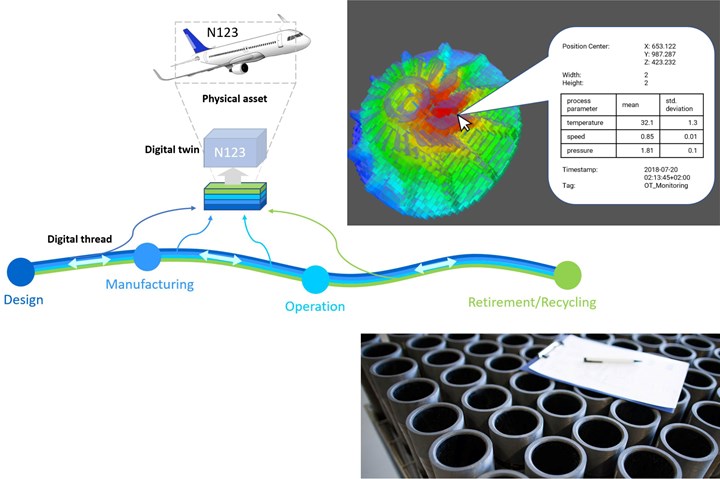
The digital thread is a key idea in modern manufacturing and engineering. It helps connect all the data from a product’s start to finish. This connection creates a clear path of information. It improves how teams work and how products develop.

Understanding the digital thread basics helps you see its value. It links design, production, and operation data into one flow. This flow supports better decisions and faster problem solving.

Core Concept

The digital thread is a continuous flow of data across a product’s life. It links every stage, from design to use. This connection ensures all teams share the same information. It reduces errors and speeds up updates.

Data Flow And Integration

Data flows smoothly between systems and tools. The digital thread integrates data from design software, machines, and sensors. This integration creates a full picture of the product. It helps track changes and performance in real time.

Role In Product Lifecycle

The digital thread supports every step of the product lifecycle. It guides design, testing, manufacturing, and maintenance. Teams use this data to improve quality and reduce costs. It makes products more reliable and easier to update.

Digital Thread Vs Digital Twin: Key Differences Explained Clearly

Credit: www.steptools.com

Digital Twin Basics

Understanding the basics of a digital twin helps clarify its role in technology. A digital twin is a virtual copy of a physical object or system. It allows users to see, analyze, and predict how the real version behaves. This connection between the real and digital worlds supports better decisions and improved outcomes.

Core Concept

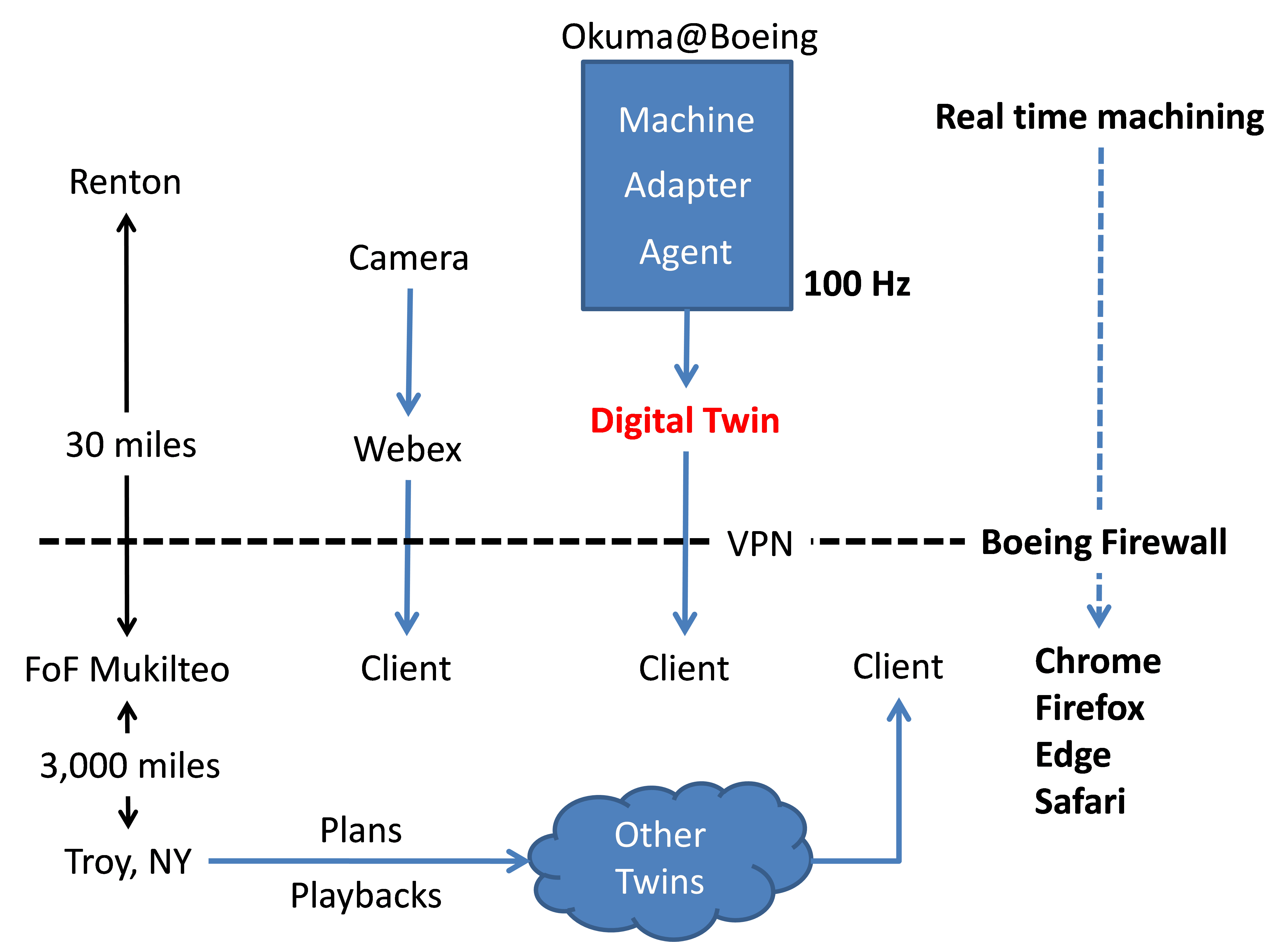
A digital twin is a digital model that mirrors a physical item or process. It uses data collected from sensors or other sources to update itself. This model acts like a bridge between the digital and physical worlds. It shows real-time data and simulates possible changes. The twin helps track performance and spot problems early.

Real-time Simulation

Real-time simulation means the digital twin updates instantly with live data. This lets users watch how the object works at any moment. The simulation helps predict what might happen next. It supports testing different scenarios without risking the real system. This saves time and reduces errors in operation or design.

Types Of Digital Twins

There are several types of digital twins, each serving a different purpose. A product twin focuses on a single item, like a machine. A process twin models workflows or factory operations. A system twin connects many parts to show how they interact. Each type helps in specific areas like maintenance or design improvements.

Comparing Digital Thread And Digital Twin

Digital Thread and Digital Twin are key concepts in modern technology. They both help companies manage products and systems better. Understanding their differences helps choose the right tool for each need.

Purpose And Function

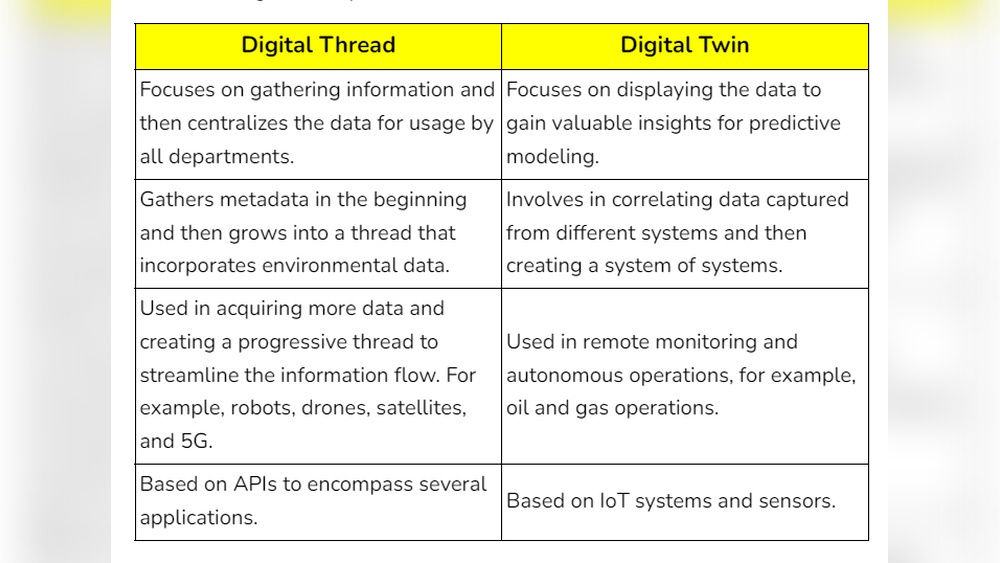
Digital Thread connects all data across a product’s lifecycle. It links design, manufacturing, and usage information. This connection helps track changes and improve processes.

Digital Twin is a virtual model of a specific object or system. It mimics real-time behavior and performance. It allows testing and monitoring without affecting the real product.

Data Sources And Usage

Digital Thread uses data from various sources along the product journey. It gathers information from design software, factory machines, and service records. This helps create a full history of the product.

Digital Twin relies on live data from sensors and systems. It collects real-time updates to simulate current conditions. This data helps predict failures and optimize operation.

Scope And Scale

Digital Thread covers the entire lifecycle of many products. It focuses on data flow between departments and stages. This broad scope supports collaboration and traceability.

Digital Twin focuses on one specific product or system. It provides detailed insights into that single item’s status. This narrow scale supports detailed analysis and control.

Digital Thread Vs Digital Twin: Key Differences Explained Clearly

Credit: www.compositesworld.com

Benefits Of Digital Thread

The digital thread connects data throughout a product’s lifecycle. It creates a clear path from design to manufacturing and beyond. This connection offers many benefits for companies. These benefits improve how teams work and how products are made.

Using a digital thread helps businesses stay organized and efficient. It provides accurate information at every stage. This reduces errors and speeds up decision-making.

Improved Collaboration

Teams can share real-time data easily. Everyone works with the same up-to-date information. This reduces misunderstandings and mistakes. Collaboration between departments becomes smoother. Faster communication leads to quicker problem-solving.

Enhanced Traceability

The digital thread tracks every change in the product. It records who made changes and when. This clear history helps find issues fast. It also supports quality control and compliance. Companies can quickly trace problems to their source.

Streamlined Manufacturing

Manufacturing processes become more efficient with the digital thread. It links design details directly to production steps. This reduces delays and rework. Machines and workers get accurate instructions on time. The result is faster production and less waste.

Benefits Of Digital Twin

Digital twins provide clear benefits for businesses and industries. They create virtual copies of real objects or systems. This helps companies understand, monitor, and improve their operations. Using digital twins leads to better decision-making and cost savings. Here are some key benefits of digital twins.

Predictive Maintenance

Digital twins help predict when machines might fail. They track equipment condition in real time. This allows fixing problems before they cause breakdowns. Predictive maintenance reduces downtime and repair costs. It also extends machine life and improves safety.

Performance Optimization

Digital twins allow testing changes in a virtual environment first. Companies can find the best ways to improve efficiency. They analyze data to spot weak spots and solve issues quickly. This leads to higher productivity and better product quality.

Risk Reduction

Digital twins simulate different scenarios and outcomes. This helps identify risks before they happen. Companies can plan for emergencies and reduce costly mistakes. It also supports safer operations and compliance with regulations.

Challenges In Implementation

Implementing Digital Thread and Digital Twin technologies brings many challenges. These challenges affect how companies collect, use, and manage data. They also impact the cost and technical effort needed to make these systems work well.

Data Management

Handling large amounts of data is a major challenge. Digital Threads and Digital Twins need accurate and updated data. Storing and processing this data requires strong systems. Poor data quality can cause wrong decisions and reduce trust.

Integration Complexity

Linking Digital Threads and Digital Twins with existing tools is difficult. Different systems use different formats and standards. Making these systems work together needs careful planning. It takes time and skilled staff to manage these connections.

Cost And Resources

Building and maintaining these technologies can be expensive. Companies must invest in software, hardware, and training. Small businesses may find these costs hard to afford. Resources must be carefully planned to avoid overspending.

Future Trends And Innovations

The future of Digital Thread and Digital Twin technologies shows exciting growth. These tools will become smarter and more connected. They will help industries work faster and make better decisions. New trends and innovations will shape how these technologies develop.

Advances in AI, IoT, and industry use will drive this change. Each area brings new ways to improve products and processes. Businesses will gain more insights and control than ever before.

Ai And Machine Learning

AI and machine learning will enhance both Digital Thread and Digital Twin. They can analyze large data sets quickly. This helps predict problems before they occur. Machines can learn from past data to improve future actions. AI will allow smarter simulations and real-time monitoring. It will reduce errors and save costs.

Iot Advancements

IoT devices will provide more data to Digital Thread and Digital Twin. Sensors will collect detailed information from machines and products. This will create accurate digital models. Faster communication will enable real-time updates. Better IoT will improve tracking and quality control. It will also support remote monitoring and maintenance.

Industry Adoption

More industries will adopt Digital Thread and Digital Twin technologies. Manufacturing, healthcare, and transportation are leading the way. They see clear benefits in efficiency and product quality. Smaller businesses will also start using these tools. Training and cost reduction will help spread adoption. Widespread use will lead to new applications and improvements.

Digital Thread Vs Digital Twin: Key Differences Explained Clearly

Credit: www.gardnerweb.com

Frequently Asked Questions

What Is The Difference Between Digital Thread And Digital Twin?

Digital thread links data across a product’s lifecycle. Digital twin is a virtual model of a product or system.

How Does Digital Thread Improve Product Development?

It connects data from design, manufacturing, and use. This helps teams work with up-to-date, consistent information.

Can Digital Twin Predict Product Performance?

Yes, it simulates real-world conditions to test performance. This helps find issues before physical prototypes are made.

Which Industries Use Digital Thread And Digital Twin?

Manufacturing, aerospace, automotive, and healthcare often use both. They improve design, production, and maintenance processes.

How Do Digital Twin And Digital Thread Work Together?

Digital thread provides data that feeds the digital twin. The twin uses this data to stay accurate and useful.

Is Digital Twin A Real-time System?

Mostly yes, it updates as new data arrives. This allows monitoring and quick reaction to changes or problems.

What Are The Benefits Of Using Digital Thread?

It reduces errors, saves time, and improves product quality. Teams get better insights and faster decision-making.

Conclusion

Digital Thread and Digital Twin both help improve products and processes. Digital Thread links data from start to finish in a product’s life. Digital Twin creates a virtual copy of a product or system. Each has its own strengths and uses.

Choosing the right one depends on your goals. Understanding these tools can guide better decisions in business. Both work together to enhance innovation and efficiency. Keep exploring how they fit your needs best.

Digitalization Vs Digitization: Key Differences You Must Know

Digitalization Vs Digitization

You’ve probably heard the terms “digitalization” and “digitization” used like they mean the same thing. But here’s the truth: they’re quite different, and knowing the difference can change how you approach your business or work.

Understanding these two ideas can help you make smarter decisions, save time, and stay ahead in a fast-moving world. Ready to clear up the confusion and unlock the power behind these terms? Keep reading, because what you learn here could transform the way you think about technology and growth.

Digitalization And Digitization Defined

Digitalization and digitization are terms often mixed up. Both relate to technology but have different meanings. Understanding their differences helps businesses use technology better. This section explains what each term means clearly and simply.

Meaning Of Digitization

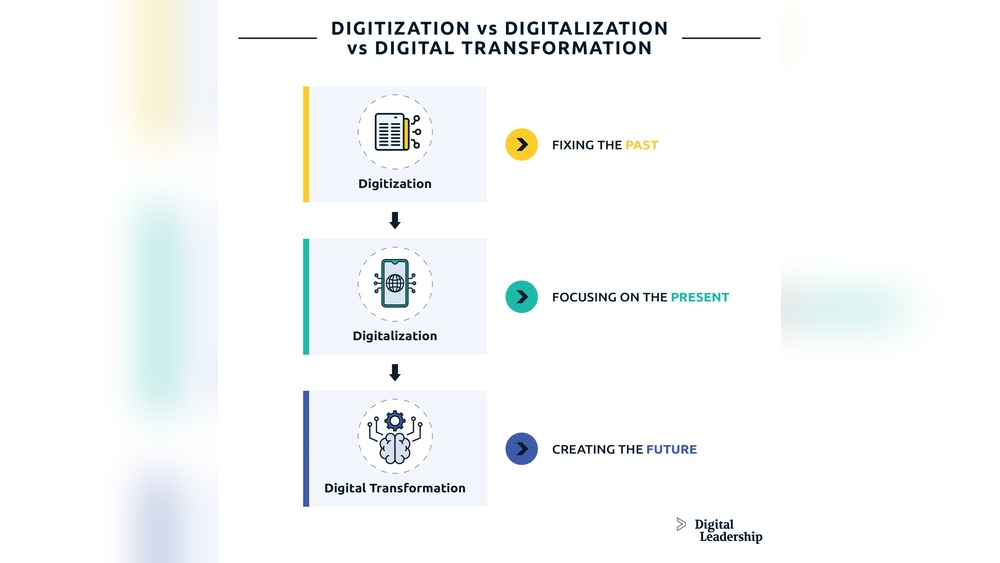
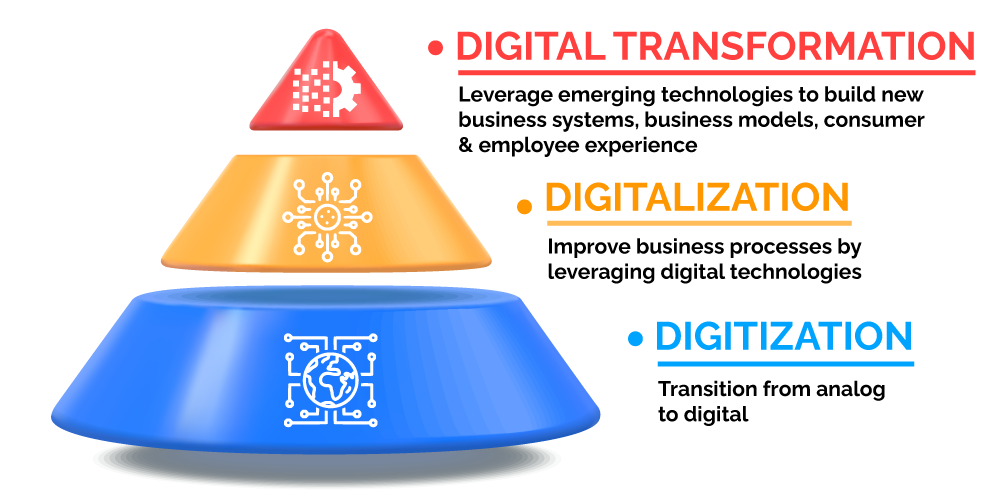
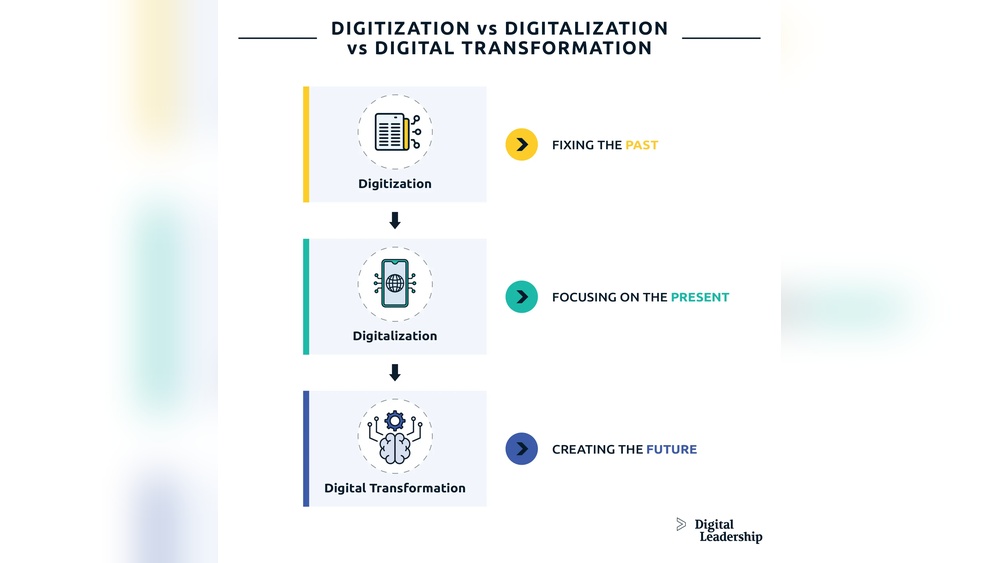
Digitization means turning information into digital form. It converts paper documents, photos, or sounds into computer files. For example, scanning a paper document creates a digital copy. Digitization makes data easy to store and share.

This process does not change how work is done. It just changes the format of information. Digitization is the first step toward using modern technology in business.

Meaning Of Digitalization

Digitalization means using digital technology to change business activities. It improves how work is done, making processes faster and easier. For example, using online tools to manage sales or customer service.

Digitalization transforms how companies operate. It helps them serve customers better and reduce costs. It goes beyond digitization by changing workflows and strategies.

Digitalization Vs Digitization: Key Differences You Must Know

Credit: www.arcweb.com

Core Differences Between Digitalization And Digitization

The core differences between digitalization and digitization shape how businesses evolve in the digital era. Both terms relate to technology but serve distinct roles. Understanding their differences helps companies use them effectively.

Digitalization transforms business models and processes by using digital technologies. Digitization, on the other hand, focuses on converting information from physical to digital form.

Scope And Purpose

Digitization converts analog data into digital formats. Examples include scanning documents or converting paper records to digital files. Its purpose is to make information easier to access and share.

Digitalization goes beyond data conversion. It changes how businesses operate and deliver value. It involves adopting digital tools to improve efficiency and customer experience.

Impact On Business Processes

Digitization improves existing processes by making data digital. It reduces errors and speeds up data handling. It does not change the process itself.

Digitalization redesigns processes using digital technologies. It creates new workflows and methods. This leads to higher productivity and innovation.

Technology Involvement

Digitization uses basic digital tools like scanners and software. These tools focus on data conversion and storage.

Digitalization involves advanced technologies such as cloud computing, artificial intelligence, and automation. These technologies enable smarter decision-making and new business models.

Benefits Of Digitization

Digitization brings many benefits to businesses and individuals. It changes how we handle information. Instead of paper files, data moves to digital forms. This shift makes tasks faster and easier. It also helps reduce errors and saves space. Digitization supports better decision-making and smoother workflows.

Efficiency In Data Management

Digitization speeds up data handling. Digital files are easier to sort and search. It reduces time spent on manual tasks. Automation can organize and update data quickly. Teams access the latest information without delay. This leads to fewer mistakes and better accuracy.

Cost Reduction

Digitization lowers costs by cutting paper use. It also reduces physical storage needs. Businesses save money on printing and shipping. Digital tools often replace expensive manual labor. Maintenance and retrieval of data become less costly. These savings improve overall budget management.

Improved Accessibility

Digital data is accessible from anywhere. Employees can view files on different devices. Remote work becomes easier and more effective. Sharing information happens instantly across teams. Accessibility supports faster responses and collaboration. It breaks down barriers caused by location.

Advantages Of Digitalization

Digitalization offers many benefits for businesses and customers. It changes how companies work and interact with users. This process helps companies become more efficient and competitive. It also improves the overall experience for customers.

Enhanced Customer Experience

Digitalization makes services faster and more accessible. Customers can get help anytime through online channels. Personalization becomes easier, meeting individual needs better. Simple and smooth interactions increase customer satisfaction. Companies can respond quickly to feedback and problems.

Business Model Innovation

Digitalization allows businesses to create new ways to deliver value. It opens doors to offer digital products and services. Companies can explore subscription or pay-as-you-go models. This flexibility helps attract and keep more customers. It also reduces costs by automating many processes.

Competitive Edge

Digitalization helps businesses stay ahead of competitors. It provides real-time data to make smart decisions. Companies can adapt quickly to market changes and trends. Faster innovation keeps products and services fresh. Efficient operations lower costs and improve profit margins.

Common Misconceptions

Many people confuse digitalization and digitization. They think these words mean the same thing. This confusion can cause mistakes in business and technology discussions. Understanding the differences helps make better decisions. Let’s clear up some common misconceptions.

Interchangeable Use Of Terms

People often use digitalization and digitization as if they are the same. Digitization means converting information into a digital format. Digitalization means using digital technology to change business processes. These two are related but not identical. Using them interchangeably can lead to wrong ideas about projects or goals.

Overlapping Technologies

Both digitalization and digitization use similar tools like computers and software. This overlap makes it harder to tell them apart. Digitization is about data conversion. Digitalization involves applying that data to improve work or services. Knowing this difference helps to focus on what technology solves. It also guides how to use technology smartly.

Real-world Examples

Understanding how digitization and digitalization work in real life helps clarify their differences. Examples from various industries show how each process affects daily operations and services. These examples make the concepts easier to grasp and relate to.

Digitization In Healthcare

Hospitals convert paper records into digital files. This change allows faster access to patient information. Doctors can view medical history on computers or tablets. It reduces the time spent searching for physical files. Digitization also helps in storing large amounts of data securely.

Medical images like X-rays and MRIs are digitized. Digital images improve clarity and sharing between specialists. They help doctors make quick and accurate diagnoses. Digitization in healthcare improves record keeping and patient care.

Digitalization In Retail

Retail stores use digital tools to improve customer experience. Online shopping platforms replace traditional stores. Customers browse and buy products using smartphones or computers. Digital payment systems make checkout fast and easy.

Stores analyze online and in-store data to understand customer behavior. This insight helps tailor marketing and inventory management. Digitalization allows retailers to offer personalized promotions and quick delivery. It changes the way stores operate and serve customers.

Future Trends

The future of digitalization and digitization is full of exciting changes. Both continue to shape how businesses and people work and live. Understanding upcoming trends helps companies stay ahead. It also guides investments in technology and training. The next few years will bring new tools and strategies that deepen digital transformation.

Emerging Technologies

New technologies are driving digital change faster than ever. Artificial intelligence is improving decision-making and automation. Cloud computing offers flexible and scalable resources for businesses. Internet of Things (IoT) connects devices and collects valuable data. Blockchain enhances security and trust in digital transactions. These technologies push the limits of what digitization can achieve. They also expand digitalization across entire industries.

Evolving Business Strategies

Businesses are changing how they use digital tools to grow. They focus on customer experience through personalized services and faster responses. Data analytics helps companies understand markets and improve products. Remote work and digital collaboration become standard practices. Companies adopt agile methods to adjust quickly to market shifts. These strategies help firms stay competitive in a digital world.

Digitalization Vs Digitization: Key Differences You Must Know

Credit: quixy.com

Digitalization Vs Digitization: Key Differences You Must Know

Credit: www.yokogawa.com

Frequently Asked Questions

What Is The Difference Between Digitalization And Digitization?

Digitization means converting information into digital form. Digitalization means using digital technology to improve business processes.

Why Is Digitalization Important For Businesses Today?

Digitalization helps businesses work faster and reach more customers. It improves efficiency and saves time and money.

How Does Digitization Help In Data Management?

Digitization makes data easy to store and access on computers. It reduces errors and speeds up information sharing.

Can Digitalization Improve Customer Experience?

Yes, digitalization allows businesses to offer faster and personalized services. It makes customer interactions smoother and more convenient.

What Are Common Examples Of Digitization And Digitalization?

Scanning paper documents is digitization. Using online tools to automate tasks is digitalization. Both help modernize work.

Conclusion

Digitalization and digitization often get mixed up but mean different things. Digitization means changing information into digital form. Digitalization is using digital data to improve business or life. Both help companies grow and work smarter. Understanding their differences helps you make better choices.

Start small, focus on clear goals, and learn as you go. This way, you can use digital tools well and see real benefits. Keep it simple and practical for the best results.

Digitalization Vs Digitization: Key Differences You Must Know

Digitalization Vs Digitization

Have you ever wondered what really sets digitalization apart from digitization? These two terms sound similar, but they have very different impacts on how you work and grow your business.

Understanding the difference can unlock new opportunities and help you make smarter decisions. This article will clear up the confusion and show you exactly how each one can change your approach to technology and success. Keep reading, and you’ll discover insights that could transform the way you think about your digital future.

Digitalization Vs Digitization: Key Differences You Must Know

Credit: www.arcweb.com

Digitalization And Digitization Basics

Understanding the basics of digitalization and digitization helps clarify their roles in today’s technology. Many confuse these terms, but they mean different things. Both play a vital role in how businesses and individuals use technology.

Defining Digitization

Digitization is the process of converting information from physical to digital form. It means turning paper documents into digital files, like PDFs or images. This step makes data easier to store and share. It does not change how the information is used; it just changes the format.

Defining Digitalization

Digitalization means using digital technology to change how work is done. It improves processes by using digital tools and systems. This can make tasks faster, cheaper, or more efficient. Digitalization often leads to new ways of doing business or serving customers.

Origins And Evolution

Digitization began with the rise of computers and scanners in the late 20th century. It focused on creating digital copies of analog information. Digitalization grew later, as internet and mobile technologies advanced. It now covers broad changes in business models and daily life. Both continue to evolve with new tech innovations.

Core Differences

Understanding the core differences between digitalization and digitization helps businesses make better decisions. Both terms relate to technology but serve different roles. Knowing their distinctions reveals how companies can use them effectively.

Scope And Purpose

Digitization means converting information into digital format. It often involves scanning paper documents or saving data electronically. Digitalization is broader. It means using digital technology to change how work is done and improve processes.

Processes Involved

Digitization focuses on simple tasks like creating digital files. It requires less effort and time. Digitalization needs deeper changes. It involves redesigning workflows and adopting new digital tools. This process is more complex and ongoing.

Impact On Business Models

Digitization improves efficiency by making data easier to access. It does not change business models much. Digitalization can transform business models. It creates new ways to deliver products and services. It often leads to better customer experiences and new revenue streams.

Technologies Driving Each Concept

Technologies play a key role in both digitization and digitalization. Each concept uses different tools and platforms. These technologies help businesses improve processes and services.

Digitization focuses on converting information from physical to digital form. Digitalization uses digital data to change business operations and models. Understanding the technologies behind each concept helps clarify their impact.

Tools For Digitization

Scanning devices capture paper documents as digital files. Optical Character Recognition (OCR) software turns images into editable text. Digital cameras and sensors collect data from physical objects. These tools transform analog information into digital formats quickly and accurately.

Platforms For Digitalization

Cloud computing platforms store and manage digital data securely. Enterprise Resource Planning (ERP) systems integrate business processes digitally. Customer Relationship Management (CRM) platforms enhance customer interactions using digital data. These platforms enable companies to redesign workflows and improve efficiency.

Role Of Automation And Ai

Automation speeds up repetitive tasks using software robots. Artificial Intelligence (AI) analyzes data to support decision-making. Together, automation and AI reduce errors and save time. They drive both digitization and digitalization by making processes smarter and faster.

Benefits And Challenges

Understanding the benefits and challenges of digitization and digitalization helps businesses grow. Both processes improve how work is done but in different ways. Knowing their strengths and risks guides better decisions.

Advantages Of Digitization

Digitization turns paper documents into digital files. It saves space and makes data easy to find. Companies reduce costs by cutting down on printing and storage.

Digital files can be shared quickly. This speeds up communication between teams. It also helps keep records safe from damage or loss.

Advantages Of Digitalization

Digitalization changes business processes using digital tools. It improves efficiency by automating routine tasks. This frees up employees to focus on more important work.

It helps create new services and products. Businesses can respond faster to customer needs. Digitalization often leads to better decision-making with real-time data.

Common Obstacles And Risks

Both digitization and digitalization face challenges. Cost of technology and training can be high. Some employees may resist changes to their work.

Data security is a major concern. Digital systems need strong protection against hacking. Without proper safeguards, companies risk losing sensitive information.

Technical problems can disrupt business operations. Reliable support and maintenance are essential. Planning helps reduce the risks and improve success.

Applications Across Industries

Digitalization and digitization have distinct roles across many industries. Both improve processes but in different ways. Digitization converts information into digital format. Digitalization uses that digital data to change business operations. Many industries apply these concepts to boost efficiency and service quality.

These technologies shape how industries operate today. They help reduce costs and save time. They also improve accuracy and customer experience. Let’s explore key industries and their uses of digitalization and digitization.

Manufacturing And Production

Manufacturing uses digitization to create digital versions of designs. Digitalization helps automate production lines and monitor machines. Factories collect data in real-time to avoid breakdowns. This improves quality and lowers waste. Digital tools speed up product development and delivery.

Healthcare And Medicine

Healthcare digitizes patient records for easy access. Digitalization allows remote monitoring and telemedicine services. Doctors use digital tools to analyze scans and test results. This leads to faster diagnoses and better care. Hospitals improve patient management and reduce errors.

Finance And Banking

Banks digitize documents and transactions for security and speed. Digitalization supports online banking and automated services. Customers access accounts anytime, from anywhere. Fraud detection systems use digital data to protect users. Finance companies analyze data to offer personalized products.

Education And Training

Education digitizes textbooks and learning materials for easier access. Digitalization enables online courses and virtual classrooms. Students learn at their own pace using digital tools. Teachers track progress through digital platforms. This makes education more flexible and inclusive.

Digitalization Vs Digitization: Key Differences You Must Know

Credit: www.yokogawa.com

Future Trends And Predictions

The future of digitalization and digitization holds many exciting possibilities. Both are set to change how businesses and people interact with technology. Trends show rapid growth in technology, workforce changes, and customer demands. Understanding these shifts helps companies stay ahead and serve their customers better.

Emerging Technologies

Artificial intelligence is becoming a key part of digital growth. It helps automate tasks and analyze data quickly. Cloud computing allows easy access to information from anywhere. The Internet of Things connects devices, making data collection smarter. These technologies support both digitalization and digitization efforts. They make processes faster and more efficient.

Shifts In Workforce Dynamics

Workplaces are changing with new digital tools. Remote work is now common due to better online platforms. Employees need new skills to handle digital systems. Training and education focus more on technology use. Teams collaborate across different locations seamlessly. These changes affect how companies organize work and manage talent.

Evolving Customer Expectations

Customers expect faster and more personalized service. They want easy access to information on multiple devices. Digital experiences must be smooth and reliable. People prefer self-service options powered by digital tools. Businesses that meet these demands gain trust and loyalty. Understanding customer needs drives future digital strategies.

Digitalization Vs Digitization: Key Differences You Must Know

Credit: quixy.com

Frequently Asked Questions

What Is The Difference Between Digitalization And Digitization?

Digitization means converting information from analog to digital form. Digitalization uses digital data to improve business processes and services.

How Does Digitization Impact Everyday Business Operations?

Digitization speeds up tasks by changing paper files into digital ones. It helps businesses access and share information easily and quickly.

Why Is Digitalization Important For Modern Companies?

Digitalization helps companies work smarter by using digital tools. It improves customer service and reduces costs through automation.

Can Digitization Happen Without Digitalization?

Yes, digitization can happen alone by scanning documents. But digitalization needs digitized data to change how work is done.

What Are Common Examples Of Digitalization In Daily Life?

Online banking, digital health records, and e-commerce are digitalization examples. They use digital tools to make tasks faster and simpler.

Conclusion

Digitalization and digitization are often mixed but mean different things. Digitization turns information into digital form. Digitalization uses that digital data to change how work gets done. Both play key roles in today’s technology world. Knowing the difference helps businesses choose the right path.

It also makes technology easier to use and understand. Embracing both can lead to smarter and faster processes. The choice depends on your goals and needs. Start small, learn, and grow with digital tools.

Digital Signal Vs Analog Signal: Key Differences Explained Clearly

Digital Signal Vs Analog Signal

Have you ever wondered how your phone call stays clear or how your favorite music sounds so crisp? It all comes down to the type of signals carrying the information—digital or analog.

Understanding the difference between digital signal vs analog signal can change the way you see technology around you. This knowledge isn’t just for tech experts; it can help you make smarter choices about devices, improve your gadgets’ performance, and even solve common tech problems.

Keep reading, and you’ll discover the key facts that make one signal type better in certain situations—and why it matters to you.

Signal Basics

Signals carry information from one place to another. They help devices talk to each other. Understanding signal types is key to learning about technology. Signals come in two main forms: analog and digital. Each type works differently and has unique uses.

What Is An Analog Signal

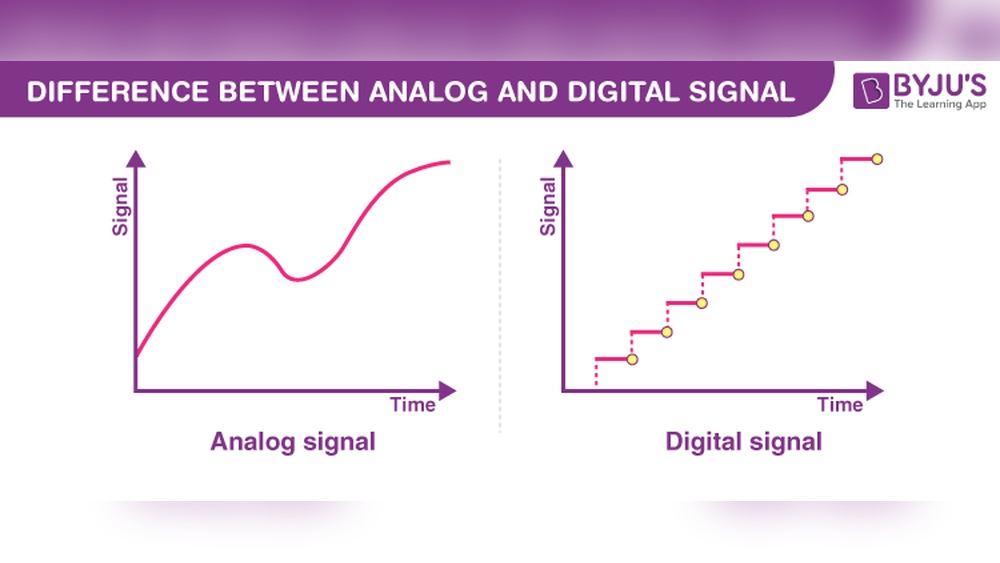
An analog signal is a continuous wave. It changes smoothly over time. This wave represents information like sound or light. The signal’s strength and frequency vary. Old radios and televisions use analog signals. The signal can lose quality over distance. Noise can also affect the signal.

What Is A Digital Signal

A digital signal uses fixed steps or levels. It represents data as numbers, usually 0 and 1. This makes the signal easy to copy and store. Digital signals are common in computers and smartphones. They resist noise better than analog signals. The signal stays clear even over long distances.

Digital Signal Vs Analog Signal: Key Differences Explained Clearly

Credit: controlbyte.tech

Waveform Characteristics

Waveform characteristics define how signals behave and carry information. Understanding these traits helps distinguish digital signals from analog signals. Each type has unique properties that affect its transmission and processing.

Continuous Vs Discrete Signals

Analog signals are continuous. They change smoothly over time without breaks. This means the waveform flows in an unbroken line. It can represent many values between its minimum and maximum.

Digital signals are discrete. They jump between specific values, usually just two: 0 and 1. These signals create square waves rather than smooth curves. The jumps happen at fixed time intervals, making digital signals easier to process.

Signal Amplitude And Frequency

Amplitude is the height of the waveform. Analog signals have varying amplitude that can take any value. This variation carries information in analog form.

Digital signals have fixed amplitude levels. The values switch between high and low states only. This clear difference helps reduce noise and errors.

Frequency is how often the waveform repeats in one second. Analog signals can have any frequency, changing smoothly over time. Digital signals use a clock signal to keep timing steady, ensuring accurate data transfer.

Data Representation

Data representation defines how information is carried by signals. It affects how devices read, store, and send data. Signals can represent data in two main ways: analog and digital. Each method uses a distinct encoding style to express information clearly. Understanding these methods helps grasp how technology processes data.

Analog Signal Encoding

Analog signals encode data through continuous waves. These waves vary in amplitude and frequency. The changes in the wave reflect the information. For example, sound waves are analog because they continuously change. This type of encoding captures subtle variations well. It suits natural signals like voice or music.

However, analog signals can face noise and distortion. These issues affect data accuracy. Small changes in the wave can lead to errors. Devices must work hard to keep the signal clear. Despite this, analog encoding remains common in many systems.

Digital Signal Encoding

Digital signals encode data using discrete values. They use binary code, which means ones and zeros. Each bit represents a piece of information. Digital encoding converts data into a sequence of 0s and 1s. This method makes data easy to store and transmit.

Digital signals resist noise better than analog signals. Small errors do not change the entire data set. This leads to higher accuracy and clearer communication. Digital encoding powers computers, smartphones, and modern networks. It allows for efficient data processing and error correction.

Transmission Methods

Transmission methods define how signals travel from one place to another. These methods affect signal quality, speed, and reliability. Understanding the differences helps in choosing the right system for communication.

Analog Transmission

Analog transmission sends continuous signals that vary in amplitude or frequency. It mimics real-world signals like sound or light. This method uses waves to carry information over cables or air.

Analog signals are prone to noise and distortion. Signal quality can degrade over long distances. Devices like amplifiers boost these signals but also increase noise.

This method suits simple communication systems such as radio and traditional telephony. It requires less complex hardware but offers lower data accuracy.

Digital Transmission

Digital transmission sends data in binary format, using 0s and 1s. It breaks information into discrete packets. This method allows error detection and correction during transmission.

Digital signals resist noise better than analog signals. They maintain quality over long distances without much loss. Repeaters regenerate the signal to keep it strong.

This method supports high-speed data transfer for internet, TV, and mobile networks. It requires more complex equipment but provides clearer, more reliable communication.

Noise And Interference

Noise and interference affect both digital and analog signals. They come from many sources like electrical devices, weather, and physical barriers. These unwanted signals can cause problems in communication and data transfer. Understanding their effects helps in choosing the right signal type for different uses.

Effects On Analog Signals

Analog signals carry information as continuous waves. Noise adds extra waves that mix with the original signal. This mixing causes the signal to lose clarity. The sound may become fuzzy, and images may blur or distort. The more noise present, the harder it is to understand the signal.

Interference can cause static, hissing, or crackling sounds in analog audio. In video, it may result in snow or lines on the screen. Analog signals do not have a way to correct these errors. Once noise enters, it stays and worsens over distance.

Effects On Digital Signals

Digital signals use binary code, with ones and zeros. Noise can cause some bits to flip from one to zero or vice versa. Digital systems check for errors and often fix them automatically. This error correction keeps the data clear and accurate.

Small amounts of noise usually do not affect digital signals much. The signal is either received correctly or lost entirely. This clear distinction reduces the impact of interference. Digital signals can travel longer distances without losing quality.

Signal Processing

Signal processing involves analyzing, modifying, and synthesizing signals. It helps improve the quality and usefulness of signals. Both analog and digital signals need processing, but the methods differ.

Processing changes raw signals into a form better for communication or storage. It reduces noise, enhances features, or extracts information. The choice of technique depends on the signal type.

Analog Signal Processing Techniques

Analog signal processing works with continuous signals. It uses circuits like filters, amplifiers, and modulators. Filters remove unwanted noise or interference from signals. Amplifiers increase the signal strength without changing its shape. Modulators change the signal to carry information over distances.

Analog techniques rely on physical components and real-time processing. They are simple but less flexible than digital methods. These techniques suit applications like radio broadcasting and audio equipment.

Digital Signal Processing Techniques

Digital signal processing uses computers or digital hardware. It converts analog signals into digital form first. Then, it applies algorithms to modify or analyze the data. Common techniques include Fast Fourier Transform (FFT), filtering, and compression.

Digital methods offer high precision and flexibility. They allow complex operations that analog circuits cannot perform. Digital processing suits mobile phones, computers, and modern communication systems. It helps improve signal clarity and data transmission efficiency.

Advantages And Disadvantages

Understanding the advantages and disadvantages of digital and analog signals helps choose the right technology. Both have unique traits that suit different needs. Knowing these traits prevents common mistakes in communication and electronics.

Benefits Of Analog Signals

Analog signals show data in a continuous form. This type captures real-world sounds and images smoothly. It works well for audio and video where detail is important. Analog devices often use less power. They are simpler and cheaper to build. The signal changes naturally, matching the original source.

Benefits Of Digital Signals

Digital signals use numbers to represent information. They resist noise and interference better than analog. This means clearer sound and sharper images. Digital data can be easily stored and copied without loss. Devices can send information faster using digital signals. They support modern technology like computers and smartphones.

Limitations Of Each Signal Type

Analog signals lose quality over long distances. Noise can distort the signal during transmission. Analog devices can be bulky and less flexible. Digital signals need more power for processing. They may lose detail if sampled too coarsely. Digital systems depend on software, which can fail. Each signal type fits different tasks and environments.

Applications

Both digital and analog signals play important roles in technology and communication. Each type of signal has specific uses based on its strengths. Understanding where each signal applies helps us see how they impact daily life and industry.

Common Uses Of Analog Signals

Analog signals carry information in continuous waves. They work well for sound and light waves. Radios use analog signals to send music and voice. Traditional telephones rely on analog signals for calls. Analog TV broadcasts use waves to deliver pictures and sound. Older audio equipment like vinyl records and cassette tapes use analog signals. Sensors measuring temperature, pressure, or light often output analog signals. These signals are simple and effective for many natural phenomena.

Common Uses Of Digital Signals

Digital signals represent data in binary form, using ones and zeros. Computers and smartphones process digital signals for fast communication. Digital TV and radio provide clearer sound and images. The internet depends on digital signals for data transmission. Digital cameras capture pictures using digital signals. Modern audio devices like CDs and MP3 players use digital signals. Digital signals are also vital in control systems and robotics. They offer high accuracy and easy storage for complex data.

Future Trends

The future of signals holds exciting changes and improvements. Both analog and digital signals are evolving. These changes will impact many fields like communication, healthcare, and entertainment. Understanding new trends helps us prepare for better technology and tools.

Emerging Technologies In Analog Signals

Analog signals are gaining new life with advanced sensors. These sensors capture data in natural forms like sound and light. Innovations improve signal clarity and reduce noise. New materials help create better analog devices. These devices work well in medical imaging and audio systems. Analog signal processing also uses machine learning for better results. This helps enhance real-world data accuracy.

Emerging Technologies In Digital Signals

Digital signals are advancing rapidly with faster processors. Quantum computing is starting to influence digital signal processing. This means quicker data analysis and better security. Artificial intelligence improves digital signal decoding and error correction. 5G and future 6G networks rely heavily on digital signals. These networks offer higher speeds and lower delays. Digital signals also drive progress in virtual and augmented reality. This will change how we interact with digital content.

Digital Signal Vs Analog Signal: Key Differences Explained Clearly

Credit: www.youtube.com

Digital Signal Vs Analog Signal: Key Differences Explained Clearly

Credit: crossroadenergy.com

Frequently Asked Questions

What Is The Main Difference Between Digital And Analog Signals?

Digital signals use binary code (0s and 1s), while analog signals use continuous waves. This makes digital signals more precise and less prone to noise.

How Do Analog Signals Carry Information?

Analog signals carry information through continuous variations in voltage or current. These changes represent sound, light, or other data forms.

Why Are Digital Signals Preferred In Modern Communication?

Digital signals offer better noise resistance and easier data processing. They allow for clearer transmission over long distances.

Can Analog Signals Be Converted To Digital Signals?

Yes, analog signals can be converted to digital using an Analog-to-Digital Converter (ADC). This process samples the signal at intervals and turns it into binary data.

Which Signal Type Is Better For Audio Quality?

Analog signals can capture more subtle sound changes, making them ideal for high-fidelity audio. Digital signals are easier to edit and store.

How Do Noise And Interference Affect Analog Signals?

Noise distorts analog signals, causing loss of quality. Since analog is continuous, it picks up more interference than digital signals.

What Are Common Uses Of Digital Signals In Daily Life?

Digital signals are used in computers, smartphones, and digital TV. They enable fast and reliable data transfer.

Conclusion

Digital and analog signals each have clear strengths and weaknesses. Digital signals offer better noise resistance and easier data storage. Analog signals carry smooth, continuous information, ideal for sound and video. Choosing the right signal depends on the task and environment.

Both types play key roles in technology today. Understanding their differences helps in making smart tech decisions. Simple yet important.

Nintendo Switch Digital Vs Physical: Ultimate Guide to Choose Right

Nintendo Switch Digital Vs Physical

Are you wondering whether to choose Nintendo Switch digital games or physical copies? This decision might seem simple, but it can impact how you play, store, and even save money.

You want the best gaming experience without any hassle or regrets. You’ll discover the real differences between digital and physical Nintendo Switch games. By the end, you’ll know exactly which option fits your gaming style and needs. Keep reading to make a choice you won’t second-guess.

Digital Games On Nintendo Switch

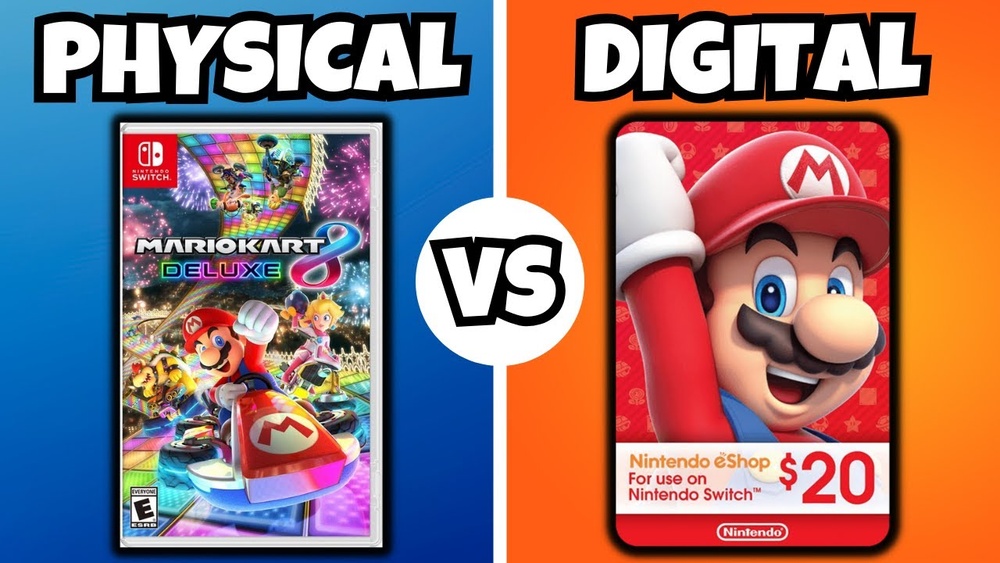
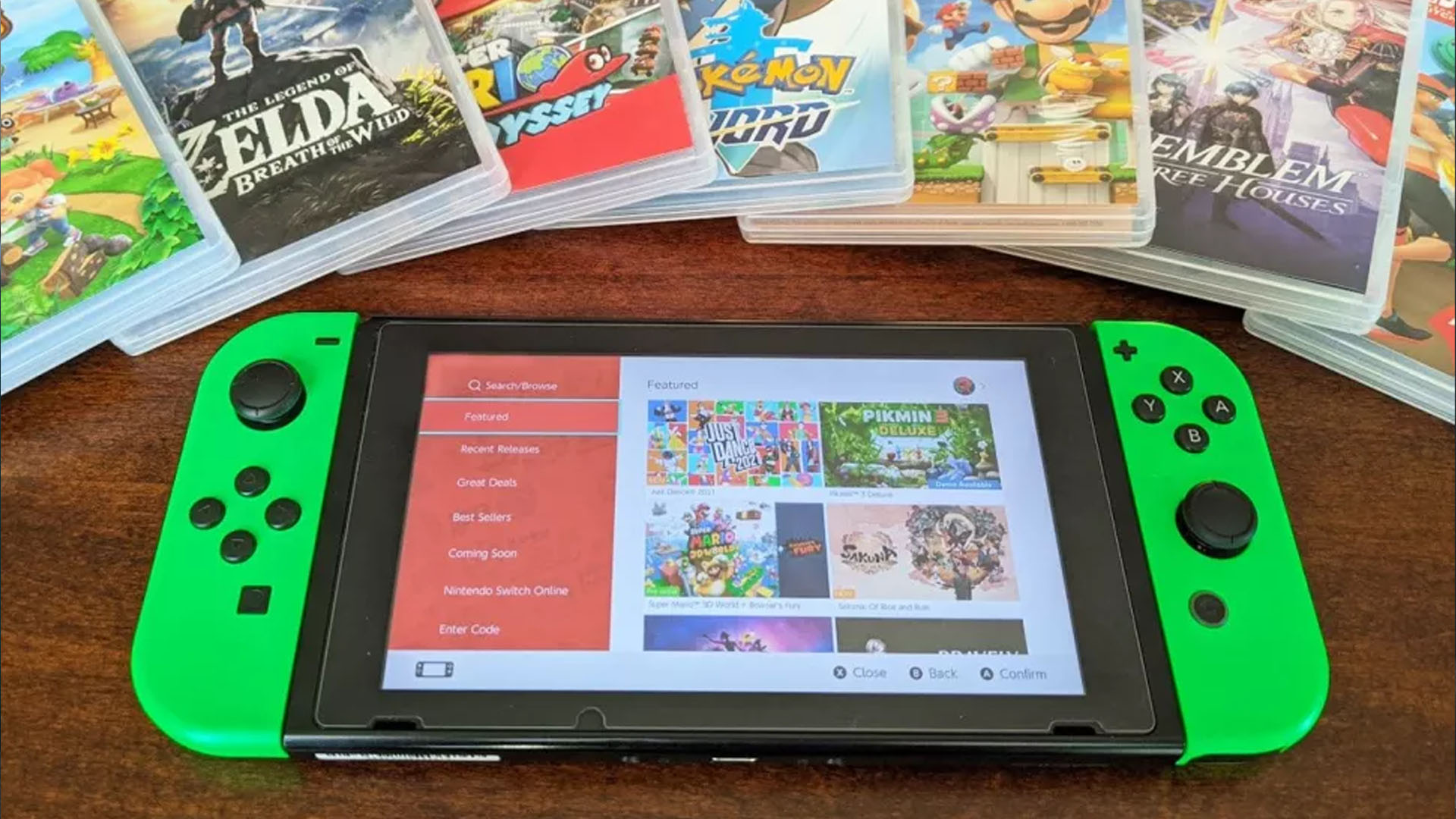
Digital games on the Nintendo Switch offer a different experience than physical copies. These games download directly to your console. You do not need to carry game cards or swap discs. This option suits players who prefer quick access and less clutter.

Many players enjoy the ease of browsing and buying games online. The Nintendo eShop provides a vast library of titles. You can start playing soon after purchase, without waiting for shipping or trips to the store.

Convenience And Accessibility

Digital games are easy to buy anytime and anywhere. Your Switch connects to the internet for instant downloads. No need to visit a store or wait for delivery. Games remain in your library, ready to play whenever you want.

You can switch between games without changing physical cards. This feature saves time and effort. It makes gaming more flexible, especially for people who travel or move often.

Storage Requirements

Digital games take up space on your Switch’s internal memory or SD card. Some games need several gigabytes. You may need to manage storage to keep your favorite titles. Deleting old games and re-downloading later is common.

Physical games do not use storage for the game itself. Still, updates and patches will take space. Careful storage management helps keep your system running smoothly.

Exclusive Digital Deals

Nintendo often offers special discounts on digital games. These deals appear only in the eShop. Sales, bundles, and limited-time offers provide savings. Players who buy digitally can benefit from these exclusive promotions.

Physical games rarely have these kinds of discounts. Digital-only games also appear first online. This option gives players early access to new titles and indie games.

Instant Updates And Patches

Digital games receive updates automatically when connected to the internet. This process fixes bugs and adds content without delay. You do not need to buy new discs or wait for physical updates.

Updates happen quietly in the background. Your game stays current and runs smoothly. This feature improves the overall gaming experience for digital players.

Nintendo Switch Digital Vs Physical: Ultimate Guide to Choose Right

Credit: www.imore.com

Physical Games On Nintendo Switch

Physical games on the Nintendo Switch offer a classic way to enjoy titles. Many players prefer holding a game cartridge in their hands. It creates a sense of ownership that digital files cannot match. Physical copies also come with box art and manuals, adding to the experience.

These games do not rely on internet downloads. Players can start gaming right after popping the cartridge in. This can save time and avoid storage problems on the Switch console. Collectors and casual gamers alike find value in physical editions.

Collectibility And Resale Value

Physical games can become collectibles over time. Rare or limited editions often increase in value. This makes physical copies interesting for collectors. Selling a physical game after playing is easy. Many stores and online platforms accept used games.

No Storage Limitations

Cartridges do not take up digital storage space. This is a big plus for Switch users with limited memory. Players can own many physical games without worrying about storage limits. It also helps keep the console running smoothly.

Sharing And Lending Games

Physical games allow easy sharing with friends and family. Lending a cartridge is simple and does not need extra setup. Players can swap games without digital restrictions. This flexibility encourages social gaming experiences.

Durability And Longevity

Cartridges are sturdy and last for years if cared for. They are less vulnerable to data corruption than digital files. Players can keep physical copies for a long time. This ensures games remain playable even after many years.

Cost Comparison

Choosing between Nintendo Switch digital and physical games often comes down to cost. Understanding the price differences and other factors helps make a smart choice. This section breaks down key points about costs and savings.

Price Differences

Physical games usually cost more upfront. Stores sell them with packaging and shipping costs. Digital games often have lower prices on the Nintendo eShop. Some digital titles launch at full price, but discounts appear faster. Physical copies can be resold or shared, adding value over time.

Sales And Discounts

Digital games get frequent sales on the eShop. Nintendo and third-party sellers offer special discounts regularly. Physical games rely on store sales and clearance events. Digital sales happen year-round, while physical discounts are less common. Sales on digital titles can save significant money.

Subscription Services Impact

Nintendo Switch Online offers free games monthly. These games add value for digital users. Subscribers can access classic games digitally without buying them. Physical game owners do not benefit from this service as much. Subscription perks can reduce the overall cost of digital gaming.

Performance And Usability

Performance and usability are key factors when choosing between Nintendo Switch digital and physical games. Both options offer unique experiences that impact how you play and enjoy your games. Understanding these differences helps pick the right format for your needs.

Loading Times

Physical games usually require the cartridge to load data. This can slow down the start time slightly compared to digital games. Digital games load directly from the internal memory or microSD card, making them faster in many cases. Still, the difference is often small during actual gameplay.

Game Installation Process

Physical games need no installation beyond inserting the cartridge. You can start playing quickly without waiting. Digital games require downloading and installing before playing. This can take time depending on your internet speed. Updates for digital games install automatically, while physical games need updates after inserting the cartridge.

Travel And Offline Play

Physical cartridges work offline with no internet needed. They are easy to carry and swap between Switch systems. Digital games require the console to be linked to your account. Offline play is possible, but some checks may need internet access. Physical games offer more freedom for travel and playing without Wi-Fi.

Space And Portability

Space and portability play a big role in choosing between digital and physical Nintendo Switch games. The way you store and carry your games affects your gaming experience. Each option has its own benefits and challenges in this area.

Physical Game Storage

Physical game cartridges are small and easy to carry. You can keep them in a case or box. This means less space is needed on your Switch console. No need to worry about storage limits on the device. You can swap cartridges anytime without deleting files.

However, carrying many cartridges can become bulky. Losing or damaging a cartridge means losing the game. Physical copies take up space in your bag or pocket. Still, many gamers like the feel of holding a game in their hands.

Digital Library Management

Digital games store directly on the Switch’s internal memory or SD card. This saves physical space and reduces clutter. You can carry hundreds of games without extra weight or bulk. Easy to download and launch games anywhere with Wi-Fi.

Storage size can limit how many digital games you keep. You may need to delete games to free up space. Managing downloads and updates requires some attention. Yet, digital libraries offer quick access to your full collection anytime.

Nintendo Switch Digital Vs Physical: Ultimate Guide to Choose Right

Credit: www.reddit.com

Multiplayer And Sharing Options

Multiplayer and sharing options are key to enjoying the Nintendo Switch. Choosing between digital and physical games affects how you play with others and share games. Both formats offer ways to connect and play together. Understanding these differences helps you pick the best option for your gaming style.

Playing with family and friends is more fun with the right sharing features and multiplayer options. Let’s explore how digital and physical games handle these aspects.

Family Sharing Features

Digital games support family sharing through one main account. This account holds the purchased games. Other users on the same console can access these games. Sharing is easy but limited to one console at a time. Physical games don’t need an account to share. You just swap the game cartridge between players. This works on any Switch console. Digital sharing saves space but requires internet. Physical games offer more freedom for sharing but need the cartridge.

Local Multiplayer Benefits

Physical games shine in local multiplayer. Each player can use their own Switch with a cartridge. No downloads or accounts needed. This makes quick setups easy. Digital games allow local multiplayer too. But some require downloads or extra steps. Physical copies are better if you want fast, hassle-free play with friends in one place. Both types support multiplayer, but physical games offer a simple, direct way to share and play locally.

Choosing Based On Gaming Habits

Choosing between digital and physical Nintendo Switch games depends a lot on your gaming habits. Different types of players have unique needs. Understanding these needs helps you pick the right format.

Your gaming style, collection interest, and internet access all play a role in this choice.

Casual Vs. Hardcore Gamers

Casual gamers often prefer digital games. They want quick access and no need to swap cartridges. Digital downloads let them start playing fast.

Hardcore gamers might lean toward physical copies. They like owning discs and trading games. Physical copies can also be resold or shared.

Collector Preferences

Collectors usually choose physical games. They enjoy the feel of game cases and artwork. Collecting physical copies adds value and nostalgia.

Digital games lack physical presence. They do not offer a tangible collection. Digital libraries only exist on the console.

Internet Connectivity Considerations

Good internet makes digital gaming easy. Downloading and updating games happens smoothly. No need to visit a store.

Poor or limited internet favors physical games. You can play without downloads or waiting. Physical games work offline right away.

Nintendo Switch Digital Vs Physical: Ultimate Guide to Choose Right

Credit: www.youtube.com

Frequently Asked Questions

What Are The Main Differences Between Digital And Physical Switch Games?

Digital games download directly to your console, no disc needed. Physical games come on cartridges you insert into the Switch.

Is Digital Or Physical Better For Saving Space On Switch?

Digital games need internal or SD card storage space. Physical cartridges take no storage but may need updates.

Can I Share Physical And Digital Switch Games With Friends?

Physical games can be lent or shared easily. Digital games are tied to your account and cannot be shared.

Do Digital Switch Games Offer Better Discounts Than Physical Copies?

Digital stores often have sales and discounts. Physical games can be found cheaper in stores or secondhand.

Which Option Is Safer From Loss Or Damage, Digital Or Physical?

Digital games are safe from physical damage but need account access. Physical games can be lost or damaged but don’t rely on accounts.

Conclusion

Choosing between Nintendo Switch digital and physical games depends on your needs. Digital games save space and offer quick access. Physical games can be shared and resold easily. Some players prefer collecting physical copies for their shelves. Others like the convenience of digital downloads.

Both options have clear benefits and small drawbacks. Think about how you play and store games. Your choice should match your habits and budget. Either way, Nintendo Switch offers fun and flexibility. Enjoy your gaming experience the way you want.

Offset Vs Digital Printing: Ultimate Guide to Choosing Right

Offset Vs Digital Printing

When it comes to bringing your ideas to life on paper, choosing the right printing method can make all the difference. You might have heard about offset and digital printing, but which one is truly best for your project?

Understanding the key differences between these two can save you time, money, and frustration. You’ll discover exactly how offset and digital printing work, what makes each unique, and which option suits your needs perfectly. Stick with me, and by the end, you’ll feel confident making the smart choice for your next print job.

Offset Vs Digital Printing: Ultimate Guide to Choosing Right

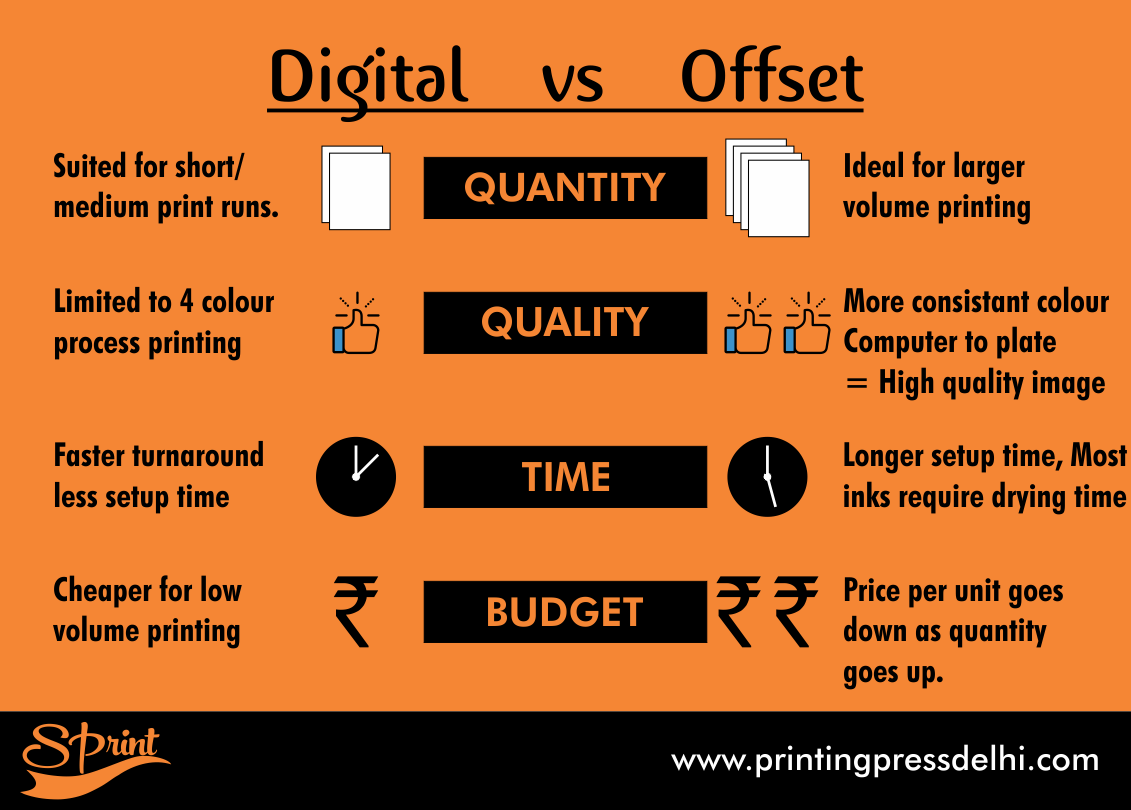
Credit: printingpressdelhi.com

Printing Basics

Printing plays a key role in sharing information and creating visual materials. Two main printing methods are offset and digital printing. Both have unique ways to put images and text on paper. Understanding these basics helps you choose the right method for your needs.

Each printing type uses different technology and steps. Knowing how they work can save time and money. It also ensures the best quality for your project.

How Offset Printing Works

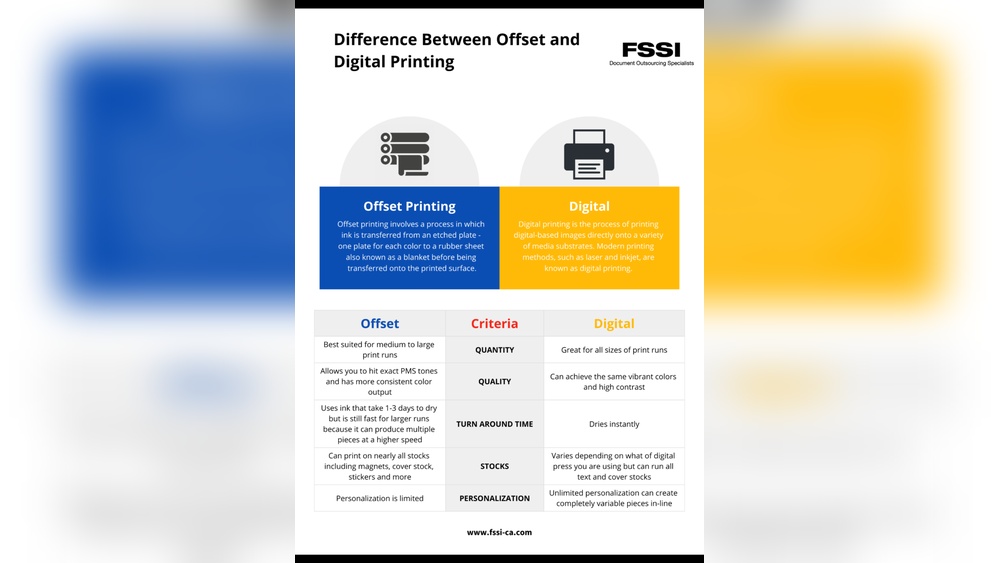
Offset printing uses plates to transfer images. The plates are metal sheets with your design. Ink sticks only to the image areas on the plates. Then, the ink moves from the plate to a rubber blanket. Finally, the blanket presses the ink onto paper.

This method works well for large print runs. It creates sharp, clear images and consistent colors. Setup takes time, but cost per piece drops with volume. Offset printing suits books, magazines, and packaging.

How Digital Printing Works

Digital printing skips the plates. It uses digital files sent directly to the printer. The printer sprays tiny droplets of ink or toner onto paper. This process is fast and flexible.

Digital printing fits small or quick jobs. It allows easy changes between prints. Colors may vary slightly from offset printing. This method suits flyers, business cards, and short runs.

Offset Vs Digital Printing: Ultimate Guide to Choosing Right

Credit: www.jukeboxprint.com

Cost Comparison

Cost plays a big role in choosing between offset and digital printing. Each method has different expenses that can affect your budget. Understanding these costs helps you pick the best option for your project.

Setup Costs

Offset printing has high setup costs. Plates need to be made before printing starts. This process takes time and money.

Digital printing setup is quick and cheap. It does not need plates. You just send the file and print.

Per-unit Costs

Offset printing becomes cheaper per unit as you print more. The initial cost spreads out over many copies.

Digital printing has a steady per-unit cost. Each copy costs about the same, no matter the amount.

Cost Efficiency By Volume

Offset printing works best for large print runs. The more you print, the less each item costs.

Digital printing suits small or medium runs. It is cost-effective for fewer copies and quick jobs.

Quality And Detail

Quality and detail are key factors in choosing between offset and digital printing. Both methods offer unique strengths that affect the final look of printed materials. Understanding these differences helps pick the right printing style for your needs.

Image Sharpness

Offset printing produces very sharp images with fine lines and clear details. It uses metal plates that transfer ink precisely onto paper. This method suits projects needing crisp and professional visuals.

Digital printing is good for sharp images but can sometimes miss small details. It uses toner or inkjet technology, which may blur tiny lines slightly. Still, it works well for most everyday prints.

Color Accuracy

Offset printing offers excellent color accuracy and consistency. It uses CMYK inks mixed exactly to match specific colors. This makes it ideal for brand logos and color-sensitive designs.

Digital printing colors can vary slightly between prints. It relies on pre-set color profiles that might not match perfectly every time. For casual prints, this is usually not a big issue.

Material Compatibility

Offset printing works well on many types of paper and materials. It can print on thick cardstock, glossy paper, and textured surfaces without losing quality.

Digital printing is best on standard papers and some coated stocks. It may struggle with very thick or unusual materials. Still, it offers quick printing on common media types.

Offset Vs Digital Printing: Ultimate Guide to Choosing Right

Credit: www.sunprinting.com

Turnaround Time

Turnaround time is a key factor in choosing between offset and digital printing. It affects how fast you get your printed materials ready. Each printing method has unique timing features. Understanding these can help you make the right choice for your project.

Setup Time Differences

Offset printing needs more setup time. Plates must be made for each color. This process takes several hours or even days. Digital printing needs little to no setup. It prints directly from the computer file. This saves a lot of time for small jobs.

Print Speed

Offset printing is very fast once setup is done. It can produce thousands of copies quickly. Digital printing is slower per copy but faster for short runs. It prints one page at a time. Speed depends on the printer model and job size.

Rush Job Feasibility

Digital printing suits rush jobs best. It starts printing immediately. No plate making means no waiting. Offset printing struggles with tight deadlines. Setup time delays the start of printing. Digital offers more flexibility for last-minute orders.

Customization And Flexibility

Customization and flexibility are key factors when choosing between offset and digital printing. Both methods offer unique strengths in handling different printing needs. Understanding these can help you decide which is best for your project.

Variable Data Printing

Digital printing excels in variable data printing. It allows changing text and images for each printed piece. This is great for personalized marketing materials. Offset printing cannot easily change content once the plates are made. Digital printing saves time and money for customized jobs.

Design Changes

Design changes are easier with digital printing. You can update your file quickly before printing. Offset printing requires new plates for any design change. This makes it less flexible and more costly for adjustments. Digital printing suits projects needing frequent updates or edits.

Short Runs And Prototyping

Short runs and prototyping work well with digital printing. It does not require setup costs like offset printing. This makes it cheaper and faster for small batches. Offset printing is better for large runs due to its lower cost per unit. Digital printing helps test designs before mass production.

Environmental Impact

Digital printing often uses less water and creates less waste than offset printing. This makes it a greener choice for small print runs. Offset printing, however, may be better for large jobs but can have a bigger environmental footprint.

Ink And Chemical Use

Offset printing uses oil-based inks and many chemicals. These can harm the environment if not handled well. Digital printing uses water-based or UV inks that are less toxic. It needs fewer chemicals overall. This makes digital printing a cleaner choice for the planet.

Waste Production

Offset printing creates more waste. Plates, paper, and ink leftovers add up quickly. Digital printing produces less waste because it prints on demand. There is no need for plates or long setup processes. This reduces paper waste and energy use significantly.

Sustainability Practices

Many printers now use recycled paper and eco-friendly inks. Digital printing supports these practices better due to small print runs. Offset printing still needs large runs, which can lead to excess stock. Digital printing offers more control, helping reduce environmental impact.

Choosing By Project Type

Choosing between offset and digital printing depends on the type of project. Each method suits different needs and results. Understanding these differences helps pick the best option for your work.

Marketing Materials

Digital printing works well for small batches of flyers, brochures, and posters. It offers quick turnaround and easy changes. Offset printing suits large runs, providing consistent quality and lower cost per piece.

Books And Magazines

Offset printing is ideal for long runs of books and magazines. It produces sharp images and clear text at a lower cost. Digital printing is best for short runs or print-on-demand copies, avoiding excess stock.

Packaging And Labels

Offset printing delivers vibrant colors and sharp details for packaging and labels. It handles large volumes efficiently. Digital printing allows for customization and variable data on smaller batches, perfect for unique designs.

Future Trends

The printing industry is evolving fast. Both offset and digital printing face changes that affect how businesses use them. Understanding future trends helps companies choose the best method. This section explores key shifts shaping printing.

Technological Advances

New machines print faster and with better quality. Digital printers now match offset for color accuracy. Software improvements allow easier design adjustments. Automation reduces human errors and saves time. These advances cut costs and boost efficiency.

Hybrid Printing Solutions

Hybrid printing blends offset and digital methods. It uses the speed of offset for large runs. Digital printing handles short runs and variable data. This mix offers flexibility and lower waste. Businesses get the best of both worlds.

Industry Shifts

Demand grows for eco-friendly and sustainable printing. Companies seek inks and papers with less impact. Digital printing supports on-demand jobs, reducing excess stock. Offset printing adapts by using greener materials. The market moves toward responsible production practices.

Frequently Asked Questions

What Is The Main Difference Between Offset And Digital Printing?

Offset printing uses plates to transfer ink, while digital printing uses digital files directly. Offset suits large runs; digital is best for short runs and quick jobs.

Which Printing Method Is Cheaper For Small Print Runs?

Digital printing is cheaper for small print jobs because it has lower setup costs. Offset printing requires costly setup, so it is better for large quantities.

How Does Print Quality Compare Between Offset And Digital Printing?

Offset printing generally offers higher image quality and color accuracy. Digital printing quality has improved but may not match offset for fine details.

Can Offset Printing Handle Complex Color Designs?

Yes, offset printing manages complex color designs well with precise color matching. It uses CMYK and spot colors for vibrant, consistent results.

Is Digital Printing Faster Than Offset Printing?

Digital printing is faster since it skips plate creation and setup. Offset printing takes longer but is efficient for high-volume projects.

Which Printing Method Is More Eco-friendly?

Digital printing is usually more eco-friendly due to less waste and fewer chemicals. Offset printing uses more resources and creates more waste.

When Should I Choose Offset Printing Over Digital Printing?

Choose offset printing for large orders needing high quality and consistent colors. Digital printing is better for quick, small, or personalized jobs.

Conclusion

Choosing between offset and digital printing depends on your needs. Offset printing suits large orders with consistent quality. Digital printing works best for small runs and quick jobs. Cost, speed, and print volume all matter in your decision. Each method has clear strengths for different projects.

Knowing these differences helps you pick the right option. This way, your prints will look great and meet your goals. Keep your budget and timeline in mind too. Now, you can make a smart choice for your printing needs.

Digital Piano Vs Keyboard: Ultimate Guide to Choose the Best

Digital Piano Vs Keyboard

Are you torn between choosing a digital piano or a keyboard? You’re not alone.

Both offer great ways to enjoy music, but they serve different needs and styles. Understanding their key differences can save you time, money, and frustration. You’ll discover which option fits your goals, skill level, and budget. Keep reading to find out how to make the best choice for your musical journey.

Key Differences Between Digital Pianos And Keyboards

Digital pianos and keyboards both serve musicians but differ in many ways. These differences affect how they sound, feel, and function. Knowing these can help you choose the best instrument for your needs.

Sound Quality And Tone

Digital pianos focus on producing a rich, natural piano sound. They use high-quality samples from real acoustic pianos. Keyboards offer various sounds, not just piano tones. These include strings, drums, and synth effects. The sound quality on keyboards varies widely.

Keyboard Action And Feel

Digital pianos have weighted keys that mimic an acoustic piano’s feel. This helps with finger strength and playing technique. Keyboards often have lighter, unweighted keys. They are easier to press and better for beginners or quick playing.

Portability And Size

Keyboards are usually smaller and lighter. This makes them easy to carry and store. Digital pianos tend to be larger and heavier. They often look like traditional pianos and require more space.

Features And Functions

Keyboards come with many built-in features. These include rhythms, recording options, and learning tools. Digital pianos focus on replicating a real piano experience. They have fewer extra sounds and functions.

Price Range

Digital pianos generally cost more due to their realistic sound and feel. Keyboards are available in a wide price range. Budget models are affordable, while advanced ones can be expensive.

Choosing Based On Skill Level

Choosing between a digital piano and a keyboard depends a lot on skill level. Each type suits different players. Understanding your level helps pick the right instrument. This choice can improve practice and enjoyment.

Beginners And Learning

Beginners need simple tools to start well. Digital pianos offer weighted keys that feel like real pianos. This helps build finger strength and good habits. Keyboards are lighter and often cheaper. They have many sounds and rhythms, which can make learning fun. For true beginners, a keyboard may be enough to explore music.

Intermediate Players

Intermediate players want more features and better sound quality. Digital pianos provide realistic piano tones and touch response. This supports skill growth and playing accuracy. Keyboards offer variety and portability, which suit different styles. Players at this level benefit from an instrument that encourages daily practice and skill improvement.

Advanced Musicians

Advanced musicians need high-quality sound and feel. Digital pianos often have graded hammer action keys that mimic acoustic pianos. They include detailed sound samples for expressive play. Keyboards at this level focus on versatility and extra functions like recording. Professionals choose based on style and performance needs. A good instrument helps refine technique and expression.

Sound And Speaker Systems

Sound and speaker systems are key factors when choosing between a digital piano and a keyboard. They affect how the music sounds and the overall playing experience. Understanding the differences helps you pick the best option for your needs.

Built-in Speakers

Digital pianos usually have strong built-in speakers. They create rich, clear sounds that mimic an acoustic piano. Keyboards often have smaller speakers. These may not deliver as deep or natural sound as digital pianos. Built-in speakers are handy for practice and small rooms.

External Amplification

Both digital pianos and keyboards can connect to external amps or speakers. This boosts volume for bigger spaces or performances. Keyboards often need external amplification for better sound. Digital pianos may not require it due to better built-in speakers. External amplification adds flexibility for different settings.

Sound Customization

Keyboards offer many sound options, from pianos to synths and drums. Players can adjust tones and effects easily. Digital pianos focus on authentic piano sounds, with fewer customization choices. They aim for a true piano feel. Sound customization is great for creative players and various music styles.

Digital Piano Vs Keyboard: Ultimate Guide to Choose the Best

Credit: www.pianodreamers.com

Portability And Space Considerations

Choosing between a digital piano and a keyboard often depends on space and how easy it is to move the instrument. Both have unique features that fit different needs.

Portability and space are key factors for many players. Some need an instrument for home use only. Others want something they can take on the road. Storage also matters in small rooms or apartments.

Home Use

Digital pianos usually look and feel like traditional pianos. They often take up more room. They need a sturdy stand or furniture. This suits players with enough space at home.

Keyboards are lighter and smaller. They fit on tables or special stands. They are perfect for limited space or simple setups. Many models have built-in speakers, so no extra gear is needed.

Travel And Gigging

Keyboards win for travel and gigs. They weigh less and come with carry bags. Setting up is quick and easy. Many have battery power for places without plugs.

Digital pianos are heavier and bulkier. Moving them requires extra care and helpers. Some portable models exist but still weigh more than keyboards.

Storage Options

Keyboards fold down or slide into small spaces. They fit under beds or in closets. Digital pianos need dedicated space and often stay in one spot.

Choosing the right instrument saves room and hassle. Think about where you will use and keep your instrument.

Additional Features To Consider

Choosing between a digital piano and a keyboard involves more than just sound and feel. Extra features can greatly affect your playing experience. These features help with practice, creativity, and connection to other devices. Consider these options carefully to find the right fit for you.

Recording And Connectivity

Many digital pianos and keyboards come with recording options. You can capture your playing and listen back to improve. Some models allow multi-track recording for layering sounds.

Connectivity matters too. USB and MIDI ports link your instrument to computers or apps. Bluetooth support makes wireless connections possible. This helps share music or use digital tools easily.

Built-in Rhythms And Voices

Keyboards often include many rhythms and instrument voices. This lets you play with backing tracks and different sounds. Digital pianos usually have fewer voices but focus on piano tones.

Rhythms can help you keep time and add fun to practice. Voices let you explore other music styles without extra gear.

Learning Tools And Apps

Some instruments come with built-in lessons or apps for learning. Light-up keys and metronomes guide your practice. These tools support beginners and help track progress.

Apps can offer sheet music, tutorials, and interactive games. They make learning simple and engaging. Check if the instrument supports popular learning apps.

Digital Piano Vs Keyboard: Ultimate Guide to Choose the Best

Credit: www.pianodreamers.com

Maintenance And Durability

Maintenance and durability are key factors when choosing between a digital piano and a keyboard. Both require care to stay in good shape. Their build quality and how you look after them affect how long they last.

Understanding these points helps you make a smart choice. It also saves money on repairs or replacements later.

Build Quality

Digital pianos usually have heavier, solid parts. They often mimic traditional pianos with sturdy keys and frames. Keyboards tend to be lighter and made with plastic. This makes them easy to carry but less tough.

Strong build quality means less chance of damage. Digital pianos can handle regular use better. Keyboards are good for beginners or casual players who move their instrument often.

Care Tips

Keep both instruments away from dust and moisture. Use a soft cloth to clean the surface. Avoid liquids near the keys to prevent damage. Store them in a safe place when not used.

Regularly check cables and connections. Loose parts can cause problems over time. Cover your digital piano or keyboard with a dust cover. This simple step extends the life of the instrument.

Longevity

Digital pianos tend to last longer due to their sturdy build. They can serve players for many years with proper care. Keyboards may wear out faster, especially if moved often.

Some keyboards have replaceable parts, which helps extend their life. Choosing a model with good reviews on durability is smart. Proper maintenance boosts the lifespan of either instrument.

Popular Models And Brands

Choosing between a digital piano and a keyboard means understanding the best models and brands. Popular options vary by features, sound quality, and price. Some brands focus on authentic piano feel. Others offer versatile keyboards with many sounds and functions.

This section highlights top digital pianos, keyboards, and budget-friendly choices. Each category includes trusted brands known for quality and reliability. These picks help buyers make smart decisions based on needs and budgets.

Top Digital Pianos

Yamaha is a leading name in digital pianos. Their P-Series offers realistic key action and great sound. Roland is another top brand with models like the FP series. These pianos mimic acoustic piano touch well. Casio also makes popular digital pianos, such as the Privia line. They balance price and performance effectively.

Top Keyboards

Korg and Yamaha dominate the keyboard market. Korg’s B2 and Korg EK-50 provide many voices and rhythms. Yamaha’s PSR series offers user-friendly features for beginners. Casio’s CT and WK series include portable, versatile keyboards. They suit players wanting variety in sounds and styles.

Budget-friendly Options

Alesis and Donner produce affordable digital pianos and keyboards. Alesis Recital is popular for its weighted keys and sound quality. Donner’s DEP series gives good value with basic piano features. Yamaha and Casio also have entry-level models priced for beginners. These options suit learners who want quality without a high cost.

Digital Piano Vs Keyboard: Ultimate Guide to Choose the Best

Credit: www.youtube.com

Making The Final Choice

Choosing between a digital piano and a keyboard can feel tricky. Both have unique features that fit different players. Understanding your needs and testing options helps make a clear choice. Also, knowing where to buy is important for a smooth purchase.

Assessing Your Needs

Think about your skill level and goals. Beginners may want a keyboard with simple functions. More serious players might prefer a digital piano with weighted keys. Consider space and budget too. Decide if portability is important or if you need a full piano feel.

Testing Before Buying

Try both instruments in a store. Play different sounds and check the key feel. Notice how the keys respond to touch. Listen to the sound quality carefully. Testing helps you find what feels right for your style and comfort.

Where To Purchase

Buy from a reliable music store or a trusted online retailer. Music stores let you try instruments and get expert advice. Online shops offer more options and often better prices. Look for stores with good return policies and customer support.

Frequently Asked Questions

What Is The Main Difference Between Digital Piano And Keyboard?

A digital piano mimics an acoustic piano’s sound and feel. A keyboard offers more sounds and features but less realistic keys.

Which Is Better For Beginners, Digital Piano Or Keyboard?

Keyboards are usually better for beginners due to lighter keys and more learning features. Digital pianos help build strong piano technique.

Can Digital Pianos Be Used For Live Performances?

Yes, digital pianos can be used live, especially models with good speakers or output jacks. They offer authentic piano sound on stage.

Do Keyboards Offer More Sound Options Than Digital Pianos?

Yes, keyboards provide a wide range of sounds, including drums, strings, and synths. Digital pianos focus mainly on piano tones.

Is Portability A Factor Between Digital Pianos And Keyboards?

Keyboards are generally lighter and easier to carry. Digital pianos tend to be heavier because of weighted keys and larger frames.

Conclusion

Choosing between a digital piano and a keyboard depends on your needs. Digital pianos offer a feel closer to real pianos. Keyboards provide more sounds and features for variety. Think about your skill level and budget before deciding. Both instruments can help you enjoy music and improve skills.

Play around with each to find what suits you best. Keep practicing, and most of all, have fun making music!

Storyscraper Lifetime Deal: Unlock Unlimited Content Creation

Storyscraper Lifetime Deal

Storyscraper is a powerful tool for content creators. It helps gather and repurpose online content with ease.

Imagine never having to worry about content creation again. Storyscraper is here to help you with that. This tool allows you to scrape and curate content from various sources. This means more time for you to focus on other tasks.

Storyscraper’s lifetime deal is a great offer. You pay once and use it forever. This is perfect for bloggers, marketers, and anyone needing fresh content. In this blog, we will explore the benefits of the Storyscraper lifetime deal. Discover why it is a smart investment for your content needs. Stay with us to learn more.

Storyscraper Lifetime Deal: Unlock Unlimited Content Creation

Credit: www.grabltd.com

Introduction To Storyscraper

In the digital age, content is king. Creating engaging stories can be challenging. Storyscraper simplifies this process. It helps you generate captivating stories effortlessly. This tool is perfect for content creators, marketers, and writers. With Storyscraper, you can create unique content quickly.

What Is Storyscraper?

Storyscraper is an innovative tool for content generation. It uses advanced algorithms to scrape and spin content. This means you get fresh, unique stories every time. It’s designed to help you save time and effort in content creation.

Storyscraper is user-friendly and intuitive. You don’t need technical skills to use it. Just input your topic, and let Storyscraper do the rest. It generates stories that are SEO-optimized and engaging.

Key Features

Storyscraper comes with a variety of features. These features make content creation easy and efficient.

  • Automated Content Generation: Generate stories with just a few clicks.
  • SEO Optimization: Ensure your content ranks well on search engines.
  • Customizable Templates: Use pre-designed templates for different content types.
  • Multi-language Support: Create content in various languages.
  • Regular Updates: Get the latest features and improvements.

These features make Storyscraper a powerful tool for content creators. It’s designed to make your job easier and your content more engaging.

Feature Benefit
Automated Content Generation Save time and effort in content creation.
SEO Optimization Improve your search engine rankings.
Customizable Templates Create professional-looking content easily.
Multi-language Support Reach a global audience with your content.
Regular Updates Access the latest features and improvements.

Benefits Of The Lifetime Deal

Investing in the Storyscraper Lifetime Deal offers numerous advantages. This deal is perfect for those who want long-term benefits without recurring costs. Let’s explore some key benefits.

Cost Savings

The Storyscraper Lifetime Deal helps you save money. You pay once and avoid monthly fees. This deal is cost-effective for long-term users. Over time, you save more compared to subscription plans. It is a smart investment for those who plan to use the tool often.

Unlimited Access

With the Storyscraper Lifetime Deal, you get unlimited access. There are no restrictions on usage. You can use all the features as much as you want. This ensures you get the most out of your investment. Enjoy all the benefits without worrying about hitting limits.

How Storyscraper Works

Storyscraper is a tool for creating content quickly and easily. It uses advanced algorithms to help users generate high-quality articles. With Storyscraper, you can produce content for blogs, websites, and social media.

Content Generation Process

The content generation process in Storyscraper is straightforward. First, you input a topic or keyword. The tool then analyzes the input and gathers relevant information. It pulls data from various sources to ensure accuracy.

Next, Storyscraper organizes the information into a coherent structure. It creates an outline for the article. The tool then writes the content, ensuring it is unique and engaging. Finally, you can review and edit the content to fit your needs.

User Interface Overview

Storyscraper features a user-friendly interface. The dashboard is clean and easy to navigate. You can find all the necessary tools and options without any hassle.

The main screen displays your recent projects. You can start a new project with a single click. The input field for topics and keywords is prominent and easy to use. Once you generate content, the editing tools are straightforward.

Storyscraper also offers customization options. You can adjust the tone, length, and style of the content. This ensures that your content matches your brand’s voice.

In summary, Storyscraper simplifies content creation. Its intuitive design and powerful algorithms make it a valuable tool for content creators.

Storyscraper Lifetime Deal: Unlock Unlimited Content Creation

Credit: saaspirate.com

Target Users For Storyscraper

Storyscraper is an innovative tool designed to make content creation easier. It is perfect for those who produce a lot of written content. But who benefits the most from using Storyscraper? Let’s explore the target users for Storyscraper.

Bloggers And Writers

Bloggers and writers always need fresh content. Storyscraper helps them generate ideas quickly. It can scrape the web for relevant information. This saves time and effort. Writers can focus on creating engaging stories. They get inspiration without spending hours on research.

Storyscraper also helps in organizing content. Writers can use it to outline articles. They can gather facts and quotes easily. This tool simplifies the writing process. It is a great asset for anyone who writes regularly.

Marketing Professionals

Marketing professionals need to create compelling content. Storyscraper helps them stay ahead. It provides the latest trends and information. Marketers can produce relevant content quickly. This keeps their audience engaged.

The tool also helps in keyword research. Marketers can use it to find popular keywords. This improves SEO and drives traffic to their sites. Storyscraper is a valuable tool for any marketing team.

Storyscraper also aids in content planning. Marketers can schedule posts and manage content calendars. This ensures a steady flow of fresh content. It makes marketing campaigns more effective.

Success Stories

The Storyscraper Lifetime Deal has helped many users achieve their content goals. Here, we will explore some of these success stories. Learn from real experiences and understand the impact of Storyscraper.

Case Studies

Let’s dive into some case studies that highlight the power of Storyscraper. These examples will show how different users leveraged the tool to enhance their content strategy.

User Industry Results
John Doe Marketing Increased blog traffic by 50%
Jane Smith Education Created 100+ lesson plans
Mike Brown Travel Boosted social media engagement

User Testimonials

Hear directly from the users of Storyscraper. These testimonials offer valuable insights into their experiences and achievements.

  • Anna White: “Storyscraper saved me countless hours. I can now focus on strategy.”
  • David Green: “The tool is easy to use and very effective.”
  • Sarah Blue: “My blog’s quality has improved significantly. I highly recommend it.”

Many users have shared their positive experiences. They emphasize how Storyscraper has made their content creation process smoother and more productive.

Comparing Storyscraper To Competitors

Comparing Storyscraper to its competitors is essential for making an informed choice. Storyscraper offers unique features and pricing that set it apart. This section will delve into the details to help you understand the differences.

Feature Comparison

Storyscraper provides a user-friendly interface. It allows easy content scraping and management. Competitors often have more complex interfaces. Storyscraper also supports multiple languages. Many competitors lack this multilingual support. Another key feature is automation. Storyscraper automates many tasks. This saves time and effort. Competitors often require more manual work. Storyscraper’s integration capabilities are robust. It integrates well with other tools. Not all competitors offer this level of integration.

Pricing Comparison

Storyscraper’s pricing is competitive. It offers a lifetime deal. This means a one-time payment. No recurring fees. This is cost-effective in the long run. Many competitors charge monthly or yearly. These recurring fees add up over time. Storyscraper’s pricing includes all features. No hidden costs. Competitors often have tiered pricing. Higher tiers unlock more features. This can be more expensive. Storyscraper provides great value for its price.

Tips For Maximizing Storyscraper

Storyscraper is a fantastic tool for extracting and curating content effortlessly. To get the most out of this tool, follow these tips. They will help you streamline your content creation process and enhance your productivity.

Best Practices

Utilize the following best practices to make the most of Storyscraper:

  • Set Clear Goals: Define what you want to achieve before you start scraping.
  • Use Specific Keywords: Focus on targeted keywords to get the most relevant content.
  • Regular Updates: Keep your scraped content updated to maintain freshness.
  • Organize Your Data: Use categories and tags to organize your scraped content.
  • Review and Edit: Always review and edit the scraped content for accuracy.

Common Pitfalls

Avoid these common pitfalls to ensure efficient use of Storyscraper:

  1. Overloading the Tool: Scraping too much data at once can slow down the tool. Scrape in smaller batches for better performance.
  2. Ignoring Copyrights: Ensure you have permission to use the content you scrape. Respect copyright laws.
  3. Skipping QA: Do not publish scraped content without quality checks. Ensure it aligns with your standards.
  4. Neglecting SEO: Optimize your scraped content for SEO to improve visibility.
  5. Using Generic Keywords: Avoid using broad keywords. They can lead to irrelevant content. Be specific.
Storyscraper Lifetime Deal: Unlock Unlimited Content Creation

Credit: m.youtube.com

Frequently Asked Questions

What Is The Storyscraper Lifetime Deal?

The Storyscraper Lifetime Deal is a one-time purchase for lifetime access. No recurring fees.

How Does Storyscraper Work?

Storyscraper extracts stories from various sources. It then compiles them into a readable format.

Is Storyscraper Suitable For All Websites?

Yes, Storyscraper works with most websites. It adapts to different formats.

Can I Use Storyscraper On Multiple Devices?

Yes, you can use Storyscraper on multiple devices. It’s highly compatible.

Does Storyscraper Offer Customer Support?

Yes, Storyscraper offers customer support. They assist with any issues or questions.

Conclusion

Storyscraper Lifetime Deal offers great value for content creators. It simplifies content generation. The tool saves time and boosts productivity. Users benefit from its easy interface. It suits both beginners and experts. Investing in Storyscraper could enhance your content strategy.

Give it a try and streamline your writing process. Make content creation easier and more efficient. Don’t miss this opportunity to improve your workflow.


Havoc Shield Lifetime Deal: Ultimate Cybersecurity Solution

Havoc Shield Lifetime Deal

In today’s digital age, cybersecurity is a top priority. Protecting your data from cyber threats is crucial.

Enter Havoc Shield, a comprehensive cybersecurity solution offering a lifetime deal. This is an opportunity for businesses to secure their digital assets at an affordable price. With cyber threats evolving, having a robust security system in place is essential. Havoc Shield provides tools and resources to safeguard your information.

It is designed for businesses of all sizes, ensuring protection against various cyber threats. This lifetime deal is an investment in your company’s future security. Stay tuned as we delve into the features and benefits of this unbeatable offer.

Havoc Shield Lifetime Deal: Ultimate Cybersecurity Solution

Credit: appsumo.com

Introduction To Havoc Shield

In today’s digital age, cybersecurity is critical. Many businesses face cyber threats daily. Protecting data is crucial. Havoc Shield offers a solution. This blog introduces Havoc Shield. Learn its benefits and why cybersecurity matters.

What Is Havoc Shield?

Havoc Shield is a cybersecurity platform. It helps businesses protect their digital assets. The platform offers tools to detect threats. It also provides training for employees. With Havoc Shield, companies can secure their data. It is user-friendly and effective.

Importance Of Cybersecurity

Cybersecurity protects sensitive information. Data breaches can harm businesses. They lead to financial losses and damage reputations. Small businesses are often targets. They may lack strong defenses. Cyberattacks are rising. Every company needs protection.

Havoc Shield offers that protection. It helps prevent data breaches. It ensures businesses stay safe. Investing in cybersecurity is essential. With Havoc Shield, you can be prepared.

Havoc Shield Lifetime Deal: Ultimate Cybersecurity Solution

Credit: www.g2.com

Key Features

Havoc Shield offers a lifetime deal with impressive features. These features provide robust protection for your digital assets. Let’s explore the key features that make Havoc Shield stand out.

Comprehensive Protection

Havoc Shield delivers all-around security. It protects against cyber threats. It includes malware, phishing, and data breaches. Your sensitive data remains safe. This feature ensures peace of mind.

User-friendly Interface

The interface is easy to navigate. Even beginners can use it without trouble. Clear instructions guide users through each step. It makes managing security settings simple. No need for technical expertise.

Benefits Of Lifetime Deal

Investing in a Havoc Shield Lifetime Deal provides numerous benefits. This deal offers a one-time payment option for continuous access. It ensures long-term security and substantial cost savings. Below, we explore these key benefits in detail.

Cost Savings

With a lifetime deal, you pay once and enjoy the service forever. This eliminates recurring monthly or yearly fees. You save money over time. No more worrying about subscription renewals. This is especially beneficial for small businesses with tight budgets. Investing once allows you to allocate funds to other critical areas.

Long-term Security

A lifetime deal ensures continuous protection. Havoc Shield provides ongoing security updates. Your system remains protected against evolving threats. This long-term security is crucial for peace of mind. It means consistent protection without additional costs. Your data and network stay secure.

Committing to a lifetime deal also builds trust. You rely on a proven security solution for years. This stability helps in maintaining business operations smoothly. No disruptions due to security issues. Investing in long-term security is a smart choice for any business.

How It Works

Understanding how Havoc Shield works is crucial for making the most of this powerful tool. This section breaks down the processes involved, from the initial setup to daily operations. By the end, you’ll have a clear picture of how to integrate and utilize Havoc Shield effectively.

Setup Process

The setup process of Havoc Shield is streamlined for ease of use. Follow these simple steps to get started:

  1. Sign Up: Create an account with your email address.
  2. Install Software: Download and install the Havoc Shield software on your devices.
  3. Configure Settings: Adjust settings to match your security needs.
  4. Run Initial Scan: Perform an initial scan to identify vulnerabilities.

Once the setup is complete, Havoc Shield starts protecting your digital assets immediately.

Daily Operations

Havoc Shield’s daily operations ensure that your data remains secure. Here’s what happens each day:

  • Automatic Scans: The software runs scans to detect new threats.
  • Real-Time Monitoring: Continuous monitoring for suspicious activities.
  • Alerts & Notifications: Immediate alerts for any detected threats.
  • Updates: Regular updates to keep the software up to date.

With these daily operations, Havoc Shield maintains a secure environment for your digital activities.

By following the setup process and understanding the daily operations, you can ensure that Havoc Shield works effectively for you. Stay protected and secure with this comprehensive tool.

Target Audience

Choosing the right cybersecurity solution is crucial for any organization. Havoc Shield offers a lifetime deal that caters to various types of businesses. Below, we explore the target audience for this robust security platform. Whether you run a small business or manage a remote team, Havoc Shield has something for you.

Small Businesses

Small businesses often face unique cybersecurity challenges. Limited budgets can make it hard to invest in top-notch security. Havoc Shield provides an affordable yet effective solution. Protect your business without breaking the bank. This platform covers all essential security needs. It ensures data protection and compliance with industry standards.

Many small businesses lack dedicated IT staff. Havoc Shield simplifies cybersecurity management. Its user-friendly interface makes it easy to use. You don’t need to be a tech expert to keep your business safe. The platform offers automated features that require minimal manual intervention. This saves time and lets you focus on growing your business.

Remote Teams

Remote teams have become the norm in today’s work environment. Ensuring the security of remote workers is crucial. Havoc Shield offers tools designed for remote security. Protect sensitive data accessed from various locations. It provides secure VPNs and endpoint protection. This keeps your team safe, no matter where they work from.

Remote work can expose your business to various cyber threats. Phishing attacks and unsecured networks are common risks. Havoc Shield offers solutions to mitigate these risks. Its security training modules educate your team on best practices. Knowledgeable employees are your first line of defense. Equip them with the right tools and knowledge.

Havoc Shield Lifetime Deal: Ultimate Cybersecurity Solution

Credit: www.havocshield.com

Customer Reviews

Customer reviews play a crucial role in assessing the value of any product. They provide real insights from actual users. Havoc Shield Lifetime Deal has received a significant number of reviews. These reviews highlight its effectiveness and user satisfaction.

Success Stories

Many users have shared their success stories with Havoc Shield. They praise its security features and ease of use. Here are a few notable examples:

  • John, a small business owner, mentioned that Havoc Shield saved his company from a potential data breach.
  • Mary, an IT manager, found the platform user-friendly and efficient in monitoring threats.
  • Tom, a freelancer, appreciated the affordable pricing for such robust security features.

Common Praise

Users have consistently praised Havoc Shield for several reasons. Here is a summary of the common praise:

Feature Comment
Ease of Use Many users find the platform intuitive and easy to navigate.
Customer Support Quick and helpful responses from the support team.
Comprehensive Security Users feel protected with the platform’s extensive security features.

The positive feedback showcases the platform’s reliability and user satisfaction. These reviews help potential buyers make an informed decision. They provide reassurance about the effectiveness of the Havoc Shield Lifetime Deal.

Comparison With Competitors

When choosing a cybersecurity solution, it’s crucial to compare options. This section will help you understand how Havoc Shield stands against its competitors. We’ll look at key features and pricing.

Feature Comparison

Havoc Shield offers a comprehensive suite of tools. It includes endpoint protection, threat detection, and compliance management. Competitors like Norton and McAfee also provide similar tools. However, Havoc Shield excels in ease of use. Its dashboard is intuitive. You don’t need to be a tech expert to navigate it.

Other competitors may offer advanced features. Yet, they often require steep learning curves. Havoc Shield is designed with simplicity in mind. This makes it ideal for small businesses.

Pricing Comparison

Pricing is another critical factor. Havoc Shield offers flexible pricing plans. You can choose a plan that fits your budget. Competitors like Norton and McAfee have higher price points. They often charge extra for additional features.

Havoc Shield provides all essential tools in one package. This makes it cost-effective. You get value for your money. Plus, with the lifetime deal, you save even more. It ensures long-term protection without recurring costs.

Getting Started

Havoc Shield Lifetime Deal offers an affordable solution for securing your business. Easy setup and comprehensive protection simplify cybersecurity tasks. Ideal for small to medium-sized enterprises.

Are you ready to secure your digital assets with Havoc Shield? Getting started is simple. This guide will help you through the initial steps.

Purchase Process

First, visit the Havoc Shield website. Look for the lifetime deal offer. Click on the “Buy Now” button. You will be redirected to the payment page. Fill in your details and complete the purchase. Once done, you will receive a confirmation email. This email will have your login details.

First Steps

Log in to your Havoc Shield account. You will land on the dashboard. Start by setting up your profile. Fill in your company details. Add team members if needed. Next, explore the features available. Begin with the security check. Follow the prompts provided. The dashboard is user-friendly. You will find it easy to navigate. Make sure to check out the tutorials. These will help you understand the tools better. Configure the security settings as per your needs. Start monitoring your digital assets. Keep track of any alerts or notifications. Remember, protecting your data is crucial. With Havoc Shield, you are in safe hands. “`

Frequently Asked Questions

What Is The Havoc Shield Lifetime Deal?

The Havoc Shield Lifetime Deal offers a one-time payment for lifetime access to their cybersecurity tools.

How Does Havoc Shield Protect My Business?

Havoc Shield provides security tools to protect your business from cyber threats. It includes monitoring, alerts, and compliance features.

Is Havoc Shield Suitable For Small Businesses?

Yes, Havoc Shield is designed for small businesses. It offers easy-to-use tools and affordable pricing.

What Features Are Included In The Havoc Shield Lifetime Deal?

The deal includes cybersecurity tools like threat monitoring, employee training, and compliance management. All with lifetime access.

How Can I Purchase The Havoc Shield Lifetime Deal?

Visit the Havoc Shield website. Look for the Lifetime Deal option and follow the purchase instructions.

Conclusion

Secure your business with Havoc Shield’s Lifetime Deal. It’s a smart investment. Protect your data and ensure peace of mind. This deal offers valuable tools at a great price. Don’t miss out on this opportunity. Enhance your cybersecurity today. Stay safe, stay protected.

Make Havoc Shield your trusted partner. Your business deserves the best defense. Take action now. Secure your future.

https://www.youtube.com/watch?v=QLEJj-lrx9A