
The hum of a microwave is a familiar sound in kitchens worldwide, a testament to its convenience in reheating leftovers, defrosting ingredients, or preparing quick meals. When this essential appliance falters, displaying an error code, it can be a significant disruption.
Among the various Panasonic microwave models, the H98 error code is one that users may encounter. Understanding what this code signifies and how to troubleshoot it effectively can save you time, money, and the frustration of a malfunctioning appliance.
This guide aims to demystify the Panasonic H98 error code, providing a comprehensive walkthrough of its potential causes and step-by-step solutions. We will explore the common issues that lead to this error, from simple power fluctuations to more complex internal component failures.
By following the troubleshooting steps outlined, you can hopefully restore your Panasonic microwave to full working order or at least determine if professional repair is necessary.
Key Takeaways
- The H98 error code on Panasonic microwaves typically indicates a door interlock switch issue or a problem with the main control board.
- Power cycling the microwave is the first and simplest troubleshooting step.
- Inspecting the door and its seals for damage is crucial, as this can affect switch operation.
- While some issues like a faulty door switch can be replaced by a DIY enthusiast, complex electrical repairs require professional expertise.
- Always unplug the microwave before attempting any internal inspection or repair.
- Understanding the specific model of your Panasonic microwave is important, as troubleshooting steps can vary slightly.
Understanding The Panasonic H98 Error Code
The Panasonic H98 error code is a diagnostic indicator that appears on the microwave’s display panel when the appliance detects a specific malfunction. Unlike more general error codes, the H98 is often tied to a particular set of components or system behaviors. At its core, this error usually points to a problem with the door interlock system or the main control unit that manages the microwave’s operations.
The door interlock system is a critical safety feature. It comprises several switches that must be correctly engaged when the door is closed for the microwave to operate. These switches ensure that the microwave cavity is sealed before high-frequency energy (microwaves) is generated.
If any of these switches fail to register as closed, or if the control board receives an inconsistent signal from them, the H98 error can be triggered to prevent operation and protect the user from potential hazards.
Common Scenarios Leading To H98
Several common scenarios can precipitate the H98 error code. Often, it’s not a sudden, catastrophic failure but a gradual degradation of components or a response to external factors.
- Door Misalignment or Damage: If the microwave door is not closing properly, perhaps due to a bent frame, worn hinges, or obstructed seals, the interlock switches may not be activated correctly. This can lead to the H98 error. Even minor misalignments can prevent the switches from making proper contact.
- Faulty Door Interlock Switches: These microswitches are mechanical components that wear out over time. They can become stuck, lose their tension, or fail to send the correct electrical signal to the control board. A single faulty switch in the interlock system is a frequent cause of the H98 code.
- Power Surges or Fluctuations: While less common for this specific code, sudden power interruptions or surges can sometimes cause electronic components, including the main control board, to glitch or reset incorrectly, leading to diagnostic errors like H98.
- Internal Wiring Issues: Loose or damaged wiring connections between the door switches and the main control board can disrupt communication, signaling a fault.
- Main Control Board Malfunction: The main control board, or PCB (Printed Circuit Board), is the brain of the microwave. If it malfunctions due to age, electrical stress, or manufacturing defects, it can misinterpret signals or fail to operate correctly, resulting in various error codes, including H98.

Credit: d3appliance.com
Step-by-step Troubleshooting For H98 Error
When faced with the H98 error, it’s essential to approach troubleshooting systematically. Starting with the simplest solutions and progressing to more complex checks can help identify the root cause efficiently. Remember, safety is paramount; always disconnect the microwave from the power outlet before attempting any internal inspections.
Step 1: Power Cycle The Microwave
This is the most basic troubleshooting step and can resolve temporary glitches in the microwave’s electronic system.
- Unplug the microwave from the power outlet.
- Wait for at least 5 to 10 minutes. This allows any residual power in the capacitors to dissipate and the control board to reset.
- Plug the microwave back in.
- Try operating the microwave to see if the H98 error code has disappeared.
If the error persists after a power cycle, it indicates a more persistent issue that requires further investigation.
Step 2: Inspect The Door And Seals
The microwave door is a critical component for the interlock system. Any issues with its closure can trigger the H98 error.
- Visually inspect the door: Look for any signs of damage, such as cracks, warping, or bent edges.
- Check the hinges: Ensure the door opens and closes smoothly without sticking. Loose or damaged hinges can cause misalignment.
- Examine the door seals (gasket): Make sure the rubber or plastic seals around the door are intact, clean, and not torn or compressed. Debris or damage here can prevent a proper seal.
- Test the door closure: Close the door firmly. Does it feel secure? Does it close flush with the microwave body? If it feels loose, wobbly, or doesn’t close completely, this is a strong indicator of a door-related problem.
If you find any damage to the door, seals, or hinges, this is a likely culprit. Depending on the severity and your comfort level, you might be able to replace these parts yourself or may need professional assistance.
Step 3: Check For Obstructions
Sometimes, foreign objects or food debris can get lodged between the door and the microwave frame, preventing the door from closing fully and thus not engaging the interlock switches.
- Open the microwave door.
- Carefully examine the entire perimeter where the door meets the microwave body.
- Remove any food particles, packaging, or other debris. A soft cloth or brush can be helpful here.
- Close the door and check if it now closes properly.
This is a simple yet often overlooked cause of door-related errors.
Step 4: Listen For Switch Engagement
The door interlock switches often make a distinct “click” sound when the door is closed and they are engaged.
- With the microwave unplugged, open and close the door several times.
- Listen carefully for the sound of switches engaging as the door closes. You might hear multiple clicks if there are several switches.
- Try gently pushing on the door at different points as you close it. Does this affect the engagement sound?
If you don’t hear any clicks, or if the sounds are inconsistent, it suggests one or more of the interlock switches might be faulty or misaligned.
Step 5: Advanced Internal Inspection (requires Caution)
Warning: This step involves working with electrical components and should only be attempted if you have some experience with appliance repair and are comfortable working with electricity. Always unplug the microwave before proceeding.
- Access the control panel and door switches: This typically involves removing screws located on the back or sides of the microwave, and sometimes around the control panel itself. Consult your microwave’s service manual or online videos specific to your Panasonic model for guidance.
- Locate the door interlock switches: There are usually 2 or 3 switches located on the frame where the door latches.
- Test the switches: Using a multimeter set to continuity mode, test each switch.
- With the door open (switch not engaged), the switch should show no continuity.
- With the door closed (switch engaged), the switch should show continuity.
- If a switch shows continuity when it shouldn’t, or no continuity when it should, it is likely faulty and needs replacement.
- Inspect wiring: Check all visible wires connected to the switches and the main control board for any signs of damage, fraying, or loose connections.
- Inspect the main control board: Look for any signs of burnt components, discolored areas, or bulging capacitors, which can indicate a failure of the main board.
Note: If you are not comfortable with electrical testing or internal component access, it is best to stop here and call a qualified technician.

Credit: www.youtube.com
Identifying Faulty Door Interlock Switches
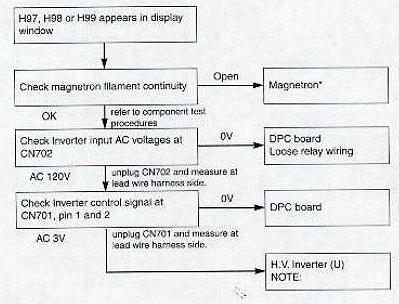
The door interlock switches are the most common culprits behind the H98 error code in Panasonic microwaves. These safety switches are designed to ensure the microwave is properly sealed before it operates. When one or more of these switches fail, the control board detects an unsafe condition and displays the H98 error.
Types Of Door Interlock Switches
Microwaves typically have multiple interlock switches, each serving a specific role in the safety mechanism:
- Primary Interlock Switch: This is the first switch engaged when the door closes. It signals the microwave that the door is beginning to latch.
- Secondary Interlock Switch: This switch is engaged once the door is fully latched. It confirms that the door is securely closed and sealed.
- Tertiary (or Monitor) Interlock Switch: Some models have a third switch that acts as a monitor. It is designed to detect if the primary or secondary switches fail or become stuck in the closed position when the door is open, providing an extra layer of safety.
Symptoms Of Faulty Switches
A faulty door interlock switch can manifest in several ways, often preceding or coinciding with the H98 error:
- Microwave fails to start: You press the start button, but nothing happens, and the H98 error appears.
- Intermittent operation: The microwave might work for a while and then stop, displaying the error.
- Sparks inside the microwave: In rare cases, a misaligned or faulty switch can allow microwaves to escape, causing arcing or sparking. This is a serious safety hazard.
- No power at all: While less common for H98, a severely damaged switch could potentially disrupt the entire power circuit.
Testing Door Interlock Switches With A Multimeter
To accurately diagnose a faulty door switch, a multimeter is essential.
- Ensure the microwave is unplugged.
- Gain access to the switches: This usually involves removing the outer casing of the microwave. Refer to your model’s service manual for specific instructions.
- Identify the switches: They are typically small, box-like components with lever actuators, located on the frame where the door latches.
- Set your multimeter to continuity mode (often indicated by a speaker symbol or Ω).
- Test each switch individually:
- With the door open: The lever of the switch should be in its resting position. Test the continuity across the switch terminals. It should register no continuity (an open circuit).
- With the door closed (or by manually pressing the switch lever): The lever should be depressed. Test the continuity across the terminals. It should register continuity (a closed circuit).
- If a switch shows continuity when it should be open, or no continuity when it should be closed, it is faulty.
Pro Tip: Take clear photos or label wires before disconnecting them to ensure correct reassembly. If you are unsure about the process, consult a professional.
Credit: www.applianceaid.com
Troubleshooting The Main Control Board (pcb)
While door interlock switches are the most frequent cause of the H98 error, a malfunctioning main control board (PCB) can also be responsible. The PCB is the central hub that receives input from the user interface, monitors various components (including door switches), and controls the microwave’s functions, such as the magnetron, turntable motor, and fan.
Signs Of A Faulty Control Board
Identifying a faulty control board can be more challenging than diagnosing a simple switch. However, some indicators might suggest its failure:
- Multiple error codes: If your microwave displays various error codes intermittently, it could point to a general issue with the control board.
- Unresponsive buttons or display: If the control panel is erratic, buttons don’t work, or the display shows random characters, the PCB might be failing.
- Microwave operates erratically: The microwave might turn on by itself, run for incorrect durations, or fail to heat properly, despite no obvious mechanical issues.
- Burn marks or physical damage: Upon opening the microwave, visible burn marks, scorch spots, or damaged components (like capacitors) on the PCB are definitive signs of failure.
- H98 persists after ruling out door switches: If you have meticulously tested and replaced all door interlock switches and the H98 error continues to appear, the control board becomes a primary suspect.
Testing The Control Board
Testing a control board is complex and often requires specialized knowledge and equipment.
- Visual Inspection: As mentioned, look for any obvious signs of physical damage on the PCB.
- Continuity Checks: A technician might perform continuity tests on specific circuits or components on the board. However, this requires a detailed understanding of the board’s schematic.
- Voltage Checks: With the microwave plugged in (and extreme caution exercised), a technician can check if the control board is receiving the correct power supply voltages and if it’s sending the correct signals to other components.
Warning: Attempting voltage checks on a live microwave is extremely dangerous due to high voltages present, especially around the capacitor and transformer. This should only be performed by a qualified professional.
Replacing The Control Board
If the control board is confirmed to be faulty, it will need to be replaced.
- Identify the exact part number: This is crucial. The part number is usually printed on the control board itself. Ensure it matches your specific Panasonic microwave model.
- Order the replacement part: You can often find replacement boards through appliance parts distributors or directly from Panasonic if available.
- Disconnect power and remove the old board: Carefully disconnect all wires and connectors, taking note of their positions. Remove the screws holding the board in place.
- Install the new board: Mount the new PCB and reconnect all wires and connectors precisely as they were on the old board.
- Reassemble the microwave: Replace the outer casing and any screws.
- Test the microwave: Plug it in and check if the H98 error is gone and if the microwave operates correctly.
Control board replacement is generally a more expensive repair than replacing door switches, often necessitating professional installation due to the complexity and potential risks involved.
Other Potential Causes For H98
While door interlock switches and the main control board are the most common culprits for the H98 error, other less frequent issues can also trigger this code. Understanding these possibilities can further aid in comprehensive troubleshooting.
1. Door Latch Mechanism Issues
Beyond the electrical switches, the physical latch mechanism that physically secures the door can also be a source of problems.
- Sticking Latch: The metal or plastic hook that engages with the door frame can become stiff or sticky due to accumulated grease, dirt, or corrosion. This can prevent it from fully retracting or extending, impacting how the door closes and engages the switches.
- Worn or Broken Latch: Over time, the latch mechanism can wear down or even break. A worn latch might not provide enough force to properly engage the switches, or a broken one might fail to secure the door at all.
Troubleshooting:
- Visually inspect the latch mechanism on the door.
- Try lubricating it with a silicone-based lubricant (avoid oil-based lubricants that can attract dirt).
- Gently clean any debris that might be hindering its movement.
- If the latch appears broken or excessively worn, it will need replacement.
2. Issues With The Door Opening Mechanism
The internal components that allow the door to open smoothly can also play a role.
- Stiff Door Release Button/Lever: If the button or lever used to open the microwave door is stiff or not returning to its original position properly, it can affect how the door closes and latches.
- Internal Springs or Cables: Some door mechanisms rely on internal springs or cables. If these break or become dislodged, the door might not open or close correctly.
Troubleshooting:
- Ensure the door release mechanism operates freely.
- If it feels stiff, try cleaning and lubricating the area around the button or lever.
- Damage to these internal parts often requires disassembly and professional repair.
3. Wiring Harness Problems
The wiring that connects the door switches to the main control board is crucial.
- Loose Connections: Vibrations during operation or during installation can cause wire connectors to become loose at either the switch or the control board end. This interrupts the electrical signal.
- Damaged Wires: Wires can become pinched, frayed, or broken, especially in areas where they flex during door operation. Rodents can also sometimes chew through wires.
Troubleshooting:
- After unplugging the microwave, carefully inspect the wiring harness that runs from the door area to the control board.
- Ensure all connectors are securely seated.
- Look for any signs of cuts, abrasions, or pinching on the wires. If damaged, the affected section of the harness may need to be repaired or replaced.
4. Environmental Factors
While less common, extreme environmental conditions can sometimes contribute to electronic malfunctions.
- Excessive Heat or Humidity: Prolonged exposure to high temperatures or humidity can degrade electronic components over time, potentially leading to failures.
- Power Fluctuations: While a power cycle is a troubleshooting step, chronic unstable power supply (brownouts, frequent surges) can stress the control board and other components.
Troubleshooting:
- Ensure the microwave is installed in a well-ventilated area, away from heat sources.
- Consider using a surge protector for your appliance if you live in an area prone to power instability.
When To Call A Professional
While many minor issues can be resolved with DIY troubleshooting, there are clear indicators that it’s time to seek professional help. Attempting complex repairs without the necessary expertise can lead to further damage or, more importantly, pose a safety risk.
Indicators For Professional Service
- Uncertainty or Lack of Experience: If you’re uncomfortable with electrical diagnostics, disassembling appliances, or handling potentially hazardous components (like capacitors), it’s best to call a professional.
- Persistent Error After Basic Troubleshooting: If you’ve performed a power cycle, checked the door and seals, and the H98 error persists, it suggests a deeper issue that likely requires specialized tools and knowledge.
- Visible Damage to Internal Components: If, upon opening the microwave, you see burnt parts, damaged wiring, or signs of corrosion on the control board, a professional can accurately diagnose the extent of the damage and perform the repair.
- Need for Specialized Tools: Testing components like the magnetron or high-voltage capacitor requires specific tools and safety precautions that most homeowners don’t possess.
- Safety Concerns: Microwaves contain high-voltage components that can store a lethal electrical charge even when unplugged. If you have any doubts about safety, always defer to a qualified appliance repair technician.
- Cost-Benefit Analysis: For older or less expensive microwave models, the cost of professional repair might approach or exceed the price of a new appliance. A technician can provide an estimate to help you make an informed decision.
Finding A Qualified Technician
When seeking professional repair, look for:
- Reputable Local Appliance Repair Services: Check online reviews, ask for recommendations from friends or neighbors.
- Authorized Service Centers: For Panasonic appliances, an authorized service center may have technicians specifically trained on their products.
- Clear Estimates: Ensure the service provider gives you a detailed estimate before commencing work, outlining parts and labor costs.
According to a report by the Association of Home Appliance Manufacturers (AHAM), the average repair cost for a microwave can range from $100 to $300, depending on the complexity and parts needed. For a control board replacement, it could be on the higher end of this spectrum.
Panasonic Microwave H98 Error Code: A Summary Table
To provide a quick reference, here’s a summary of common causes and troubleshooting steps for the Panasonic H98 error code.
| Potential Cause | Troubleshooting Steps | Likelihood of Resolution (DIY) | Estimated Repair Cost (Professional) |
|---|---|---|---|
| Temporary Electronic Glitch | Perform a power cycle (unplug for 5-10 minutes, then plug back in). | High | N/A (if resolved) |
| Door Misalignment or Damage | Inspect door, hinges, and seals for damage or obstruction. Ensure door closes firmly and flush. | Medium (minor adjustments/cleaning); Low (if door frame is bent) | $50 – $150 (for hinge/seal replacement) |
| Faulty Door Interlock Switch(es) | Test switches with a multimeter for continuity. Replace faulty switches. | Medium (requires multimeter and basic electrical knowledge) | $75 – $200 ( |