
A sudden power outage can leave any homeowner feeling vulnerable, but when your garage door opener, a crucial gateway to your home, refuses to budge, the inconvenience can quickly escalate into a security concern. LiftMaster, a leading brand in garage door openers, offers robust and reliable systems, yet even the most advanced technology can be affected by a loss of electricity.
Understanding how to manage your LiftMaster opener during and after a power outage is essential for maintaining access to your home and ensuring its security.
This guide will walk you through the common issues that arise with LiftMaster garage door openers during a power outage, the steps you can take to regain functionality, and preventative measures to ensure you’re prepared for the next blackout. From understanding the emergency release mechanism to troubleshooting common problems, we’ll cover everything you need to know to keep your garage door operational when the lights go out.
Key Takeaways
- Manual Operation is Key: During a power outage, your LiftMaster opener will likely become inoperable, necessitating the use of the emergency release cord to manually operate the garage door.
- Battery Backup: Many modern LiftMaster models include a battery backup system designed to provide limited operation during power outages.
- Safety First: Always disengage the opener from the door before attempting manual operation to prevent damage to the opener or door.
- Troubleshooting Steps: Common issues after a power restoration include the opener losing its remote control programming or the safety sensors needing realignment.
- Preventative Maintenance: Regularly test your battery backup and emergency release mechanism to ensure they function correctly when needed.
Understanding Liftmaster Openers And Power Outages
LiftMaster garage door openers are designed with various features to enhance convenience and security. However, like any electrical appliance, they rely on a consistent power supply. When the electricity grid fails, the opener’s primary motor and electronic components cease to function.
This is a critical juncture where understanding the opener’s built-in safety and emergency features becomes paramount.
The Role Of The Emergency Release Cord
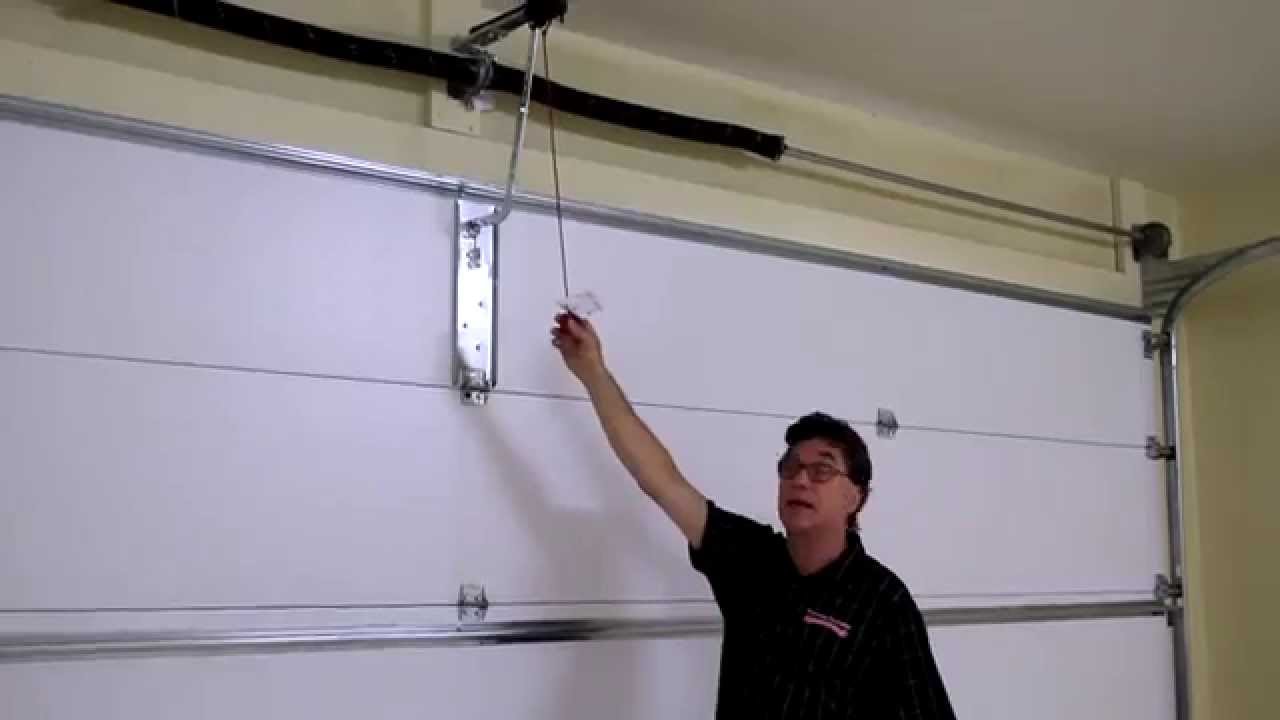
Every LiftMaster garage door opener is equipped with an emergency release cord, typically a red or yellow rope hanging from the trolley mechanism on the opener’s rail. This cord is your lifeline during a power outage. Pulling this cord disengages the trolley from the opener’s drive chain or belt, effectively disconnecting the motor from the garage door. This allows you to lift or lower the door manually.
Pro Tip: Before pulling the emergency release, ensure the garage door is fully closed. If the door is partially open, the weight can make manual operation difficult and potentially dangerous. It’s also crucial to ensure no one is in the path of the door as you manually operate it.
Battery Backup Systems: A Lifesaver
Many newer LiftMaster models come with an integrated battery backup system. This feature is specifically designed to provide a limited number of open and close cycles during a power outage. The battery typically kicks in automatically when it detects a loss of AC power, allowing you to operate your garage door as you normally would via remote or keypad.
The capacity of these battery backups varies by model. Some might offer enough power for a few cycles, while others can sustain operation for longer periods. It’s essential to know your specific LiftMaster model’s capabilities and to maintain the battery’s health.
Batteries have a finite lifespan and may need replacement every 3-5 years, depending on usage and environmental factors.
Why Your Opener Stops Working During An Outage
When the power goes out, the electric motor that drives the garage door opener cannot receive the electricity it needs to operate. This is the most straightforward reason your opener becomes unresponsive. Beyond the motor, the logic board and other electronic components also lose power, rendering the opener’s sophisticated control systems inactive.
Even if you have a battery backup, its capacity is not infinite. If the outage is prolonged, or if the battery is old or depleted, it may not be able to power the opener for an extended period. In such cases, manual operation via the emergency release cord is the only option.

Credit: marvinsgaragedoors.com
Restoring Operation After A Power Outage
Once the power is restored, your LiftMaster opener might not immediately return to its fully functional state. Several issues can arise, ranging from simple resets to more complex sensor or programming problems. Following a systematic approach can help you get your opener working again efficiently.
Re-engaging The Opener
After a power outage, if you manually operated the door using the emergency release cord, you’ll need to re-engage the opener’s trolley to the door. This is usually a straightforward process, but it’s vital to do it correctly.
- Ensure the Garage Door is Closed: Before re-engaging, make sure the garage door is fully in the closed position.
- Locate the Trolley: Find the trolley mechanism on the opener’s rail.
- Pull the Release Cord: Sometimes, a gentle pull on the emergency release cord is needed to disengage the trolley.
- Re-engage Mechanism: Most LiftMaster openers have a lever or mechanism on the trolley that allows you to re-engage it with the drive chain or belt. This might involve pulling a lever or pushing a button. Consult your LiftMaster manual for the specific procedure for your model.
- Test: Once re-engaged, you should be able to operate the door using the remote.
Warning: Never attempt to re-engage the opener while the door is in motion or if the opener is still under power. Always ensure the door is stationary and the opener is in a neutral state before attempting this step.
Resetting Your Liftmaster Opener
In some instances, a power surge or fluctuation during the outage and restoration can cause the opener’s logic board to malfunction or require a reset. Many LiftMaster models have a reset procedure that can resolve electronic glitches.
- Unplug the Opener: The first step is to unplug the garage door opener from the power outlet. This ensures no power is flowing through the system.
- Wait: Leave the opener unplugged for at least 5-10 minutes. This allows any residual power in the capacitors to dissipate and can help reset the internal electronics.
- Check Battery Backup (if applicable): If your model has a battery backup, remove the battery during this unplugging period. This ensures a complete power cycle for both the main unit and the backup.
- Plug Back In: After the waiting period, plug the opener back into the power outlet.
- Test: Attempt to operate the garage door using your remote or wall button.
If the opener still doesn’t respond, you may need to perform a hard reset, which often involves pressing and holding a specific button on the motor unit for a set duration. Again, refer to your LiftMaster owner’s manual for the precise instructions for your model.
Remote Control And Keypad Issues
Power outages can sometimes disrupt the communication between your LiftMaster opener and its remote controls or wireless keypads. The opener’s memory for these devices may be cleared, or the devices themselves might need to be reprogrammed.
- Reprogramming Remotes: Most LiftMaster openers have a “Learn” button on the motor unit. To reprogram a remote, you typically press and release this button, then press and hold the desired button on your remote. The opener’s indicator light will usually flash to confirm the programming. This process is detailed in your LiftMaster manual.
- Reprogramming Keypads: Wireless keypads also require a reprogramming sequence. This usually involves entering a PIN code and then pressing a specific sequence of buttons on the keypad to sync it with the opener.
- Check Batteries: Ensure the batteries in your remote controls and keypads are fresh, as a low battery can sometimes cause connectivity issues, especially after a power interruption.
Safety Sensor Alignment
The safety sensors are crucial for the proper functioning of your garage door opener. These small sensors are located near the bottom of the garage door track and emit an invisible beam across the opening. If this beam is broken while the door is closing, the opener will reverse the door’s direction to prevent accidents.
Power outages, or even minor vibrations from the house settling, can sometimes cause these sensors to become misaligned. If your door closes partially and then reverses, or if the opener refuses to close the door at all, misaligned safety sensors are a common culprit.
- Locate Sensors: Identify the two sensors at the bottom of your garage door tracks. They usually have a small indicator light on each.
- Check Indicator Lights: One sensor typically has a steady light, while the other’s light might blink or be off if there’s a misalignment or obstruction.
- Align: Gently adjust the angle of the sensors until both indicator lights are steady and illuminated. You may need to loosen a mounting screw to adjust the angle.
- Obstructions: Ensure nothing is blocking the path between the sensors, such as tools, debris, or even cobwebs.
- Clean Lenses: Wipe the lenses of the sensors with a soft, dry cloth.
If realignment doesn’t solve the issue, the sensors might require more thorough troubleshooting, potentially involving checking wiring connections or replacing a faulty sensor.

Credit: bt1doors.com
Troubleshooting Common Liftmaster Issues Post-outage
Beyond the general steps, specific problems can arise that require targeted troubleshooting. Being aware of these common issues can save you time and frustration when dealing with a LiftMaster opener after a power disruption.
Opener Not Responding To Remote Or Wall Button
If your LiftMaster opener is receiving power (you might hear a faint hum or see indicator lights on the motor unit) but is unresponsive to its controls, several factors could be at play.
- Loss of Programming: As mentioned, the opener might have lost its programming for the remotes. Follow the reprogramming steps outlined in your manual.
- Wall Button Issue: If the remote works but the wall button doesn’t, the issue might be with the wiring to the wall button or the button itself. Check for loose connections at the motor unit.
- Logic Board Fault: In rare cases, a power surge during the outage could have damaged the logic board. If all other troubleshooting steps fail, this might be the cause.
Garage Door Opens But Won’t Close
This is a classic symptom of misaligned safety sensors. However, other possibilities exist:
- Travel Limits: The opener’s travel limits (the points at which the door stops when fully open or closed) might have been inadvertently reset or altered. These limits tell the opener when to stop. Reprogramming the travel limits, as described in your manual, is often necessary after a power interruption.
- Obstruction in Track: A physical obstruction in the garage door track can prevent it from closing fully, triggering the safety reversal. Inspect the tracks carefully.
- Force Settings: The opener has force settings that determine how much effort it will exert to open or close the door. If these settings are too low, the opener might struggle to close the door against minor resistance. You may need to adjust the force settings, but do so cautiously as incorrect settings can damage the door or opener.
Garage Door Closes Partially And Reverses
This is almost always an indication of an issue with the safety sensors or a problem with the door’s ability to close completely.
- Safety Sensors: Double-check the alignment and ensure no obstructions are breaking the beam.
- Obstruction: A small object, a warped section of the door, or debris in the track can prevent the door from closing fully, triggering the safety reversal.
- Travel Limits: If the travel limit for the closed position is set too low, the opener might think the door is closed when it’s not, causing it to reverse. Adjusting the closed travel limit is necessary.
Opener Makes Noise But Door Doesn’t Move
If you hear the opener motor running, but the door remains stationary, the trolley is likely disengaged from the drive mechanism, or there’s a mechanical issue within the opener’s drive system.
- Trolley Disengaged: This is common after manual operation. Ensure the trolley is properly re-engaged with the chain or belt.
- Broken Drive Chain/Belt: The drive chain or belt that connects the trolley to the motor could be broken or have slipped off its sprockets. This requires inspection and potential repair or replacement.
- Internal Gear Stripped: The gears inside the opener’s motor unit can wear out or strip, preventing power from being transferred to the drive mechanism. This usually necessitates motor unit repair or replacement.
Credit: www.youtube.com
Maintaining Your Liftmaster Opener For Power Outages
Proactive maintenance is the best strategy for ensuring your LiftMaster opener is ready for any power outage. Regular checks and upkeep can prevent common issues and guarantee the functionality of essential safety features.
Testing The Battery Backup System
If your LiftMaster has a battery backup, you should test it periodically. Most manufacturers recommend testing at least twice a year.
- Simulate Power Loss: Unplug the garage door opener from the wall outlet.
- Operate the Door: Use your remote control to open and close the garage door.
- Observe Performance: Note if the opener operates at a normal speed and sound. If it’s significantly slower, weaker, or fails to complete a full cycle, the battery may be nearing the end of its life or may need charging.
- Re-plug: Plug the opener back into the outlet. The battery backup system will begin to recharge.
Battery Replacement: LiftMaster batteries typically last 3-5 years. If your battery fails a test or is several years old, consider replacing it. Genuine LiftMaster replacement batteries are recommended for optimal performance and compatibility.
Checking The Emergency Release Mechanism
The emergency release cord is simple but vital. Ensure it’s easily accessible and functional.
- Accessibility: Make sure the cord is not tangled, frayed, or otherwise obstructed. It should hang freely from the trolley.
- Functionality Test: Periodically, with the opener powered off, gently pull the cord to ensure it disengages the trolley smoothly. Then, re-engage the trolley and test the opener with the remote.
Lubrication And General Maintenance
A well-maintained garage door system is less likely to encounter problems during stressful events like power outages.
- Lubricate Moving Parts: Apply a silicone-based lubricant or white lithium grease to the tracks, rollers, hinges, and springs of your garage door. This reduces friction and strain on the opener.
- Inspect Rollers and Tracks: Ensure rollers are turning freely and that tracks are free of debris and not bent or damaged.
- Check Springs: Garage door springs are under high tension and are critical for smooth operation. If you suspect an issue with your springs, contact a professional for inspection and repair.
Keeping Your Manual Handy
In the event of an emergency, having your LiftMaster owner’s manual readily available can be invaluable. It contains specific instructions for your model regarding emergency release, re-engagement, battery backup, remote programming, and limit adjustments. Store a physical copy in a safe place or keep a digital version accessible on your smartphone or computer.
Advanced Troubleshooting And When To Call A Professional
While many power outage-related issues can be resolved with basic troubleshooting, some problems may indicate more serious mechanical or electrical faults. Knowing when to seek professional help is crucial for safety and to prevent further damage.
When To Call A Professional
- Persistent Issues: If you’ve followed all troubleshooting steps and your LiftMaster opener still doesn’t function correctly, it’s time to call a qualified garage door technician.
- Damaged Components: Any visible damage to the motor unit, rail, drive chain/belt, or garage door itself warrants professional assessment.
- Spring Problems: Garage door springs are under extreme tension and can cause severe injury if handled improperly. Never attempt to adjust or replace springs yourself.
- Electrical Concerns: If you suspect electrical issues beyond a simple reset, such as frayed wiring or a malfunctioning logic board, a professional electrician or garage door technician should be consulted.
- Uncertainty: If at any point you feel uncomfortable or unsure about performing a repair or adjustment, it’s always best to err on the side of caution and call a professional.
Understanding Liftmaster Model Differences
LiftMaster offers a wide range of openers, from basic chain-drive models to advanced belt-drive systems with smart features. The specific troubleshooting steps and features, such as battery backup capabilities, can vary significantly between models.
- Battery Backup Models: If your model includes a battery backup, familiarize yourself with its specifications, including how to test and replace the battery. LiftMaster’s Premium Series and some Contractor Series models often include this feature.
- Smart Control Models: LiftMaster’s MyQ-enabled openers offer remote access and control via a smartphone app. While these features are convenient, they rely on a stable internet connection. During a power outage, your home Wi-Fi will likely be down, disabling MyQ functionality. However, the battery backup (if equipped) will still allow local operation via remote.
- Drive Types: Chain-drive openers are generally more robust but can be noisier. Belt-drive openers are quieter and often found in premium models. The troubleshooting for mechanical issues might differ slightly based on the drive type.
Resources For Liftmaster Support
LiftMaster provides extensive resources for homeowners:
- Owner’s Manuals: The most critical resource. You can usually find digital copies on the LiftMaster website by searching for your specific model number.
- LiftMaster Website Support: The official LiftMaster website often has FAQs, troubleshooting guides, and video tutorials. LiftMaster Support provides detailed information.
- Authorized Dealers/Technicians: For repairs and installations, using an authorized LiftMaster dealer ensures you receive quality service from trained professionals.
Preparing For Future Power Outages
The best way to handle a power outage affecting your garage door opener is to be prepared *before* it happens. A little foresight can save a lot of hassle.
Create A Garage Door Emergency Kit
Consider assembling a small kit to keep in your garage, containing:
- Flashlight with extra batteries: Essential for visibility during dark outages.
- Work gloves: To protect your hands when manually operating the door.
- Your LiftMaster owner’s manual: For quick reference.
- Basic tools: A small screwdriver or pliers might be useful for minor adjustments.
- Fresh batteries for remotes/keypads: To ensure they function if the opener’s memory is lost.
Educate Household Members
Ensure everyone in your household knows how to:
- Locate and use the emergency release cord.
- Manually open and close the garage door.
- Re-engage the opener after power is restored.
- Identify the safety sensors and their function.
Consider A Surge Protector
While not directly related to power outages, power surges that often accompany power restoration can damage electronic components. Plugging your garage door opener into a high-quality surge protector can help safeguard its logic board and other sensitive electronics.
Battery Backup As A Standard Feature
If you live in an area prone to frequent power outages and don’t currently have a battery backup system, consider upgrading your LiftMaster opener to a model that includes this feature. It provides a significant level of convenience and security during blackouts.