
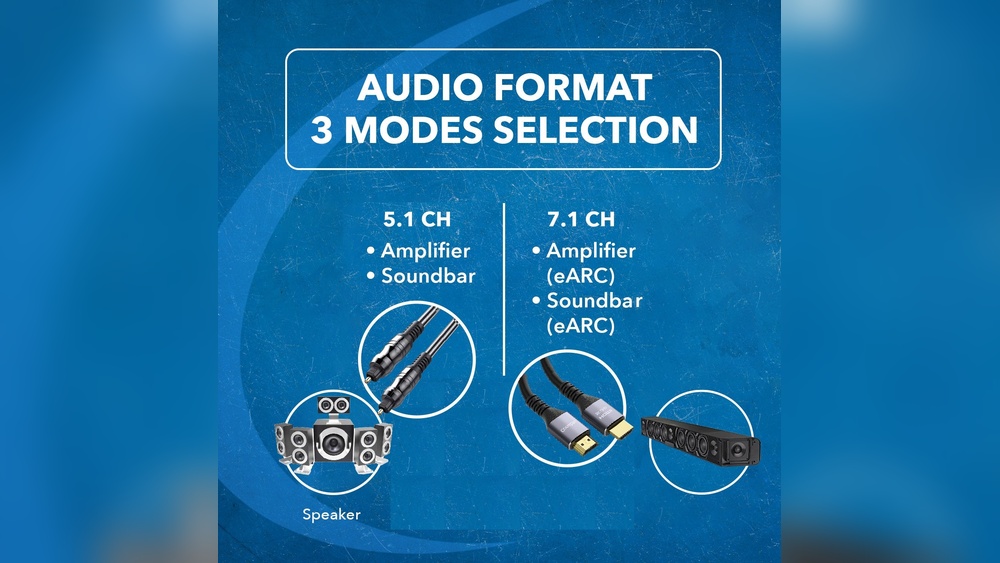
When it comes to connecting your devices for the best sound and picture, you might wonder: HDMI or digital optical—which one should you choose? Both options have their strengths, but understanding the differences can make a big impact on your experience.
You want clear sound, sharp visuals, and a setup that just works. This guide will help you see which connection fits your needs perfectly, so you get the most out of your TV, sound system, or gaming setup. Keep reading to discover the key facts that will make your choice simple and smart.
Hdmi Basics
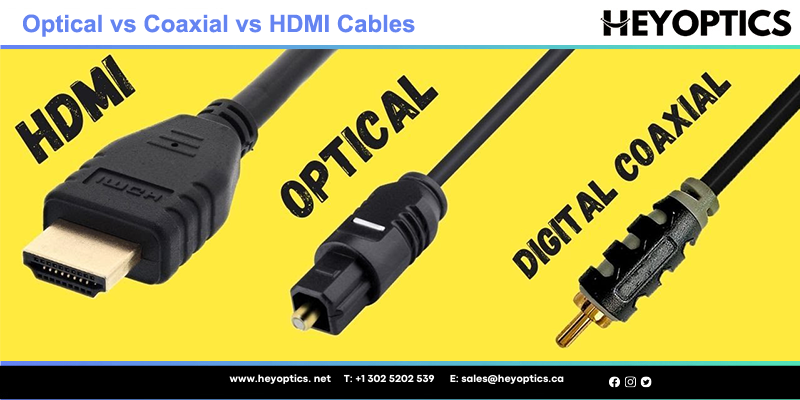
HDMI, short for High-Definition Multimedia Interface, is a common way to connect audio and video devices. It carries both sound and picture through one cable. This makes it simple to link TVs, computers, gaming consoles, and more.
Understanding HDMI basics helps you choose the right connection for your devices. It offers clear, high-quality signals for home entertainment and work setups.
What Hdmi Transmits
HDMI sends digital video and audio signals. It supports high-definition video, including 4K and even 8K resolution. The audio can be stereo or multi-channel surround sound. HDMI also carries control signals to manage devices with one remote. Some versions support Ethernet data transfer too.
Hdmi Versions And Features
There are several HDMI versions, each adding new features. HDMI 1.4 introduced 4K video at 30Hz and 3D support. HDMI 2.0 increased 4K to 60Hz and improved audio. HDMI 2.1 supports higher resolutions, up to 10K, and faster refresh rates. It also adds dynamic HDR and eARC for better audio quality.
Choosing the right HDMI version depends on your device and needs. Newer versions offer better performance and future-proofing.

Credit: www.youtube.com
Digital Optical Basics
Digital optical cables carry audio signals using light. They use thin strands of glass or plastic fiber. These fibers transmit light pulses that represent sound data. This method avoids electrical interference common in other cables.
Optical cables can deliver clear and high-quality sound. They often support surround sound formats like Dolby Digital. The cables are also simple to connect and use. Many home theater and audio devices include optical ports.
How Optical Audio Works
Optical audio transfers sound as light pulses inside the cable. The source device converts audio signals into light signals. These light signals travel through the fiber optic cable. The receiving device then converts the light back to audio.
This process keeps the audio clean and free from noise. Since it uses light, electrical interference is minimal. The cable design allows for long-distance transmission without signal loss. This makes optical cables reliable for home audio setups.
Common Uses Of Optical Cables
Optical cables connect TVs, soundbars, and gaming consoles. They transmit digital audio signals between devices easily. Many Blu-ray players and DVD players use optical outputs. Optical cables also link audio receivers and home theater systems.
They are popular for delivering surround sound in home theaters. Optical cables work well for clear, high-quality audio. They are also common in setups without HDMI support. This makes them a versatile choice for many users.
Audio Quality Comparison
Choosing the right connection for audio affects your listening experience. HDMI and digital optical cables both deliver sound, but their quality differs. Understanding these differences helps you pick the best option for clear and rich audio.
Sound Clarity And Fidelity
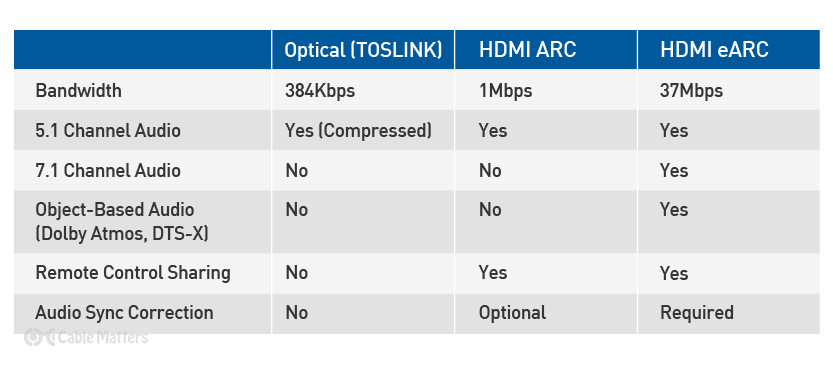
HDMI supports uncompressed audio, which means sound is delivered exactly as intended. This leads to clearer and more detailed audio. Digital optical cables send compressed signals, which can reduce sound quality slightly. HDMI also carries higher bandwidth, allowing better handling of complex sounds. Digital optical connections may introduce slight signal loss over long distances, affecting clarity. Overall, HDMI offers superior sound clarity and fidelity for most setups.
Supported Audio Formats
HDMI supports a wide range of audio formats including Dolby TrueHD and DTS-HD Master Audio. These formats provide high-definition sound for movies and music. Digital optical cables support standard Dolby Digital and DTS formats but cannot handle newer high-definition audio. This limits the richness and depth of the sound. If your system uses advanced audio formats, HDMI is the better choice. For basic stereo or surround sound, digital optical still works well.
Bandwidth And Signal Strength
Bandwidth and signal strength play key roles in choosing between HDMI and digital optical cables. These factors affect how well audio and video data travel from one device to another. Strong signal and high bandwidth mean better sound and picture quality. Understanding these differences helps you pick the right cable for your setup.
Data Transmission Limits
HDMI cables carry both audio and video signals. They support very high bandwidth, up to 48 Gbps with the latest versions. This allows HDMI to transmit high-resolution video and multi-channel audio without losing quality.
Digital optical cables use light to send audio signals only. Their bandwidth is lower, around 125 Mbps. This limits digital optical cables to standard and some high-quality audio formats, but not video.
Because of its higher bandwidth, HDMI can handle more data at once. Digital optical cables have a smaller data capacity, limiting audio options.
Impact On Audio Performance
HDMI supports advanced audio formats like Dolby Atmos and DTS:X. These formats require high bandwidth for clear, immersive sound. HDMI’s strong signal maintains audio quality over longer distances.
Digital optical cables support popular formats like Dolby Digital and DTS. They cannot carry newer, high-definition audio types. Signal strength may weaken over longer runs, causing sound issues.
For simple stereo or surround sound, digital optical works fine. For richer sound experiences, HDMI provides better performance with stronger signals.
Compatibility And Setup
Choosing between HDMI and digital optical depends a lot on compatibility and setup. Both connect audio devices but work differently. Understanding these differences helps pick the right option for your needs.
Device Support
HDMI supports audio and video in one cable. Most modern TVs, game consoles, and Blu-ray players have HDMI ports. Digital optical sends only audio signals. Older devices often use optical connections for sound.
HDMI is common in newer devices. Optical cables work well with some soundbars and home theaters. Check your device ports before buying cables. Matching the port type avoids extra adapters or converters.
Ease Of Installation
HDMI cables are simple to plug in. One cable handles audio and video, reducing clutter. Digital optical cables need separate video connections. The optical cable plugs into a small, square port easily.
Both cables are easy to connect. Optical cables require careful alignment to avoid signal loss. HDMI cables click in place and fit snugly. No special tools or skills are needed for either.
Latency And Synchronization
Latency and synchronization play a key role in your audio experience. They affect how sound matches the picture on your screen. A delay between audio and video can spoil movies or games. Different connection types handle these issues in various ways. Understanding these differences helps you pick the right option.
Audio Delay Factors
Audio delay happens when sound takes longer to reach your ears. This delay can come from processing inside devices. Digital optical cables often cause more delay than HDMI. The reason is optical signals need extra conversion steps. HDMI carries audio and video together with less processing time. Devices like soundbars, receivers, or TVs add their own delay too. The type of audio format also matters. High-quality formats like Dolby Atmos need more processing, causing slight delays.
Syncing Audio With Video
Syncing audio and video is crucial for a natural experience. HDMI usually keeps them well synchronized. It sends both signals together, reducing mismatch chances. Optical cables send audio separately, which can cause lag. Many modern devices offer settings to fix audio delay. You can adjust these settings to match sound with the picture. Some TVs and receivers have an auto-sync feature. This feature detects delay and corrects it automatically. Using HDMI can simplify syncing due to its integrated design.
Durability And Cable Quality
Durability and cable quality play a key role in choosing between HDMI and digital optical cables. Both types have different designs and materials that affect how long they last and how well they perform. Understanding their physical strength and resistance to signal interference helps make a better choice for your setup.
Physical Strength
HDMI cables are often thicker and made with strong outer layers. This makes them less likely to break or get damaged with bending or pulling. The connectors on HDMI cables are metal and fit snugly, reducing the risk of loose connections.
Digital optical cables use thin plastic fibers inside a protective jacket. They can be fragile if bent sharply or twisted. The connectors are smaller and more delicate than HDMI, so careful handling is needed to avoid damage.
Signal Interference
HDMI cables carry electrical signals. They can pick up interference from other electronic devices nearby. Good quality HDMI cables have shielding to block noise and keep the signal clear. Low-quality cables may cause static or picture issues.
Digital optical cables transmit signals using light. This makes them immune to electrical interference. They work well in areas with many electronics or strong signals. The light signal is stable, giving consistent sound quality without noise.
Credit: www.cablematters.com
Cost And Availability
Cost and availability play a big role in choosing between HDMI and digital optical cables. These factors affect your budget and ease of purchase. Understanding price differences and where to buy helps you make the best choice for your needs.
Price Differences
HDMI cables usually cost more than digital optical cables. The price depends on length and brand. Basic HDMI cables start at a few dollars. High-speed or longer cables cost more. Digital optical cables often come at a lower price. They are simpler and less common in different lengths. Both types have affordable options for most budgets.
Where To Buy
HDMI cables are widely available in many stores. Electronics shops, big retailers, and online stores all sell them. Digital optical cables are less common. You find them mostly in specialty electronics stores or online. Both cables are easy to buy online with many choices. Shipping is usually fast and affordable.
When To Choose Hdmi
Choosing HDMI over digital optical depends on your device needs and setup. HDMI carries both video and audio signals. It supports high-definition video and multi-channel audio. This makes it ideal for modern home theaters and gaming systems. HDMI cables also support advanced features like ARC and eARC, which improve sound quality and simplify connections.
Best Use Cases
HDMI works best with TVs, monitors, and projectors. It connects Blu-ray players, gaming consoles, and streaming devices easily. Use HDMI for setups needing both video and audio through one cable. It handles high-definition video formats like 4K and HDR. HDMI supports surround sound systems with up to 32 audio channels. Perfect for gaming and movie watching with clear, detailed sound.
Future-proofing
HDMI standards keep improving. New versions support higher resolutions and faster refresh rates. HDMI 2.1 supports 8K video and dynamic HDR. It also offers enhanced audio return channel (eARC). This allows better sound quality and compatibility with future devices. Using HDMI now means fewer upgrades later. It ensures your setup stays compatible with new tech for years.
Credit: www.heyoptics.net
When To Choose Digital Optical
Choosing the right audio connection can change your listening experience. Digital optical cables offer a unique way to send sound signals. They shine with light pulses, not electric signals. This makes them less prone to interference and noise. Knowing when to pick digital optical can help you get clear, crisp audio.
This option works best in certain setups and devices. It supports multi-channel audio like Dolby Digital and DTS. Many soundbars, TVs, and gaming consoles have optical ports. Digital optical works well for users wanting good sound without complexity.
Ideal Scenarios
Use digital optical if your devices have optical ports only. Great for connecting a TV to a soundbar or receiver. It handles surround sound formats for movies and games well. Perfect for setups where HDMI is not available or too complex.
It is also handy in long cable runs. Optical cables can send signals without losing quality. Works well in rooms with many electronic devices causing interference. A good choice for simple and stable audio connections.
Limitations To Consider
Digital optical does not carry video signals. You need a separate cable for picture quality. It cannot support newer audio formats like Dolby Atmos or DTS:X. Limited to 5.1 channel audio, which may not satisfy audiophiles.
Fragile cables require careful handling to avoid damage. Not as common on newer devices that prefer HDMI ARC or eARC. Check device compatibility before buying optical cables. Knowing these limits helps avoid connection problems.
Frequently Asked Questions
What Is The Main Difference Between Hdmi And Digital Optical?
HDMI carries both audio and video signals in one cable. Digital optical only carries audio signals using light.
Can Hdmi And Digital Optical Support Surround Sound?
Yes, both can support surround sound formats like Dolby Digital. HDMI supports more advanced formats like Dolby TrueHD.
Which Cable Provides Better Audio Quality, Hdmi Or Digital Optical?
HDMI usually offers better audio quality due to higher bandwidth. Digital optical can lose quality with some high-resolution formats.
Is Hdmi Better For Connecting Tvs Than Digital Optical?
HDMI is better for TVs because it carries video and audio. Digital optical is mostly used only for audio connections.
Are Hdmi Cables More Expensive Than Digital Optical Cables?
HDMI cables tend to be slightly more expensive due to technology. Digital optical cables are simpler and usually cost less.
Conclusion
Choosing between HDMI and digital optical depends on your needs. HDMI carries both audio and video in one cable. Digital optical only carries audio signals. HDMI supports higher sound quality and newer formats. Optical cables work well for basic audio setups.
Both have their strengths for home entertainment. Think about your devices and what you want to connect. Simple setups may benefit from optical cables. For better quality and fewer cables, HDMI is best. Pick the option that fits your equipment and budget.
Your sound experience depends on the right connection choice.