

Finding the right way to display your memories can be a challenge when you have thousands of photos trapped on your phone. The best digital picture frame helps you move those images into your living space, but choosing the right one means weighing convenience against storage needs. You must decide if you want a simple, app-based system or a frame that offers more manual control over your files. This article helps you settle on the model that fits your home and your habits.
As an Amazon Associate, we earn from qualifying purchases. This post contains affiliate links – if you buy through them, we may earn a commission at no extra cost to you.
1. Aura Walden 15″ WiFi Digital Picture Frame

Right for: Users wanting a large, premium display with simple cloud sharing.
The Aura Walden 15 offers a large, 15-inch Full HD screen designed for wall mounting or tabletop use. It features an anti-glare display that automatically adjusts brightness and manages photo cropping for you. The frame connects to WiFi and uses the Aura app to let family members send photos from anywhere.
This frame is built for those who want a “set it and forget it” experience. Because it includes unlimited free cloud storage, you don’t need to worry about managing SD cards or USB drives. It’s an excellent choice for a busy family room where everyone wants to contribute photos instantly.
What works:
- Large 15-inch Full HD display
- Unlimited free cloud storage included
- Automatic brightness and orientation adjustments
- Easy app-based photo sharing
- Wall mounting kit included
Where it gives ground:
- Requires a constant WiFi connection
- No mention of manual USB photo import
Skip it if: You prefer managing your photo library offline via local storage devices.
2. 64GB 15.6″ Frameo Digital Picture Frame WiFi

Right for: People who need massive local storage and offline playback.
The Frameo 15.6 Inch features a large IPS touchscreen with a 1920 x 1080 resolution. It includes 64GB of internal memory, which the manufacturer states can hold about 100,000 photos. You can also use SD cards or USB drives to import and back up your memories without needing the internet.
This model is a strong pick for someone who wants to keep a huge library of photos available at all times. The ability to use physical storage means your slideshow can keep running even if your WiFi goes down. Just be careful when plugging in the power cable to avoid damaging the port contacts.
What works:
- Large 64GB internal storage capacity
- Supports SD card and USB expansion
- Vivid IPS touchscreen display
- Includes built-in speakers for video
- Allows offline photo viewing
Where it gives ground:
- USB port doesn’t support computer transfers
- Requires care when inserting power cable
Skip it if: You want a completely wireless, cloud-only setup without managing physical cards.
3. Aura Digital HD Picture Frame

Right for: Gift-givers looking for a highly-rated, user-friendly desktop display.
The Aura Carver is a 10-inch digital frame that focuses on ease of use and aesthetics. It’s frequently recommended for its quick setup process, which takes about one minute to connect to WiFi. Like other Aura models, it provides unlimited free cloud storage for your photos and videos.
This frame is ideal for gifting because you can preload it with memories before the recipient even opens the box. It fits easily on a desk or shelf, making it a great choice for grandparents or friends who want to see daily updates. It provides a clean, simple experience for those who aren’t tech-savvy.
What works:
- Fast one-minute WiFi setup
- Unlimited free cloud storage
- Premium packaging for gifting
- Supports photos from various sources
- No subscription fees required
Where it gives ground:
- Smaller screen than the Walden series
- No mention of manual SD card slots
Skip it if: You need a very large wall-mounted display for a big room.
4. Frameo 10.1 Inch

Right for: Users needing a compact frame with reliable local memory.
The Frameo 10.1 Inch by moonka uses a 1280×800 IPS screen with a 16:10 aspect ratio. It comes with 32GB of internal storage, allowing you to store thousands of photos locally. The frame includes a touch interface and supports auto-rotation for both landscape and portrait orientation.
Since it supports offline viewing, you don’t have to worry about a persistent internet connection to see your saved slideshows.
What works:
- 32GB of built-in memory
- Reliable IPS touchscreen display
- Supports offline photo viewing
- Includes auto-rotate and sleep timer
- Simple user-friendly interface
Where it gives ground:
- Only supports 2.4GHz WiFi networks
- Video uploads via app limited to 15 seconds
Skip it if: You require a larger screen for viewing photos from across the room.
5. Skylight Digital Picture Frame
Right for: Someone who wants the simplest possible email-based photo sharing.
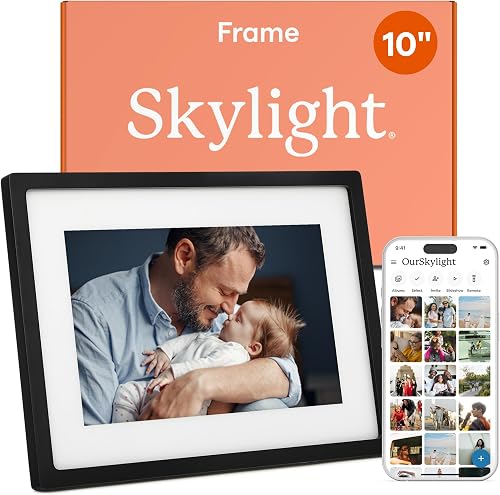
The Skylight Digital Frame uses a unique email address to receive photos, making it very easy to share from any device. It features a 10-inch color touchscreen with a 1280×800 resolution. The frame is designed to be a “bridge for every generation,” focusing on plug-and-play simplicity.
You can use the Gift Mode to preload images before sending it to a loved one. Because it relies on cloud storage, it avoids the mess of managing physical SD cards entirely.
What works:
- Simple email-based photo uploads
- Intuitive touchscreen interface that is compact enough for personal spaces.
- Gift Mode for preloading photos
- No SD card management required
- Plug-and-play setup
Where it gives ground:
- WiFi required to receive new photos
- Smaller screen size compared to premium models
Skip it if: You want to import large batches of photos using a USB drive.
6. Aura Digital HD Picture Frame
Right for: Those who want a high-quality display with a sleek mat design.
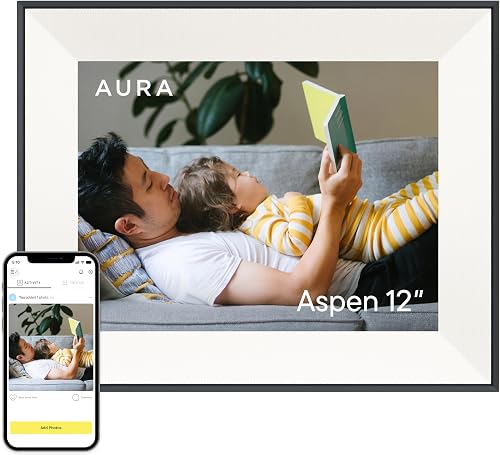
The Aura Aspen offers a 12-inch HD display framed with a black mat, giving it a more traditional picture frame look. It shares the same unlimited cloud storage and easy app-based setup as other Aura models.
The high-resolution screen ensures your photos look clear, and the simple app makes it easy for family members to add new content.
What works:
- Elegant design with black mat
- High-resolution HD display
- Unlimited free cloud storage
- Very easy to set up
- App-based sharing for multiple users
Where it gives ground:
- No mention of manual memory expansion
- Requires constant WiFi connectivity
Skip it if: You prefer a frame with a larger screen designed for wall mounting.
7. RCA 10.1” WiFi Digital Picture Frame

Right for: Users who prioritize flexible storage options.
The RCA 10.1 Inch features a 1280×800 IPS touchscreen and 32GB of built-in storage. It uses the “Uhale” app for private sharing, which also includes a website for uploading photos from a computer. It supports SD cards and USB drives for additional memory and offline backups.
Being able to upload photos from a computer website is a convenient feature that many other app-only frames lack.
What works:
- 32GB internal storage plus expansion
- Upload photos via app or website
- Bright HD IPS touchscreen
- Includes wall mounting and stand
- Supports offline slideshow playback
Where it gives ground:
- App required for wireless features
- Standard 10.1-inch screen resolution
Skip it if: You want a premium, high-resolution screen that is larger than standard desktop models.
How to Think Before You Choose
Cloud vs. Local Storage
Cloud-based frames rely on an app or email to send photos, which is convenient but usually requires a constant WiFi connection. Local storage frames, like those supporting SD cards or USB drives, allow you to keep your photos even when the internet is down. You should check the Energy Star guidelines for electronic display power efficiency at home to ensure your frame is suitable for long-term use.
Screen Size and Resolution
A larger screen makes photos easier to see from a distance, but higher resolution is needed to keep images sharp as the display grows. If you plan to hang the frame on a wall, look for a display with a larger surface area to ensure visibility. Smaller frames are better for bedside tables or desks where you’ll be viewing the screen up close.
Sharing Methods
Consider who will be sending the photos to the frame. Some frames use dedicated apps that allow multiple users to join, while others use a simple email address to receive files. If you have family members who aren’t tech-savvy, an email-based system is often the easiest path.
Who Should Skip These Altogether
Some people may find that these devices don’t fit their specific needs or current lifestyle.
- Anyone who prefers to view photos in physical albums or printed frames.
- Users who don’t have a reliable 2.4GHz WiFi network at home.
- People who would only use the device once and then store it away.
- Those who already own a tablet that can be repurposed as a digital photo slideshow.
The Aura Walden 15 is the best choice for those who want a large, high-quality wall display, while the Aura Carver is the top pick for a simple, elegant gift. Check your available space and then follow the provided links to secure your frame today.
Frequently Asked Questions
Do these frames require a monthly subscription?
Most of the frames listed here, such as the Aura models, don’t charge a monthly subscription fee for their cloud storage. You can add unlimited photos and videos using their free apps. Always check the specific product listing to confirm that no hidden fees are mentioned for cloud services.
Can I display videos on these frames?
Yes, most digital frames now support video playback with sound. For example, the Aura Walden 15 and the Frameo models allow you to send videos from your phone or import them via SD card. Note that some app-based uploads have a brief time limit per video.
What happens if my WiFi connection stops?
Frames that rely on cloud storage usually require a WiFi connection to receive new photos or updates. However, many models, including the Frameo 15.6 Inch and RCA 10.1 Inch, allow you to view existing photos stored in their internal memory or on SD cards even without WiFi.
Are these frames difficult to set up for seniors?
Many of these frames are designed with simplicity in mind, featuring quick WiFi setup and easy-to-use touchscreens. Frames like the Skylight or Aura Carver are specifically marketed as being easy for all ages to use. Once set up, the recipient usually just needs to turn the frame on to see new photos.
What should I check before buying a frame?
Check the WiFi compatibility, as many frames only support 2.4GHz networks. You should also confirm whether the frame includes a stand or a wall-mounting kit, depending on where you intend to place it. Finally, ensure the storage capacity meets your needs, especially if you have a very large photo collection.
Final Thoughts
Once you’ve picked your favorite, don’t let those precious moments stay buried in your camera roll for another day. Set up your new display on a shelf where you’ll see it often, and start inviting family members to share their snapshots too. You’ll love how much warmth it brings to your home.